
1. Introduction
Welcome to the OPPO Reno15c 5G user manual. This guide provides essential information to help you set up, operate, maintain, and troubleshoot your new smartphone. The OPPO Reno15c 5G combines advanced technology with a durable design, offering a seamless user experience.

Figure 1.1: Front view of the OPPO Reno15c 5G smartphone.

Figure 1.2: Back view of the OPPO Reno15c 5G smartphone, showcasing the camera module and 'Dancing Aurora Design'.
2. What's in the Box
Upon unboxing your OPPO Reno15c 5G, please ensure all the following items are present:
- OPPO Reno15c 5G Smartphone
- Power Adapter (80W SuperVOOC)
- USB Cable (Type-C)
- Phone Case
- SIM Tray Ejector
- Quick Start Guide (this document)
- Safety Information
3. Setup
3.1. Inserting the SIM Card
- Locate the SIM card tray on the side of your device.
- Insert the SIM tray ejector tool into the small hole next to the tray and press gently until the tray pops out.
- Place your Nano-SIM card(s) into the designated slots on the tray. Ensure the gold contacts face downwards. The device supports Dual SIM.
- Carefully reinsert the SIM card tray into the phone until it clicks into place.

Figure 3.1: Side view of the OPPO Reno15c 5G, showing the SIM card tray location.
3.2. Initial Power On and Basic Configuration
- Press and hold the Power button (located on the right side) until the OPPO logo appears.
- Follow the on-screen instructions to select your language, region, and connect to a Wi-Fi network.
- Sign in with your Google account or create a new one to access Google services and the Play Store.
- Set up your preferred security methods, such as fingerprint recognition, face unlock, PIN, or pattern.
3.3. Charging the Device
Before first use, it is recommended to fully charge your device. Use the provided 80W SuperVOOC Power Adapter and USB Cable for optimal charging speed.
- Connect the USB cable to the power adapter.
- Plug the power adapter into a wall outlet.
- Connect the USB Type-C end of the cable to the charging port at the bottom of your phone.
- The charging indicator will appear on the screen.

Figure 3.2: Visual representation of the 7000mAh battery and 80W SuperVOOC Flash Charge capabilities.
4. Operating Your Device
4.1. Display and User Interface
The OPPO Reno15c 5G features a 120Hz Smart Adaptive OLED screen, providing a smooth and vibrant visual experience. The display also incorporates 2160Hz PWM dimming for eye protection.

Figure 4.1: The 120Hz Smart Adaptive OLED display of the OPPO Reno15c 5G.
The device runs on ColorOS 16, based on Android 15, offering a smooth, smart, and secure user interface. The All-New Trinity Engine optimizes performance for lasting fluidity.

Figure 4.2: ColorOS 16 interface highlighting smooth performance.
4.2. Camera Features
The OPPO Reno15c 5G is equipped with an advanced camera system for vivid photography and videography.
- 50MP Ultra-Clear Main Camera: Capture detailed images in various lighting conditions.
- 50MP Ultra Wide Selfie Camera: Features a 100° FOV, ideal for group selfies.
- AI Flash Photography 2.0: Utilizes a dual flash system for clear shots in low light.
- AI Portrait Glow: Allows professional relighting of photos after capture.
- 4K Ultra-Clear Video: Record high-resolution videos with stability.
- Dual-View Video: Record simultaneously with both front and rear cameras.

Figure 4.3: Example of a wide-angle selfie captured with the 50MP Ultra Wide Selfie Camera.
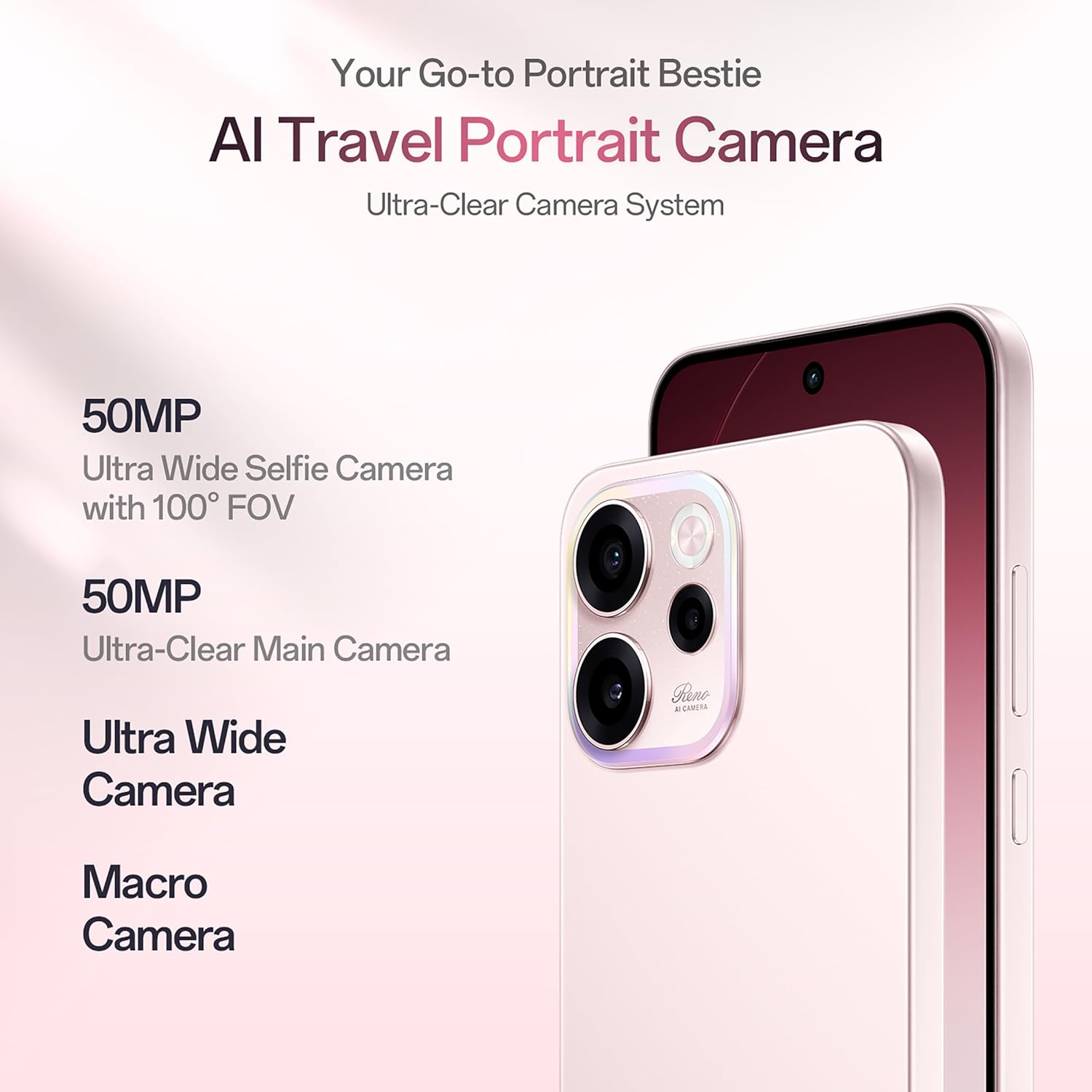
Figure 4.4: Demonstrating 4K Ultra-Clear Video recording on the OPPO Reno15c 5G.
4.3. Performance and Battery
Powered by the 4nm Snapdragon 6 Gen 1 platform and AI HyperBoost 2.0, the Reno15c 5G ensures stable and cool performance for gaming and multitasking. The 7000mAh battery, combined with 80W SuperVOOC flash charge, provides extended usage and rapid recharging.

Figure 4.5: Overview of the Snapdragon 6 Gen 1 Mobile Platform and its performance enhancements.
4.4. Connectivity and AI Features
The device supports 5G connectivity and features AI LinkBoost 3.0 for enhanced network performance, including AI Gaming Antenna System Acceleration, AI Super Wi-Fi Booster, and AI Network Booster for Teamfights.

Figure 4.6: Explanation of AI LinkBoost 3.0 for optimized connectivity.
Integrated AI Super Tools include real-time AI Translate for conversations and photos, AI Call Summary, VoiceScribe for notes, and AI Mind Space for organizing digital content. Deep Gemini integration and Circle to Search further enhance AI capabilities.

Figure 4.7: AI Mind Space for intelligent organization and recall of screen content.
4.5. Security and Durability
The Reno15c 5G is built with IP69 All-Weather Armour, providing resistance against hot water jets and submersion up to 2 meters. Its All-Round Armour architecture offers superior drop protection. Security features include OPPO Lock for anti-theft and military-grade Private Computing Cloud (PCC) with end-to-end hardware encryption.

Figure 4.8: The OPPO Reno15c 5G demonstrating its IP69 water and dust resistance.
5. Maintenance
5.1. Cleaning Your Device
- Use a soft, lint-free cloth to gently wipe the screen and body of the phone.
- Avoid using harsh chemicals, abrasive materials, or aerosol sprays.
- For stubborn smudges, slightly dampen the cloth with water or a screen cleaner specifically designed for electronics.
5.2. Software Updates
Regularly check for and install software updates to ensure your device has the latest features, security patches, and performance improvements.
- Go to Settings > About device > ColorOS version.
- Tap on Check for updates.
- If an update is available, follow the on-screen instructions to download and install it. Ensure your device has sufficient battery and a stable internet connection.
5.3. Storage Management
To maintain optimal performance, regularly manage your device's storage.
- Delete unnecessary files, apps, and media.
- Clear cache data for apps in Settings > Apps > App management > [Select App] > Storage usage > Clear cache.
- Utilize cloud storage services for backups of photos and videos.
6. Troubleshooting
This section addresses common issues you might encounter with your OPPO Reno15c 5G.
| Problem | Possible Solution |
|---|---|
| Device does not turn on | Ensure the battery is charged. Connect the charger and wait a few minutes before attempting to power on. If it still doesn't turn on, perform a force restart by holding the Power button and Volume Up button simultaneously for about 10 seconds. |
| Battery drains quickly | Check for background apps consuming power. Reduce screen brightness, disable unnecessary features like GPS or Bluetooth when not in use. Review battery usage in Settings to identify power-hungry apps. |
| Apps are crashing or freezing | Clear the app's cache (Settings > Apps > App management > [App Name] > Storage usage > Clear cache). If the issue persists, try reinstalling the app. Ensure your device software is up to date. |
| Cannot connect to Wi-Fi/Mobile Data | Restart your phone and the Wi-Fi router. Check if Airplane Mode is off. Verify SIM card insertion and mobile data settings. Reset network settings (Settings > System settings > Back up and reset > Reset phone > Reset network settings). |
| Fingerprint sensor not working | Ensure your finger is clean and dry. Re-register your fingerprints in Settings > Password & security > Fingerprint. If the issue persists, ensure the screen is clean and free from damage. |
If you encounter issues not listed here or if the suggested solutions do not resolve your problem, please contact OPPO customer support.
7. Specifications
Key technical specifications for the OPPO Reno15c 5G:
| Feature | Detail |
|---|---|
| Brand | OPPO |
| Model | Reno15c 5G |
| Operating System | Android 15 (ColorOS 16) |
| RAM Memory | 12 GB |
| Storage Capacity | 256 GB |
| Screen Size | 6.57 Inches |
| Display Type | AMOLED, 120Hz Smart Adaptive |
| Colour | Afterglow Pink |
| SIM Card Slot | Dual SIM |
| Connector Type | USB Type C |
| Biometric Security | Fingerprint Recognition |
| Water Resistance Level | IP69 Water Resistant |
| Battery Power | 7000 mAh |
| Item Weight | 196 Grams |
| Item Dimensions | 15.8 x 7.5 x 0.7 Centimeters |
| Cellular Technology | 5G |
| Wireless Provider | Unlocked for All Carriers |
| Model Year | 2026 |
8. Warranty and Support
8.1. Warranty Information
Your OPPO Reno15c 5G comes with a limited warranty:
- Handset: 12 Months
- Adapter & Cable: 6 Months
Please retain your proof of purchase for warranty claims. The warranty covers manufacturing defects and does not cover damage caused by misuse, accidents, or unauthorized repairs.
8.2. Customer Support
For technical assistance, service, or further inquiries, please contact OPPO customer support:
- Manufacturer: OPPO MOBILES INDIA PVT LTD.
- Address: 5th FLOOR, Tower B, BUILDING, N-8, DLF Cyber City, DLF Phase 2, Gurugram, Haryana 122002
- Toll-Free Number: 18001032777
You can also visit the official OPPO website for more support resources, FAQs, and service center locations.


