
1. Introduction
The VELATEMOR Tuya WiFi Gate Opener Module QS-WIFI-S10-C03 is designed to integrate your gate or garage door system with smart home platforms. This module enables remote control, voice commands, and scheduled operations through the Tuya application, enhancing the functionality of your existing gate opener.
2. Safety Information
- Ensure all power to the gate opener system is disconnected before installation to prevent electrical shock.
- Installation should be performed by qualified personnel or under professional supervision.
- Verify that the module's input voltage (100-240VAC) matches your power supply.
- Do not expose the module to moisture or extreme temperatures outside its specified operating range.
- Keep the device away from children.
3. Package Contents
Verify that all items are present in the package:
- 1 x VELATEMOR Tuya WiFi Gate Opener Module (QS-WIFI-S10-C03)
- 1 x Sensor
- 1 x Sensor Connecting Cable
- 1 x Instruction Manual

Image: Contents of the VELATEMOR Tuya WiFi Gate Opener Module package, including the module, a sensor, and the instruction manual.
4. Product Overview
The VELATEMOR Tuya WiFi Gate Opener Module provides smart control capabilities for your gate or garage door. Key features include:
- Voice Control Integration: Compatible with smart home systems for hands-free operation.
- Remote Access: Control your gate from any location using the Tuya app on your smartphone, with real-time status updates.
- Scheduling and Timer Function: Configure automated schedules or countdown timers for gate operation.
- Easy Installation: Designed for simple connection to your control board's dry contacts.
- Shared Device Management: Allows multiple users to control the gate through the Tuya app.

Image: Front view of the VELATEMOR Tuya WiFi Gate Opener Module, showing the 'WiFi' logo and product label.
5. Setup
5.1 Pre-installation
- Ensure your gate opener system is compatible with dry contact input.
- Confirm you have a stable 2.4GHz Wi-Fi network available at the installation location.
- Download the Tuya Smart or Smart Life app from your device's app store.
5.2 Wiring Instructions
Connect the module to your gate opener's control board using the dry contact terminals. Refer to the diagram on the module and your gate opener's manual for specific dry contact points.
- Power Connection: Connect the 'N' (Neutral) and 'L' (Live) terminals of the module to your 100-240VAC power supply.
- Sensor Connection: Connect the provided sensor to the 'S1' and 'S2' terminals. Mount the sensor on your gate to detect its open/closed status.
- Gate Opener Connection: Connect the 'L1' and 'L2' terminals (dry contact output) to the corresponding dry contact input terminals on your gate opener's control board. These terminals typically trigger the gate's open/close function.
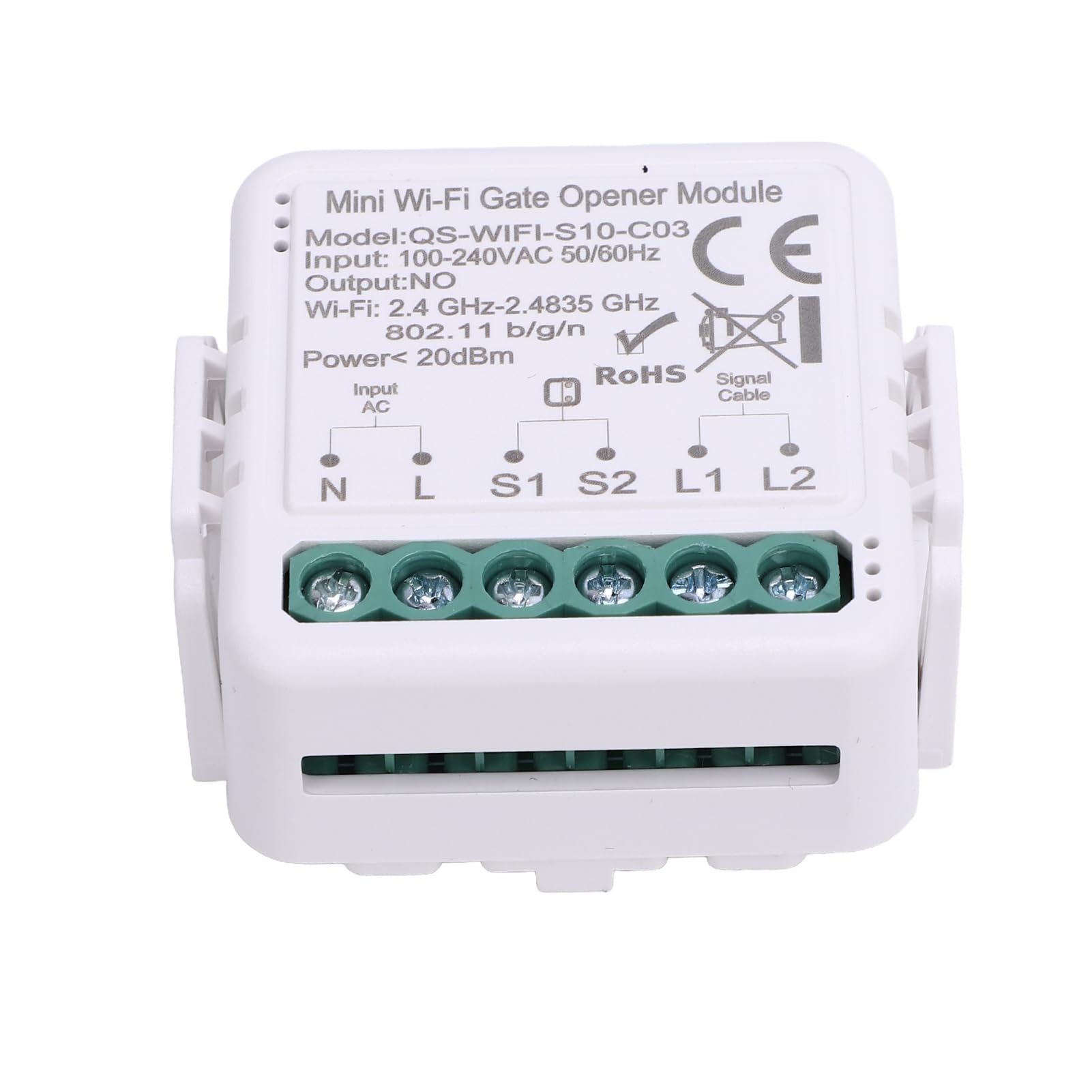
Image: Close-up front view of the VELATEMOR Tuya WiFi Gate Opener Module, displaying model number QS-WIFI-S10-C03, input/output specifications, and wiring terminals for N, L, S1, S2, L1, L2.
5.3 App Pairing
- Power on the module after completing the wiring.
- Open the Tuya Smart or Smart Life app and register/log in.
- Follow the in-app instructions to add a new device. The module should enter pairing mode automatically (indicated by a blinking LED).
- Select the appropriate device type (e.g., 'Garage Door Opener' or 'Switch') and connect to your 2.4GHz Wi-Fi network.
- Once paired, you can rename the device and configure its settings within the app.
6. Operating Instructions
6.1 Remote Control via Tuya App
- Open the Tuya app on your smartphone.
- Select the gate opener module from your device list.
- Use the on-screen controls to open, close, or stop the gate. The app will display the real-time status of the gate (open/closed) based on the connected sensor.
6.2 Voice Control
- Ensure the Tuya app is linked to your preferred voice assistant (e.g., Google Home).
- Use voice commands such as "Hey Google, open the garage door" or "Hey Google, close the gate."
6.3 Scheduling and Timers
- Within the Tuya app, navigate to the device settings for the gate opener.
- Set up schedules for automatic opening or closing at specific times.
- Configure countdown timers for temporary gate operations.
6.4 Shared Device Management
- In the Tuya app, access the device sharing options.
- Invite family members or authorized users to control the gate opener.
7. Maintenance
- Cleaning: Periodically wipe the module with a dry, soft cloth. Do not use liquid cleaners.
- Firmware Updates: Check the Tuya app regularly for available firmware updates to ensure optimal performance and security.
- Connection Check: Ensure all wiring connections remain secure and free from corrosion.
8. Troubleshooting
- Module not powering on: Check power connections (N and L terminals) and ensure the power supply is active.
- Unable to pair with app: Ensure the module is in pairing mode (blinking LED). Verify your Wi-Fi network is 2.4GHz and has a strong signal. Restart the module and try pairing again.
- Gate not responding to commands: Check the wiring between the module's L1/L2 terminals and the gate opener's dry contact input. Ensure the gate opener itself is functioning correctly.
- Incorrect gate status in app: Verify the sensor is correctly installed and connected to S1/S2 terminals. Ensure the sensor is detecting the gate's position accurately.
- Voice control not working: Confirm the Tuya app is properly linked to your voice assistant and the device name is recognized.
9. Specifications
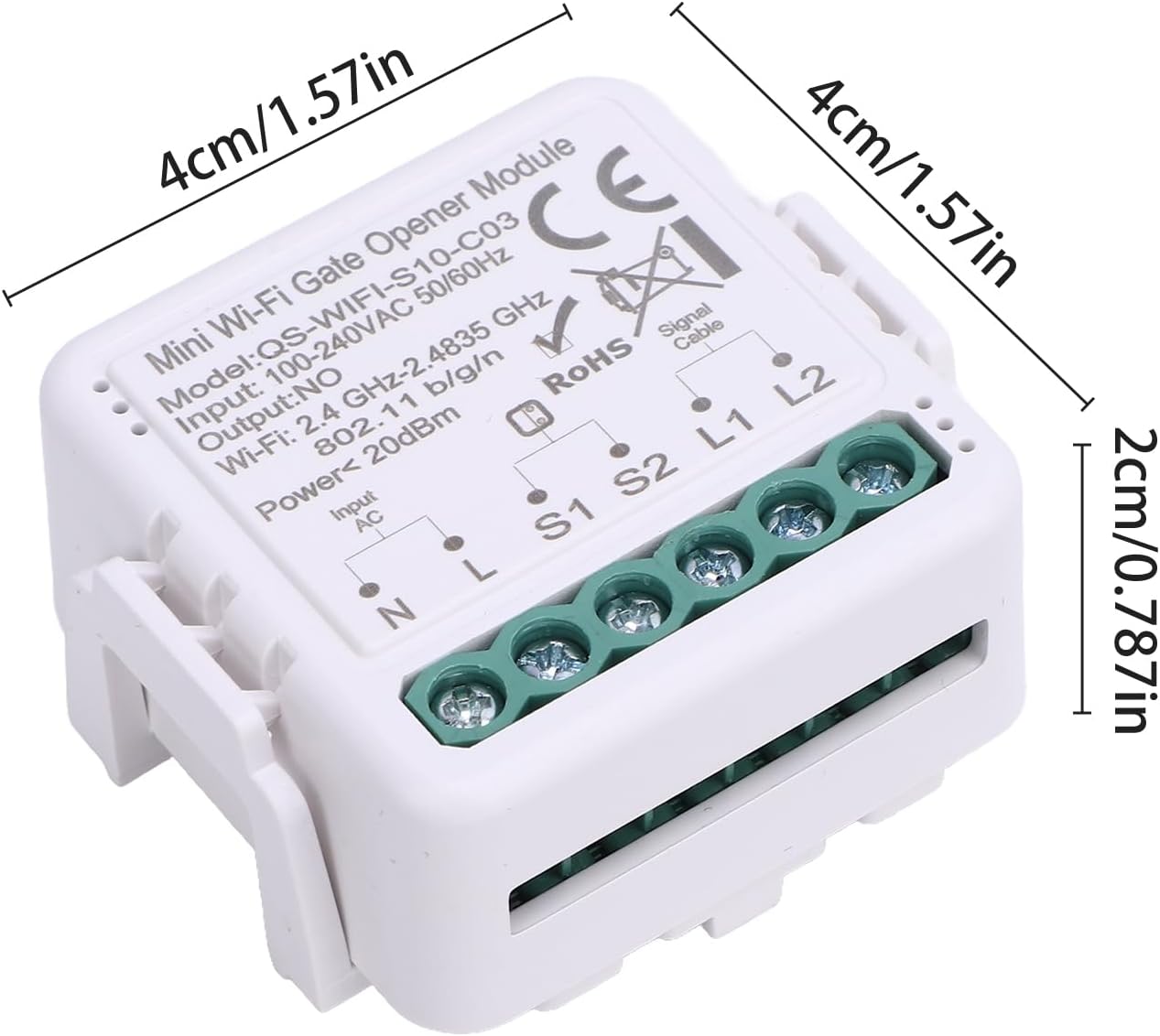
Image: Top-down view of the VELATEMOR Tuya WiFi Gate Opener Module with dimensions indicated, showing its compact size of approximately 4cm x 4cm x 2cm.
| Feature | Specification |
|---|---|
| Brand | VELATEMOR |
| Model | QS-WIFI-S10-C03 |
| Input Voltage | 100-240VAC, 50/60Hz |
| Output | Normally Open (NO) |
| Wi-Fi Frequency | 2.4GHz - 2.4835GHz |
| Wi-Fi Standard | 802.11 b/g/n |
| Power | < 20dBm |
| Operation Temperature | -10°C to +40°C |
| Operation Range | Up to 200 m / 656.17 ft (line of sight) |
| Product Dimensions | 4.98 x 4.98 x 3 cm |
| Item Weight | 45 g |
| Country of Origin | China |
10. Warranty and Support
For warranty information and technical support, please refer to the contact details provided with your purchase documentation or visit the official VELATEMOR website. Keep your proof of purchase for warranty claims.