
Introduction
Thank you for choosing the Thunelec Wireless Earbuds U9. These earbuds feature Bluetooth 5.4, active and environmental noise cancellation, a multifunctional touch screen, and IPX7 waterproofing. This manual provides detailed instructions to help you get the most out of your device.
Package Contents
- Thunelec Wireless Earbuds (Left and Right)
- Charging Case with Touch Screen
- USB-C Charging Cable
- Silicone Ear Tips (S, M, L sizes)
- User Manual
Setup
1. Charging the Earbuds and Case
Before first use, fully charge the earbuds and charging case. Connect the USB-C charging cable to the charging port on the case and a power source. The built-in smart indicator on the case will show real-time battery levels.

Image: Charging the Thunelec Wireless Earbuds U9 case, illustrating 48 hours of total playtime and 1.5 hours fast charging.
- Earbuds provide 6-8 hours of continuous use on a single charge.
- The charging case extends total battery life to 48 hours.
- The charging case fully charges in approximately 1.5 hours.
2. Selecting the Right Ear Tips
Choose the silicone ear tips (S, M, L) that provide the most comfortable and secure fit for your ears. A proper fit is crucial for optimal sound quality and noise cancellation performance.

Image: Ergonomic fit and IPX7 waterproof design of the Thunelec Wireless Earbuds U9, showing various ear tip sizes.
3. Pairing with Your Device
The earbuds feature one-step auto-pairing. Simply open the charging case, and the earbuds will enter pairing mode. On your device (smartphone, tablet, laptop), enable Bluetooth and select "U9" from the list of available devices.
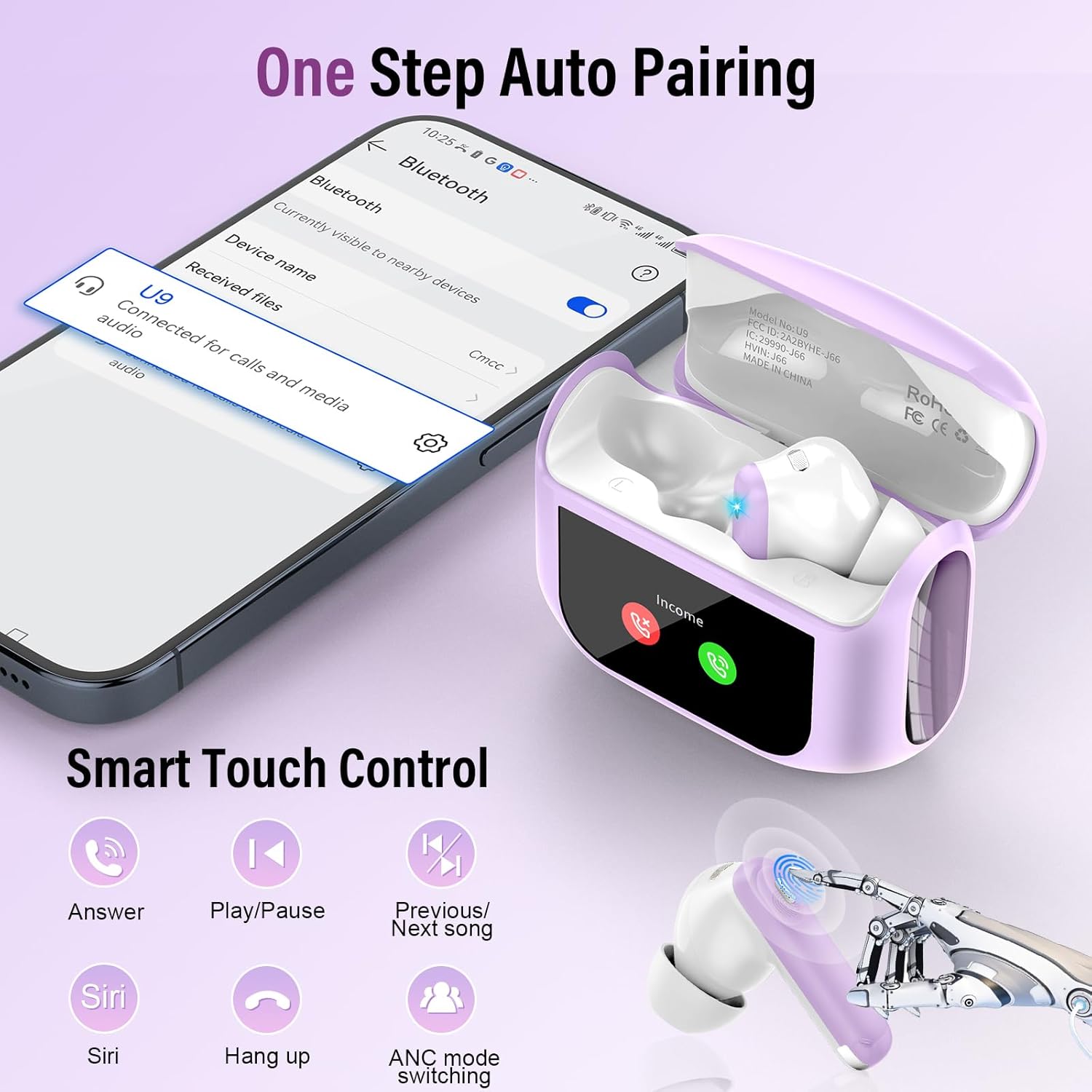
Image: One-step auto-pairing process for Thunelec Wireless Earbuds U9 with a mobile device.
- Ensure Bluetooth is enabled on your device.
- Select "U9" from the Bluetooth device list.
- The earbuds will automatically connect to the last paired device when removed from the case.
Operating Instructions
1. Touch Screen Controls (Charging Case)
The charging case features a full-color touch screen for convenient control of various functions without needing your phone.

Image: LED Full-Color Touch Screen on the Thunelec Wireless Earbuds U9 charging case, showing various control options.
- Music Playback: Play/Pause, Next/Previous track.
- Call Management: Answer/End calls.
- Noise Control: Switch between ANC, Transparency, and Normal modes.
- Settings: 7-language switching, wallpaper customization, screen brightness adjustment.
- Utility: Headphone search function, timer.
- Note: Direct volume control is not supported via the earbuds. Adjust volume via the charging case screen or your connected device.
2. Earbud Touch Controls
The earbuds themselves have touch-sensitive areas for quick control.
Image: Smart Touch Control functions on the Thunelec Wireless Earbuds U9.
- Single Tap: Play/Pause music, Answer/End call.
- Double Tap (Left/Right): Previous/Next song.
- Long Press: Activate Voice Assistant (Siri), Switch ANC modes (ANC/Transparency/Normal).
- Reject Call: Long press during an incoming call.
3. Noise Control Modes (ANC, ENC, Transparency)
The Thunelec U9 earbuds offer advanced noise control features.

Image: ANC+ENC Noise Cancellation features of the Thunelec Wireless Earbuds U9, demonstrating different listening modes.
- Active Noise Cancellation (ANC): Blocks up to 45dB of external noise, ideal for noisy environments like public transport or offices.
- Environmental Noise Cancellation (ENC): Enhances vocal clarity during calls by suppressing background static.
- Transparency Mode: Allows you to hear your surroundings clearly without removing the earbuds, ensuring safety in urban environments.
- Switch between modes using the touch screen on the charging case or by long-pressing the earbud touch area.
4. EQ Modes
Customize your audio experience with 5 built-in EQ modes.

Image: 3D Spatial Audio and 5 Custom EQ Modes available on the Thunelec Wireless Earbuds U9.
- Available modes: Standard, Classic, Jazz, Rock, Pop.
- Select your preferred EQ mode via the touch screen on the charging case to optimize sound for different content.
Maintenance
1. Cleaning
Regularly clean your earbuds and charging case to maintain optimal performance and hygiene.
- Use a soft, dry, lint-free cloth to wipe the earbuds and charging case.
- For ear tips, remove them from the earbuds and gently clean with a damp cloth and mild soap if necessary. Rinse thoroughly and dry completely before reattaching.
- Avoid using abrasive materials or harsh chemicals.
2. Water Resistance (IPX7)
The earbuds are IPX7 waterproof, meaning they can withstand sweat, rain, and splashes. They are not designed for swimming or prolonged submersion.
- Do not charge the earbuds or case if they are wet.
- Ensure the charging port cover (if any) is securely closed before exposure to water.
- After exposure to water, dry the earbuds completely before placing them back in the charging case.
Troubleshooting
1. Earbuds Not Pairing
- Ensure both earbuds are charged.
- Place earbuds back in the case, close the lid, then open it again to re-enter pairing mode.
- Turn off and on Bluetooth on your device.
- Forget "U9" from your device's Bluetooth list and try pairing again.
- Ensure the earbuds are within the Bluetooth range of your device (typically 10 meters/33 feet).
2. One Earbud Not Working
- Check the battery level of the non-working earbud.
- Place both earbuds back in the charging case, close the lid, and then open it again.
- Clean the charging contacts on both the earbud and the case.
3. Poor Sound Quality or Disconnections
- Ensure the earbuds are fully charged.
- Check for obstructions between the earbuds and your device.
- Try moving closer to your device to reduce interference.
- Ensure ear tips provide a secure seal in your ear.
4. Earbud Finding Function
If you misplace an earbud, use the "Find My Earphone" function on the charging case's touch screen. This will make the lost earbud emit a beeping sound to help you locate it.

Image: Demonstrating the earbud-finding function of the Thunelec Wireless Earbuds U9.
Specifications
| Model | U9 |
| Brand | Thunelec |
| Bluetooth Version | 5.4 |
| Noise Cancellation | ANC (up to 45dB), ENC |
| Earbud Playtime | 6-8 hours (single charge) |
| Total Playtime (with case) | Up to 48 hours |
| Case Charging Time | Approx. 1.5 hours |
| Waterproof Rating | IPX7 |
| Driver Size | 14.2mm Bio-carbon fiber dynamic coils |
| EQ Modes | 5 (Standard, Classic, Jazz, Rock, Pop) |
| Ear Placement | In Ear |
| Color | Taro Purple |
Warranty and Support
Thunelec products are designed for reliability and performance. For warranty information or technical support, please refer to the warranty card included in your package or visit the official Thunelec website.
Contact Support: For further assistance, please contact our customer support team via the contact information provided on our website or your purchase platform.