
Introduction
This manual provides detailed instructions for the installation, operation, and maintenance of the Soundstream MPQ-6BX 1/2 DIN 5-Band Car Audio Equalizer with Digital Bass Reconstruction. Please read this manual thoroughly before using the product to ensure proper function and to prevent damage.
Safety Information
- Power Supply: Ensure the unit is connected to a 12V DC negative ground power supply.
- Wiring: All wiring should be performed with the vehicle's ignition turned off to prevent electrical shorts.
- Mounting: Mount the unit securely to prevent movement during vehicle operation. Avoid mounting in locations exposed to direct sunlight, excessive heat, or moisture.
- Ventilation: Ensure adequate ventilation around the unit to prevent overheating.
- Professional Installation: If you are unsure about any installation steps, consult a qualified car audio professional.
Product Overview
The Soundstream MPQ-6BX is a compact 1/2 DIN 5-band equalizer designed to enhance your car audio system. It features digital bass reconstruction, a selectable subsonic filter, and flexible input/output options for comprehensive sound control.
Key Features:
- 5-Band Equalization: Provides ±18 dB adjustment at 50 Hz, 200 Hz, 1 kHz, 5 kHz, and 20 kHz for precise frequency tuning.
- Digital Bass Reconstruction: Restores low frequencies often lost during audio compression, enhancing bass impact.
- Subsonic Filter: Selectable 35–80Hz filter protects subwoofers from unwanted ultra-low frequencies.
- Versatile Inputs: Includes AUX, low-level RCA, and high-level speaker inputs for compatibility with various head units.
- High Output Preamplifier: Delivers 7V RMS / 12V peak preamplifier outputs with ultra-low 0.01% Total Harmonic Distortion (THD) and a 110 dB Signal-to-Noise Ratio (SNR).
- Compact Design: 1/2 DIN size (7" W x 5.1" D x 1.2" H) for easy installation in tight spaces.
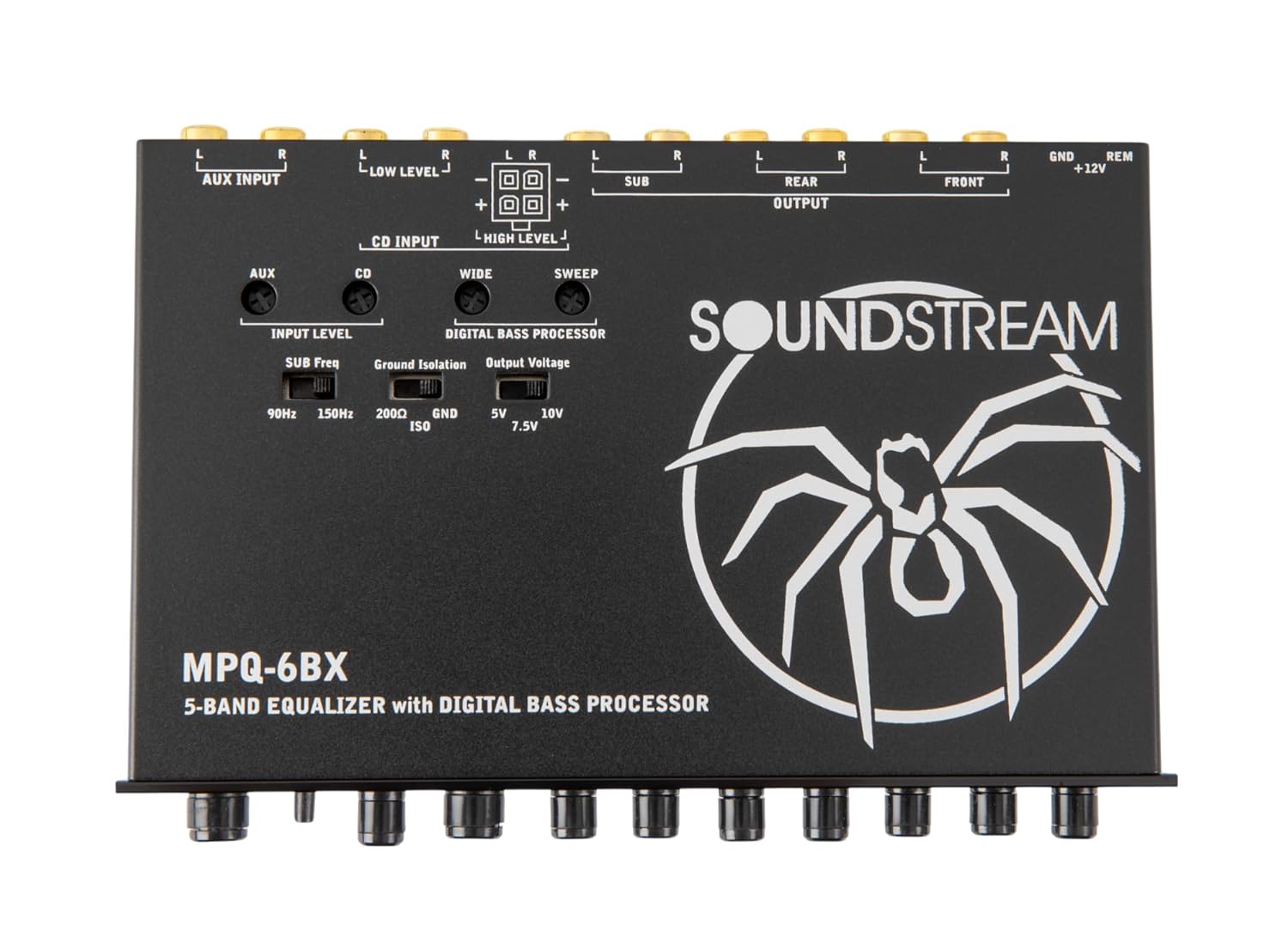
Figure 1: Angled view of the Soundstream MPQ-6BX equalizer.
Setup and Installation
Proper installation is crucial for optimal performance. Refer to the wiring diagram and follow these steps carefully.
Package Contents:

Figure 2: Included components: MPQ-6BX equalizer, remote knob, and installation accessories.
- Soundstream MPQ-6BX Equalizer
- Remote Bass Knob
- Installation Accessories (wiring harness, mounting hardware)
- User Manual
Mounting:
- Choose a suitable location in your vehicle, such as a 1/2 DIN dash opening or under the dashboard, ensuring it is away from heat sources and moisture.
- Ensure there is enough space for wiring connections and ventilation.
- Secure the unit using the provided mounting hardware.
Wiring Connections:

Figure 3: Rear panel connections for power, inputs, and outputs.
- Power Connection:
- Connect the +12V wire to a constant 12V power source (e.g., battery positive terminal) with an inline fuse.
- Connect the GND wire to a clean chassis ground point.
- Connect the REM (Remote) wire to the remote turn-on output of your head unit.
- Input Connections:
- AUX Input: For external audio devices via RCA.
- Low-Level RCA Input: Connect to the RCA pre-out of your head unit.
- High-Level Speaker Input: Use for head units without RCA outputs. Connect directly to speaker wires.
- Output Connections:
- Connect the FRONT, REAR, and SUB RCA outputs to the corresponding inputs on your amplifiers.
Operating Instructions
Familiarize yourself with the controls to optimize your audio experience.

Figure 4: Front panel controls of the MPQ-6BX equalizer.
Front Panel Controls:
- Master Volume: Adjusts the overall output level of the equalizer.
- Input Select: Switches between CD (Low-Level RCA/High-Level) and AUX inputs.
- Fader (F/R): Balances the audio output between front and rear channels.
- Level (Digital Bass Processor): Adjusts the intensity of the digital bass reconstruction.
- Subsonic (35Hz/80Hz): Selects the cutoff frequency for the subsonic filter.
- EQ Bands (50Hz, 200Hz, 1kHz, 5kHz, 20kHz): Adjusts the gain (±18dB) for each frequency band.
Rear Panel Settings:

Figure 5: Top view showing input level, ground isolation, and output voltage switches.
- Input Level (90Hz/150Hz/200Hz): Adjusts the input sensitivity for the digital bass processor. Experiment to find the best setting for your source.
- Ground Isolation (200Ω/GND/ISO): Helps eliminate ground loop noise. Try different settings if you experience hum or hiss.
- Output Voltage (5V/7.5V/10V): Sets the maximum output voltage of the preamplifier. Match this to the input sensitivity of your amplifiers.
Maintenance
The Soundstream MPQ-6BX is designed for reliable operation with minimal maintenance.
- Cleaning: Use a soft, dry cloth to clean the unit. Do not use abrasive cleaners or solvents.
- Connections: Periodically check all wiring connections to ensure they are secure and free from corrosion.
- Environment: Ensure the unit remains in a well-ventilated area, free from excessive heat, dust, and moisture.
Troubleshooting
| Problem | Possible Cause | Solution |
|---|---|---|
| No power | Blown fuse, incorrect wiring, loose power connection. | Check inline fuse, verify +12V, GND, and REM connections. Ensure connections are secure. |
| No audio output | Incorrect input selection, loose RCA connections, amplifier not powered. | Verify Input Select switch position. Check all RCA connections. Ensure amplifiers are powered on. |
| Distorted sound | Input level too high, output voltage mismatch, EQ settings too extreme. | Reduce head unit volume. Adjust Input Level and Output Voltage switches. Reset EQ bands to flat and adjust gradually. |
| Engine noise/hum | Ground loop, poor ground connection. | Ensure a clean, secure ground connection. Experiment with the Ground Isolation switch (200Ω/GND/ISO). |
| Weak bass | Digital Bass Processor level too low, Subsonic filter set too high, EQ bass band reduced. | Increase Digital Bass Processor Level. Adjust Subsonic filter to a lower frequency or off. Increase 50Hz EQ band. |
Specifications
| Model Number | MPQ-6BX |
| Equalizer Bands | 5 (50Hz, 200Hz, 1kHz, 5kHz, 20kHz) |
| EQ Adjustment Range | ±18 dB |
| Subsonic Filter | Selectable 35Hz - 80Hz |
| Max Output Voltage | 7V RMS / 12V Peak |
| Total Harmonic Distortion (THD) | 0.01% |
| Signal-to-Noise Ratio (SNR) | 110 dB |
| Input Impedance | 20 kΩ (AUX/Low-Level), 60 Ω (High-Level) |
| Output Impedance | 150 Ω |
| Frequency Response | 20Hz - 20kHz |
| Power Supply | 12V DC Negative Ground, PWM Switched |
| Current Consumption | 250mA |
| Dimensions (W x D x H) | 7" x 5.1" x 1.2" (17.78 cm x 12.95 cm x 3.05 cm) |
| Weight | 1.7 lbs (0.77 kg) |
Warranty and Support
For warranty information and technical support, please refer to the warranty card included with your product or visit the official Soundstream website. Keep your purchase receipt as proof of purchase for warranty claims.
Soundstream Official Website: www.soundstream.com


