
Introduction
This manual provides comprehensive instructions for the safe and efficient use, installation, and maintenance of your Chefman Bottom-Loading Hot and Cold Water Dispenser with Ice Maker, Model RJ56-DIS. Please read all instructions carefully before operating the appliance and retain this manual for future reference.

Front view of the Chefman Bottom-Loading Hot and Cold Water Dispenser with Ice Maker. The dispenser features two spouts for ice and water, with indicator lights above.
Safety Information
Always follow basic safety precautions when using electrical appliances to reduce the risk of fire, electric shock, and injury to persons. This appliance is for household use only. Do not use outdoors.
- Ensure the dispenser is placed on a level, stable surface.
- Do not immerse the appliance, cord, or plug in water or other liquids.
- Keep children away from the hot water dispenser. This unit includes a child safety protection feature for the hot water spout.
- Unplug the dispenser before cleaning or performing any maintenance.
- Do not operate the appliance with a damaged cord or plug.
Setup
Unpacking and Placement
- Remove all packaging materials.
- Place the dispenser on a firm, level floor surface. Ensure there is at least 4 inches of clearance from the back and sides for proper ventilation.
- Avoid placing the unit in direct sunlight or near heat sources.
Water Bottle Installation
This dispenser features a bottom-loading design, accommodating 1 to 5-gallon water bottles without heavy lifting.
- Open the lower cabinet door on the front of the dispenser.
- Remove the cap from a new 1 to 5-gallon water bottle.
- Insert the probe from the dispenser into the opening of the water bottle.
- Slide the water bottle into the cabinet and close the door securely.
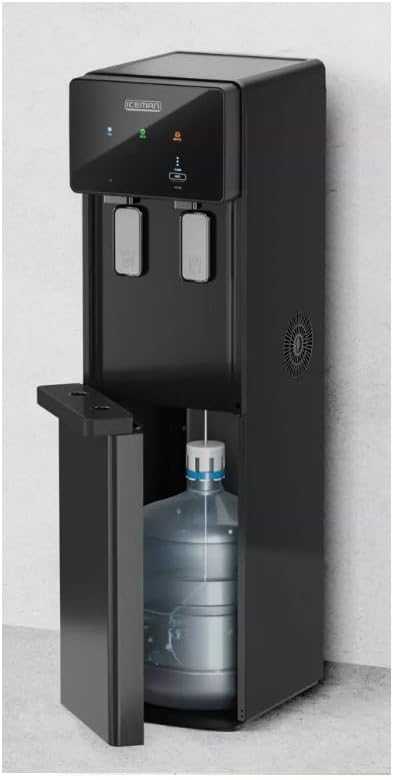
The lower cabinet door is open, showing a 5-gallon water bottle being placed inside the dispenser for bottom-loading.
Initial Power-Up and Flush
- Plug the dispenser into a grounded electrical outlet.
- Allow the unit to sit for at least 30 minutes before dispensing water to allow the water to fill the internal tanks and reach desired temperatures.
- Dispense and discard at least two cups of water from both the hot and cold spouts to flush the system before first use.
Operating Instructions
Dispensing Cold Water
The dispenser provides cold water at approximately 45°F.
- Place a cup under the cold water spout.
- Press the cold water dispensing paddle with the cup to release water.
- Release the paddle to stop the flow.
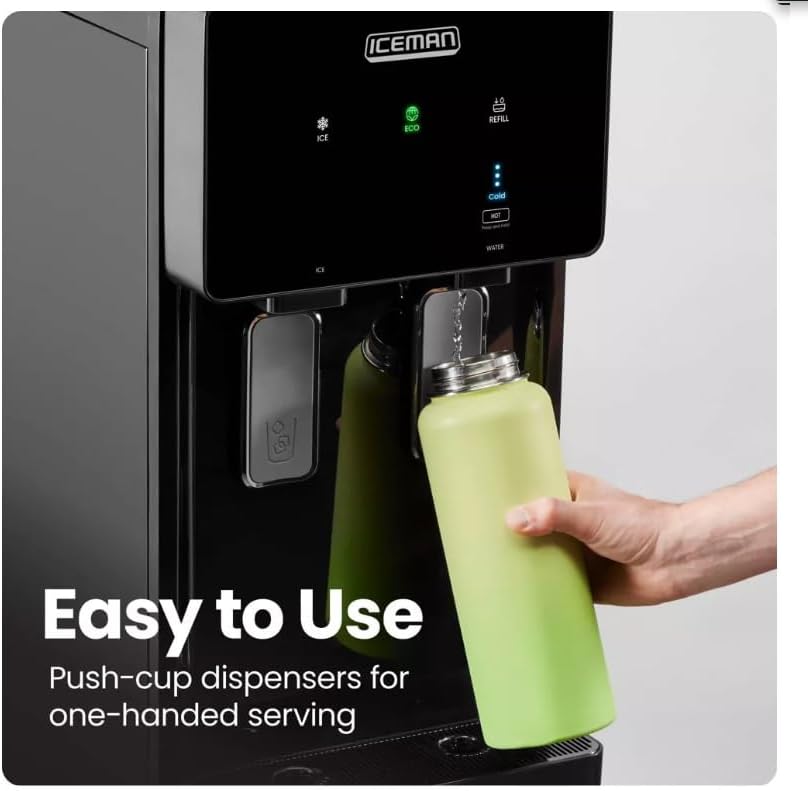
A user dispensing cold water into a green water bottle using the push-cup mechanism.
Dispensing Hot Water
The dispenser provides hot water at approximately 200°F. A child safety lock is integrated for the hot water spout.
- Place a heat-resistant cup under the hot water spout.
- Simultaneously press the child safety lock button and the hot water dispensing paddle.
- Release both to stop the flow.
Ice Making Function
The unit can produce up to 22 pounds of bullet-style ice daily. The ice reservoir fills in approximately 4 hours.
- Ensure the ice making function is activated (refer to control panel indicators).
- Allow sufficient time for the first batch of ice to be produced.
- Place a cup under the ice dispensing spout.
- Press the ice dispensing paddle with the cup to release ice.

A user dispensing bullet-style ice cubes into a glass from the Chefman water dispenser.
LED Indicators
- Cold Water Ready: Illuminates when cold water has reached its optimal temperature.
- Refill Alert: Illuminates when the water bottle is empty and needs replacement.
- Ice: Indicates the ice making function is active.
Eco Mode
Activate Eco Mode to conserve energy when the dispenser is not in active use. This mode reduces power consumption by adjusting heating and cooling cycles.

The Chefman water dispenser positioned in a room, illustrating its design and highlighting the Eco Mode feature for energy efficiency.
Maintenance
Self-Cleaning Function
The dispenser includes a built-in self-cleaning function to maintain hygiene. Refer to the control panel for activation instructions.
Exterior Cleaning
- Unplug the dispenser before cleaning.
- Wipe the exterior surfaces with a soft, damp cloth. Do not use abrasive cleaners or solvents.
Drip Tray Cleaning
- The drip tray should be emptied and cleaned regularly to prevent overflow and bacterial growth.
- Remove the drip tray, empty any accumulated water, and wash with mild soap and water. Rinse thoroughly and dry before replacing.
Troubleshooting
Before contacting customer support, review the following common issues and solutions.
| Problem | Possible Cause | Solution |
|---|---|---|
| No water dispensing | Water bottle empty or not properly installed. | Replace water bottle or ensure it is correctly seated. |
| Water not hot/cold enough | Unit recently plugged in; heating/cooling elements off. | Allow 30-60 minutes for water to reach temperature. Ensure hot/cold switches are on. |
| No ice production | Ice function off; water bottle empty; initial cycle not complete. | Activate ice function. Replace water bottle. Allow 4 hours for initial ice production. |
| Water leak | Water bottle cracked or improperly seated. | Check water bottle for damage. Reinstall bottle ensuring a tight seal. |
Specifications
| Feature | Detail |
|---|---|
| Model Number | RJ56-DIS |
| Brand | Chefman |
| Color | Stainless Steel |
| Material | Stainless Steel |
| Capacity | 1 to 5 gallons (water bottle) |
| Product Dimensions (D x W x H) | 17.2" x 12.24" x 44.88" |
| Wattage | 1440 watts |
| Installation Type | Freestanding |
| Access Location | Bottom-Loading |
| Upper Temperature Rating (Hot) | 200 °F |
| Lower Temperature Rating (Cold) | 45 °F |
| Power Source | Corded Electric |
| Daily Ice Production | Up to 22 pounds |
| Ice Cube Style | Bullet-style |
| Item Weight | 82 pounds |
| UPC | 810170924453 |
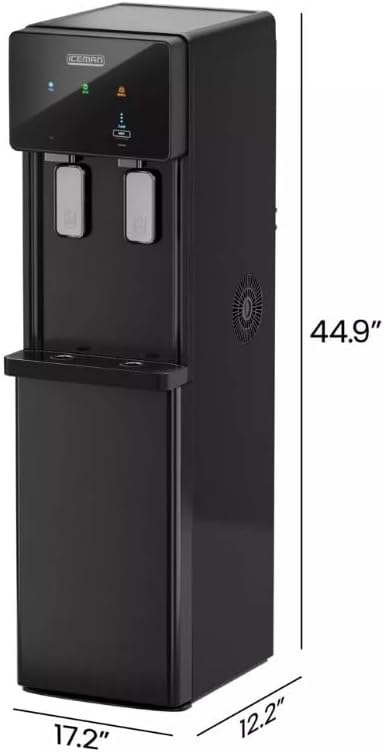
Side view of the Chefman water dispenser, illustrating its physical dimensions.
Warranty
This product comes with a 1-year assurance from iceman. Please retain your proof of purchase for warranty claims. For detailed warranty terms and conditions, refer to the documentation provided with your purchase or contact customer support.
Support
For further assistance, troubleshooting not covered in this manual, or warranty inquiries, please contact Chefman Customer Support. Contact information can typically be found on the manufacturer's website or on the product packaging.
- Online Support: Visit the official Chefman website.
- Phone Support: Refer to your product registration card or the Chefman website for contact numbers.


