
1. Introduction
Thank you for choosing the Otlonpe S-F16B Personal Portable Desk Fan. This compact and versatile fan is designed to provide efficient cooling wherever you need it, featuring a powerful 4000mAh rechargeable battery, four adjustable speed settings, and an emergency power bank function. Please read this manual thoroughly before use to ensure proper operation and maintenance.
2. Safety Information
- Do not insert fingers or any objects into the fan grille when the fan is operating.
- Keep the fan away from water and other liquids to prevent electric shock.
- Do not disassemble or modify the fan. Repairs should only be performed by qualified personnel.
- Ensure the power source voltage is compatible with the fan's requirements (5V/2A).
- Keep out of reach of children.
- Avoid prolonged exposure to direct sunlight or high temperatures.
- When cleaning, ensure the fan is turned off and unplugged.
3. Package Contents
- Otlonpe S-F16B Personal Portable Desk Fan
- USB-C Charging Cable
- User Manual
4. Product Overview
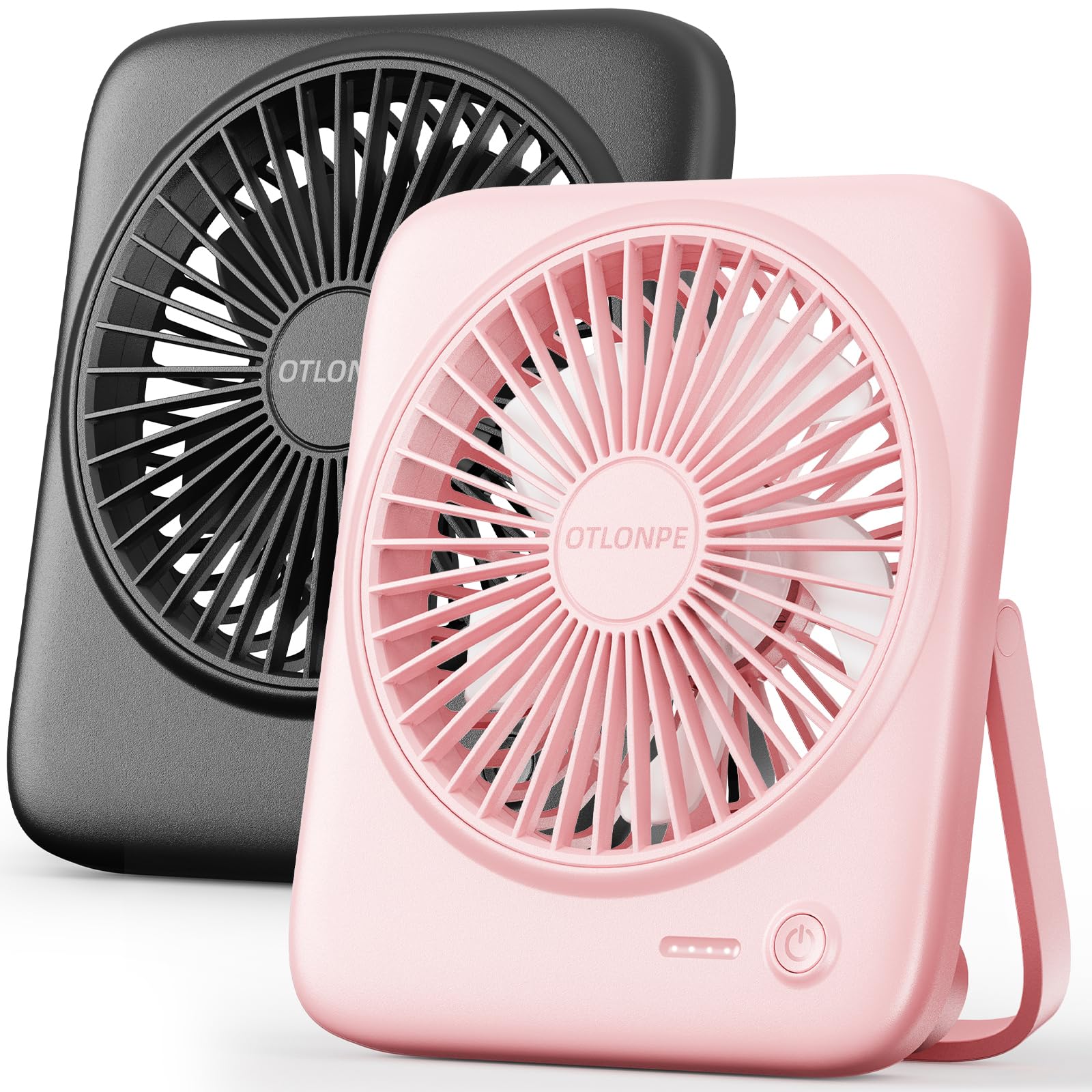
The Otlonpe S-F16B fan features a compact design with a front grille, control button, and a foldable stand for versatile positioning. It is equipped with a 4000mAh battery for cordless operation and a USB-C port for charging and power bank functionality.
5. Setup
- Unpack: Carefully remove the fan and all accessories from the packaging.
- Initial Charge: Before first use, fully charge the fan. Connect the provided USB-C cable to the fan's charging port and the other end to a 5V/2A USB power adapter (not included) or a computer USB port. The charging indicator lights will show the charging status.
- Positioning: Place the fan on a stable, flat surface. Adjust the foldable stand to achieve the desired angle for airflow. The fan head can be adjusted 180 degrees.
6. Operating Instructions
The fan features a single control button for power and speed adjustment.
- Power On/Speed 1: Press the power button once to turn on the fan at speed 1 (gentle breeze).
- Speed 2: Press the power button a second time for speed 2 (moderate breeze).
- Speed 3: Press the power button a third time for speed 3 (strong breeze).
- Speed 4: Press the power button a fourth time for speed 4 (powerful gust).
- Power Off: Press the power button a fifth time to turn off the fan.
7. Charging the Fan
The fan is equipped with a 4000mAh rechargeable battery, providing 5-23 hours of cordless operation depending on the speed setting. It takes approximately 4 hours to fully charge the fan using a 5V/2A input.
- Connect the USB-C charging cable to the fan's charging port.
- Connect the other end of the cable to a compatible USB power source (e.g., wall adapter, power bank, computer USB port).
- The indicator lights will illuminate to show the charging progress. Once fully charged, the lights will indicate a full battery.
- The fan can be used while it is charging.
8. Emergency Power Bank Function
The Otlonpe S-F16B fan can also function as an emergency power bank to charge your mobile devices.
- Ensure the fan has sufficient battery charge.
- Connect your device's charging cable to the fan's USB-C port.
- The fan will begin to charge your device. Note that this function is intended for emergency use and may not provide a full charge to all devices.
9. Maintenance and Cleaning
Regular cleaning helps maintain optimal performance and extends the lifespan of your fan.
- Power Off: Always ensure the fan is turned off and unplugged before cleaning.
- Front Grille Removal: The front grille is detachable for easy cleaning. Gently snap off the front grille.
- Cleaning Blades and Grille: Use a soft, dry cloth or a brush to remove dust from the fan blades and the grilles. For stubborn dirt, a slightly damp cloth can be used, but ensure no water enters the motor area.
- Reassembly: Once clean and dry, carefully snap the front grille back into place.
- Exterior Cleaning: Wipe the exterior of the fan with a soft, dry cloth. Do not use abrasive cleaners or solvents.
10. Troubleshooting
| Problem | Possible Cause | Solution |
|---|---|---|
| Fan does not turn on. | Battery is depleted. | Charge the fan using the provided USB-C cable. |
| Fan runs slowly or weakly. | Low battery. | Recharge the fan. |
| Fan makes unusual noise. | Obstruction in blades or grille. | Turn off and unplug the fan. Carefully check for and remove any obstructions. Clean the blades. |
| Cannot charge external device. | Fan battery is too low; incorrect cable. | Ensure the fan is sufficiently charged. Use a compatible charging cable for your device. |
11. Specifications
| Feature | Detail |
|---|---|
| Model Name | S-F16B |
| Model Number | S-F16A |
| Brand | Otlonpe |
| Power Source | Battery Powered (4000mAh) / USB Powered |
| Number of Speeds | 4 |
| Noise Level | 30 dB |
| Wattage | 7.5 watt-hours |
| Voltage | 5 volts DC |
| Dimensions (D x W x H) | 3.8D x 14.4W x 16.8H centimetres |
| Item Weight | 260 g |
| Material | Acrylonitrile Butadiene Styrene, Plastic |
| Special Features | Adjustable Tilt, Foldable, Portable, Quiet Operation, Safety Certified |
| Certifications | CE, FCC, RoHS, UL |
12. Warranty and Support
The Otlonpe S-F16B Personal Portable Desk Fan comes with a 180-Day Manufacturer's Warranty from the date of purchase. This warranty covers defects in materials and workmanship under normal use.
For warranty claims, technical support, or any questions regarding your product, please contact Otlonpe customer service through the retailer where the product was purchased or refer to the contact information provided on the product packaging.
Please retain your proof of purchase for warranty validation.