
1. Introduction
Thank you for choosing the BORUIT V10 Small Powerful Flashlight and EV30 Clip On Flashlight. This manual provides detailed instructions for the safe and efficient operation, maintenance, and troubleshooting of your new flashlights. Please read this manual thoroughly before use and retain it for future reference.
2. Safety Information
- Do not shine the flashlight directly into eyes. The intense light can cause temporary vision impairment or permanent eye damage.
- Keep out of reach of children.
- Do not disassemble or modify the flashlights. This may cause damage and void the warranty.
- Avoid exposing the flashlights to extreme temperatures or direct sunlight for prolonged periods.
- Ensure the charging port is dry before connecting the USB-C cable.
3. Package Contents
Upon unpacking, please verify that all items are present and in good condition:
- 1 x BORUIT V10 Small Powerful Flashlight
- 1 x BORUIT EV30 Clip On Flashlight
- 1 x USB-C Charging Cable
- 1 x User Manual (this document)
4. Product Overview
4.1 BORUIT V10 Flashlight
The BORUIT V10 is a compact and powerful flashlight designed for versatility. It features a main light, a COB side light with multiple colors, a UV light, and an 80dB alarm function. It is USB-C rechargeable, includes a keychain attachment, and has a magnetic base for hands-free use.

Image 4.1: BORUIT V10 demonstrating its super bright and long-range illumination, along with various side light color options including white, warm, green, red, blue, red flash, red & blue strobe, and UV light. It also highlights 1000 lumens output and a 100-meter range.
4.2 BORUIT EV30 Flashlight
The BORUIT EV30 is a clip-on flashlight offering 550 lumens of brightness. It is USB-C rechargeable and includes a keychain, magnetic base, red light, and UV light functions. Its design allows for stable clamping without falling off, making it ideal for hands-free operation.

Image 4.2: BORUIT EV30 showcasing its durable clip for attachment to hats or straps, and its magnetic suction function for hands-free use on metal surfaces. The image also illustrates its compact and portable design.
5. Setup and Charging
5.1 Initial Charge
Before first use, it is recommended to fully charge both flashlights. Use the provided USB-C cable to connect the flashlight to a standard USB power adapter (not included) or a computer USB port.

Image 5.1: The BORUIT V10 flashlight highlighting its USB-C charging capability and IPX4 waterproof rating. The image also shows the integrated buzzer feature.
The charging indicator lights will show the charging status. Once fully charged, disconnect the cable.
6. Operating Instructions
6.1 BORUIT V10 Operation
The V10 flashlight features a main light switch and a side light switch for various functions.
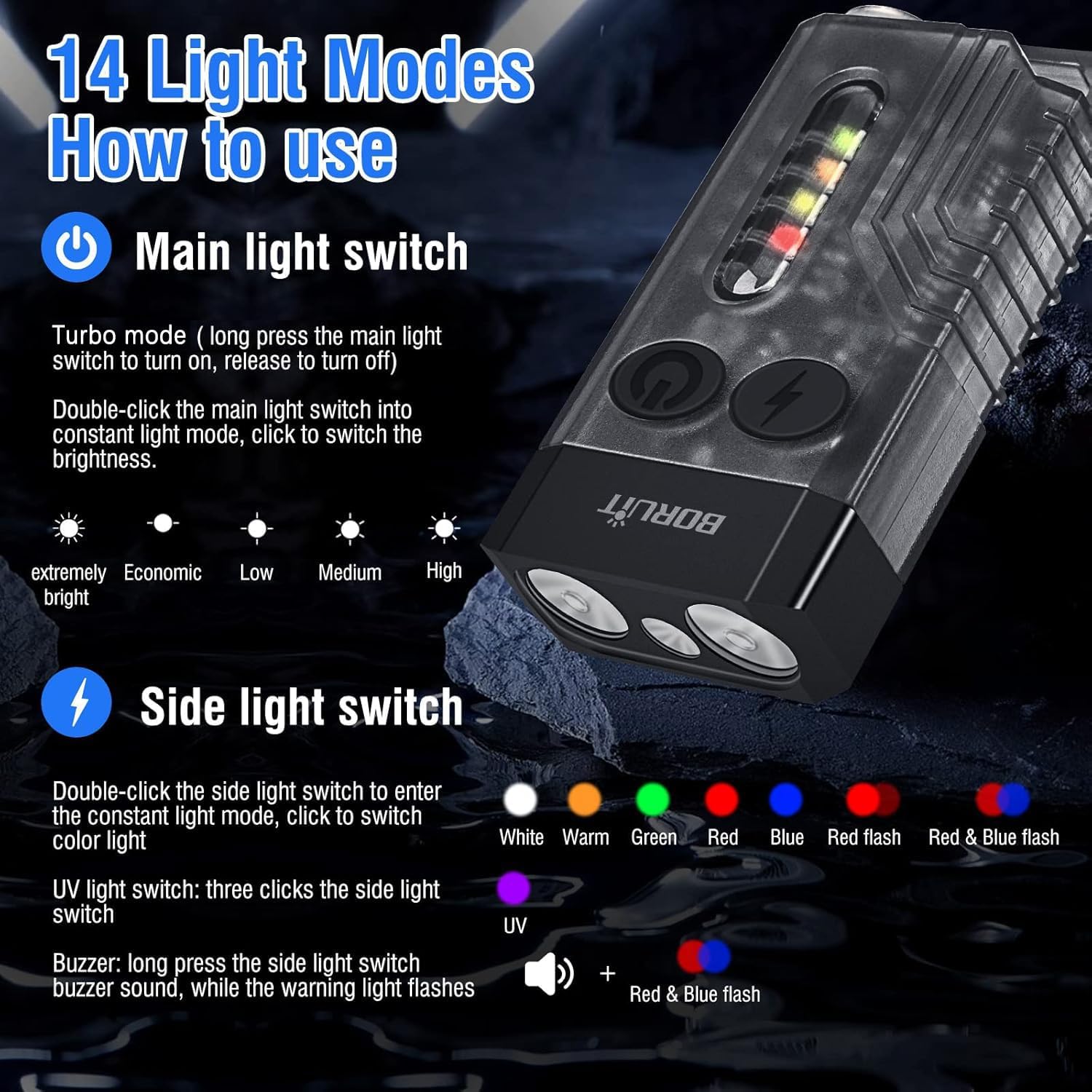
Image 6.1: Detailed instructions for the BORUIT V10's 14 light modes. It illustrates the operation of the main light switch for turbo and constant modes with brightness levels (extremely bright, economic, low, medium, high), and the side light switch for white, warm, green, red, blue, red flash, red & blue flash, UV light, and the buzzer sound with warning light.
Main Light Switch:
- Turbo Mode: Long press the main light switch to turn on. Release to turn off.
- Constant Light Mode: Double-click the main light switch to enter constant light mode. Click again to cycle through brightness levels: Extremely Bright, Economic, Low, Medium, High.
Side Light Switch:
- Color Light Mode: Double-click the side light switch to enter the constant light mode. Click to switch color lights: White, Warm, Green, Red, Blue, Red Flash, Red & Blue Flash.
- UV Light: Three clicks of the side light switch.
- Buzzer: Long press the side light switch to activate the buzzer sound while the warning light flashes.
6.2 BORUIT EV30 Operation
The EV30 flashlight has separate buttons for the main light and side light functions.

Image 6.2: The BORUIT EV30 flashlight illustrating the functions of its main light button (single click for High-Medium-Low-SOS, long press to turn off, long press in OFF mode for UV light) and side light button (single click for White High-White Medium-White Low, long press to turn off, long press in OFF mode for Red Light, Red Breathing Light, Alternating Red and Blue Flashes).
Main Light Button:
- Single Click: Cycles through High, Medium, Low, SOS modes.
- Long Press: Turns off the main light.
- In OFF Mode, Long Press: Activates UV Light. Long press again to turn off.
Side Light Button:
- Single Click: Cycles through White High, White Medium, White Low modes.
- Long Press: Turns off the side light.
- In OFF Mode, Long Press: Cycles through Red Light, Red Breathing Light, Alternating Red and Blue Flashes. Long press again to turn off.
7. Special Features
7.1 BORUIT V10 Features
- 80dB Beeping Alarm: Activated via the side light switch (long press). Provides an audible alarm with flashing lights for emergency situations.
- IPX4 Waterproof: Resistant to splashing water from any direction. Not suitable for submersion.
- Portable Keychain: Easily attachable to keys or bags for convenient carrying.
- Strong Magnet: Integrated magnet allows attachment to metal surfaces for hands-free illumination.
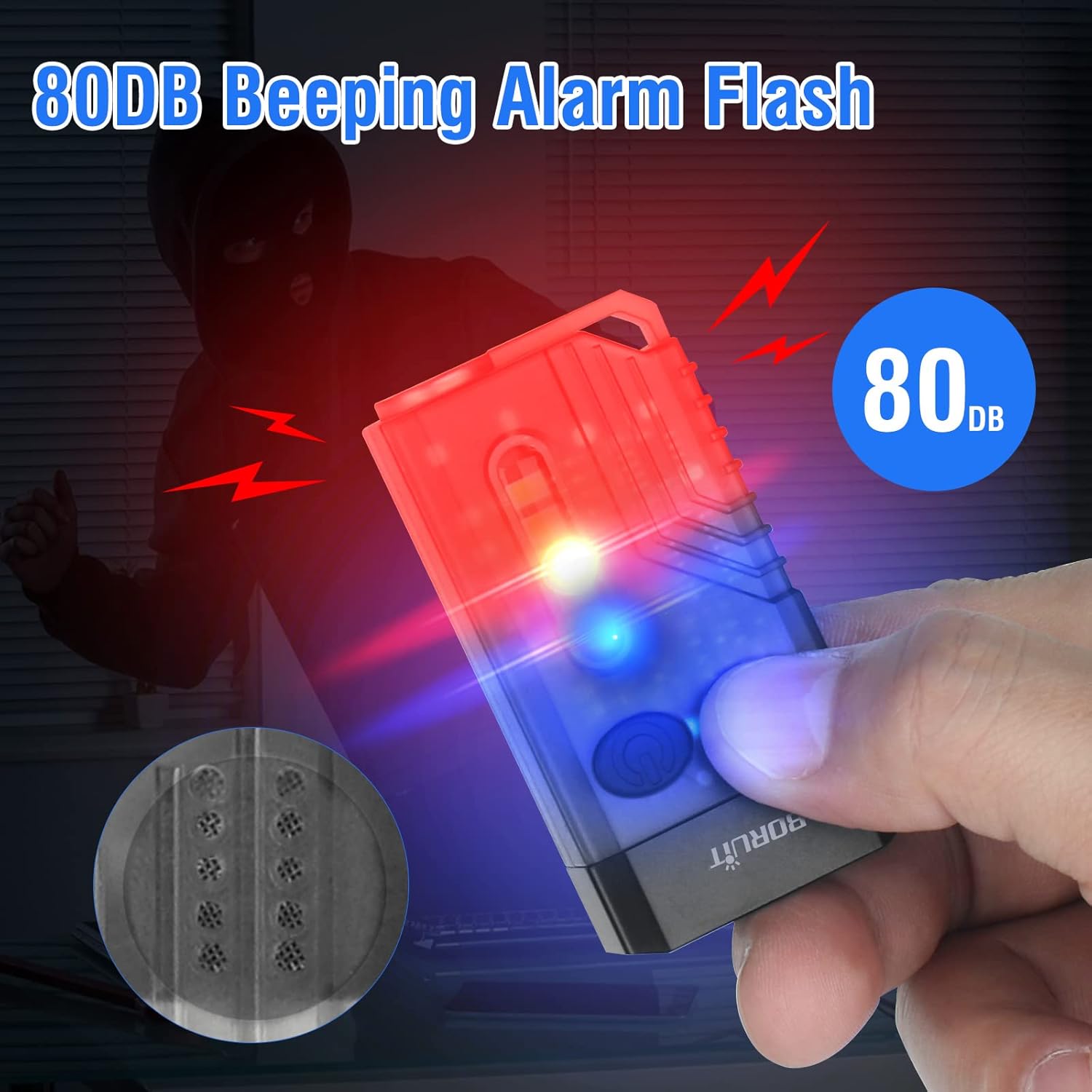
Image 7.1.1: The BORUIT V10 flashlight demonstrating its 80dB beeping alarm and flashing red and blue lights, designed for warning or emergency situations.

Image 7.1.2: The BORUIT V10 flashlight highlighting its portable keychain design for easy carrying and its strong magnetic base for hands-free attachment to metal surfaces.
7.2 BORUIT EV30 Features
- Durable Clip: Designed to withstand 10,000 open-and-close cycles, providing stable clamping without falling off. Ideal for attaching to clothing, hats, or straps.
- Magnetic Suction Function: The tail magnet allows the flashlight to be attached to metal surfaces, providing hands-free lighting for tasks like car repairs or camping.
- Portable Lighting: Flat body design for comfortable holding and convenient carrying.

Image 7.2.1: The BORUIT EV30 flashlight utilizing its magnetic suction function to attach to an overhead metal surface, providing hands-free illumination.
8. Maintenance
- Cleaning: Wipe the flashlight body with a soft, damp cloth. Do not use abrasive cleaners or solvents.
- Storage: Store the flashlights in a cool, dry place when not in use. For long-term storage, charge the battery every 3-6 months to maintain battery health.
- Water Resistance: While the V10 is IPX4 waterproof, avoid prolonged exposure to heavy rain or submersion. Ensure the charging port cover is securely closed.
9. Troubleshooting
| Problem | Possible Cause | Solution |
|---|---|---|
| Flashlight does not turn on. | Battery is depleted. | Charge the flashlight using the USB-C cable. |
| Light output is dim. | Low battery level. | Recharge the flashlight. |
| Charging not working. | Cable or adapter issue; dirty charging port. | Try a different USB-C cable or power adapter. Ensure the charging port is clean and dry. |
| Buttons are unresponsive. | Temporary software glitch. | Allow the battery to fully discharge and then recharge. If the issue persists, contact customer support. |
10. Specifications
BORUIT V10
- Main Light Output: Up to 1000 Lumens
- Beam Distance: Up to 100 meters
- Side Light Functions: White, Warm, Green, Red, Blue, Red Flash, Red & Blue Strobe, UV Light
- Special Features: 80dB Beeping Alarm, Magnetic Base, Keychain, IPX4 Waterproof
- Charging: USB-C Rechargeable
BORUIT EV30
- Light Output: Up to 550 Lumens
- Light Modes: White High/Medium/Low, Red Light, Red Breathing Light, Alternating Red/Blue Flashes, UV Light, SOS
- Special Features: Durable Clip, Magnetic Base, Keychain
- Charging: USB-C Rechargeable
- Dimensions: Approximately 2.6 inches (Length) x 1.14 inches (Width)
- Weight: Approximately 2.15 oz
11. Warranty and Support
BORUIT products are manufactured to high-quality standards. For warranty information or technical support, please refer to the contact details provided with your purchase or visit the official BORUIT website. Please retain your proof of purchase for warranty claims.


