
1. Setup
This section provides instructions for setting up your ULANZI MA66 Magnetic Camera Tripod.
1.1 Attaching Your Device
The MA66 features a strong magnetic mount for secure attachment to compatible devices like the DJI Pocket3/4. Ensure the device is properly aligned and the magnetic connection is firm before use.

Image: ULANZI MA66 Magnetic Camera Tripod with a DJI Pocket3/4 attached, demonstrating its compact form.

Image: Close-up of the ULANZI MA66 demonstrating its strong magnetic attachment to a DJI Pocket3/4, highlighting its secure and stable connection. The image also shows the device mounted on a vertical metal surface.
1.2 Quick-Release System
The MA66 is compatible with UKA/Arca-Swiss quick-release systems, allowing for rapid setup and mode changes. To attach, align the quick-release plate with the corresponding mount and secure it firmly.

Image: Diagram illustrating the ULANZI MA66's compatibility with both Uka and Arca-Swiss quick-release systems for versatile mounting options.
For optimal stability, ensure the base is seated properly. If not, adjust its orientation for a secure fit.
1.3 Initial Inspection
Before first use, inspect the tripod for any signs of damage. Ensure all moving parts operate smoothly and securely.
2. Operating Modes
The ULANZI MA66 offers multiple operating modes for diverse shooting scenarios.
2.1 Multi-Angle Adjustments
The MA66 allows for smooth multi-directional adjustments, enabling flexible positioning for various shots including overhead, low-angle, and side-mounted perspectives.
Video: Demonstrates the ULANZI MA66 Action Camera Tripod Mount's compatibility with DJI OSMO Pocket 3 and its flexible angle adjustments.
2.2 Handheld and Tripod Setups
Effortlessly switch between handheld and tripod configurations to adapt to any shooting requirement.

Image: Two users demonstrating the ULANZI MA66 in both handheld selfie stick mode and stable tripod mode, showcasing its versatility.
2.3 Specific Modes
- Selfie Stick Mode: Extend the legs to use as a comfortable grip for handheld shooting.
- Desktop Stand Mode: Fold out the legs to create a stable stand for tabletop use.
- Tripod Mode: Fully extend the legs to function as a compact tripod for stable shots.
- Briefcase Mode: Fold the legs for a compact, easy-to-carry form factor.
- Hands-Free Carry: Secure the tripod legs into a strap buckle for convenient access while on the go.
- Overhead/Mantis Mode: Utilize the hidden hook to secure the device to fences or railings for unique overhead perspectives. Ensure all base feet are fully supported on a stable, flat surface when using this mode. Avoid attaching to moving objects.

Image: A collage of four images demonstrating the ULANZI MA66 in various configurations: Selfie Stick Mode, Desktop Stand Mode, Tripod Mode, and Briefcase Mode.
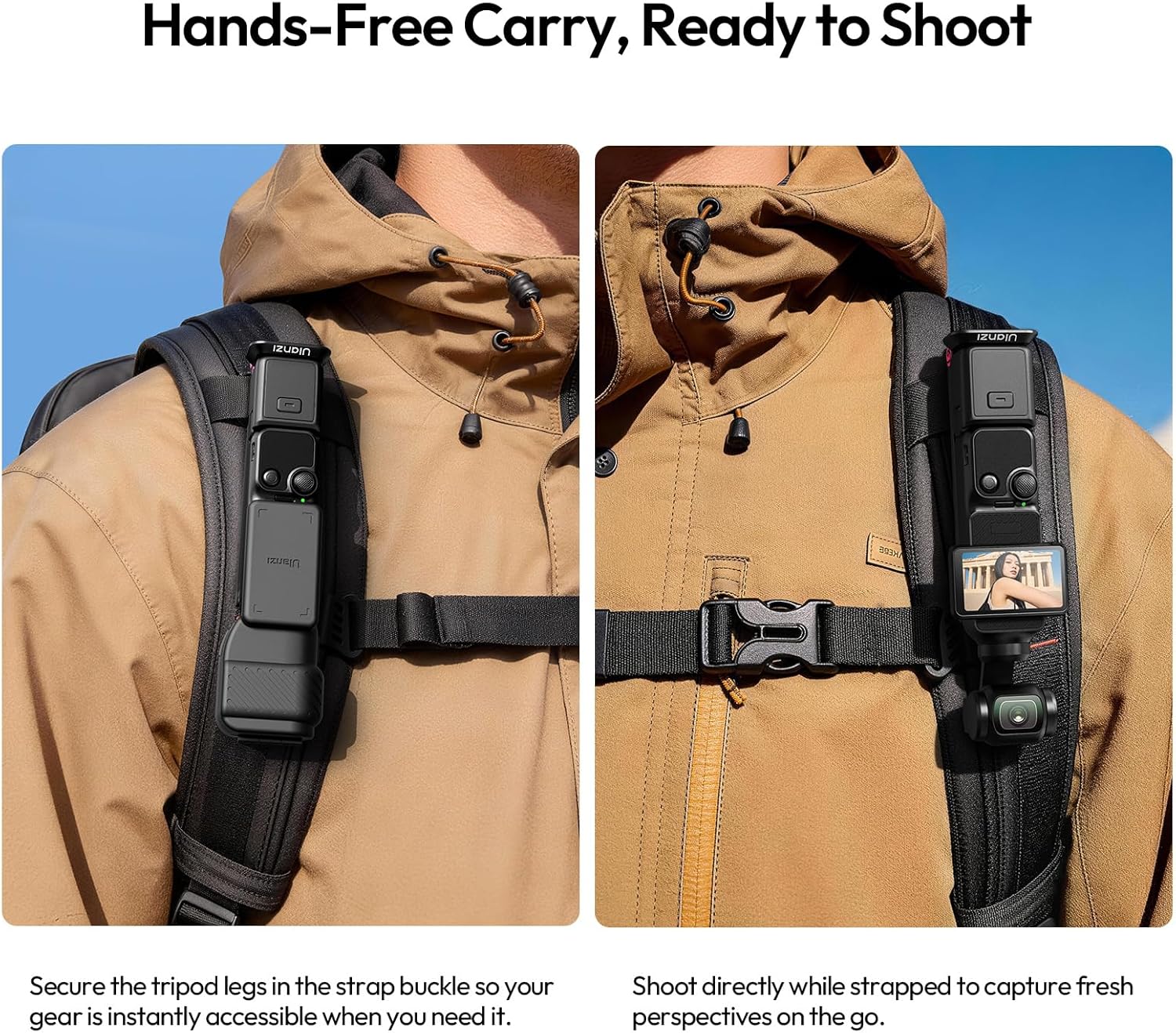
Image: The ULANZI MA66 attached to a backpack strap, illustrating the hands-free carry option for easy access during travel.

Image: The ULANZI MA66 utilizing its hidden hook to mount on a tennis court fence, demonstrating the "Mantis Mode" for overhead shooting.
3. Maintenance
Proper care ensures the longevity and performance of your ULANZI MA66 Magnetic Camera Tripod.
- Cleaning: Wipe the aluminum alloy and silicone surfaces with a soft, dry cloth. Avoid abrasive cleaners or solvents.
- Storage: Store the tripod in a cool, dry place away from direct sunlight and extreme temperatures.
- Inspection: Periodically check for any loose screws or signs of wear on the magnetic components and joints. Tighten as necessary.
- Weight Limit: Do not exceed the maximum weight limit of 250 grams to prevent damage.
4. Troubleshooting
If you encounter issues with your ULANZI MA66, refer to these general troubleshooting tips.
- Device Not Attaching Securely:
- Ensure the magnetic surfaces on both the tripod and your device are clean and free of debris.
- Verify that your device is compatible with magnetic mounts.
- Check if the device's weight exceeds the 250g limit.
- Tripod Instability:
- Ensure the legs are fully extended and locked into position when using tripod mode.
- Place the tripod on a flat, stable surface.
- When using the hidden hook, ensure all base feet are fully supported.
- Difficulty with Quick-Release:
- Ensure the quick-release plate is correctly aligned with the mount.
- Check for any obstructions or debris in the quick-release mechanism.
For further assistance, please contact ULANZI customer support.
5. Specifications
| Feature | Detail |
|---|---|
| Model Name | MA66 |
| Brand | ULANZI |
| Material | Aluminum Alloy, Silicone |
| Colour | Black |
| Compatible Devices | Camera, Action Camera (specifically DJI Pocket3/4) |
| Special Feature | Magnetic Mount, Hidden Hook, Quick-Release (UKA/Arca-Swiss) |
| Weight Limit | 250 Grams |
| Folded Size | 121.8 x 38 x 11.5 mm |
| Product Weight | 75g |
| Country of Origin | China |
6. Warranty Information
The ULANZI MA66 Magnetic Camera Tripod comes with a 1-year warranty from the date of purchase.
This warranty covers manufacturing defects and material faults under normal use. It does not cover damage caused by misuse, accidents, unauthorized modifications, or exceeding the specified weight limit. Please retain your proof of purchase for warranty claims.
7. Support
For technical assistance, product inquiries, or warranty claims, please visit the official ULANZI website or contact their customer support directly.
Official ULANZI Website: www.ulanzi.com
Please refer to the website for the most up-to-date contact information and support resources.


