
1. Introduction
Thank you for choosing the taopodo S18 Portable Bluetooth Speaker. This manual provides essential information for the safe and efficient operation of your device. The S18 speaker features Bluetooth 5.4 connectivity, 30W loud stereo sound, TWS (True Wireless Stereo) pairing capability, IPX7 waterproof rating, and colorful RGB lights, designed for an enhanced audio experience.
2. Package Contents
Please check the package for the following items:
- taopodo S18 Portable Bluetooth Speaker
- Power Cable
- User Manual
3. Product Overview
Familiarize yourself with the speaker's components and controls.
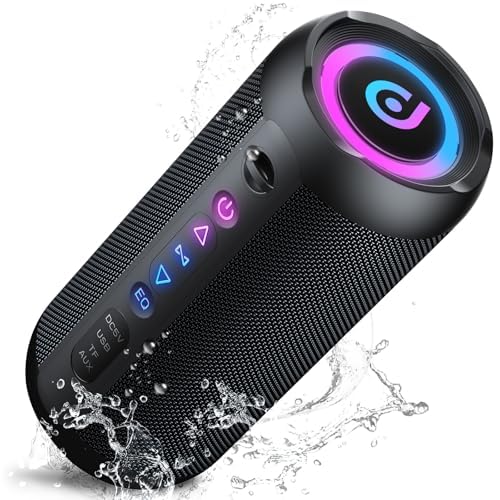
Image 1: Front view of the taopodo S18 Portable Bluetooth Speaker. The speaker features a rectangular prism shape with a speaker grille on the front, indicating the audio output area. The overall design is compact and suitable for portability.
Buttons and Ports:
- Power Button: Press and hold to power on/off. Short press to change RGB light modes.
- Volume Down / Previous Track Button: Short press to decrease volume. Long press to go to the previous track.
- Play/Pause / Call Button: Short press to play/pause music. Short press to answer/end calls. Long press to reject calls.
- Volume Up / Next Track Button: Short press to increase volume. Long press to go to the next track.
- TWS Button: Short press to initiate TWS pairing.
- Charging Port: USB-C port for charging the speaker.
4. Setup
4.1 Charging the Speaker
- Connect the provided power cable to the speaker's charging port.
- Connect the other end of the power cable to a suitable USB power adapter (not included) or a computer's USB port.
- The charging indicator light will illuminate during charging and turn off when fully charged.
- For optimal battery life, fully charge the speaker before first use.
4.2 First-Time Bluetooth Pairing
- Ensure the speaker is fully charged.
- Press and hold the Power Button for 2-3 seconds to turn on the speaker. A power-on tone will sound, and the Bluetooth indicator light will flash, indicating it's in pairing mode.
- On your Bluetooth-enabled device (smartphone, tablet, computer), go to the Bluetooth settings.
- Search for available devices and select "taopodo S18" from the list.
- Once connected, the Bluetooth indicator light will stop flashing and remain solid, and a connection tone will sound.
- You can now play audio through your taopodo S18 speaker.
5. Operating Instructions
5.1 Power On/Off
- Power On: Press and hold the Power Button for 2-3 seconds.
- Power Off: Press and hold the Power Button for 2-3 seconds.
5.2 Bluetooth Connection
- After initial pairing, the speaker will automatically attempt to reconnect to the last paired device when powered on.
- If reconnection fails, manually select "taopodo S18" from your device's Bluetooth settings.
5.3 Music Playback
- Play/Pause: Short press the Play/Pause Button.
- Volume Up: Short press the Volume Up Button.
- Volume Down: Short press the Volume Down Button.
- Next Track: Long press the Volume Up Button.
- Previous Track: Long press the Volume Down Button.
5.4 Call Handling
- Answer/End Call: Short press the Play/Pause Button.
- Reject Call: Long press the Play/Pause Button.
5.5 RGB Light Modes
- Short press the Power Button to cycle through different RGB light modes.
- Continue pressing to turn off the lights.
6. TWS (True Wireless Stereo) Pairing
TWS allows you to pair two taopodo S18 speakers together for a true stereo sound experience.
- Ensure both taopodo S18 speakers are powered on and not connected to any other Bluetooth device.
- On one of the speakers (this will be the primary speaker), short press the TWS Button. The speaker will emit a tone, and its TWS indicator light will flash.
- The primary speaker will automatically search for the secondary speaker. Once connected, both speakers will emit a confirmation tone, and their TWS indicator lights will remain solid.
- Now, connect your Bluetooth device to the primary speaker ("taopodo S18") as described in section 4.2.
- Audio will now play in stereo through both speakers.
- To disconnect TWS, short press the TWS Button on either speaker.
7. Maintenance
- Cleaning: Wipe the speaker with a soft, damp cloth. Do not use abrasive cleaners or solvents.
- Water Resistance: The speaker is IPX7 waterproof, meaning it can be submerged in up to 1 meter of water for 30 minutes. Ensure the charging port cover is securely closed before exposure to water. Do not expose to saltwater or other chemicals.
- Storage: Store the speaker in a cool, dry place away from direct sunlight and extreme temperatures.
- Battery Care: To prolong battery life, charge the speaker at least once every three months if not in regular use. Avoid fully discharging the battery frequently.
8. Troubleshooting
| Problem | Possible Solution |
|---|---|
| Speaker does not power on. | Ensure the speaker is charged. Connect to a power source and try again. |
| Cannot pair with Bluetooth device. | Make sure the speaker is in pairing mode (flashing Bluetooth indicator). Turn off and on Bluetooth on your device. Ensure the speaker is not connected to another device. Move closer to the speaker. |
| No sound or low volume. | Increase volume on both the speaker and your connected device. Ensure the device is playing audio. Check if the speaker is properly connected via Bluetooth. |
| Sound quality is poor. | Move the speaker closer to your Bluetooth device. Avoid obstacles between the speaker and device. Try playing a different audio source. |
| TWS pairing fails. | Ensure both speakers are not connected to any other Bluetooth device. Place speakers close to each other. Repeat the TWS pairing steps carefully. |
9. Specifications
| Feature | Detail |
|---|---|
| Model Name | S18 |
| Brand | taopodo |
| Connectivity Technology | Bluetooth 5.4 |
| Speaker Type | 3D |
| Audio Output Mode | Stereo |
| Speaker Maximum Output Power | 30 Watts |
| Surround Sound Channel Configuration | 2.0 |
| Waterproof Rating | IPX7 |
| Product Dimensions | 4"D x 1.9"W x 2.5"H |
| Item Weight | 2.14 pounds |
| Included Components | Power Cable |
| Control Method | App (Note: While 'App' is listed, primary control is via physical buttons.) |
| Recommended Uses | For Smartphones or Tablets, For Music Players, For Computers, Outdoor/portable audio setups |
10. Warranty Information
The taopodo S18 Portable Bluetooth Speaker comes with a limited warranty. Please refer to the warranty card included in your package or contact customer support for detailed terms and conditions. This warranty typically covers manufacturing defects and workmanship under normal use.
11. Customer Support
If you encounter any issues or have questions regarding your taopodo S18 speaker that are not addressed in this manual, please contact taopodo customer support. Contact information can typically be found on the product packaging, warranty card, or the official taopodo website.
