
1. Important Safety Information
Please read all safety information before using your NEBROO Infinity Hearing Aid & Amplifier.
- Warning: If you are younger than 18, do not use this device.
- Warning: Consult a doctor if you experience any pain or discomfort.
- Warning: This hearing aid should not cause pain when inserting it. If it does, remove it and re-evaluate the ear tip size or consult a professional.
- Caution: This device is not hearing protection. It will not protect your ears from loud noises.
- Caution: The sound output should not be uncomfortable or painful. If it is, reduce the volume immediately.
- Caution: You might need medical help if a piece gets stuck in your ear. Do not attempt to remove it yourself if it is lodged.
- Note: If you remain concerned about your hearing or the device's performance, consult a professional.
- Note: It is normal to experience an adjustment period when you start using a hearing aid. Your brain needs time to acclimate to amplified sounds.
- Note: Report any injuries, malfunctions, or other adverse events to the FDA.
2. What's Included
Your NEBROO Infinity package contains the following items:
- Pair of NEBROO Infinity Hearing Aids
- Charging Case with Battery Level Display
- Multiple Ear Tip Sizes (Small, Medium, Large) for Personalized Fit
- Quick-Start Guide (this manual)
3. Setup and First Use
3.1. Initial Charging
- Before first use, remove the protective tape covering the rechargeable battery contacts on each hearing aid.
- Place both hearing aids into the charging case. Ensure they are seated correctly.
- Connect the USB cable to the charging case and a constant 5V USB C (non-fast) charging source. The charging case display will show the battery status.
- Allow approximately 3 hours for a full charge. A full charge provides up to 19 hours of listening time.
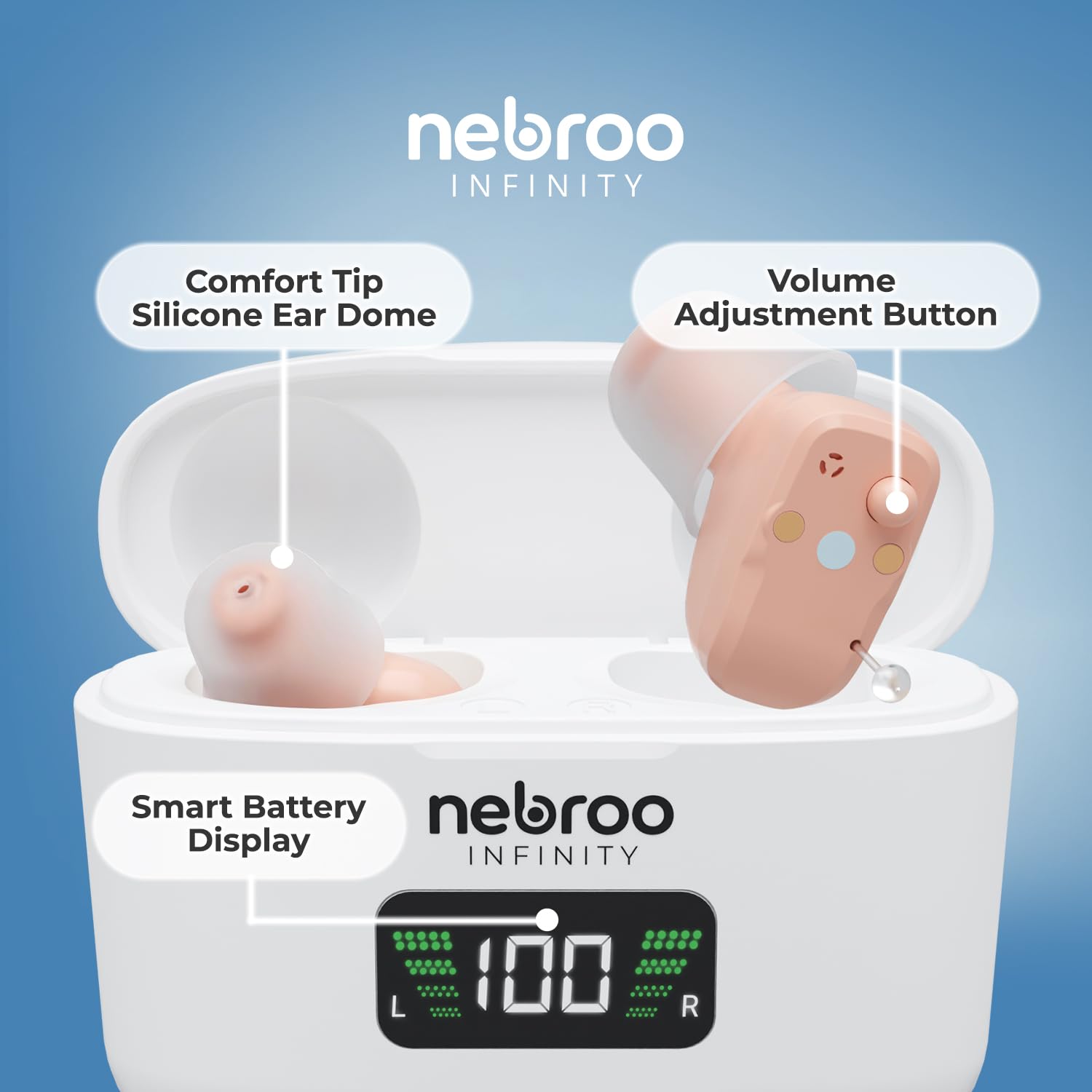
Figure 1: Charging the NEBROO Infinity Hearing Aids. The image also illustrates volume adjustment and insertion steps.
3.2. Selecting Ear Tip Size
The NEBROO Infinity comes with multiple silicone ear tip sizes (small, medium, large) to ensure a comfortable and secure fit. The small domes are pre-installed.
- Try each size to find the one that fits snugly in your ear canal without causing discomfort.
- A proper fit is crucial for optimal sound quality and to prevent feedback.
3.3. Inserting the Hearing Aids
- Hold the hearing aid between your thumb and forefinger.
- Gently insert the earpiece into your ear canal.
- Once inserted, open and close your jaw several times to help the hearing aid settle into a comfortable and secure position. It should feel snug but not painful.

Figure 2: Proper insertion of the NEBROO Infinity Hearing Aid.
3.4. Initial Acclimation
It takes time for your brain to adjust to new sounds and amplification. Begin by wearing the hearing aids for short periods in quiet environments and gradually increase wear time and exposure to different soundscapes.
4. Operating Instructions
4.1. Power On/Off
- The hearing aids automatically power on when removed from the charging case.
- They automatically power off when returned to the charging case.
- Upon powering on, they reset to a default volume level of 3 and mode 1.
4.2. Adjusting Volume and Modes
Each hearing aid operates independently and features a single multi-function button for adjustments.
- Volume Adjustment: The device offers 6 volume levels. Press the multi-function button briefly to cycle through volume levels.
- Environment Modes: The NEBROO Infinity features 4 adaptable sound modes:
- Standard: General listening in quiet environments.
- Restaurant: Optimized for noisy environments, reducing background chatter.
- Outdoor: Designed to minimize wind noise and enhance distant sounds.
- Music & Movies: Provides a richer audio experience for entertainment.

Figure 3: Components of the NEBROO Infinity, including the volume adjustment button.
4.3. Smart Battery Display
The charging case features a smart display that shows the individual battery levels for the left (L) and right (R) hearing aids, as well as the charging case's own battery level.
5. Maintenance
5.1. Cleaning
- Regularly clean your hearing aids to ensure optimal performance and hygiene.
- Use a soft, dry cloth to wipe the surface of the hearing aids daily.
- Gently clean the ear tips to remove any earwax or debris. Replace ear tips as needed.
- Do not use water or cleaning solutions directly on the hearing aids unless specifically instructed.
5.2. Storage
- When not in use, store your NEBROO Infinity hearing aids in their charging case. This protects them and keeps them charged.
- Store the charging case in a cool, dry place away from direct sunlight and extreme temperatures.
6. Troubleshooting
If you encounter issues with your NEBROO Infinity Hearing Aid & Amplifier, please refer to the following common solutions:
| Problem | Possible Cause | Solution |
|---|---|---|
| No sound or low volume | Low battery; ear tip blocked by wax; incorrect volume setting; improper fit. | Charge the hearing aids; clean the ear tip; increase volume; re-insert for a better fit. |
| Feedback (whistling sound) | Improper fit; ear tip too small; earwax buildup in ear canal. | Ensure proper insertion; try a larger ear tip; consult a doctor for earwax removal. |
| Sound is distorted or unclear | Ear tip blocked; incorrect environment mode; device malfunction. | Clean the ear tip; switch to a different environment mode; contact support if issue persists. |
| Difficulty with multi-function button | User motor control difficulty. | Practice using the button in a relaxed setting. If persistent, consider alternative devices if available. |
| Hearing aids not charging | Protective tape still on contacts; charging cable/source issue; improper seating in case. | Remove tape; ensure cable is connected to a 5V USB C source; verify hearing aids are correctly placed in the case. |
If the problem persists after trying these solutions, please contact NEBROO customer support.
7. Specifications
- Model Name: Infinity
- Manufacturer: NEBROO
- Battery Type: Lithium Ion (1 included)
- Battery Life: Up to 19+ hours per charge
- Charging Time: Approximately 3 hours
- Environment Settings: 4 (Standard, Restaurant, Outdoor, Music & Movies)
- Volume Levels: 6
- Item Weight: 7.4 ounces (total package)
- Package Dimensions: 6.1 x 3.86 x 1.93 inches
8. Warranty and Support
For warranty information, please refer to the documentation provided with your purchase or visit the official NEBROO website. For technical support or further assistance, please contact NEBROO customer service directly.


