
1. Introduction
Thank you for purchasing the KJK KJK201-0115-A Trail Camera. This camera is designed for wildlife monitoring, outdoor surveillance, and home security, offering high-resolution video and still images with advanced motion detection and night vision capabilities. Please read this manual carefully before use to ensure proper operation and to maximize the camera's performance.

This image displays the KJK KJK201-0115-A Trail Camera, showcasing its main features including 2.7K video resolution, 36-megapixel still image capability, 0.1-second trigger speed, 130-degree human motion sensor, 22-meter infrared night vision range, IP66 waterproof rating, and microSD card support. The camera is shown open, revealing the battery compartment.
2. Product Overview
Key Features
- High Resolution: Captures 2.7K Full HD video and 36-megapixel still images.
- Fast Trigger Speed: 0.1-second ultra-high speed trigger to capture fast-moving subjects.
- Wide Detection Angle: 130-degree PIR motion sensor with a detection range of up to 22 meters.
- Advanced Night Vision: Equipped with 22 invisible 850nm infrared LEDs for clear monochrome recording in complete darkness, with an effective range of up to 22 meters.
- Durable Design: IP66 waterproof and dustproof rating for reliable outdoor use in various weather conditions (-22°F to +158°F).
- Flexible Power: Battery-powered operation (4x AAA batteries included) eliminates the need for wiring, allowing versatile placement.
- Multiple Recording Modes: Supports video, still image, and combined video+still image modes.
- Easy Setup: User-friendly interface with Japanese language support for straightforward configuration.
Package Contents
- KJK KJK201-0115-A Trail Camera Body (x1)
- Mounting Stand (x1)
- AAA Batteries (x4)
- Instruction Manual (x1)
3. Setup
3.1 Battery Installation
- Open the camera's latch and gently open the housing.
- Insert four (4) AAA batteries into the battery compartment, ensuring correct polarity (+/-).
- Close the housing and secure the latch.

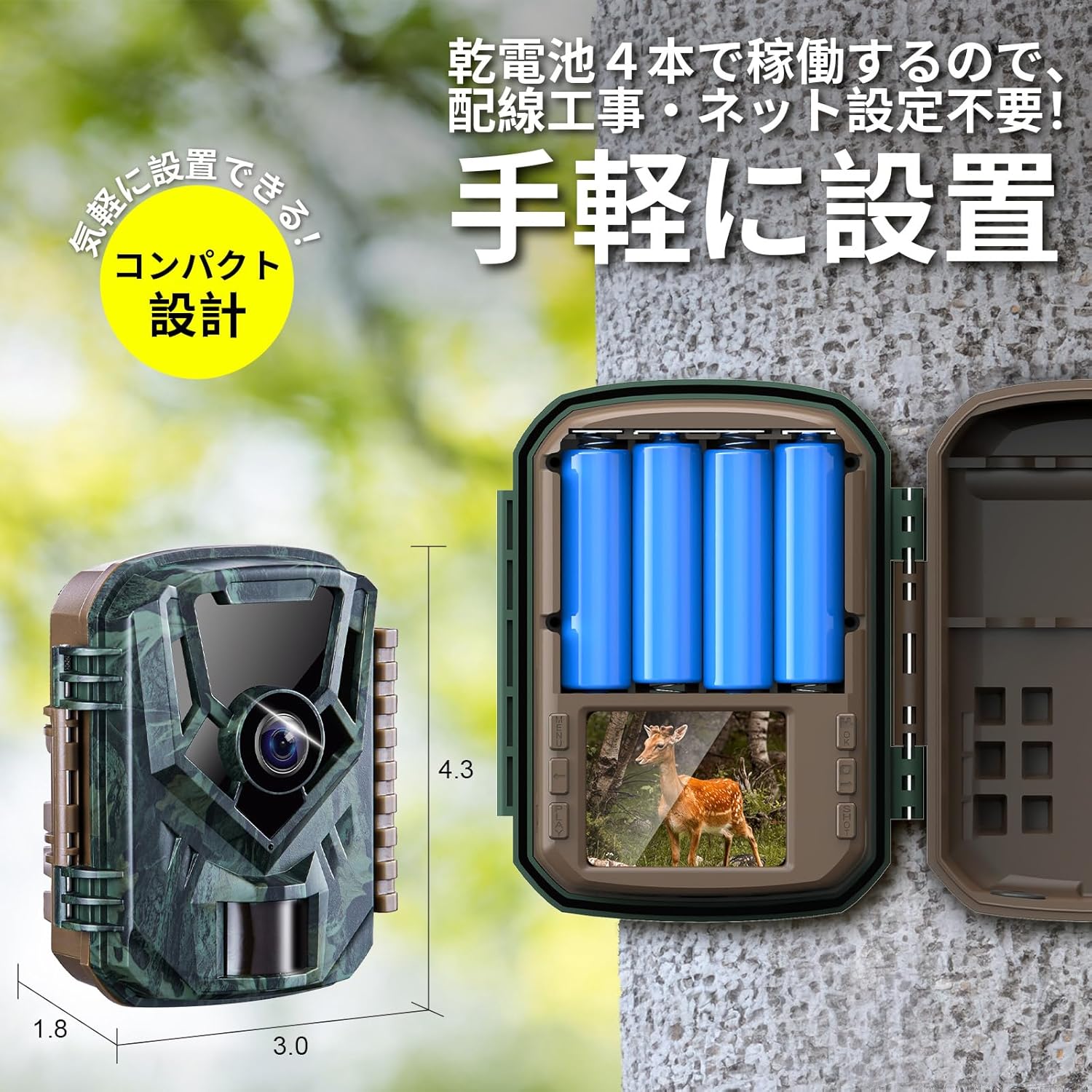
This image illustrates the compact design of the KJK KJK201-0115-A Trail Camera, highlighting its small size and the convenient battery compartment designed for four dry cell batteries. The image emphasizes ease of installation without complex wiring.
3.2 MicroSD Card Installation
The camera requires a microSD card (up to 128GB, not included) for storing photos and videos.
- With the camera powered off, locate the microSD card slot.
- Insert the microSD card into the slot until it clicks into place.
- To remove, push the card in again until it springs out.
3.3 Initial Power-On and Language Setting
- Switch the camera to the 'SETUP' mode. The LCD screen will turn on.
- Navigate through the menu using the control buttons to find the 'Language' setting.
- Select 'English' (or your preferred language) and confirm.
- After setting the language, you can proceed with other settings like date, time, and recording parameters.
3.4 Mounting the Camera
The KJK201-0115-A can be mounted using the included stand, straps, or screws.
- Stand: Attach the camera to the stand and place it on a flat surface.
- Strap: Use a mounting strap (not included) to secure the camera to a tree or pole.
- Screws: Use screws (not included) to fix the camera to a wall or other stable structure.

This image demonstrates various mounting options for the KJK KJK201-0115-A Trail Camera, including using a strap to attach it to a tree, placing it on a flat surface, or securing it with screws to a wall.
4. Operating Instructions
4.1 Power On/Off and Mode Selection
- OFF: The camera is powered off.
- SETUP: Use this mode to access the menu, change settings, and view recordings.
- ON: The camera enters active monitoring mode. The LCD screen will turn off after 5 seconds, and the camera will automatically record based on your settings.
4.2 PIR Motion Sensor
The Passive Infrared (PIR) sensor detects heat changes caused by moving objects, triggering the camera to record. The sensor has a 130-degree detection angle and a range of up to 22 meters.
- Optimal Placement: Position the camera to ensure the target area is within the sensor's field of view. Avoid placing it directly facing strong heat sources or reflective surfaces.
- Limitation: The PIR sensor cannot detect motion through glass or other transparent barriers.
This diagram shows the high-sensitivity PIR motion sensor of the KJK KJK201-0115-A Trail Camera, detailing its 22-meter detection distance and 130-degree detection angle. It visually represents how the sensor detects movement of animals or people within 0.1 seconds.

This diagram provides guidance on optimal placement for the PIR sensor, showing correct and incorrect angles relative to animal movement to ensure accurate detection and recording.
4.3 Day/Night Automatic Switching
The camera automatically switches between day (color) and night (monochrome infrared) recording modes based on ambient light conditions. The infrared LEDs provide clear visibility in low-light or dark environments.

This image demonstrates the invisible infrared LED night vision feature of the KJK KJK201-0115-A Trail Camera. It shows the camera equipped with 22 850nm infrared LEDs, enabling clear monochrome shooting in complete darkness. The camera automatically switches between day and night modes.

This image illustrates the automatic day and night mode switching capability of the KJK KJK201-0115-A Trail Camera, showing a clear color image during the day and a sharp monochrome image at night.
5. Recording Modes
The camera offers three distinct recording modes:
- Video Mode: Records video clips at 2.7K resolution. You can set the video length in the camera's menu.
- Still Image Mode: Captures 36-megapixel photos. You can configure the number of consecutive shots per trigger.
- Video & Still Image Mode: Captures both a still image and a video clip when triggered.
Select your desired recording mode through the camera's menu in 'SETUP' mode.

This image explains the three available recording modes: video mode (up to 2.7K, max 3 minutes), still image mode (up to 5 consecutive shots), and a combined video and still image mode. It shows examples of a squirrel captured in both video and photo modes.
6. Viewing Recordings
You can view your captured photos and videos using one of the following methods:
- On the Camera: Switch to 'SETUP' mode and use the navigation buttons to browse and play back recordings directly on the camera's LCD screen.
- Via USB Cable: Connect the camera to a computer using a USB cable (not included). The camera will appear as a removable disk, allowing you to access and transfer files.
- Using a Card Reader: Remove the microSD card from the camera and insert it into a compatible card reader connected to your computer. This allows direct access to the files on the card.

This image demonstrates three ways to view recordings from the KJK KJK201-0115-A Trail Camera: directly on a PC via USB cable, on the camera's built-in screen, or by using a card reader to view on a PC.
7. Maintenance
- Cleaning: Use a soft, dry cloth to clean the camera lens and housing. Avoid abrasive cleaners or solvents.
- Battery Replacement: Replace batteries when the low battery indicator appears on the screen or when performance degrades. Always use fresh, high-quality AAA batteries.
- Storage: If storing the camera for an extended period, remove the batteries to prevent leakage. Store in a cool, dry place.
- Firmware Updates: Check the manufacturer's website periodically for any available firmware updates to ensure optimal performance and new features.
8. Troubleshooting
- Camera not turning on:
- Check if batteries are inserted correctly with proper polarity.
- Ensure batteries have sufficient charge. Replace if necessary.
- No recordings or poor detection:
- Ensure a formatted microSD card is inserted.
- Check PIR sensor sensitivity settings in the menu.
- Verify camera placement; avoid obstructions or direct sunlight/heat sources that might cause false triggers or missed detections.
- Remember the PIR sensor does not work through glass.
- Poor image/video quality:
- Clean the camera lens.
- Ensure sufficient lighting for day recordings.
- For night vision, ensure objects are within the 22-meter infrared range.
- Playback issues on PC (e.g., video speed):
- Some default media players may have compatibility issues. Try using a different media player, such as VLC Media Player, for smoother playback.
- Difficulty understanding instructions:
- Ensure the camera's menu language is set to English.
- Refer to the detailed sections in this manual for specific guidance.
9. Specifications
| Feature | Specification |
|---|---|
| Model | KJK201-0115-A |
| Video Resolution | 2.7K Full HD |
| Still Image Resolution | 36 Megapixels |
| Trigger Speed | 0.1 seconds |
| PIR Detection Angle | 130 degrees |
| PIR Detection Range | Up to 22 meters |
| Night Vision | 22x 850nm Infrared LEDs |
| Night Vision Range | Up to 22 meters |
| Waterproof Rating | IP66 |
| Power Source | 4x AAA Batteries |
| Storage | MicroSD card (up to 128GB, not included) |
| Control Method | Push Button |
| Dimensions | 16 x 11 x 7 cm |
| Recommended Use | Indoor/Outdoor Security, Wildlife Monitoring |
10. Warranty and Support
The KJK KJK201-0115-A Trail Camera comes with a 12-month warranty from the date of purchase. This warranty covers manufacturing defects and ensures the product is free from defects in material and workmanship under normal use.
If you encounter any issues or have questions regarding your product, please contact KJK customer support. Provide your model number and purchase details for efficient assistance.
For further assistance, please refer to the contact information provided with your purchase or visit the official KJK website.


