
Introduction
Thank you for choosing the WHATOOK W02 Pro Cordless Compressed Air Duster. This device is designed for efficient and powerful dust removal from various surfaces and electronics. Its high-performance motor, adjustable speed settings, and portable design make it suitable for a wide range of cleaning tasks at home, in the office, or outdoors. Please read this manual carefully before use to ensure proper operation and maintenance.
Safety Information
- Heat Generation: The high-power motor generates heat during operation. If the device becomes too hot, turn it off and allow it to cool down before continuing use.
- Charging: Do not use the device while it is charging. Ensure the device is fully charged before its first use.
- Storage: Store the device in a cool, dry place away from direct sunlight and extreme temperatures.
- Children and Pets: Keep the device out of reach of children and pets.
- Water Exposure: Do not expose the device to water or use it in wet conditions.
Package Contents
Verify that all items are present in the package:
- WHATOOK W02 Pro Air Duster
- 4 x Nozzles (Round, Flat, Long, Inflation)
- USB-C Charging Cable
- Storage Bag
- User Manual

Image: The WHATOOK W02 Pro air duster and its accessories, including various nozzles, charging cable, and storage bag.
Setup
- Initial Charge: Before first use, fully charge the device using the provided USB-C cable and an 18W power adapter (not included). A full charge takes approximately 2.5 hours.
- Attach Nozzle: Select the appropriate nozzle for your cleaning task. Align the tabs on the nozzle with the slots on the duster's outlet and twist to secure it in place.

Image: The WHATOOK W02 Pro with its interchangeable nozzles and compact dimensions.
Operating Instructions
Power On/Off
Press and hold the power button for 3 seconds to turn the device on or off.
Adjusting Airflow Speed
The W02 Pro features a precise 1 to 100 level adjustable airflow. Once powered on, press and hold the button for 3 seconds to activate continuous speed adjustment. Release the button at your desired speed. The triangular LED light indicates the current power level, becoming brighter with increasing power.

Image: The device displaying its 100-level precision airflow adjustment and visual power indicator.
Applications
- PC & Electronics: Use the long or flat nozzle for precise dust removal from computer components, keyboards, and other sensitive electronics.
- Car Cleaning: The various nozzles are effective for cleaning car interiors, vents, and hard-to-reach areas.
- Outdoor Use: Ideal for blowing leaves, cleaning outdoor equipment, or inflating small items with the inflation nozzle.
- Household Cleaning: Suitable for dusting furniture, air filters, and other household items.

Image: Examples of the air duster in use for various cleaning tasks.

Image: Cleaning dust from a PC tower.

Image: Dusting a keyboard with the air duster.
Charging and Battery
The WHATOOK W02 Pro is equipped with a high-quality 12000mAh battery, providing extended usage times. It supports 18W USB-C fast charging.
- Battery Capacity: 12000mAh (6000mAh x 2)
- Charging Time: Approximately 2.5 hours for a full charge with an 18W USB-C adapter.
- Run Time: Up to 260 minutes on the lowest setting. Actual run time varies based on speed setting.

Image: Charging the device using the USB-C port.
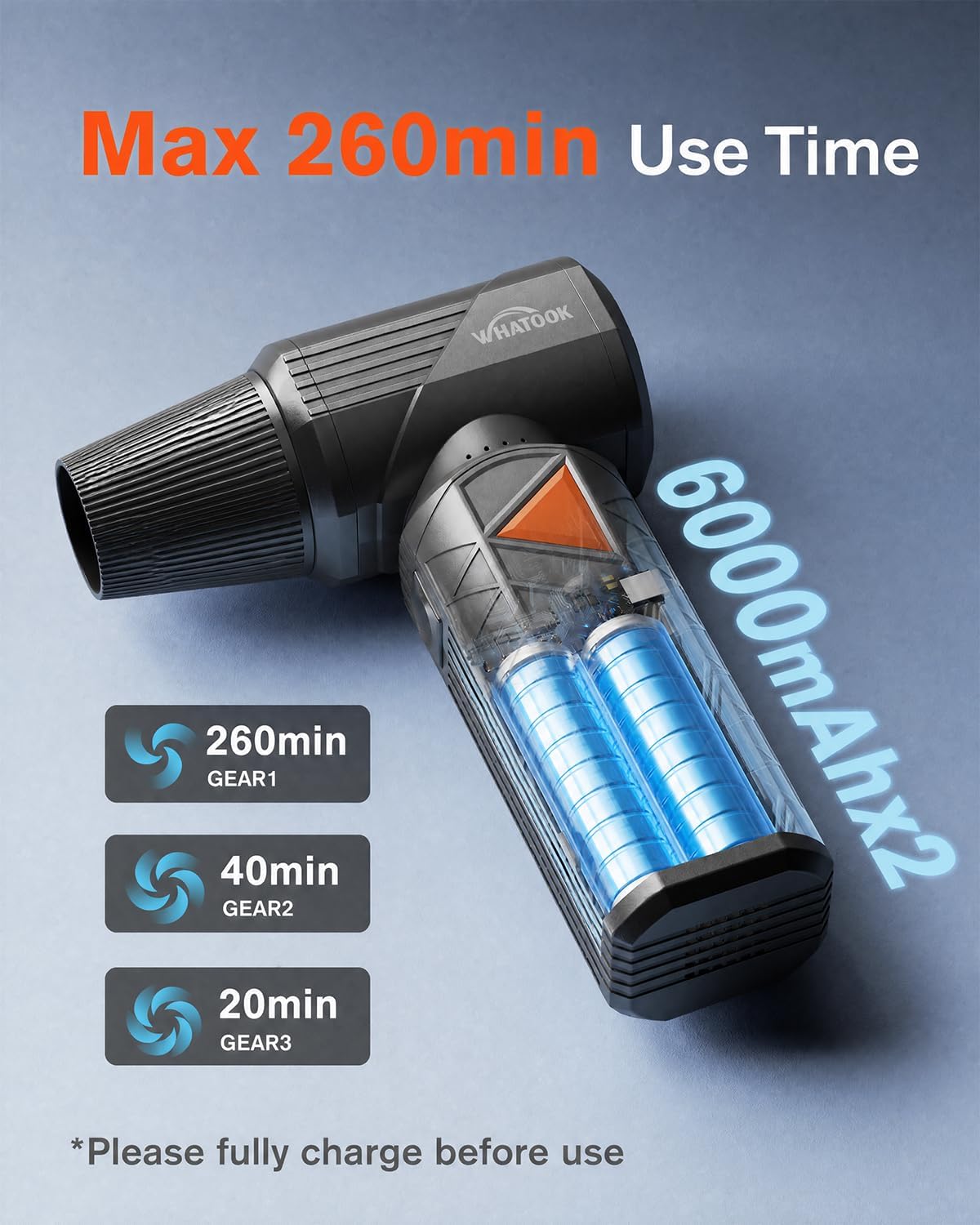
Image: Battery life indications for different power settings.
Maintenance
- Cleaning the Device: Wipe the exterior of the device with a soft, dry cloth. Do not use harsh chemicals or abrasive cleaners.
- Nozzle Care: Clean nozzles as needed to prevent blockages. Ensure they are dry before reattaching.
- Storage: When not in use, store the device and its accessories in the provided storage bag to protect them from dust and damage.
Troubleshooting
- Device Overheating: If the device becomes excessively hot during use, turn it off immediately and allow it to cool down completely before resuming operation. This is a safety feature due to the powerful motor.
- Low Airflow: Check if the battery is sufficiently charged. Ensure the nozzle is correctly attached and not obstructed.
- Device Not Turning On: Ensure the battery is charged. Press and hold the power button for 3 seconds to activate.
Specifications
| Feature | Specification |
|---|---|
| Model Name | W02 Pro |
| Brand | WHATOOK |
| Motor Speed | Up to 400,000 RPM |
| Max Wind Speed | 100 m/s (360 km/h) |
| Airflow Adjustment | 1-100 Levels |
| Battery Capacity | 12000mAh (6000mAh x 2) |
| Charging Type | USB-C 18W Fast Charge |
| Full Charge Time | Approx. 2.5 hours |
| Run Time | Up to 260 minutes (lowest setting) |
| Weight | 380 Grams |
| Special Features | High Power, Portable, Rechargeable, Cordless |
Warranty and Support
The WHATOOK W02 Pro comes with a 2-year manufacturer's warranty. For any questions, technical assistance, or warranty claims, please contact WHATOOK customer support. French language support is available for your convenience.

Image: Customer service, return policy, and warranty information.