
1. Introduction
Thank you for choosing the Apexcam K80 4K WiFi Portable Vlogging Action Camera. This manual provides essential information for the proper setup, operation, and maintenance of your device. Please read it thoroughly before use to ensure optimal performance and longevity.
2. Product Overview
2.1 Key Features
- Magnetic Design: Allows for versatile mounting and hands-free recording.
- 4K Video Recording: Captures high-resolution video at 30 frames per second.
- Electronic Image Stabilization (EIS): Reduces video shake for smoother footage.
- Built-in 64GB Storage: Provides ample space for recordings without external memory cards.
- 10m Waterproof (Camera Only): The camera is waterproof up to 10 meters without an additional case. Note: The extension module is not waterproof.
- Lightweight and Portable: Weighs only 43g, ideal for on-the-go use.
- 1300mAh Extension Module: Extends battery life significantly. Note: The extension module is not waterproof.
- Wi-Fi Connectivity: Connects to the Viipulse mobile application for live viewing, settings adjustment, and media transfer.
- Loop Recording: Automatically overwrites older footage to save storage space.
2.2 Package Contents
The package includes the following items:
- Apexcam K80 Camera
- Extension Module
- Magnetic Lanyard
- 360° Magnetic Clip
- Back Clip
- Data Cable
- Pre-installed 64GB Memory Card
- User Manual (this document)
2.3 Camera Components
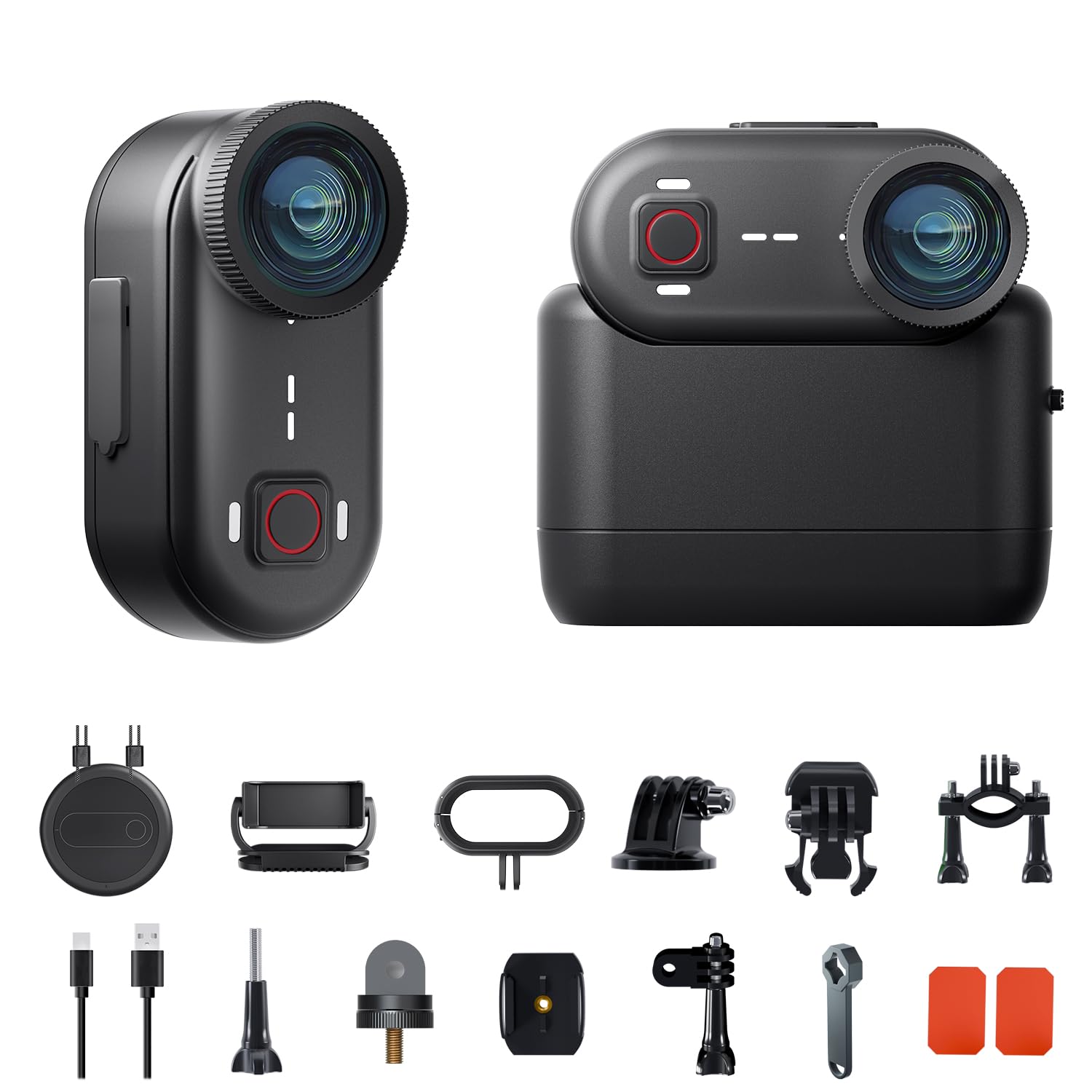
Image: Apexcam K80 camera with its extension module attached. This shows the compact size and the main lens.

Image: The Apexcam K80 camera resting in the palm of a hand, highlighting its compact, thumb-sized design and light weight of 43 grams (1.52 oz).

Image: A collection of accessories for the K80 camera, including mounts for bicycles and helmets, demonstrating its versatility for different activities.

Image: This image illustrates the magnetic design and rear clip features of the Apexcam K80, showcasing how it can be attached to clothing or gear for hands-free recording, including a 360-degree rotating clip.
3. Setup
3.1 Initial Charging
Before first use, fully charge the camera and the extension module. Connect the camera to a power source using the provided data cable. The camera's battery life is approximately 90 minutes, and with the extension module, it extends to about 270 minutes.

Image: The Apexcam K80 camera with its extension module, displaying battery life information: 270 minutes with the module and 90 minutes for the camera alone.
3.2 Attaching the Extension Module
To attach the 1300mAh extension module, align the connectors on both the camera and the module and gently push them together until they click into place. This module provides additional power and can also serve as a grip.
Important Note: The extension module is not waterproof. Ensure it is detached before using the camera in water.
3.3 Mounting the Camera
The K80 camera offers various mounting options:
- Magnetic Lanyard: Wear the camera around your neck for a first-person perspective.
- 360° Magnetic Clip: Attach to hats, backpacks, or clothing.
- Back Clip: Secure to pockets or straps.
- Bike/Helmet Mounts: Use the included accessories for cycling or other sports.
4. Operating Instructions
4.1 Power On/Off
Press and hold the power button (usually located on the side or top) for a few seconds to turn the camera on or off.
4.2 Recording Video / Taking Photos
Once powered on, press the record/shutter button to start or stop video recording, or to take a photo. Refer to the camera's small display or the mobile app for mode selection.
4.3 Electronic Image Stabilization (EIS)
The K80 features 6-axis EIS for stable footage. This feature is typically enabled by default or can be toggled in the camera settings via the mobile app.

Image: A visual comparison demonstrating the effect of Electronic Image Stabilization (EIS). The "OFF" image shows blurred motion, while the "ON" image displays clear, stable footage of a motocross rider, highlighting enhanced stability and image quality.
4.4 Wi-Fi Connectivity and Viipulse App
To connect your camera to the Viipulse mobile application:
- Download the "Viipulse" app from your smartphone's app store.
- Turn on the K80 camera.
- Enable Wi-Fi on the camera (refer to the camera's menu or quick settings).
- On your smartphone, connect to the K80's Wi-Fi network (SSID and password usually displayed on the camera screen).
- Open the Viipulse app. You can now view live footage, adjust settings, and transfer photos/videos to your phone.

Image: The Apexcam K80 camera wirelessly connected to a smartphone displaying the Viipulse app interface, which allows for live viewing and control.
4.5 Loop Recording
The loop recording feature allows the camera to continuously record by overwriting the oldest files when the storage is full. This is useful for dashcam-like applications. Ensure you save important footage promptly to avoid accidental deletion. This setting can be managed through the camera's menu or the Viipulse app.
5. Maintenance
5.1 Cleaning the Camera
Use a soft, lint-free cloth to clean the camera lens and body. For stubborn dirt, slightly dampen the cloth with water. Avoid using harsh chemicals or abrasive materials.
5.2 Waterproof Usage
The K80 camera is waterproof up to 10 meters (33 feet) without a protective case. Before submerging, ensure all ports and covers are securely closed. After use in saltwater, rinse the camera with fresh water and dry thoroughly.

Image: The Apexcam K80 camera partially submerged in water with splashes, illustrating its waterproof design up to 10 meters (33 feet) without requiring an external case.
Caution: The extension module is NOT waterproof. Do not use the extension module underwater.
5.3 Storage
Store the camera in a cool, dry place away from direct sunlight and extreme temperatures.
6. Troubleshooting
| Problem | Possible Cause | Solution |
|---|---|---|
| Camera does not power on. | Low battery. | Charge the camera fully. |
| Video footage is shaky. | EIS is off or insufficient for extreme movement. | Ensure EIS is enabled in settings. For very intense activities, some shake may still occur. |
| Cannot connect to Wi-Fi/App. | Incorrect Wi-Fi password, Wi-Fi not enabled on camera, or app issue. | Verify Wi-Fi is on and password is correct. Restart both camera and phone. Reinstall the Viipulse app if necessary. |
| Camera stops recording unexpectedly. | Storage full (if loop recording is off), low battery, or overheating. | Check storage space. Charge battery. Allow camera to cool down if hot. |
| Extension module not working. | Not properly attached, low battery in module. | Ensure module is securely connected. Charge the module. |
7. Specifications
| Feature | Detail |
|---|---|
| Brand | Apexcam |
| Model Number | K80 |
| Product Dimensions (L x W x H) | 3.5 x 6 x 5 cm |
| Item Weight | 43 Grams |
| Battery | 1 A (included) |
| Average Battery Life | 90 minutes (camera only), 270 minutes (with extension module) |
| Photo Sensor Technology | CMOS |
| Video Recording Resolution | 4K |
| Effective Still Resolution | 20 Megapixels |
| Max Focal Length | 30 Millimeters |
| Max Aperture | f/2.4 |
| Video Capture Format | MP4 |
| Supported Audio Format | MP4 |
| Screen Size | 2 inches |
| Connectivity Technology | Wi-Fi |
| Special Features | Lightweight, Internal Memory |
| Water Resistance Level | Waterproof (up to 10m for camera) |
| Image Stabilization | Yes, Digital (EIS) |
| Form Factor | Compact |
| Flash Memory Size | 64 GB (built-in) |
| Compatible Devices | Smartphone, PC |
| Recommended Uses | Outdoor |
| Box Contents | Camera, Extension Module, Magnetic Lanyard, 360° Magnetic Clip, Back Clip, Data Cable, Memory Card |
8. Warranty and Support
Specific warranty information is not provided in the product details. For warranty claims or technical support, please contact Apexcam customer service through the retailer where the product was purchased or visit the official Apexcam website for contact information.
Keep your purchase receipt as proof of purchase for any warranty-related inquiries.
