
1. Product Overview
The plplaaoo FS8233 is an ultra-thin, full-screen intelligent automatic digital multimeter designed for electricians, engineers, and technicians. It features intelligent auto-ranging technology for precise detection of voltage, current, resistance, and continuity without manual adjustments. Built with durable ABS and silicone materials, it offers reliable performance in various environments.
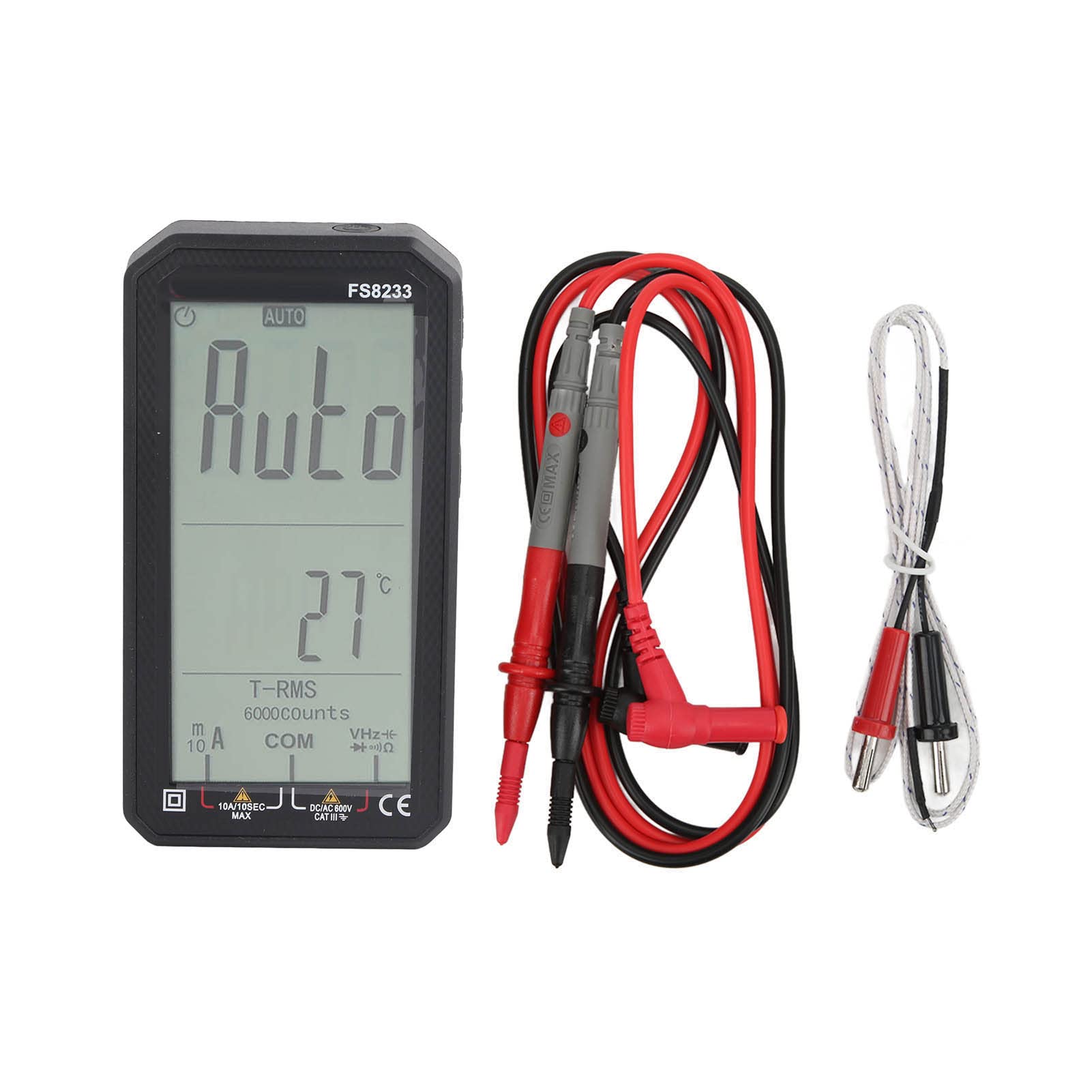
Image 1.1: Front view of the plplaaoo FS8233 Digital Multimeter, showcasing its full-screen display.
Key Features:
- Automatic Testing: Intelligent auto-ranging for voltage, current, resistance, and continuity.
- High Accuracy: Advanced chip ensures ±0.5% DC voltage accuracy.
- Durable Construction: Made from premium ABS and wear-resistant silicone for industrial-grade durability.
- Multifunctional: Measures AC/DC voltage (up to 600V), current (10A max), resistance (60MΩ), capacitance (60mF), and temperature.
- Safety Features: Anti-burn protection and 600V CAT III safety rating.
- User-Friendly Design: Large backlit screen for clear readings in low-light conditions.
2. Safety Information
Always adhere to safety precautions when using electrical testing equipment. Failure to do so may result in injury or damage to the device or equipment being tested.
- Ensure the multimeter is in good working condition before use.
- Do not exceed the maximum input values specified for each function.
- Verify the correct function and range are selected before making measurements.
- Use appropriate personal protective equipment (PPE) such as insulated gloves and safety glasses.
- Avoid touching exposed conductors or circuit components during measurements.
- Replace batteries promptly when the low battery indicator appears to ensure accurate readings.
- The device has a 600V CAT III safety rating. Always respect this rating and do not use it in circuits exceeding this category.
3. Setup
3.1 Battery Installation
The FS8233 multimeter requires two 1.5V AAA batteries (not included) for operation.
- Locate the battery compartment cover on the back of the multimeter.
- Use a screwdriver to open the battery compartment.
- Insert two AAA batteries, ensuring correct polarity (+ and -).
- Securely close the battery compartment cover.
3.2 Connecting Test Leads
The multimeter comes with two test leads. Connect them to the appropriate input jacks:
- Insert the black test lead into the COM (common) jack.
- Insert the red test lead into the VHzΩmA jack for most voltage, resistance, frequency, capacitance, and current measurements (up to 600mA).
- For high current measurements (up to 10A), insert the red test lead into the 10A jack.

Image 3.2: Bottom view of the multimeter, illustrating the input jacks for test lead connection.
4. Operating Instructions
The FS8233 features intelligent auto-ranging, simplifying most measurements. Power on the device and it will automatically detect the measurement type.
4.1 Power On/Off
- Press the power button (usually marked with a circle and a vertical line) to turn the multimeter on.
- Press and hold the power button to turn the multimeter off.

Image 4.1: The multimeter display indicating 'AUTO' mode, ready for automatic measurement.
4.2 Automatic Measurement
In auto mode, the multimeter will automatically identify and measure AC/DC voltage, resistance, and continuity. Simply connect the test leads to the circuit or component you wish to measure.
4.3 Specific Measurements
While the device is largely auto-ranging, it supports specific measurements:
- Voltage (AC/DC): Connect test leads in parallel to the circuit. The multimeter will automatically detect AC or DC voltage.
- Current (AC/DC): Connect test leads in series with the circuit. Ensure the red lead is in the correct current jack (mA or 10A).
- Resistance: Connect test leads across the component. Ensure the component is de-energized.
- Capacitance: Connect test leads across the capacitor. Ensure the capacitor is discharged before testing.
- Temperature: Connect the included temperature probe to the appropriate jacks (usually VΩmA and COM) and place the probe tip on the object to be measured.

Image 4.3: An electrician using the FS8233 multimeter to perform tests on an electrical panel, demonstrating practical application.
4.4 Reading the Display
The large backlit screen displays readings clearly. The unit of measurement (V, A, Ω, F, °C) will be shown alongside the numerical value. The 'AUTO' indicator confirms auto-ranging is active.

Image 4.4: Close-up view of the multimeter's display, showing a clear numerical reading and measurement units.
5. Maintenance
5.1 Cleaning
To maintain the multimeter's performance and appearance:
- Wipe the casing with a damp cloth and mild detergent. Do not use abrasive cleaners or solvents.
- Ensure no moisture enters the device through the input jacks or seams.
5.2 Battery Replacement
When the low battery indicator appears on the display, replace the batteries as described in Section 3.1. Always use fresh 1.5V AAA batteries.
5.3 Storage
Store the multimeter in a cool, dry place away from direct sunlight and extreme temperatures. If storing for an extended period, remove the batteries to prevent leakage.
6. Troubleshooting
If you encounter issues with your FS8233 Digital Multimeter, refer to the following common troubleshooting steps:
- No Display/Device Not Turning On:
- Check if the batteries are correctly installed and have sufficient charge. Replace if necessary.
- Ensure the power button is pressed firmly.
- Incorrect or Unstable Readings:
- Verify that the test leads are securely connected to the correct input jacks.
- Ensure good contact between the test probes and the circuit/component being measured.
- Check for damaged test leads and replace if necessary.
- Ensure the component being measured is within the multimeter's specified range.
- 'OL' or Overload Indication:
- This indicates the measured value exceeds the current range. Ensure the red test lead is in the appropriate high-current jack (10A) if measuring high current, or that the voltage/resistance is within the device's maximum limits.
7. Specifications
| Parameter | Specification |
|---|---|
| Model | FS8233 |
| Material | ABS + Silicone |
| Battery | 2 x 1.5V AAA Battery (Not Included) |
| AC Current Range | 6000mA (1mA, ±(1.0% + 8 digits)), 10A (0.01A) |
| DC Current Range | 6000mA (1mA, ±(1.0% + 5 digits)), 10A (0.01A) |
| DC Voltage Range | 6V (0.001V, ±(0.5% + 3 digits)), 60V (0.01V), 600V (0.1V) |
| Resistance Range | Up to 60MΩ |
| Capacitance Range | Up to 60mF |
| Safety Rating | 600V CAT III |
| Included Components | 2 Test Leads, 1 Temperature Probe, User Manual |