
Introduction
This manual provides detailed instructions for the SINOVCLE 7 Inch HD IPS Touchscreen Wireless CarPlay & Android Auto system. This device offers seamless smartphone integration, voice control, precise GPS navigation, and enhanced safety features like an HD night vision waterproof backup camera. Designed for universal compatibility, it ensures a safer and more convenient driving experience.
What's in the Box
- Car Stereo Display
- Mounting Hardware
- User Manual
- Reversing camera
- 64G TF Card
Video: Unboxing the SINOVCLE 7 Inch Car Stereo Display and its components.
Product Features
- Wireless CarPlay & Android Auto + Voice Control: Seamlessly connect your iPhone or Android phone via wireless CarPlay and Android Auto, enabling easy access to music, GPS navigation, calls, and messages directly on the screen. Activate Siri or Google Assistant for hands-free calling, route planning, and music switching—fully liberate your hands, keep eyes on the road and hands on the wheel, and enjoy a safer driving experience without frequent phone checks.
- Accurate Real-Time GPS Navigation: After connecting to CarPlay or Android Auto, the device syncs with your phone’s GPS function to deliver precise, real-time navigation guidance. Clear route displays and voice prompts help you avoid traffic jams efficiently, making every commute or road trip worry-free.
- Plug and Play Universal Compatibility: Powered by the car’s cigarette lighter, no complicated wiring or professional installation is required. This aftermarket car infotainment upgrade is compatible with all vehicles—sedans, SUVs, trucks, RVs, and more. Complete installation in seconds and start using it immediately, saving time and modification costs.
- 7-Inch HD IPS High Sensitivity Touchscreen & Dual Audio Modes: Equipped with a 7-inch HD IPS touchscreen featuring anti-glare display technology, it offers excellent color reproduction, wide viewing angles, and clear visibility even in strong sunlight. The high-sensitivity touch response ensures smooth one-touch operation. With dual audio modes (built-in speaker + car speaker sync via Bluetooth), you can enjoy immersive sound for music and voice prompts.
- HD Night Vision Waterproof Backup Camera with LED Light: Comes with a 170° wide-angle HD backup camera that is waterproof and equipped with built-in LED lights. When reversing, the LED lights automatically turn on to supplement light in dark environments, while the screen displays reverse images in real time. This enhances visibility for safe parking and reversing, even at night or in dim areas—perfect for new drivers.
Setup & Installation
Mounting the Display
The device includes a suction cup mounting bracket for flexible placement on your dashboard or windshield. The bracket is adjustable to achieve optimal viewing angles. For textured dashboards, a sticky platform is provided to ensure secure attachment of the suction cup.

Image: The adjustable mounting bracket allows for 360-degree screen adjustment to suit various vehicle interiors and driver preferences.

Image: A sticky platform is included for secure mounting on textured dashboards, ensuring the suction cup adheres firmly.
Power Connection
Power the device using the included car cigarette lighter adapter. The adapter also features an additional USB port for charging other accessories. A long USB-C cable is provided for flexible routing.

Image: The power plug includes a dedicated USB port for quick phone charging while using CarPlay/Android Auto.
Backup Camera Connection
Connect the provided HD night vision waterproof backup camera to the dedicated camera input port on the device. The camera features a 170° wide-angle view and built-in LED lights for improved visibility in low-light conditions.

Image: The display supports CCD backup camera input, offering a 170° wide view and 12 built-in LED lights for enhanced night vision.

Image: Diagram showing the various connection ports on the device, including AUX in, Camera input, USB port, Micro TF slot, and DC 12V port.
Operating Instructions
Wireless CarPlay & Android Auto
To connect your smartphone wirelessly, ensure Bluetooth is enabled on your phone. On the device, select either CarPlay or Android Auto from the main menu. Follow the on-screen prompts to pair your phone via Bluetooth. Once paired, your phone's interface will be mirrored on the display, allowing access to navigation, music, calls, and messages.

Image: Illustration showing both wired and wireless connection options for CarPlay and Android Auto, with voice control activation.

Image: Step-by-step guide for connecting to CarPlay via Bluetooth pairing.

Image: Step-by-step guide for connecting to Android Auto via Bluetooth pairing.
Voice Control
Activate Siri or Google Assistant directly from the touchscreen for hands-free operation of calls, navigation, and music playback.
GPS Navigation
Utilize your phone's GPS applications (e.g., Google Maps) directly on the 7-inch display for clear, real-time navigation with voice prompts.

Image: The device displays GPS maps from your connected smartphone, offering clear route previews and navigation.
Audio Modes
The device supports multiple audio output options:
- Built-in Speaker: For direct audio playback from the device.
- Bluetooth Sync: Connects to your car's existing Bluetooth system to play audio through your vehicle's speakers.
- FM Transmission: Transmits audio to a selected FM frequency on your car radio. Tune your car radio to an unused FM station and set the device to the same frequency.
- Auxiliary (AUX) Output: Use the provided auxiliary cable to connect the device directly to your car's AUX input for audio playback.

Image: Visual representation of the four audio output options: FM Transmitter, Built-in Speaker, Bluetooth, and AUX Connection.

Image: The device can transmit FM signals to your car's original radio, allowing you to choose from 12 preset frequencies to avoid interference.
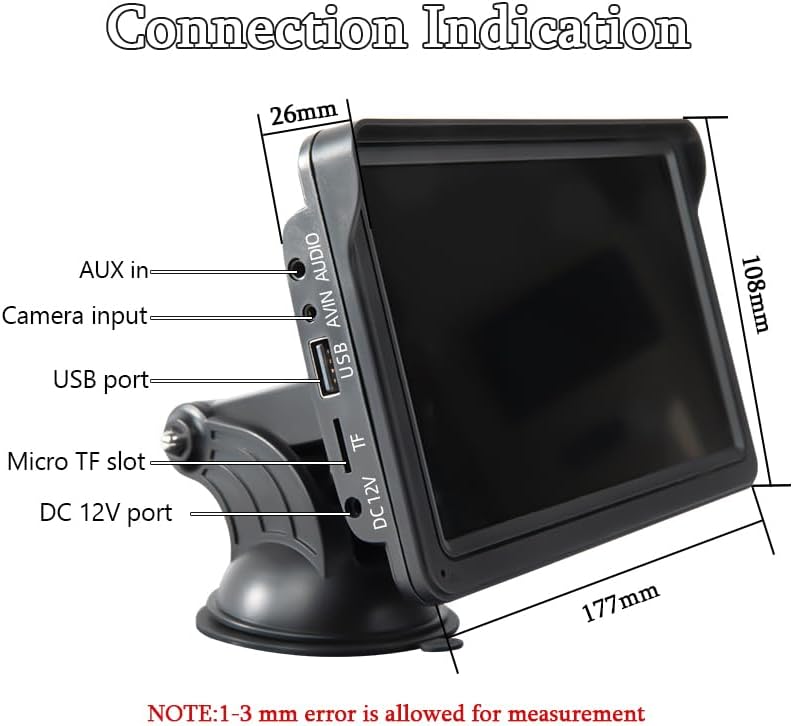
Image: Bluetooth 5.0 enables hands-free calling and music streaming, enhancing driving safety.
Screen Mirroring
The device supports screen mirroring, allowing you to display content directly from your smartphone onto the 7-inch screen. This feature is compatible with both Android and iOS devices.
Dashcam/DVR Functionality
The device supports dashcam functionality with the included 64G TF Card. It can record video, capture photos, and offers loop recording options. You can access recorded footage through the playback feature in the menu.
Maintenance
To ensure the longevity and optimal performance of your SINOVCLE display, regularly clean the screen with a soft, lint-free cloth. Avoid using harsh chemicals or abrasive materials that could damage the screen. Keep the device free from dust and moisture.
Troubleshooting
- No Power: Ensure the cigarette lighter adapter is securely plugged into the vehicle's 12V socket and the USB-C cable is firmly connected to the device. Check your vehicle's fuse for the 12V socket.
- CarPlay/Android Auto Not Connecting: Verify that Bluetooth is enabled on your smartphone and the device. Ensure the correct CarPlay/Android Auto option is selected on the display. Try restarting both your phone and the device.
- No Audio: Check the selected audio output mode (Bluetooth, FM Transmitter, AUX). Ensure your car radio is tuned to the correct FM frequency if using FM transmission, or that the AUX cable is properly connected. Adjust the volume on both the device and your car stereo.
- Backup Camera Not Displaying: Confirm the backup camera is correctly connected to the AV input port. Ensure the camera's power is properly wired (if applicable).
- Screen Not Responding: Try restarting the device by disconnecting and reconnecting the power. If the issue persists, perform a factory reset via the settings menu (note: this will erase custom settings).
Specifications
| Product Dimensions | 2 x 7 x 4.5 inches |
| Item Weight | 1.57 pounds |
| ASIN | B0G7X83MQ6 |
| Brand | SINOVCLE |
| Vehicle Service Type | Car, RV, SUV, Truck |
| Screen Size | 7 Inches |
| Special Feature | Wireless Carplay |
| Connectivity Technology | Auxiliary, Bluetooth, USB |
| Map Type | Road |
| Audio Output Mode | Stereo |
| Touch Screen Type | Capacitive |
| Display Type | LCD |
Warranty & Support
This product is eligible for optional protection plans:
- 2-Year Protection Plan
- 3-Year Protection Plan
- Complete Protect (monthly subscription covering eligible purchases)
For further assistance or technical support, please refer to the contact information provided in the included User Manual or visit the SINOVCLE official website.


