
Product Overview
The Niking Auto Wireless 8 Gang Switch Panel is designed to simplify the control of multiple auxiliary lights and devices in your vehicle. This innovative system eliminates complex wiring, offering a clean and organized solution for trucks, SUVs, UTVs, cars, and boats. It features a slim, multifunction touch panel with various control modes and built-in safety protections.
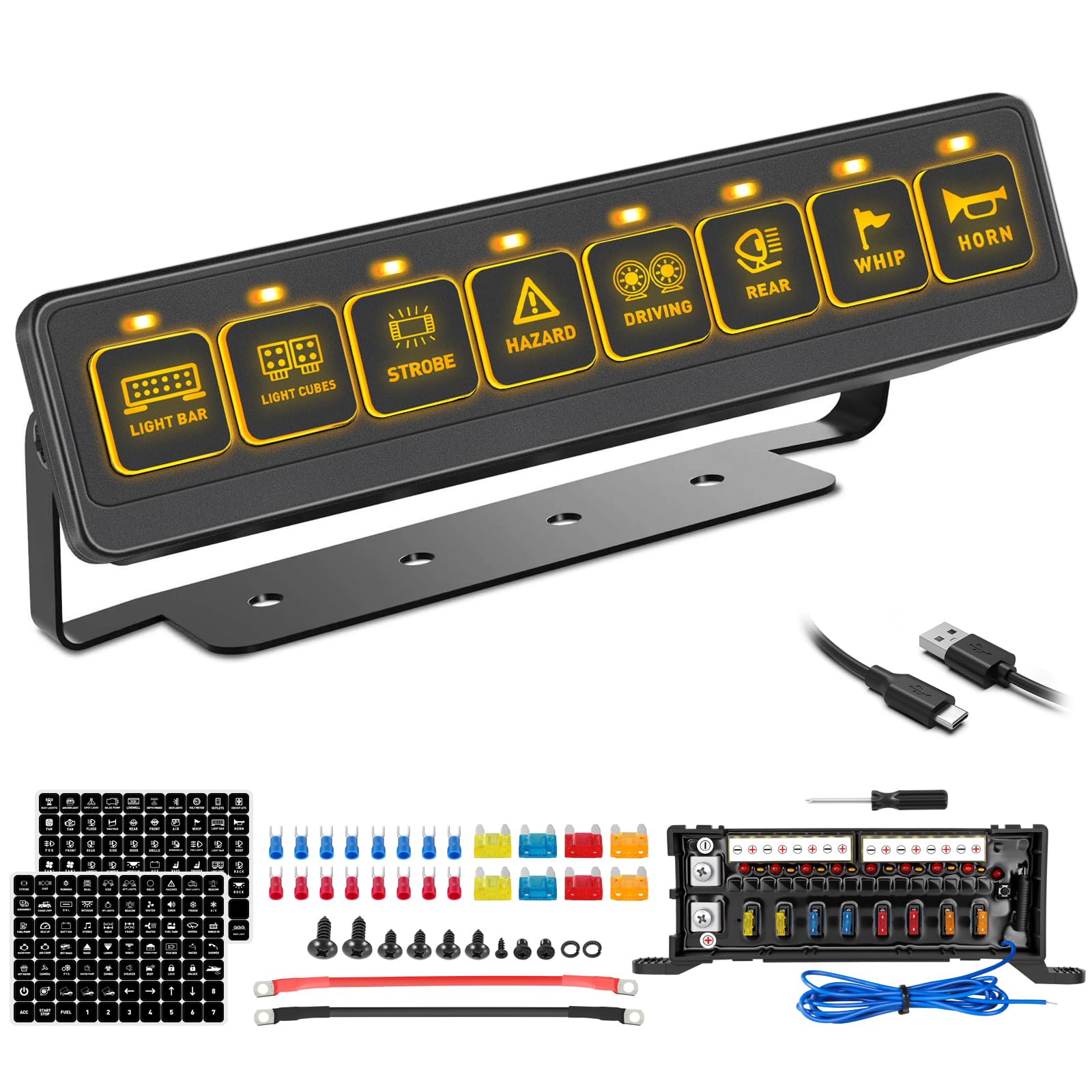
Image: The Niking Auto Wireless 8 Gang Switch Panel, showcasing its compact design and illuminated buttons.
Key features include:
- Wireless Control: Manage up to 8 different LED lighting and devices without extensive wiring.
- Multiple Lighting Modes: Includes Toggle Constant, Slow (2s), Medium (1.5s), and Fast (1s) strobe modes for versatile use.
- Memory Function: Retains your last setting for quick access to device functions.
- Safety Protections: Equipped with reverse polarity, over-voltage, over-current protections, and extra fuse performance.
- Dual Power Supply Options: Can be powered by 2 AAA batteries (not included) or a USB cable (included).
- Universal Fitment: Suitable for a wide range of vehicles including trucks, cars, buses, off-road vehicles, ATVs/UTVs, boats, and RVs.
Setup and Installation
This section provides instructions for setting up and installing your Niking Auto Wireless 8 Gang Switch Panel. Ensure your vehicle's power is off before beginning installation.
Package Contents
Verify that all components are present in your package:
- Wireless 8 Gang Switch Panel
- Circuit Relay Control Box
- 140pcs Self-Adhesive Labels
- Mounting Bracket Kits
- USB Charging Cables
- Wiring Harness Kit
- User Manual
- Mounting Accessories (screws, fork type terminals)

Image: All components included in the Niking Auto Wireless 8 Gang Switch Panel package, laid out for inspection.
Wiring the Control Box
The control box manages power distribution to your accessories. Follow these steps for proper wiring:
- Connect the positive (+) terminal of the control box to your vehicle's positive battery terminal.
- Connect the negative (-) terminal of the control box to your vehicle's negative battery terminal or a suitable ground point.
- Connect the ACC (Accessory) wire from the control box to a switched 12V power source in your vehicle. This ensures the system powers on/off with your vehicle's ignition.
- Connect your auxiliary lights or devices to the corresponding output terminals (1-8) on the control box. Each circuit has a specific fuse rating (5A, 10A, 15A, 20A).

Image: Detailed wiring diagram illustrating connections from the battery and ACC to the control box, and outputs to accessories.
Mounting the Switch Panel
The slim design allows for flexible mounting options. Use the included mounting bracket to secure the switch panel in a convenient location, such as the dashboard, instrument panel, or overhead console.

Image: Comparison showing a vehicle's engine bay before and after installation of the control box, demonstrating a clean and organized setup.
Pairing the Switch Panel with the Control Box
The switch panel and control box are pre-paired at the factory. Re-pairing is only necessary if replacing either the panel or the control box.
- Press the pairing button on the control box.
- Within 5 seconds, press any button on the wireless switch panel.
- When the pairing button indicator on the control box flashes 3 times, pairing is successful.

Image: Visual guide demonstrating the three steps to pair the wireless switch panel with its control box.
Operating Instructions
Learn how to effectively use your Niking Auto Wireless 8 Gang Switch Panel to control your vehicle's accessories.
Powering the Switch Panel
The switch panel can be powered in two ways:
- USB Cable: Connect the included USB cable for direct charging.
- AAA Batteries: Insert 2 AAA batteries (not included) into the battery compartment.

Image: Illustration of the two power source options for the wireless switch panel: USB charging and AAA batteries.
Control Modes
The switch panel offers four distinct lighting modes for connected devices:
- Toggle Constant: Provides stable, continuous illumination or power.
- Slow Strobe (2s): Flashes every 2 seconds.
- Medium Strobe (1.5s): Flashes every 1.5 seconds.
- Fast Strobe (1s): Flashes every 1 second.
The memory function ensures that the panel retains your last selected mode for each button, providing quick and convenient access.

Image: Visual representation of the four different lighting modes available on the switch panel: Toggle, Auxiliary, Strobe, and Hazard.
Video: This video demonstrates how to set the control modes for the Niking Auto 8 Gang Wireless Switch Panel, including adjusting flashing speeds.
Wireless Control Range
The wireless switch panel offers a control range of up to 164 feet (50 meters), allowing for flexible operation from inside or outside your vehicle.

Image: An illustration highlighting the 164ft remote control distance of the wireless switch panel, showing a vehicle with various LED lights activated.
Customization
Personalize your switch panel with the included 140 self-adhesive labels to clearly identify each controlled accessory.

Image: A close-up of the wireless switch panel with various customizable self-adhesive labels, allowing users to clearly mark each button's function.
Maintenance
To ensure the longevity and optimal performance of your Niking Auto Wireless 8 Gang Switch Panel, follow these maintenance guidelines:
- Regular Cleaning: Keep the switch panel and control box free from dust and debris. Use a soft, dry cloth for cleaning. Avoid abrasive cleaners or solvents.
- Check Connections: Periodically inspect all wiring connections to the control box and accessories to ensure they are secure and free from corrosion.
- Fuse Inspection: The control box is equipped with individual fuses for each circuit. If an accessory stops working, check the corresponding fuse in the control box and replace it if blown. Always replace with a fuse of the same amperage rating.
- Battery Replacement: If using AAA batteries for the switch panel, replace them when the panel's responsiveness decreases or it fails to power on.
Troubleshooting
If you encounter issues with your switch panel, refer to the following common problems and solutions:
| Problem | Possible Cause | Solution |
|---|---|---|
| Switch panel does not power on. | No power to the switch panel (dead batteries or USB not connected). | Replace AAA batteries or ensure USB cable is properly connected and receiving power. |
| Accessory does not turn on when button is pressed. | 1. Blown fuse in control box. 2. Loose wiring connection. 3. Accessory malfunction. 4. Switch panel not paired. | 1. Check and replace the corresponding fuse in the control box. 2. Verify all wiring connections are secure. 3. Test the accessory directly to confirm it is functional. 4. Re-pair the switch panel with the control box (refer to Setup section). |
| Switch panel loses connection or is unresponsive. | 1. Low battery in switch panel. 2. Interference. 3. Panel out of range. | 1. Replace AAA batteries or connect via USB. 2. Move away from strong electromagnetic interference sources. 3. Ensure the switch panel is within 164ft of the control box. |
| ACC connection required for normal use. | The system is designed to power on/off with the vehicle's ignition. | Ensure the ACC wire from the control box is correctly connected to a switched 12V source. |
Product Specifications
| Specification | Detail |
|---|---|
| Brand | Niking Auto |
| Model Number | CSP-8 |
| Operation Mode | ON-OFF |
| Current Rating | 100 A (Max) |
| Operating Voltage | 12-24 volts DC |
| Max Power Rate | 1200W@12V / 2440W@24V |
| Working Temperature | -40°C ~ +105°C |
| Circuit Type | 8-way |
| Control Method | Remote |
| Item Dimensions (L x W x H) | 8.5 x 2.8 x 11.5 inches (approximate, for control box) |
| Material (Control Box) | Aluminum |
| Material (Switch Panel) | Plastic |
| International Protection Rating | IP67 |
| Compatible Vehicle Types | Truck, Car, Bus, Off-road, ATV/UTV, Boat, Marine, Pickup, Vans, Can-Am, Polaris RZR, Wrangler, RV, Yachts, Caravans |
Warranty Information
Niking Auto provides a 2-year quality assurance for this product. This warranty covers manufacturing defects and ensures the product meets specified quality standards under normal use. For warranty claims or further details, please contact Niking Auto customer support.
Customer Support
For any questions, technical assistance, or support regarding your Niking Auto Wireless 8 Gang Switch Panel, please visit the official Niking Auto store or contact their customer service department.
Niking Auto Store: Visit Niking Auto Store on Amazon