
Introduction
This manual provides detailed instructions for the Aosrioylt Smart Dashcam Action Camera. This portable 4K waterproof camera features audio and video recording, a magnetic mount, and a 360° clip, making it suitable for cycling, diving, and various sports activities. Its compact and lightweight design ensures optimal mobility, while its robust waterproof construction guarantees reliable performance in challenging environments.
The camera captures vivid images and sharp video recordings with its 170° wide-angle glass lens, offering exceptional 1080p/4K resolution. It is designed for intuitive installation and versatile use, easily attaching to clothing or bags with its detachable 360° rotating clip and magnetic strap.
Setup
- Charging the Device: Connect the camera to a 5V/2A power source using the provided USB Type-C cable. A full charge takes approximately 120 minutes.
- Inserting a Memory Card: The camera does not include a memory card. Insert a compatible flash memory card (e.g., 64GB SD card, as indicated in some product images) into the designated slot. Ensure the card is correctly oriented.
- Mounting the Camera:
- Magnetic Mount: Use the magnetic strap to securely attach the camera to metallic surfaces or compatible accessories.
- 360° Clip: Attach the detachable 360° rotating clip to clothing, bags, or other gear for flexible positioning.
- Initial Power On: Press and hold the power button until the indicator light illuminates, indicating the camera is ready for use.
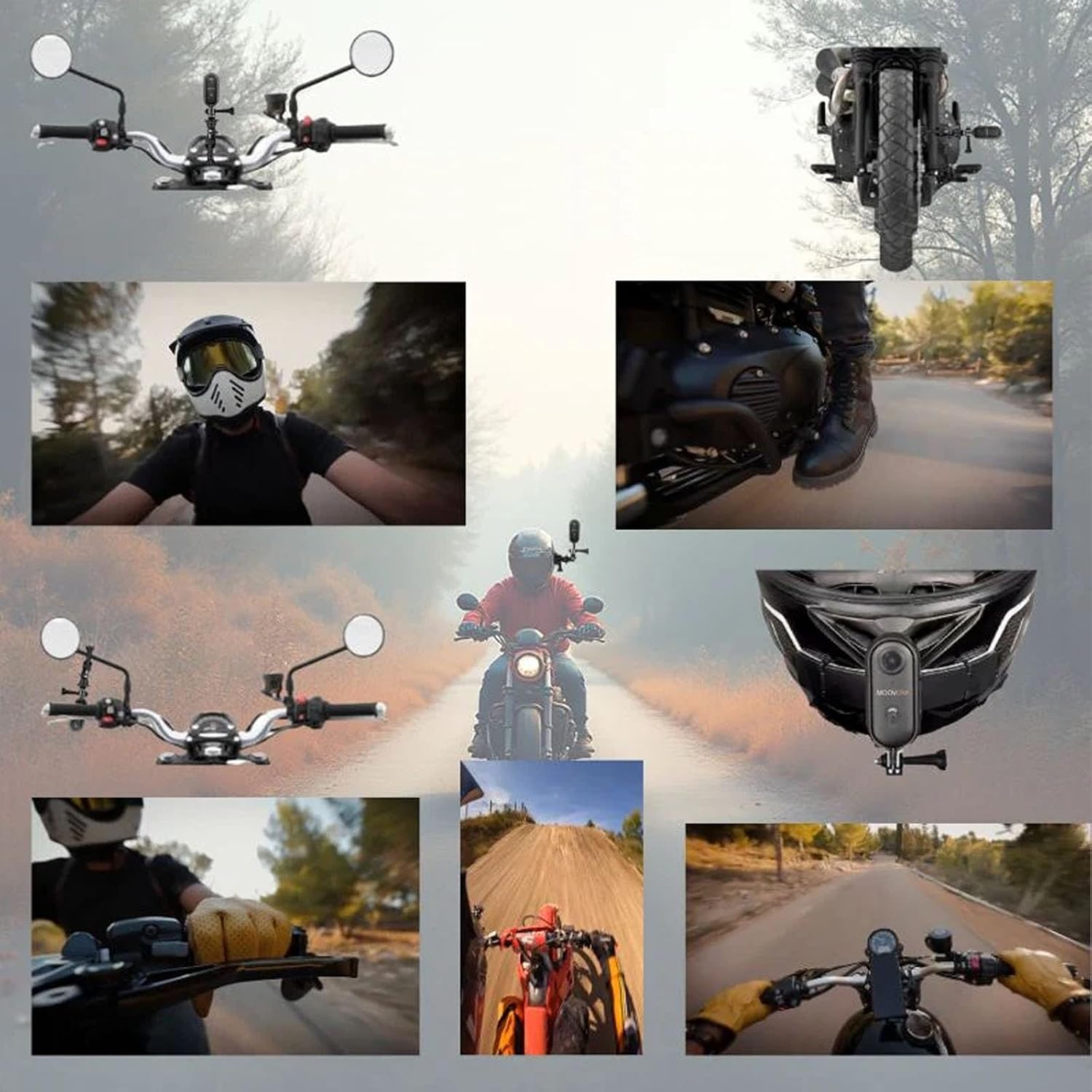
Image: Key features including charging cable, battery life, 4K night vision, and Electronic Image Stabilization (EIS).
Operating Instructions
Basic Operation
- Power On/Off: Press and hold the power button to turn the camera on or off.
- Recording Video: Once powered on, the camera typically begins recording automatically or with a single press of the record button. The video resolution is 3840 x 2160 (4K) at 30 frames per second.
- Stopping Recording: Press the record button again to stop recording.
- File Format: Videos are saved in MP4 format.
- Audio Recording: The camera supports audio recording alongside video.
Advanced Features
- 170° Wide-Angle Lens: Captures a broad field of view, ideal for action shots and comprehensive dashcam footage.
- Motion Detection: The camera can be configured to start recording automatically when motion is detected, conserving battery and storage space.
- Night Vision: Enhanced 4K night vision capabilities ensure clear recordings in low-light conditions.
- WDR & HDR: Wide Dynamic Range and High Dynamic Range technologies improve image quality in varying light conditions.
- Parking Mode: Provides surveillance when the vehicle is parked, often triggered by impact or motion.
- Loop Recording: Automatically overwrites the oldest footage when the memory card is full, ensuring continuous recording.
- GPS Tracking: Records location data, providing exact incident localization for dashcam use.
- Electronic Image Stabilization (EIS): Reduces blur and shakiness in recordings, especially during active use.

Image: Powerful functions of the dashcam, including 4K resolution, motion detection, night vision, and GPS tracking.

Image: Versatile usage scenarios for the action camera, demonstrating its application in cycling and motorcycling.
Maintenance
- Cleaning: Use a soft, dry cloth to clean the camera body. For the lens, use a specialized lens cleaning cloth and solution to avoid scratches.
- Waterproof Care: Although the camera is waterproof, ensure all ports and covers are securely closed before exposing it to water. After use in water, rinse with fresh water and dry thoroughly.
- Storage: Store the camera in a cool, dry place away from direct sunlight and extreme temperatures (-10°C to 60°C).
- Battery Care: For optimal battery life, avoid fully discharging the battery frequently. Charge the camera regularly, even if not in use for extended periods.
- Firmware Updates: Check the manufacturer's website periodically for any available firmware updates to ensure optimal performance and new features.
Troubleshooting
- Camera not turning on:
- Ensure the battery is charged. Connect the camera to a power source and wait for a few minutes before attempting to power it on again.
- Recording issues (e.g., short recording time, errors):
- Memory Card: Verify that a compatible memory card is inserted and properly formatted. The product description states "no memory card included," so ensure one has been purchased and installed.
- Storage Space: Check if the memory card has sufficient free space. Loop recording should manage this, but a full card can cause issues.
- Battery Life: Recording in 4K resolution consumes more power. Ensure the camera is fully charged before extended use. Note that actual recording time may vary from advertised figures depending on settings (e.g., 4K vs. 2K resolution).
- Poor video quality:
- Lens Cleanliness: Clean the camera lens with a soft, lint-free cloth.
- Lighting Conditions: While the camera has night vision, extreme low light or harsh backlighting can affect quality.
- Image Stabilization: Ensure Electronic Image Stabilization (EIS) is enabled if available in settings, especially for active use.
- Camera unresponsive:
- Attempt a soft reset by pressing and holding the power button for an extended period (e.g., 10-15 seconds) until the device restarts or powers off completely. If issues persist, contact customer support.
Specifications
| Model Name | Dashcam Intelligente (Smart Dashcam) |
| Model Number | B0G7H9DCVT |
| Brand | Aosrioylt |
| Video Resolution | 3840 x 2160 (4K) |
| Frames Per Second | 30 fps |
| Video Format | MP4 |
| Image Resolution (Still) | 8.3 MP |
| Image Format | JPEG |
| Lens Angle | 170° Wide-Angle |
| Charging Voltage | 5V / 2A |
| Charging Time | Approximately 120 minutes |
| Storage Temperature | -10°C to 60°C |
| Connectivity | USB |
| Water Resistance Level | Water Resistant |
| Special Features | 4K, Waterproof, Magnetic, 360° Clip, Electronic Image Stabilization (EIS) |
| Dimensions | Approximately 6.45 x 2.8 x 2 cm (2.54 x 1.1 x 0.79 inches) |
Warranty Information
Specific warranty details for the Aosrioylt Smart Dashcam Action Camera are not provided in the product information. Please refer to the retailer's return policy or contact the manufacturer directly for warranty terms and conditions.
Customer Support
For technical assistance, troubleshooting beyond this manual, or inquiries regarding your Aosrioylt Smart Dashcam Action Camera, please contact Aosrioylt customer support through their official website or the retailer where the product was purchased.
When contacting support, please have your product model number (B0G7H9DCVT) and purchase details readily available.