
1. Introduction
This manual provides detailed instructions for the assembly, operation, and maintenance of your HOMCOM 180cm TV Unit. Please read this manual thoroughly before assembly and use to ensure proper function and safety. This TV unit is designed to accommodate televisions up to 82 inches and features four pressure-opening doors for storage.

Image: The HOMCOM 180cm TV Unit, featuring a natural wood effect finish and black metal legs, supporting a large television in a modern living room environment.
2. Safety Information
Please observe the following safety precautions during assembly and use:
- Caution: Pay attention to sharp edges during unpacking and assembly to prevent injury.
- Ensure all screws and fasteners are securely tightened before use. Periodically check and retighten as necessary.
- Do not exceed the maximum weight capacities specified in the 'Specifications' section.
- Place the TV unit on a flat, stable, and level surface to prevent tipping. Use the adjustable feet to stabilize the unit on uneven floors.
- Keep small parts and packaging materials away from children.
3. Setup (Assembly Instructions)
Assembly of the HOMCOM TV Unit is required. Please follow these general steps. Refer to the included assembly diagram for specific part identification and fastening details.
- Unpack Components: Carefully remove all parts from the packaging. Lay them out on a clean, soft surface to prevent scratches. Verify all components are present according to the parts list in your separate assembly diagram.
- Assemble the Main Frame: Connect the side panels, bottom panel, and any internal dividers using the provided hardware (dowels, screws, cam locks). Ensure all connections are snug.
- Attach Back Panel: Secure the back panel to the main frame using small nails or screws. This adds stability to the unit.
- Install Legs: Attach the five metal legs to the bottom of the TV unit using the designated screws. Ensure they are firmly secured.
- Install Adjustable Feet: Screw the adjustable feet into the bottom of each metal leg. These will be used to level the unit.
- Attach Door Hinges: Install the hinges onto the doors and the corresponding positions on the TV unit frame.
- Mount Doors: Carefully attach the doors to the hinges. Adjust the hinges as needed to ensure the doors align properly and close smoothly.
- Install Press-Open Mechanisms: Insert the press-open mechanisms into their designated holes behind each door. Test the mechanism to ensure doors open and close with a gentle push.
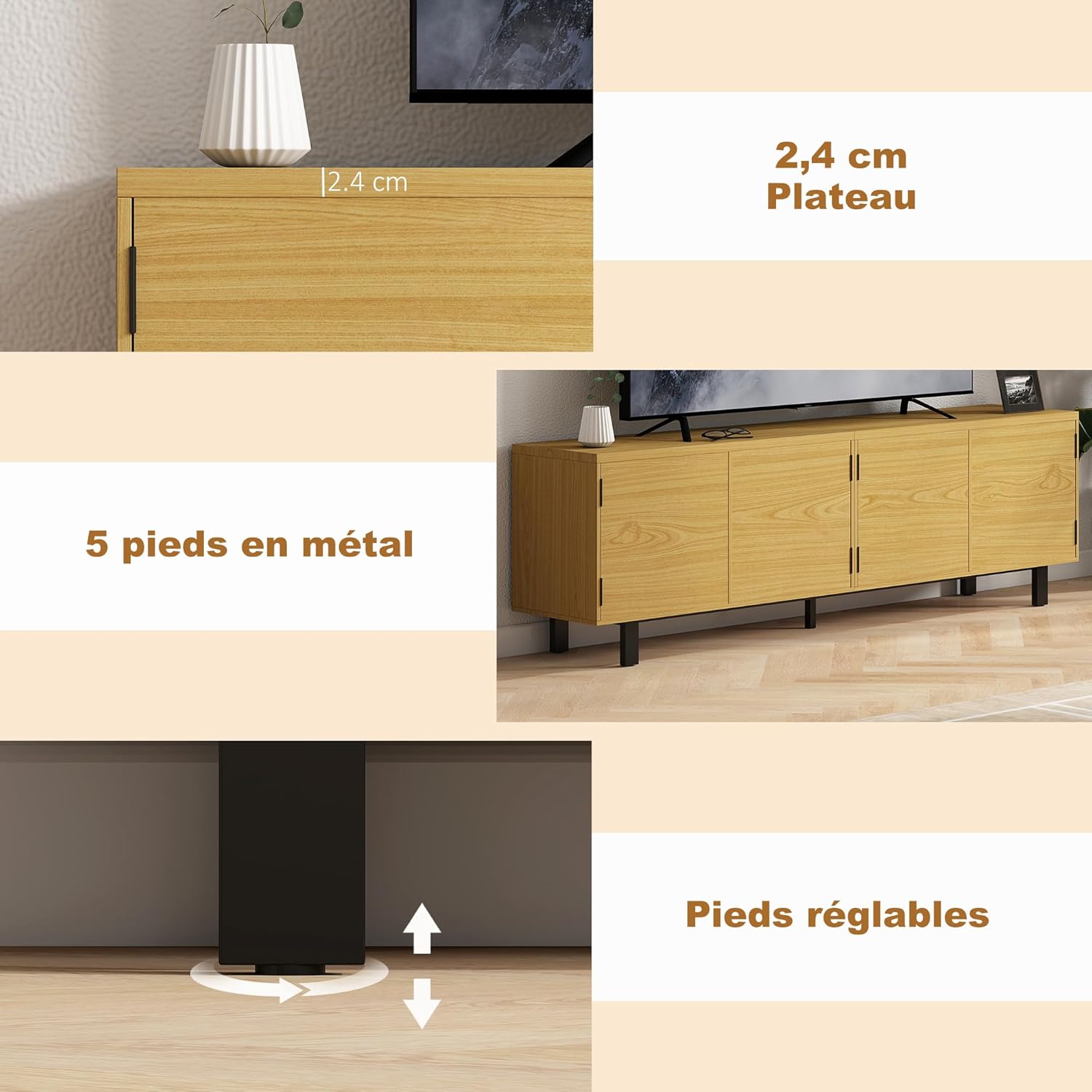
Image: Detail of the TV unit's construction, highlighting the 2.4 cm thick top panel, the robust metal feet, and the adjustable feet designed for leveling on uneven surfaces.
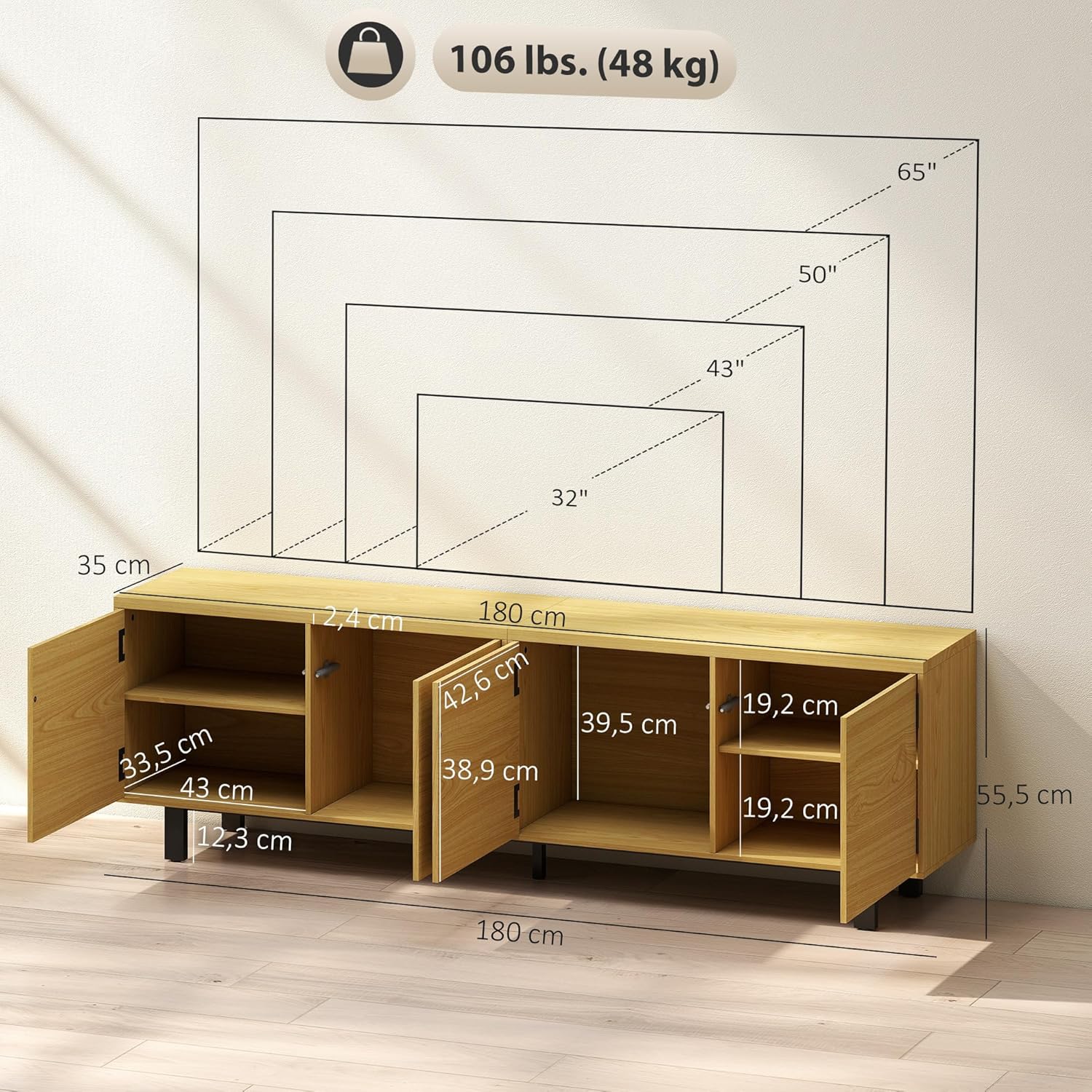
Image: A detailed diagram illustrating the overall dimensions (180 cm length, 35 cm depth, 55.5 cm height) and internal cabinet measurements of the TV unit, along with maximum weight capacity.
4. Operating Instructions
4.1 Using the Storage Cabinets
The HOMCOM TV unit features four spacious cabinets for organized storage of your media devices, books, and other items.
- Opening Doors: The doors are equipped with a press-open mechanism. Gently push the center of the door panel to release the latch, and the door will spring open slightly. Pull the door open fully.
- Closing Doors: Push the door firmly until you hear a click, indicating the press-open latch has engaged and the door is securely closed.
- Storage Capacity: The unit includes two side cupboards with shelves suitable for consoles and accessories, and two central cupboards without shelves, ideal for larger items or decorations.
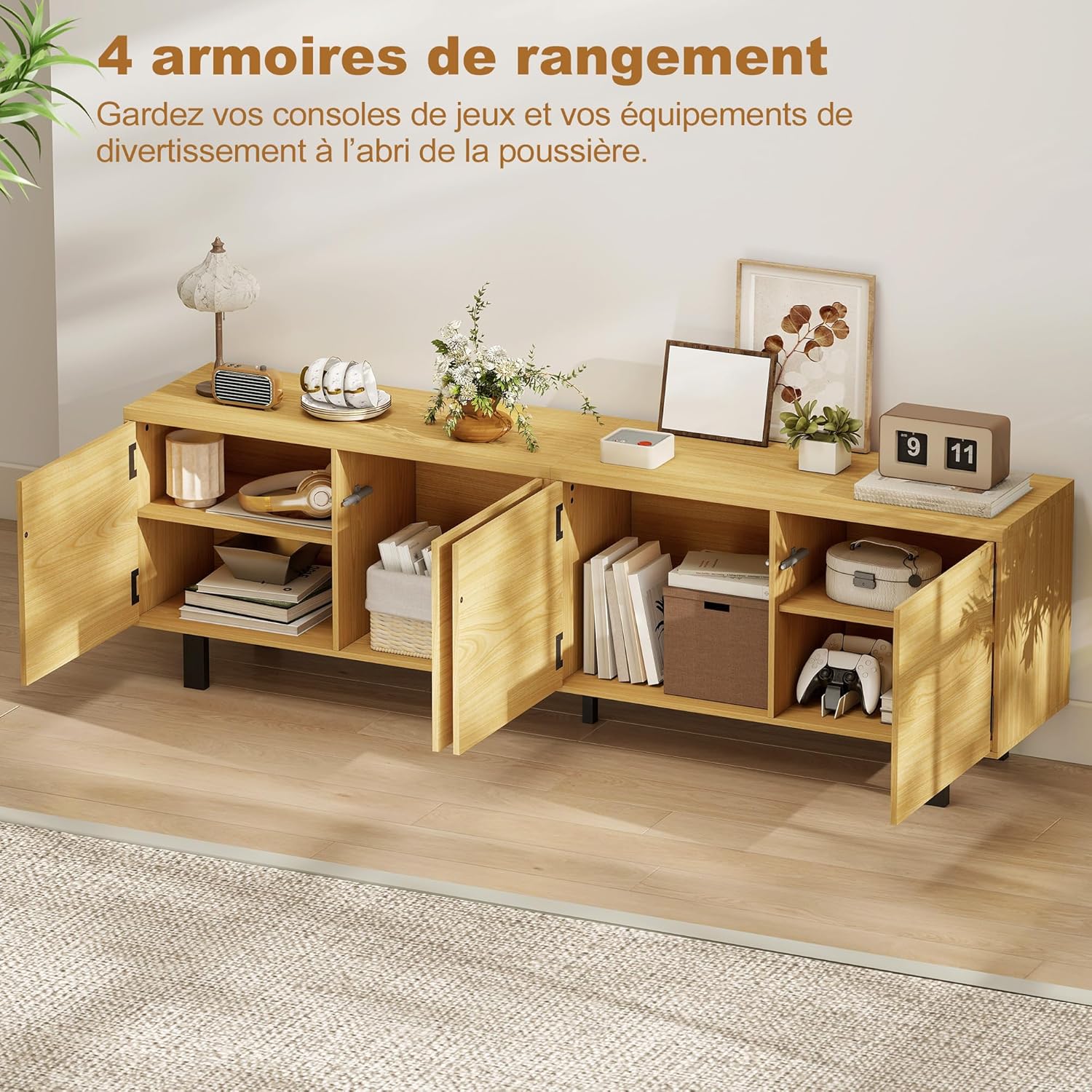
Image: The TV unit with all four doors open, showcasing the internal storage layout. The image highlights the two side compartments with shelves and the two central, larger compartments.

Image: A close-up view illustrating the press-open door feature. A hand gently pushes the door, causing it to open without the need for external handles.
4.2 Leveling the TV Unit
The TV unit is equipped with adjustable feet to ensure stability on uneven floors.
- Adjusting Feet: Gently lift or tilt the unit slightly to access the adjustable feet located at the bottom of each metal leg.
- Rotate the feet clockwise to raise that corner of the unit, or counter-clockwise to lower it.
- Use a spirit level to ensure the top surface of the TV unit is perfectly horizontal. Adjust as needed until the unit is stable and level.
5. Maintenance
Proper care will extend the life and appearance of your HOMCOM TV Unit:
- Cleaning: Wipe the surfaces with a damp cloth. Avoid using harsh chemicals, abrasive cleaners, or excessive moisture, as these can damage the finish.
- Dusting: Regularly dust the unit with a soft, dry cloth.
- Hardware Check: Periodically inspect all screws and fasteners to ensure they remain tight. Retighten any loose hardware to maintain structural integrity.
- Avoid Direct Sunlight: Prolonged exposure to direct sunlight can cause fading or discoloration of the wood effect finish.
- Protect Surfaces: Use coasters or protective pads under items placed on the top surface to prevent scratches or water marks.
6. Troubleshooting
If you encounter issues with your TV unit, refer to the following common solutions:
| Problem | Possible Cause | Solution |
|---|---|---|
| Unit is wobbly or unstable | Uneven floor surface; loose leg connections | Adjust the leveling feet on each leg until the unit is stable. Ensure all leg screws are tightened. |
| Doors do not close properly or are misaligned | Hinges are loose or improperly adjusted; press-open mechanism is not engaging | Check and tighten hinge screws. Adjust hinge settings to align doors. Ensure the press-open mechanism is correctly installed and functioning. |
| Press-open mechanism not working | Mechanism is stuck or damaged; door is too heavy or misaligned | Ensure the mechanism is clean and free of obstructions. Check door alignment. If damaged, contact customer support for replacement parts. |
| Scratches or minor damage to surface | Accidental impact; abrasive cleaning | For minor scratches, consider using a furniture repair pen or wood filler matching the natural wood effect. Avoid abrasive materials for cleaning. |
7. Specifications
Detailed specifications for the HOMCOM 180cm TV Unit:
- Model: 83B-663V00ND
- Color: Natural Wood Effect
- Material: Particle Board, Metal
- Overall Dimensions (L x D x H): 180 cm x 35 cm x 55.5 cm (70.87 in x 13.78 in x 21.85 in)
- Top Panel Thickness: 2.4 cm
- Internal Cabinet Dimensions (L x D x H): 43 cm x 33.5 cm x 39.5 cm (for side cabinets)
- Height from Bottom to Floor: 12.2 cm
- Maximum Recommended Load Capacity:
- Total: 48 kg (106 lbs)
- Top Tray: 20 kg
- Shelf: 3 kg
- Assembly: Required
- Item Weight: 31 kg
8. Warranty and Support
For warranty information, missing parts, or technical assistance, please contact HOMCOM customer support. Refer to your purchase documentation or the HOMCOM official website for contact details.
Please have your model number (83B-663V00ND) and purchase date available when contacting support.


