
1. Product Overview
The Generico NE20 AI Translation Earbuds are advanced wireless earbuds designed for seamless communication and audio experience. Featuring real-time AI translation in 140 languages, Bluetooth 5.4 connectivity, Active Noise Cancellation (ANC), and an intuitive touchscreen display, these earbuds are suitable for travel, business, sports, and daily use.

Image: The NE20 earbuds in their charging case, showcasing the integrated touchscreen display.
2. What's in the Box
- NE20 Earbuds (2 units)
- Charging Case with AI Translation and LED Display
- USB-C Charging Cable
- Quick Start Guide
- Lanyard
3. Specifications
| Model Name | NE20 AI Translation Earbuds |
| Bluetooth Version | V6.0 (as per product description, note: specifications list 5.4) |
| Speaker Size | 13 mm |
| Audio Codec | AAC + SBC |
| Earbud Battery Capacity | 30 mAh (each) |
| Charging Case Capacity | 300 mAh |
| Music Playback Time | Approx. 6-8 hours (medium volume) |
| Talk Time | Approx. 6 hours |
| Total Battery Life (with case) | Up to 48 hours |
| Standby Time | 120 hours |
| Charging Port | Type-C |
| Charging Time (Case) | Approx. 1.5 hours |
| Noise Cancellation | ENC (Environmental Noise Suppression) / ANC (Active Noise Cancellation) up to 97.69% |
| Waterproof Rating | IP55 (Life waterproof) |
| Transmission Range | Approx. 10 m |
| Control Method | Touch |
| Weight | 5 grams (each earbud) |
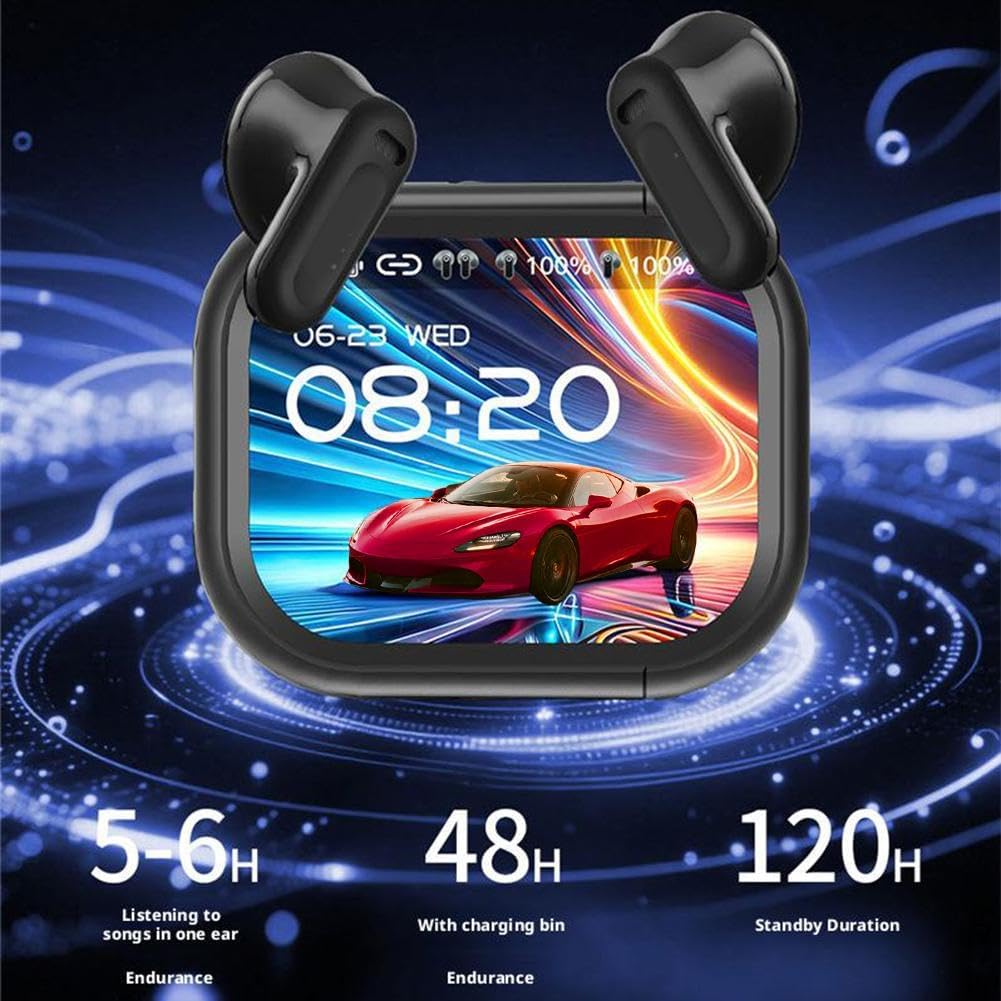
Image: Visual representation of the NE20 earbuds' battery performance, showing 5-6 hours listening time, 48 hours with charging case, and 120 hours standby.
4. Setup
4.1 Charging the Earbuds and Case
- Place both earbuds into the charging case. Ensure they are correctly seated to initiate charging.
- Connect the USB-C charging cable to the charging port on the case and plug the other end into a compatible USB power source.
- The LED display on the charging case will indicate the charging status. A full charge for the case takes approximately 1.5 hours.
4.2 Bluetooth Pairing
- Open the charging case. The earbuds will automatically enter pairing mode.
- On your device (smartphone, tablet, etc.), enable Bluetooth and search for available devices.
- Select "NE20" from the list of discovered devices to connect.
- Once connected, a confirmation message will appear on your device, and the earbuds will be ready for use.
5. Operating Instructions
5.1 Touch Controls
The NE20 earbuds feature an intuitive touchscreen display on the charging case and touch-sensitive areas on the earbuds themselves for various functions. More than 20 functions can be managed directly from the screen.

Image: Overview of the NE20 charging case touchscreen interface, showing options for music playback, mode switch, alarm, key settings, voice assistant, calls, camera control, anti-lost search, custom settings, lock screen wallpaper, and flashlight.
- Music Playback: Play/pause, skip tracks, adjust volume directly from the touchscreen or earbud taps.
- Call Management: Answer, end, or reject calls using the touch controls. The built-in 6 silicon microphones ensure clear voice communication.
- Voice Assistant: Activate your device's voice assistant with a specific touch gesture.
5.2 AI Translation Function
The NE20 earbuds offer real-time translation in 140 languages, ideal for face-to-face conversations.
- Access the translation function via the touchscreen on the charging case.
- Select the desired source and target languages.
- For face-to-face translation, one person speaks into the earbuds, and the translation is played through the other earbud or the case's speaker, and vice-versa.
5.3 Active Noise Cancellation (ANC)
The advanced ANC technology blocks up to 97.69% of environmental noise.

Image: Diagram illustrating the NE20 earbuds' noise reduction efficiency, showing a 97.69% environmental noise reduction and stable wearing design.
- Toggle ANC on/off or switch to a transparent mode using the touchscreen on the charging case or specific earbud touch gestures.
- ANC is effective in reducing ambient sounds in noisy environments.
5.4 Game Mode
Activate the low-latency game mode (latency less than 50ms) for an optimized gaming experience. This mode can be selected via the touchscreen.
5.5 Personalized Screensaver
Customize the display on your charging case.

Image: A hand holding the NE20 charging case, demonstrating the personalized screensaver switch function with various display options.
- Long press on the screen to switch between different screensavers.
- Access custom settings to upload or select preferred lock screen wallpapers.
6. Maintenance
6.1 Cleaning
- Regularly clean the earbuds and charging case with a soft, dry, lint-free cloth.
- Do not use abrasive materials, solvents, or aerosol sprays.
- Ensure charging contacts on both earbuds and case are clean and free of debris for optimal charging.
6.2 Water Resistance (IP55)
The NE20 earbuds are rated IP55 for water resistance, meaning they are protected against dust ingress and low-pressure water jets from any direction. This makes them suitable for workouts and use in light rain.

Image: A person exercising while wearing the NE20 earbuds, highlighting their professional-level sports waterproof feature, suitable for rainy days or sweat.
- Do not submerge the earbuds in water.
- Avoid exposing them to high-pressure water or extreme humidity.
- If the earbuds get wet, wipe them dry before placing them back in the charging case.
6.3 Storage
- Store the earbuds in their charging case when not in use to protect them and keep them charged.
- Store in a cool, dry place away from direct sunlight and extreme temperatures.
7. Troubleshooting
7.1 Earbuds Not Pairing
- Ensure both earbuds are charged and placed correctly in the charging case.
- Turn off and on your device's Bluetooth.
- Forget/delete "NE20" from your device's Bluetooth list and attempt to pair again.
- If issues persist, try resetting the earbuds (refer to the Quick Start Guide for specific reset instructions).
7.2 No Sound or Low Volume
- Check the volume levels on both your connected device and the earbuds.
- Ensure the earbuds are properly seated in your ears.
- Clean any debris from the earbud speakers.
7.3 Translation Not Working
- Ensure the earbuds are properly connected to your device and have an active internet connection (if required for translation services).
- Verify that the correct source and target languages are selected on the touchscreen.
- Speak clearly and at a moderate pace.
7.4 Charging Issues
- Ensure the USB-C cable and power adapter are working correctly.
- Check the charging port on the case for any obstructions.
- Ensure the earbuds' charging contacts are clean and making proper contact with the case.
8. Warranty and Support
For warranty information and customer support, please refer to the documentation provided with your purchase or contact the seller directly. The product is available on Amazon.it from December 16, 2025.