
Introduction
This manual provides essential instructions for the safe and efficient operation, installation, and maintenance of your Velivi 13.8 Cu Ft Commercial Display Beverage Fridge. Please read this manual thoroughly before using the appliance and retain it for future reference.
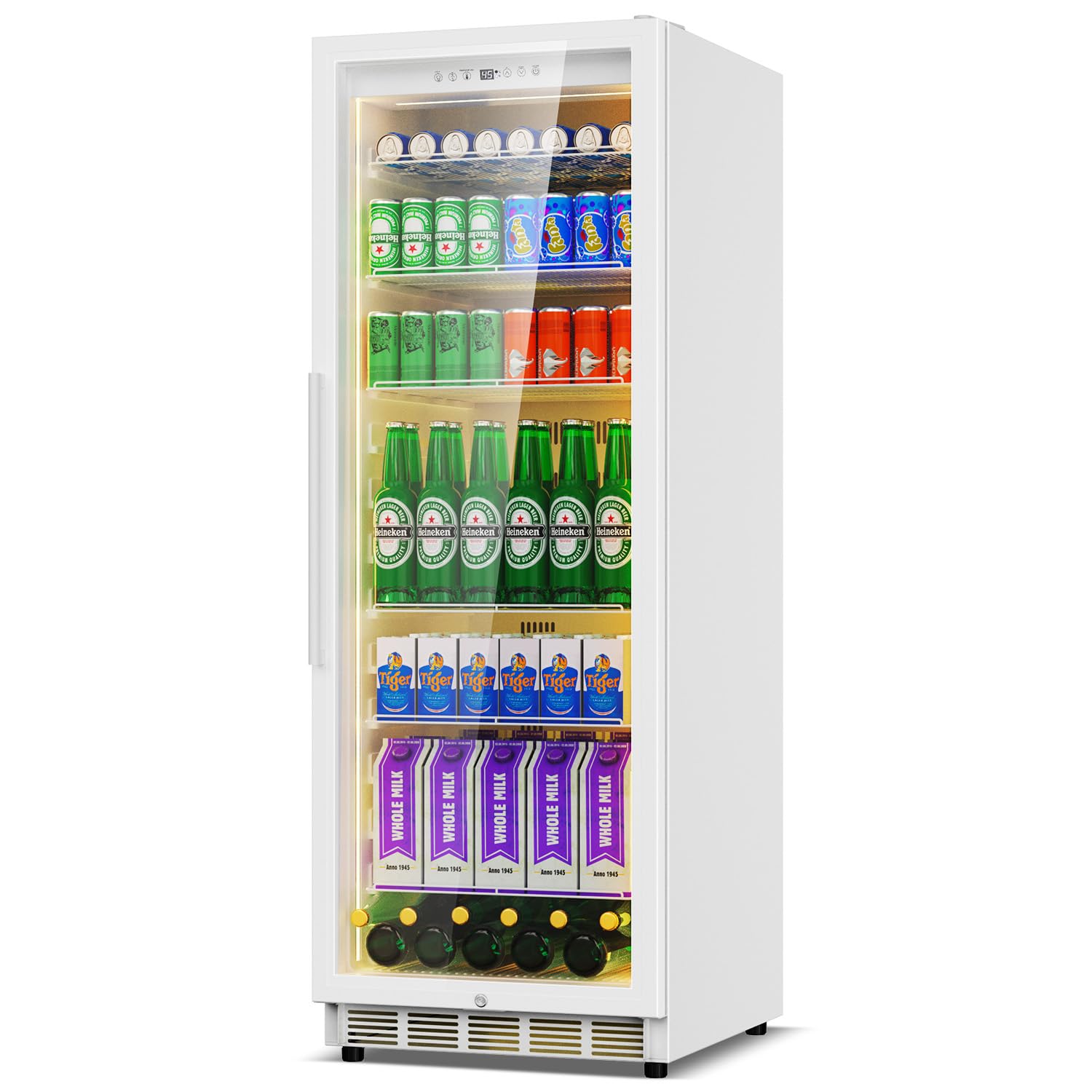
Image: Velivi 13.8 Cu Ft Commercial Display Beverage Fridge, front view.
Key Features:
- Spacious Capacity: 13.8 cu ft storage, accommodating up to 630 standard 12-ounce cans.
- Efficient Cooling: Rapid cooling with turbo fan circulation for quick temperature recovery.
- Quiet Operation: Operates at less than 40dB, suitable for various commercial environments.
- Low-E Double Glass Door: Prevents fogging and condensation, maintaining consistent internal temperatures (37°F to 65°F).
- Auto-Closing Door: 80° inclined automatic closing door design to minimize cold air leakage and save energy.
- Durable Construction: Thickened, anti-rust steel frame designed for commercial use.
- Adjustable Shelves: Six adjustable shelves for flexible storage configurations.
- LED Lighting: Interior LED lighting for enhanced product visibility.

Image: Velivi Commercial Display Fridge highlighting double tempered glass door features like heat insulation, frostless, energy saving, and low noise.
Setup Instructions
1. Unpacking and Placement:
- Carefully remove all packaging materials, including tape and protective films.
- Inspect the unit for any shipping damage. Report any damage immediately to the carrier and retailer.
- Place the refrigerator on a flat, stable surface capable of supporting its weight when fully loaded. Ensure adequate ventilation around the unit (at least 4 inches from walls).
- Allow the unit to stand upright for at least 24 hours before plugging it in. This allows the refrigerant to settle, preventing potential compressor damage.

Image: Illustration of the refrigerator in both built-in and freestanding commercial settings, demonstrating flexible placement.
2. Installing Shelves:
The refrigerator comes with adjustable shelves. Insert the shelves into the desired slots on the interior side rails. Ensure they are level and securely seated before placing items on them.
Video: Demonstration of installing shelves and the auto-rebound glass door feature on a commercial bar fridge. This video also shows the casters.
3. Door Reversal (Optional):
The door hinge can be reversed to open from the left or right, depending on your space requirements. This process typically involves rotating the door and re-anchoring it. Refer to the detailed diagram below for guidance. Note that reversing the door may affect the lock mechanism, potentially relocating it to the top of the unit.

Image: Diagram illustrating the reversible door swing, allowing for left-handed or right-handed opening.
4. Power Connection:
Plug the refrigerator into a dedicated, grounded electrical outlet. Do not use extension cords or adapter plugs. Ensure the power cord is not pinched or damaged.
Operating Instructions
1. Temperature Control:
The Velivi Commercial Display Fridge features a smart touch control panel for precise temperature management. The adjustable temperature range is between 37°F (3°C) and 65°F (18°C).
- Power Button: Press the ON/OFF button to turn the unit on or off.
- Temperature Adjustment: Use the UP (▲) and DOWN (▼) arrows to set your desired temperature.
- Temperature Lock: The control panel may feature a temperature lock function to prevent accidental changes. Consult the display for specific indicators.
- Unit Selection: Use the ℉/℃ button to switch between Fahrenheit and Celsius display.

Image: Close-up of the smart touch control panel with temperature display, adjustment arrows, and light control.
2. Interior LED Lighting:
The unit is equipped with 3-side LED display lighting to illuminate your products. Use the light button on the control panel to turn the interior lights on or off.
3. Loading the Refrigerator:
Arrange beverages on the adjustable shelves, ensuring proper air circulation. Avoid blocking the internal fan or vents. The unit can hold up to 630 standard 12-ounce cans.

Image: Interior view of the Velivi Commercial Display Fridge showcasing generous storage space and adjustable shelves filled with various beverages.
Maintenance
1. Cleaning:
- Always unplug the unit before cleaning.
- Clean the interior with a mild detergent and warm water. Wipe dry thoroughly.
- Clean the exterior with a soft cloth and mild soap. Avoid abrasive cleaners or solvents.
- Periodically clean the condenser coils at the back or bottom of the unit to ensure efficient cooling.
2. Defrosting:
This refrigerator features an automatic defrost system, eliminating the need for manual defrosting. Any accumulated frost will melt and evaporate automatically.
3. Door Seal Inspection:
Regularly check the door gasket for any signs of wear or damage. A damaged seal can lead to cold air leakage and reduced efficiency. Replace if necessary.
Troubleshooting
Before contacting technical support, please review the following common issues and solutions:
| Problem | Possible Cause | Solution |
|---|---|---|
| Refrigerator does not operate. | No power; circuit breaker tripped; power cord not fully plugged in. | Check power supply, reset breaker, ensure plug is secure. |
| Unit is not cooling sufficiently. | Temperature setting too high; door not closed properly; excessive door openings; poor ventilation; dirty condenser coils. | Adjust temperature, ensure door seals, reduce door openings, ensure proper clearance, clean condenser coils. |
| Excessive noise. | Unit not level; objects vibrating against the unit; fan obstruction. | Level the unit, ensure no contact with other objects, check for fan obstructions. |
| Condensation on glass door. | High humidity; door left open; door seal issue. | Ensure door is closed, check door seal, condensation is normal in high humidity. |
If the problem persists after attempting these solutions, please contact customer support.
Specifications
| Feature | Detail |
|---|---|
| Product Dimensions (D x W x H) | 27.17" x 23.54" x 65.75" |
| Capacity | 13.8 Cubic Feet |
| Color | White |
| Installation Type | Freestanding |
| Number of Doors | 1 |
| Defrost System | Automatic |
| Form Factor | Upright |
| Cooling Method | Compressor |
| Special Features | Adjustable Shelves, Automatic Defrost, Door Lock, Energy Efficient, Large Capacity |
| Door Shelf Count | 3 |

Image: Diagram showing the dimensions of the Velivi 13.8 Cu Ft Commercial Display Fridge (23.54" W x 27.17" D x 65.75" H).
Warranty and Support
Your Velivi Commercial Display Beverage Fridge comes with a one-year warranty. Additionally, Velivi offers lifetime technical support for this product. For any inquiries, technical assistance, or warranty claims, please contact Velivi customer service. Responses to inquiries are typically provided within 24 hours.
Please refer to your purchase documentation for specific contact details or visit the official Velivi website for support information.