
1. Introduction
Thank you for choosing the JOCCA Digital Glass Air Fryer. This appliance is designed to provide a healthier way to cook your favorite meals, utilizing rapid air circulation technology for crispy results with minimal oil. Its unique transparent borosilicate glass containers allow for real-time monitoring of your cooking progress.

Image 1.1: JOCCA brand banner showcasing kitchen appliances.
Key Features:
- Dual Capacity Glass Containers: Includes a large 4.5L bowl and a smaller 1.5L bowl, ideal for cooking different portion sizes or multiple dishes simultaneously.
- Powerful & Efficient: Equipped with a 1500W heating element for fast and even cooking.
- Borosilicate Glass: Transparent, healthier, and allows for visual monitoring of food without opening the unit. Resistant to odors and flavors.
- 4 Preset Programs: Simplifies cooking for common items like fries, meat, and fish.
- Keep Warm Function: Maintains food at an ideal serving temperature.
- Easy to Clean: Glass containers are dishwasher safe.
2. Setup
2.1 Unpacking
- Carefully remove all components from the packaging.
- Remove any protective films or stickers from the appliance and accessories.
- Retain the packaging for future storage or transport.
2.2 Initial Cleaning
Before first use, clean all removable parts thoroughly.
- Wash the glass bowls, cooking racks, and lids with warm soapy water. Rinse thoroughly and dry completely.
- Wipe the main unit (heating element and control panel) with a damp cloth. Do not immerse the main unit in water.
2.3 Assembly
Place the air fryer on a stable, heat-resistant surface, ensuring adequate ventilation around the unit.

Image 2.1: The JOCCA Digital Glass Air Fryer positioned on a kitchen counter.
- Insert the desired glass bowl (4.5L or 1.5L) into the base unit.
- Place the cooking rack inside the glass bowl.
- Carefully place the main heating unit onto the glass bowl, ensuring it is securely seated.
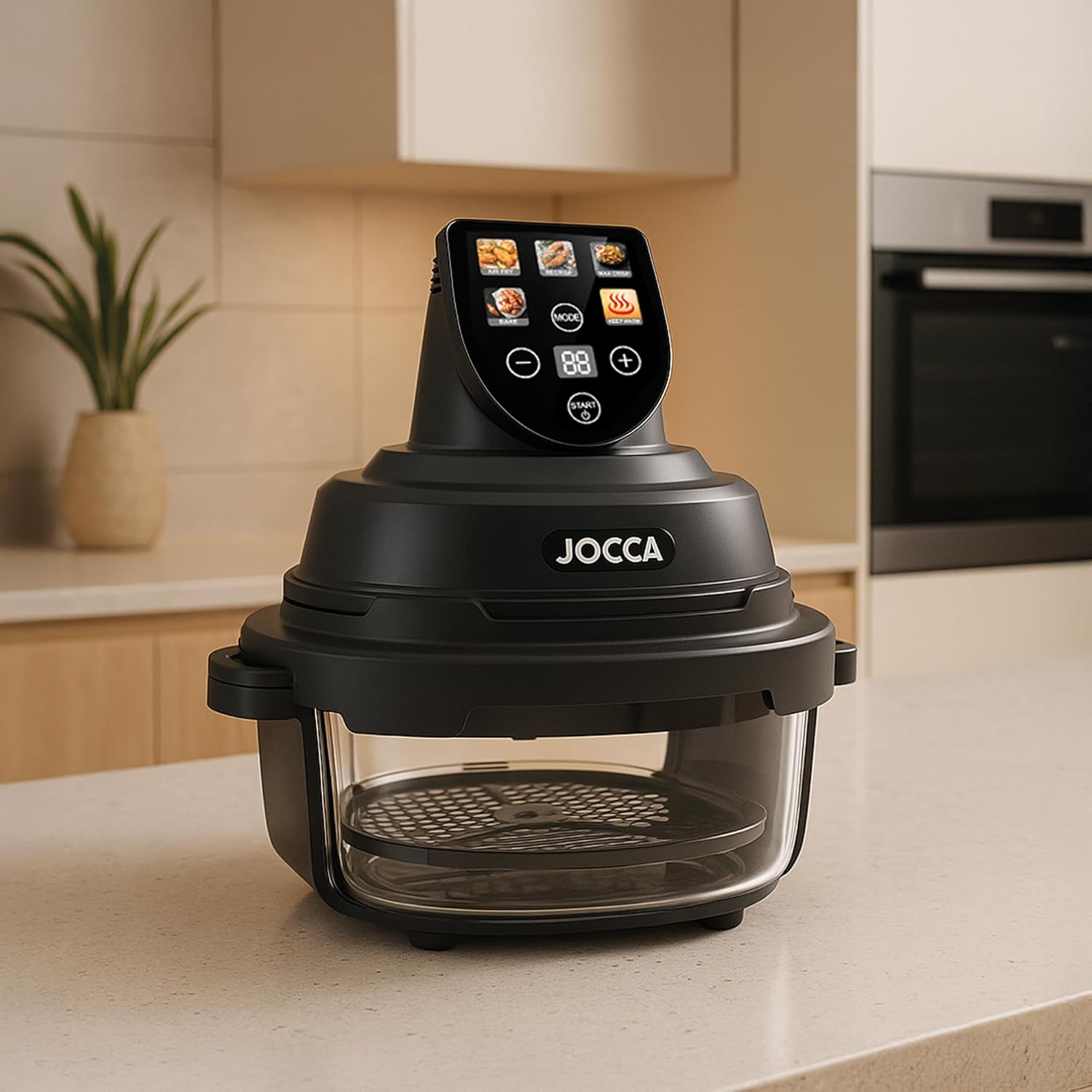
Image 2.2: The two transparent borosilicate glass bowls with their respective cooking racks.

Image 2.3: The lids and cooking racks, highlighting the accessories included with the air fryer.
3. Operating Instructions
3.1 Powering On & Basic Use
- Plug the appliance into a grounded electrical outlet. The digital display will illuminate.
- Place your food onto the cooking rack inside the glass bowl.
- Select a cooking program or manually set the temperature and time using the control panel.

Image 3.1: The digital control panel displaying preset cooking options and temperature/time settings.
3.2 Preset Programs
The air fryer features 4 preset programs for convenience:
- Air Fry: For general frying, achieving crispy textures.
- Recrisp: Ideal for reheating and restoring crispiness to leftovers.
- Bake: For baking various items.
- Max Crisp: For extra crispy results.
Additionally, a Keep Warm function is available to maintain food temperature after cooking.
3.3 Manual Settings
To manually adjust settings:
- Press the 'MODE' button to cycle through cooking functions.
- Use the '+' and '-' buttons to adjust the temperature (up to 200°C) and cooking time.
- Press 'START/STOP' to begin or pause cooking.
3.4 Monitoring Cooking Progress
The transparent borosilicate glass allows you to monitor your food visually throughout the cooking process without interrupting it. This helps prevent overcooking and ensures desired results.

Image 3.2: The air fryer in operation, showing the transparent glass bowl allowing visual monitoring of food.

Image 3.3: Demonstrating the dual capacity with two glass bowls, one containing cooked food and the other ready for preparation.
4. Maintenance
4.1 Cleaning
Regular cleaning ensures optimal performance and longevity of your air fryer.
- Always unplug the appliance and allow it to cool completely before cleaning.
- Glass Bowls and Racks: The borosilicate glass containers and cooking racks are dishwasher safe. They can also be washed by hand with warm soapy water and a non-abrasive sponge.
- Main Unit: Wipe the exterior of the main unit with a damp cloth. Do not use abrasive cleaners or immerse the unit in water.
- Ensure all parts are completely dry before reassembling or storing.
4.2 Storage
Store the air fryer in a cool, dry place. The included lids for the glass containers facilitate easy storage of leftovers directly in the refrigerator.
5. Troubleshooting
If you encounter any issues with your JOCCA Digital Glass Air Fryer, please refer to the following common problems and solutions:
| Problem | Possible Cause | Solution |
|---|---|---|
| Appliance does not turn on | Not plugged in; Power outlet malfunction; Unit not properly assembled. | Ensure the power cord is securely plugged in. Test the outlet with another appliance. Verify the heating unit is correctly seated on the glass bowl. |
| Food not cooked evenly | Overcrowding the basket; Insufficient shaking/flipping; Incorrect temperature/time. | Cook in smaller batches. Shake or flip food halfway through cooking. Adjust temperature and time as needed. |
| White smoke coming from the appliance | Greasy food; Residue from previous use. | For greasy foods, drain excess oil. Clean the appliance thoroughly after each use to remove food residue. |
| Food not crispy | Too much moisture; Not enough oil (for certain foods); Incorrect setting. | Pat food dry before cooking. Lightly coat food with oil if desired. Use the 'Max Crisp' preset or increase cooking time/temperature. |
6. Specifications
| Feature | Detail |
|---|---|
| Model Number | 2954 |
| Special Function | Borosilicate, Dual capacity: 4.5L and 1.5L, Easy cleaning, Includes 2 containers |
| Product Dimensions (D x W x H) | 30f. x 26an. x 35al. centimeters (approx. 11.8 x 10.2 x 13.8 inches) |
| Color | Cream |
| Capacity | 5 Liters (combined) |
| Material | Borosilicate Glass |
| Recommended Uses | Baking, Roasting, Frying |
| Output Wattage | 1400 Watts |
| Maximum Temperature Setting | 200 Degrees Celsius |
| Smart Home Compatibility | Not compatible with smart home systems |
| Dishwasher Safe | Yes (glass containers) |
| Configuration | 4 preset programs |
7. Warranty & Support
For warranty information, product support, or to purchase replacement parts, please visit the official Jocca store or contact their customer service directly.
Jocca Store: https://www.amazon.es/stores/Jocca/page/06AF03AA-6F2D-481F-8734-3E77DA330B02
Please retain your proof of purchase for any warranty claims.


