
1. Introduction
The AFERIY P280 Portable Power Station is a versatile and robust energy solution designed for various applications, from home backup during power outages to outdoor adventures like camping and RV trips. This manual provides essential information on the product's features, setup, operation, and maintenance to ensure safe and efficient use.
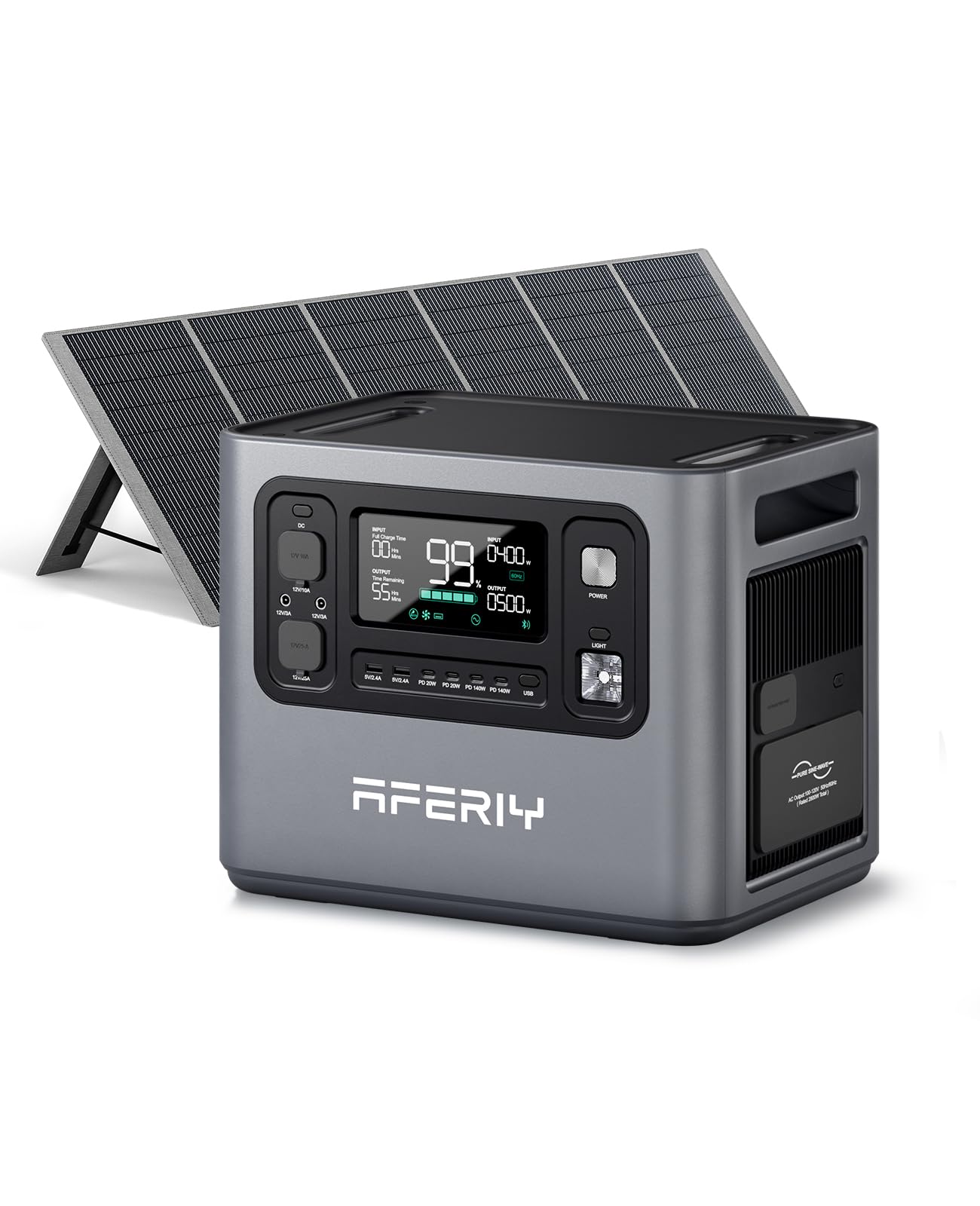
Image 1: AFERIY P280 Portable Power Station with 400W Solar Panel.
The P280 offers a 2048Wh LiFePO4 battery capacity, expandable up to 10.24kWh with additional batteries. It delivers 2800W of continuous pure sine wave AC output and supports multiple charging methods, including 1800W AC input and 1200W PV input for rapid recharging. Its UPS functionality ensures seamless power transition during outages, protecting sensitive electronics.
Video 1: AFERIY P280 Power Station Overview. This video provides a comprehensive introduction to the AFERIY P280, highlighting its features, usage scenarios, and setup procedures.
2. What's in the Box
Upon unboxing your AFERIY P280, please verify that all components are present:
- 1 x AFERIY P280 2800W Portable Power Station
- 1 x 400W Solar Panel (if purchased as a bundle)
- 1 x User Manual
- 1 x AC Charging Cable
- 1 x MC4-XT90 Cable
- 1 x Warranty Card
- 1 x Dust Cover

Image 2: Contents of the AFERIY P280 package, including the power station, solar panel, and various cables.
3. Product Overview
3.1 Design and Portability
The AFERIY P280 features a clean, square, and modern design with rugged elegance. Its cube-like structure includes built-in handles on the top sides for easy movement and portability.
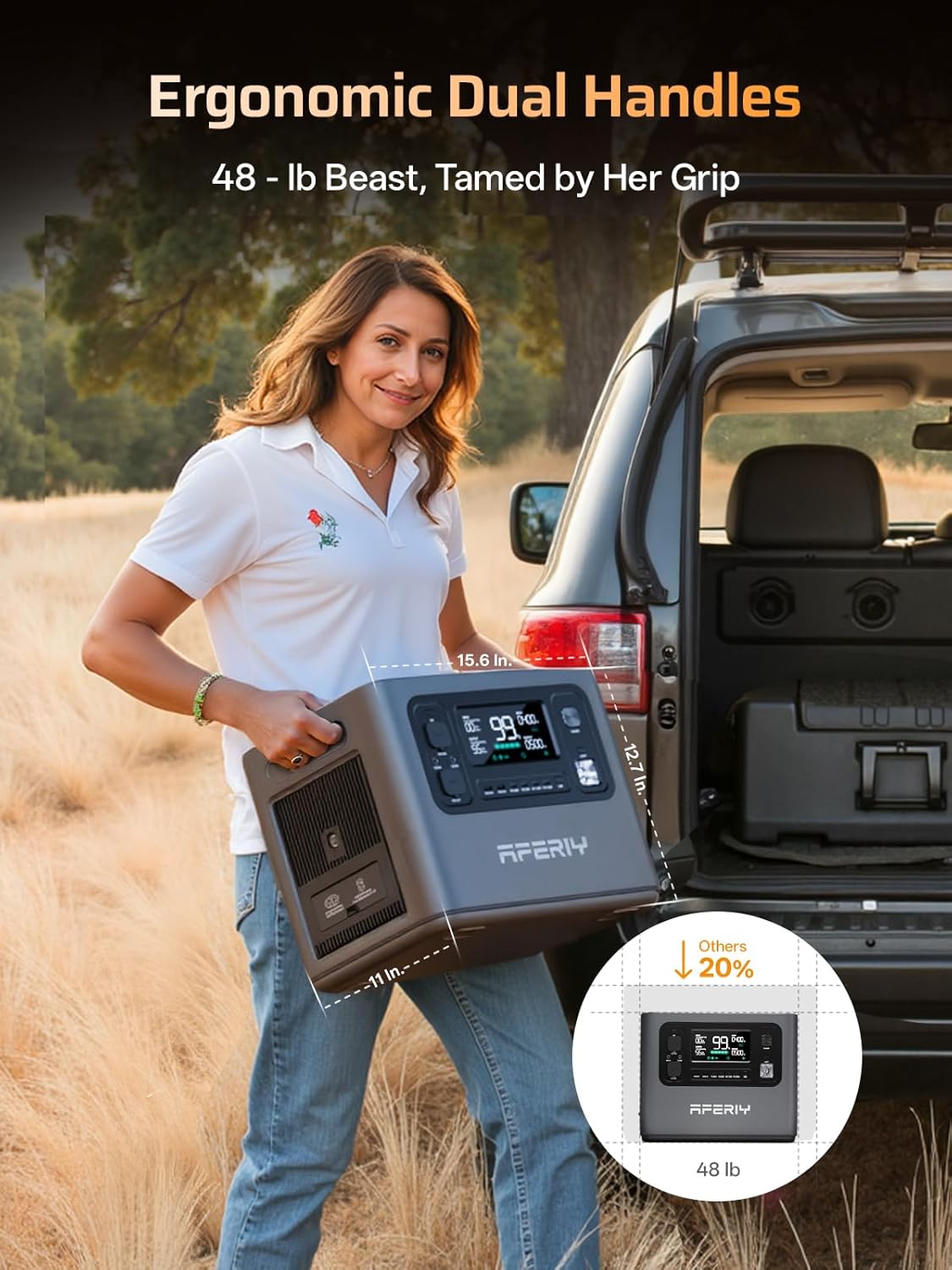
Image 3: The AFERIY P280 showcasing its ergonomic dual handles for easy transport.
3.2 Front Panel and Output Ports
The front panel of the P280 is equipped with an intuitive LCD screen and various output ports:
- LCD Screen: Displays power levels, input power, output power, and remaining charge time.
- USB-A Ports: Two 5V/2.4A (12W) ports.
- USB-C Ports: Four ports, including two 20W PD and two 140W PD ports for fast charging.
- DC Output: 12V car port and XT60 DC port for professional tools.
- AC Output: Four 110V AC outlets and one 30A AC output (NEMA TT-30) on the right side, providing up to 2800W total.

Image 4: Detailed view of the AFERIY P280's front panel, highlighting the LCD display and diverse output options.
3.3 Input Ports
The left side of the P280 features three input ports:
- AC Input: 1800W max for rapid wall charging.
- Solar Input: Two DC (XT90) input ports, supporting a total of 1200W (600W*2) from solar panels.

Image 5: The rear panel of the AFERIY P280, illustrating the AC and dual solar input ports.
4. Setup
4.1 Initial Charging
Before first use, it is recommended to fully charge your AFERIY P280. Connect the AC charging cable to a standard wall outlet. The LCD screen will indicate charging status and estimated time to full charge.
4.2 Connecting Solar Panels
For solar charging, unfold your 400W solar panel and position it to maximize sunlight exposure. Connect the MC4-XT90 cable from the solar panel to one of the DC (XT90) input ports on the P280. The power station supports dual PV inputs for faster charging.

Image 6: The AFERIY P280 being charged by solar panels in an outdoor setting.
5. Operating Instructions
5.1 Powering On/Off
Press and hold the 'POWER' button on the front panel to turn the unit on or off. The LCD screen will illuminate upon activation.
5.2 Using Output Ports
To use any output port (AC, DC, USB), ensure the corresponding output button (e.g., 'AC', 'DC', 'USB') is pressed to activate the power supply to those ports. The LCD screen will show the output wattage.
5.3 LCD Display Information
The LCD screen provides real-time data:
- Battery Percentage: Current charge level.
- Input Power (W): Power being drawn during charging.
- Output Power (W): Power being consumed by connected devices.
- Time Remaining: Estimated time until full charge or depletion based on current usage.
- Status Indicators: Icons for AC, DC, USB, and fan status.
6. Charging Options
The AFERIY P280 offers multiple flexible charging options:
- AC Charging: Utilizes 1800W AC input, charging from 0% to 80% in approximately 38 minutes, and fully charged in 1 hour.
- Solar Charging: Supports up to 1200W PV input, allowing full charge in 2 hours under optimal solar conditions.
- Car Charging: Can be charged via a car adapter, with faster charging possible using an optional AFERIY DC600 Charger.
- AC + Solar Dual Charging: Combine AC and solar inputs for the fastest possible recharge.

Image 7: The AFERIY P280 demonstrating its super AC fast charge feature, reaching 80% in 55 minutes.
7. Expandable Capacity
The AFERIY P280's base capacity of 2048Wh can be expanded significantly by connecting up to four additional expansion batteries. This modular design allows you to scale your power storage up to an impressive 10.24kWh, providing extended backup power for various needs.
7.1 Connecting Expansion Batteries
- Stack the Haven2800 Pro (P280) unit on top of the expansion batteries.
- Plug the parallel cable into the parallel port on the power station.
- Cross-connect the power station and each expansion battery using the provided parallel cables.

Image 8: The AFERIY P280 demonstrating its expandable capacity by stacking with four additional batteries, reaching 10.24kWh.
8. Smart App Control
The AFERIY P280 can be monitored and controlled remotely via a dedicated smartphone application. This app allows you to:
- Check battery energy levels and output status.
- Monitor input and output power in real-time.
- Schedule charging during off-peak hours to optimize energy costs.
- Manage various settings and receive status updates.

Image 9: The AFERIY smart app interface, showing remote monitoring and control capabilities for the power station.
9. Safety and Battery Technology
The P280 is built with safety and longevity in mind:
- LiFePO4 Battery: Features automotive-grade LiFePO4 battery cells, offering 4000+ charge cycles and a 10-year lifespan.
- Pure Sine Wave Inverter: Delivers stable and clean power, protecting sensitive appliances from damage.
- UPS Functionality: Provides an Uninterruptible Power Supply (UPS) with a switchover time of less than 10ms, crucial for medical devices and computers.
- Quiet Operation: Operates at a low noise level (around 25dB), making it suitable for indoor use without disturbance.
- Six-Layer Protection System: Incorporates multiple safety mechanisms to ensure reliable and secure operation.

Image 10: An illustration of the AFERIY P280's internal LiFePO4 battery cells and its six-layer protection system, emphasizing extended lifespan and safety.
10. Use Cases
10.1 Home Backup
The P280 serves as a reliable backup power source for your home, keeping essential appliances running during power outages. Its UPS feature ensures that critical devices like medical equipment and computers remain operational without interruption.

Image 11: The AFERIY P280 acting as an Uninterruptible Power Supply (UPS) for a home office setup, ensuring continuous power.
10.2 Outdoor and Off-Grid Applications
With its portable design and multiple output ports, the P280 is ideal for outdoor activities and off-grid living. Power your camping equipment, RV appliances, and portable tools with ease.
- Camping: Run electric skillets, ice makers, projectors, and charge drones or cameras.
- RV Use: Dual PV inputs make it a perfect power partner for RVs, allowing you to save money on upgrades.
- Portable Life: Power corded mowers, power saws, drills, chainsaws, electric hammers, and water pumps.

Image 12: The AFERIY P280 providing power for various devices at a beach campsite, demonstrating its utility for outdoor adventures.
11. Maintenance
To ensure the longevity and optimal performance of your AFERIY P280 Portable Power Station, follow these general maintenance guidelines:
- Regular Cleaning: Keep the unit clean and free from dust and debris. Use a dry, soft cloth for cleaning. Ensure ventilation openings are clear.
- Storage: When not in use for extended periods, store the power station in a cool, dry place away from direct sunlight and extreme temperatures. It is recommended to charge the unit to about 50-80% before storage and recharge every 3-6 months to prevent battery degradation.
- Avoid Extreme Temperatures: Do not operate or store the unit in excessively hot or cold environments. Refer to the specifications for recommended operating and storage temperature ranges.
- Handle with Care: Avoid dropping or subjecting the unit to strong impacts.
12. Troubleshooting
If you encounter any issues with your AFERIY P280, please refer to the following basic troubleshooting steps:
- Unit Not Turning On: Ensure the battery is charged. If not, connect to an AC outlet for charging.
- No Output from Ports: Verify that the specific output (AC, DC, USB) is activated by pressing its respective button. Check if the connected device is working correctly.
- Overload Protection: If an overload occurs, the unit may shut down. Disconnect some devices and restart the power station. The P280 has an overload protection button on the side.
- Charging Issues: For solar charging, ensure panels are in direct sunlight and cables are securely connected. For AC charging, check the power cable and wall outlet.
- App Connectivity: Ensure Bluetooth is enabled on your phone and the power station is within range. Restart the app or the power station if connection issues persist.
For more detailed troubleshooting or persistent issues, please contact AFERIY customer support.
13. Specifications
| Feature | Detail |
|---|---|
| Brand | AFERIY |
| Model Name | AF-P280 |
| Battery Capacity | 2048Wh LiFePO4 (Expandable to 10.24kWh) |
| Output Wattage | 2800W (Pure Sine Wave) |
| AC Input | 1800W Max |
| PV Input | 1200W (600W*2) |
| UPS Mode Rated | 2400W (Switchover <10ms) |
| USB-A Output | 2 x 5V/2.4A |
| USB-C Output | 2 x PD 20W, 2 x PD 140W |
| Car Port Output | 12V/10A |
| XT60 DC Output | 12V/25A |
| AC Output Voltage | 100-120V 50Hz/60Hz |
| Item Weight | 58.5 Pounds |
| Item Dimensions L x W x H | 15.43"L x 10.98"W x 12.72"H |
14. Warranty and Support
The AFERIY P280 Portable Power Station comes with a standard 2-year warranty. By contacting AFERIY customer service, you can extend this warranty up to 7 years, ensuring long-term peace of mind.
For further support, product information, or to connect with other AFERIY users, you are invited to join the official AFERIY User Group on Facebook. This community provides a platform for sharing experiences, asking questions, and staying updated on product news.

Image 13: Visual representation of the AFERIY P280's extended 7-year warranty and support.


