
1. Introduction
This manual provides essential information for the safe and efficient operation, maintenance, and care of your Jasion EB5 Electric Bike. Please read this manual thoroughly before your first ride and retain it for future reference. Proper understanding and adherence to these instructions will ensure optimal performance and longevity of your electric bike.
The Jasion EB5 is a commuter-style electric bike designed for adults, featuring a 750W peak brushless motor, a 360Wh removable battery, 7-speed gearing, 26-inch tires, and front fork suspension. It is suitable for urban commuting and light trail riding.
2. Safety Guidelines
Your safety is paramount. Always wear a helmet and appropriate safety gear when riding. Adhere to all local traffic laws and regulations. Regular inspection and maintenance are crucial for safe operation.
- Helmet Use: Always wear a certified bicycle helmet.
- Pre-Ride Check: Before each ride, inspect brakes, tires, battery, and all fasteners.
- Traffic Laws: Obey all traffic laws, signs, and signals.
- Visibility: Use the integrated front light and consider additional reflective gear, especially during low-light conditions.
- Weather Conditions: Exercise caution when riding in wet or slippery conditions.
- Weight Limit: Do not exceed the maximum load capacity of 264 lbs (120 kg).
3. Package Contents
Upon unpacking, verify that all components are present and undamaged:
- Jasion EB5 Electric Bike Frame
- 360Wh Removable Battery
- Battery Charger
- Front Light
- Horn
- Kickstand
- Toolbox
- User Manual (this document)
4. Component Identification
Familiarize yourself with the key components of your Jasion EB5 Electric Bike.

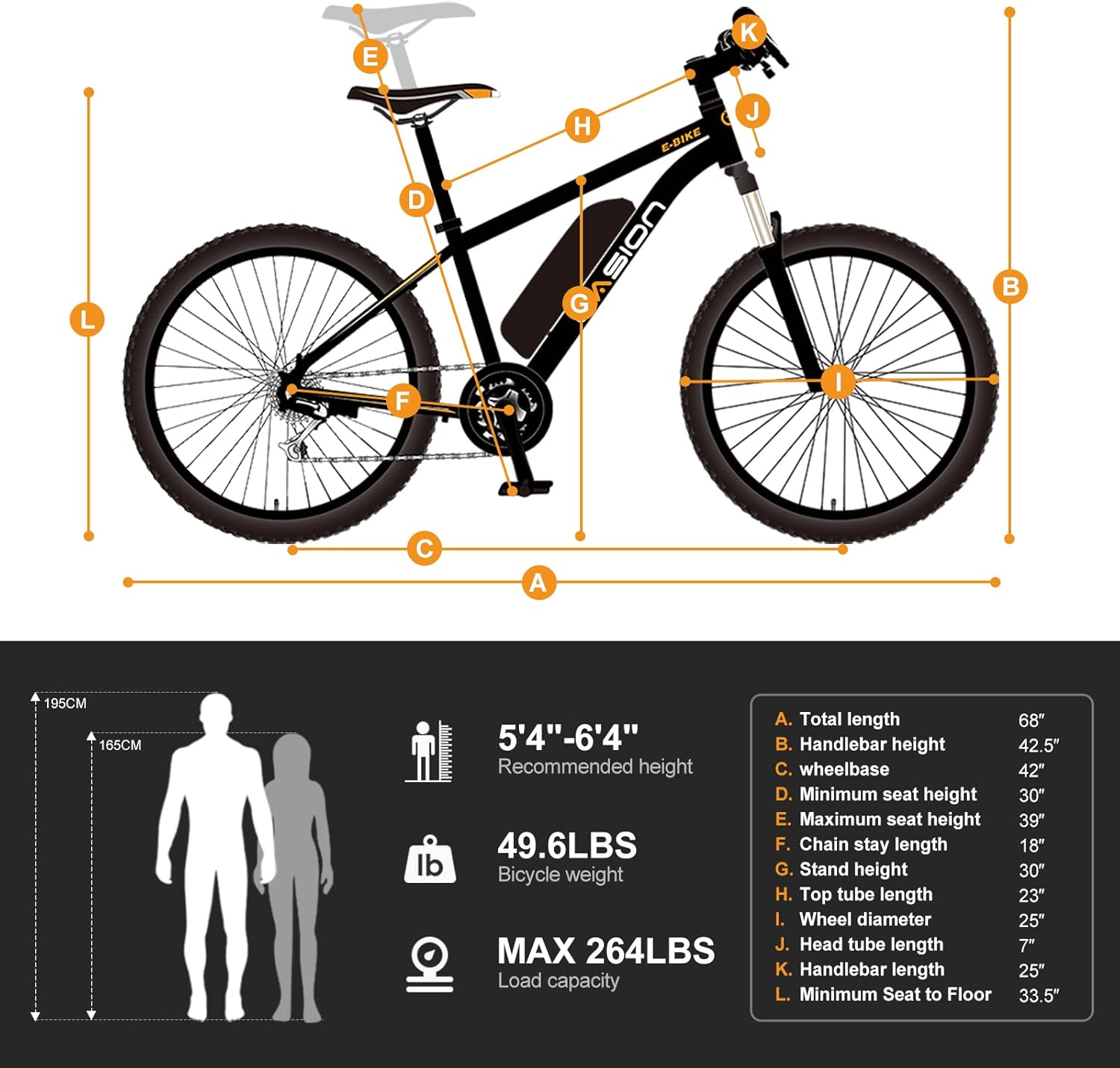
5. Assembly and Setup
Your Jasion EB5 Electric Bike comes partially assembled. Follow these general steps for final assembly. Refer to the included quick start guide for detailed visual instructions.
- Handlebar Installation: Securely attach the handlebars to the stem.
- Front Wheel Installation: Install the front wheel, ensuring the disc brake rotor is correctly aligned with the caliper.
- Pedal Attachment: Attach the pedals, noting that the left and right pedals are threaded differently (L for left, R for right).
- Seat Post Adjustment: Insert the seat post and adjust the seat height for comfortable riding.
- Battery Insertion: Insert the removable battery into its compartment on the frame.
- Pre-Ride Checks: Perform all safety checks as outlined in Section 2 before your first ride.
6. Operating Your EB5
6.1. Powering On/Off
To power on the bike, press and hold the power button on the LCD display. To power off, repeat the process.
6.2. LCD Display Functions

The upgraded LCD display provides essential riding data and allows control over various functions:
- Speed Display: Shows current, maximum, and average speed.
- Battery Level: Indicates remaining battery charge.
- PAS Level: Displays the current Pedal Assist System level (1-3 modes).
- Odometer/Trip Distance: Tracks total distance or current trip distance.
- Backlight: Adjustable brightness (1-5 levels).
6.3. Riding Modes
The Jasion EB5 offers four distinct riding modes:
- Pedal Assist System (PAS) Mode: Provides motor assistance as you pedal. You can select from 1-3 levels of assistance to suit your needs.
- Pure Electric Mode: Engage the throttle for motor power without pedaling.
- Pedal Mode: Ride the bike as a traditional bicycle without any motor assistance.
- Booster Mode: Offers a low-speed assist (4.5-7.5 km/h) to help when pushing the bike uphill or starting from a stop.
6.4. Gear Shifting
The bike is equipped with a 7-speed gear system. Use the trigger shifter on the handlebars to change gears, adapting to different terrains and riding conditions.
6.5. Braking
The Jasion EB5 features front and rear mechanical disc brakes. Apply both brake levers simultaneously for effective and controlled stopping. Ensure brake levers are easily accessible and responsive.

7. Battery Management
7.1. Charging Instructions
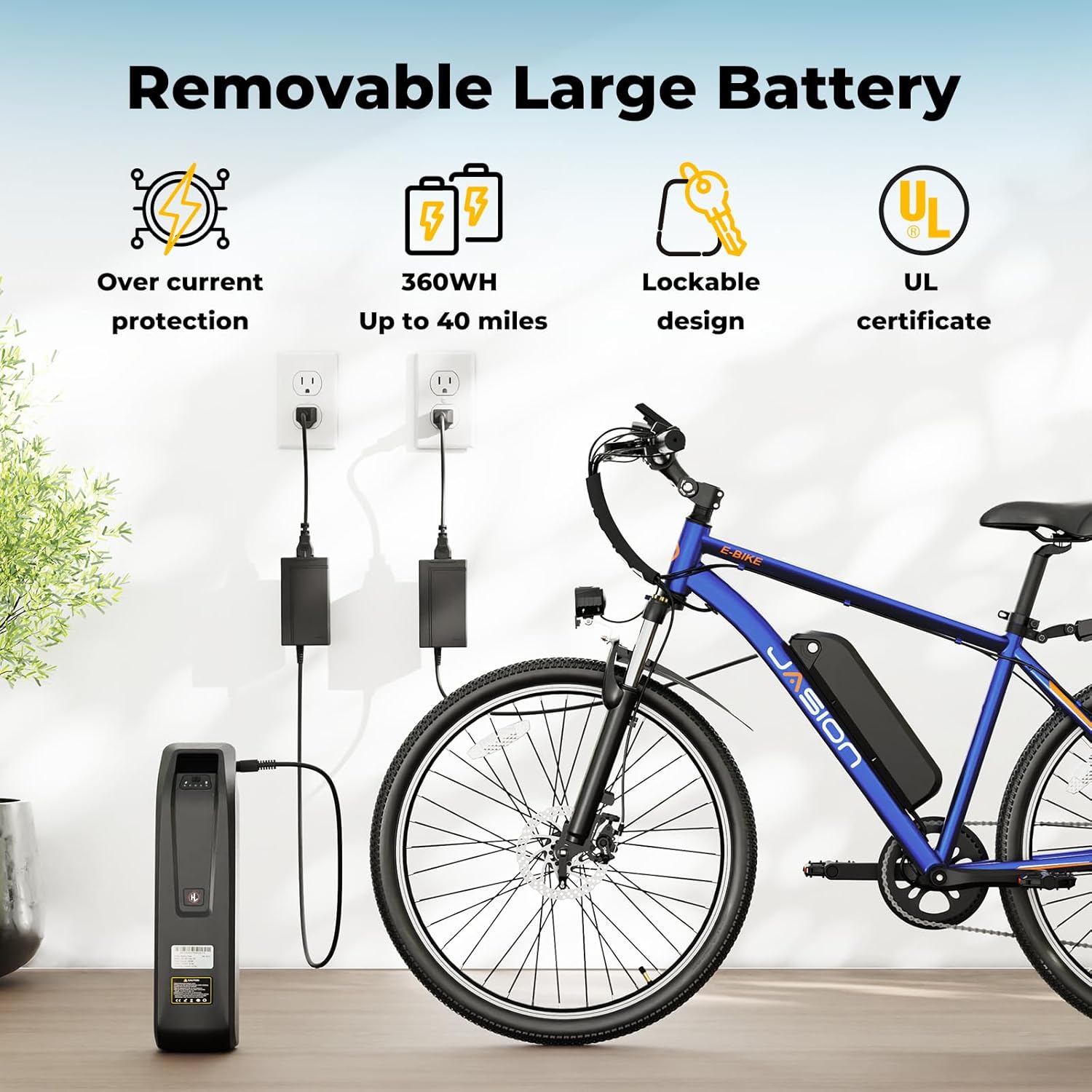
The 360Wh removable battery provides a range of 25-40 miles per charge. Charging takes approximately 5-6 hours.
- Ensure the bike is powered off before charging.
- The battery can be charged while installed on the bike or removed.
- Connect the charger to the battery's charging port, then plug the charger into a standard wall outlet.
- The charger indicator light will typically show red during charging and turn green when fully charged.
- Disconnect the charger once charging is complete.
7.2. Battery Removal and Installation
The battery features a lockable design for security and easy removal. Use the provided key to unlock the battery, then slide it out of the frame. To reinstall, align the battery with the frame slot and slide it in until it clicks into place, then lock it with the key.
7.3. Battery Care and Storage
- Avoid fully discharging the battery. Charge it regularly, even if not in use.
- Store the battery in a cool, dry place, away from direct sunlight and extreme temperatures.
- Do not expose the battery to water or moisture.
- Use only the original charger provided with your bike.
8. Maintenance and Care
Regular maintenance ensures the safety and performance of your Jasion EB5 Electric Bike.
8.1. Regular Checks
- Tires: Check tire pressure before each ride. The 26-inch puncture-resistant tires require proper inflation for optimal performance and safety.
- Brakes: Ensure brake levers are firm and responsive. Inspect brake pads for wear and replace if necessary.
- Chain: Keep the chain clean and lubricated to prevent rust and ensure smooth gear changes.
- Fasteners: Periodically check all bolts and nuts for tightness, especially on the handlebars, seat post, and wheels.
- Suspension: Inspect the front fork suspension for proper function and adjust as needed.
8.2. Cleaning
Clean your bike regularly with a damp cloth and mild soap. Avoid using high-pressure washers directly on electrical components. Dry thoroughly after cleaning.
8.3. Storage
Store your electric bike in a dry, secure location, away from extreme temperatures. If storing for an extended period, ensure the battery is partially charged (around 50-70%) and recharge it every few months.
9. Troubleshooting
This section addresses common issues you might encounter with your Jasion EB5 Electric Bike.
| Problem | Possible Cause | Solution |
|---|---|---|
| Bike does not power on | Battery not charged or improperly installed; loose electrical connection. | Ensure battery is fully charged and securely seated. Check all visible electrical connections. |
| Motor not assisting | PAS level set to 0; throttle issue; brake levers engaged. | Increase PAS level on the display. Ensure brake levers are not being squeezed. Check throttle connection. |
| Short battery range | Low tire pressure; frequent use of throttle; riding uphill often. | Inflate tires to recommended pressure. Utilize pedal assist more. Charge battery fully before each ride. |
| Brakes squealing or ineffective | Worn brake pads; contaminated rotors; improper adjustment. | Inspect and clean rotors and pads. Adjust brake calipers. Replace worn pads. |
| Display shows error code | Specific component malfunction. | Refer to the quick start guide or contact customer support with the specific error code. |
If you encounter an issue not listed here or if the suggested solutions do not resolve the problem, please contact Jasion customer support.
10. Technical Specifications
| Feature | Specification |
|---|---|
| Model Name | EB5 |
| Bike Type | Electric Bike |
| Motor | 750W Peak Brushless Motor |
| Top Speed | 20 MPH |
| Battery | 360 Wh Removable Lithium Battery |
| Range per Charge | 25-40 Miles |
| Charging Time | 5-6 Hours |
| Gears | 7-Speed |
| Wheel Size | 26 Inches |
| Tires | 26" Puncture Resistant Tires |
| Frame Material | Carbon Steel |
| Suspension | Front Fork Suspension (100mm travel) |
| Brakes | Front and Rear Mechanical Disc Brakes |
| Weight | 49.6 lbs |
| Max Load Capacity | 264 lbs |
| Recommended Height | 5'4" - 6'4" |
| Included Components | Battery, Front light, Horn, Kickstand, Toolbox |
11. Warranty and Support
Jasion provides a warranty for the EB5 Electric Bike against defects in materials and workmanship. Specific warranty terms and conditions, including duration and coverage details, are typically provided with your purchase documentation. Please refer to these documents for complete information.
For technical assistance, troubleshooting, or warranty claims, please contact Jasion customer support through their official website or the retailer where the product was purchased. Ensure you have your purchase receipt and product serial number available when contacting support.


