
1. Introduction
This manual provides detailed instructions for the assembly, operation, and maintenance of your CHOEZON TCJ23BB Adjustable Sign Stand. This stand is designed for displaying signs, posters, or boards at various events such as weddings, parties, retail environments, and conferences. Its robust metal construction and adjustable features ensure stable and versatile display options.

Image 1.1: The CHOEZON Adjustable Sign Stand in various application settings.
2. Package Contents
Please verify that all components listed below are present in your package before beginning assembly. If any parts are missing or damaged, please contact customer support.
- Main Frame Components (Upright posts, crossbars)
- Tripod Base Sections
- Curved Top Panel
- 4 x Leather Straps
- Assembly Hardware (Screws, Allen wrench)
- Leveling Feet (pre-attached or separate)

Image 2.1: Overview of all included components.
3. Assembly Instructions
Follow these steps to assemble your CHOEZON Adjustable Sign Stand. It is recommended to assemble on a clean, flat surface.
- Attach Tripod Bases: Securely attach the two tripod base sections to the bottom of the main upright posts using the provided screws and Allen wrench. Ensure they are oriented correctly for maximum stability.
- Connect Upright Posts: Join the two main upright posts with the horizontal crossbars. The design allows for adjustable height, so ensure the connection points are aligned.
- Install Curved Top Panel: Attach the curved wooden panel to the top crossbar of the frame. This panel adds structural integrity and aesthetic appeal.
- Verify Stability: Once assembled, gently shake the stand to ensure all connections are tight and the stand is stable. Adjust leveling feet if necessary to compensate for uneven surfaces.

Image 3.1: Key structural components including the tripod base and leveling feet.
4. Operating Instructions
4.1. Adjusting Height
The CHOEZON Sign Stand features three adjustable height settings to accommodate various sign sizes and display preferences. To adjust the height:
- Locate the adjustment points on the upright posts.
- Loosen the securing mechanisms (e.g., screws or clips) at these points.
- Carefully slide the upper section of the stand to the desired height.
- Securely tighten the mechanisms to lock the stand at the chosen height. Ensure both sides are adjusted equally for a level display.
4.2. Attaching Signs
Use the four provided leather straps to securely hold your sign, poster, or board in place.
- Position your sign against the stand's frame.
- Thread the leather straps through the designated slots or around the crossbar, and then around your sign.
- Fasten the straps firmly to prevent the sign from slipping or moving. Ensure even tension for a neat display.
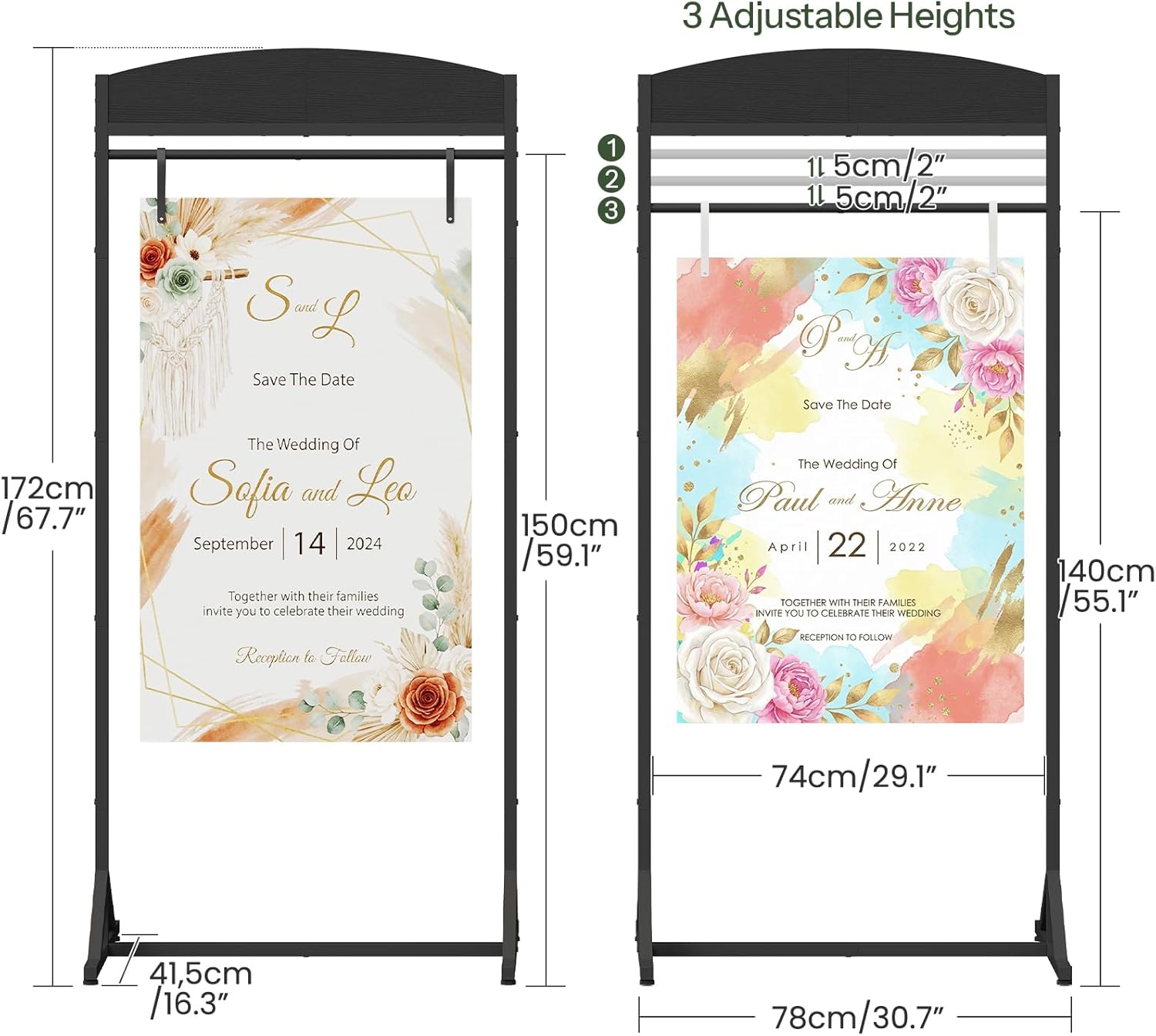
Image 4.1: Height adjustment points and overall dimensions.
5. Care and Maintenance
To ensure the longevity and appearance of your CHOEZON Sign Stand, follow these care guidelines:
- Cleaning: Wipe the metal frame with a soft, damp cloth. For stubborn marks, a mild soap solution can be used, followed by drying with a clean cloth. Avoid abrasive cleaners.
- Storage: When not in use, disassemble the stand and store it in a dry, cool place to prevent rust or damage. The stand is designed for easy disassembly and compact storage.
- Inspection: Periodically check all screws and connections to ensure they remain tight. Tighten any loose hardware as needed.
- Outdoor Use: While the stand is robust, prolonged exposure to harsh weather conditions (heavy rain, strong winds) is not recommended. For outdoor use, consider adding extra weight to the base in windy conditions.
6. Troubleshooting
- Stand is Unstable:
- Ensure all screws are tightened securely during assembly.
- Adjust the leveling feet on the tripod bases to compensate for uneven floor surfaces.
- Verify that the tripod bases are fully extended and properly positioned.
- Sign Slips or Moves:
- Ensure the four leather straps are fastened tightly around the sign and the stand's crossbar.
- Check that the sign's material is compatible with the straps and not excessively slippery.
- Difficulty Adjusting Height:
- Ensure all locking mechanisms are fully loosened before attempting to slide the frame.
- Apply gentle, even pressure when adjusting. Do not force the mechanism.
7. Product Specifications
| Feature | Specification |
|---|---|
| Model Number | TCJ23BB |
| Material | Engineered Wood, Metal |
| Color | Black |
| Item Dimensions (L x W x H) | 78 x 41.4 x 172 cm (approximately 30.7 x 16.3 x 67.7 inches) |
| Adjustable Heights | 3 settings (e.g., 172cm/67.7", 150cm/59.1", 140cm/55.1" as per diagram) |
| Special Features | Adjustable, Tripod Base, 4 Leather Straps |
| Finish Type | Polished |
8. Customer Support
For any questions, concerns, or assistance with your CHOEZON TCJ23BB Adjustable Sign Stand, please contact the manufacturer or your retailer. Please have your model number (TCJ23BB) and purchase information ready when contacting support.
For more information about CHOEZON products, you may visit the official CHOEZON store page: CHOEZON Store