
1. Introduction
Thank you for purchasing the WSTER WS-267BT Mini Bus Bluetooth Speaker. This manual provides essential information for the safe and efficient operation of your new speaker. Please read it thoroughly before use and retain it for future reference.
2. Safety Information
To ensure safe operation and prevent damage, please observe the following precautions:
- Do not expose the speaker to extreme temperatures, direct sunlight, or high humidity.
- Avoid dropping or subjecting the speaker to strong impacts.
- Do not disassemble, repair, or modify the unit. This will void the warranty.
- Keep the speaker away from water and other liquids.
- Use only the provided charging cable.
- Clean the speaker with a soft, dry cloth. Do not use abrasive cleaners.
3. Package Contents
The package includes the following items:
- WSTER WS-267BT Mini Bus Bluetooth Speaker
- Power Cable (USB charging cable)
- Quick Start Guide
4. Product Overview
The WS-267BT speaker features a unique mini bus design with a transparent body and switchable LED party lights. It supports multiple playback modes and includes an extendable antenna for FM radio reception.

Image: The WSTER WS-267BT Mini Bus Bluetooth Speaker, showcasing its transparent body and LED lights.

Image: Icons indicating the speaker's features: FM Radio, TF Card support, USB device support, Handsfree calling, and TWS pairing.
Controls and Ports:
- Power Switch: Located at the rear, slides to turn the unit ON/OFF.
- LED Light Switch: Controls the surrounding LED party lights.
- Volume/Track Controls: Buttons for adjusting volume and navigating tracks.
- Mode Button (M): Switches between Bluetooth, FM Radio, USB, and TF card modes.
- USB Port: For USB drive playback.
- TF Card Slot: For TF (MicroSD) card playback.
- Charging Port: Micro USB port for charging.
- AUX Input: For connecting external audio devices via a 3.5mm audio cable.
- Antenna: Extendable antenna for FM radio reception.
5. Setup
5.1 Charging the Speaker
- Connect the provided USB charging cable to the speaker's charging port.
- Connect the other end of the USB cable to a USB power adapter (not included) or a computer's USB port.
- The charging indicator light will illuminate during charging and turn off when fully charged.
5.2 Power On/Off
- To turn on the speaker, slide the power switch located at the rear of the unit to the 'ON' position.
- To turn off the speaker, slide the power switch to the 'OFF' position.
6. Operating Modes
6.1 Bluetooth Pairing
- Turn on the speaker. It will automatically enter Bluetooth pairing mode, indicated by a voice prompt.
- Enable Bluetooth on your mobile device (smartphone, tablet, etc.).
- Search for available Bluetooth devices and select "WS-267BT" from the list.
- Once paired, you will hear a confirmation tone. You can now play audio from your device through the speaker.
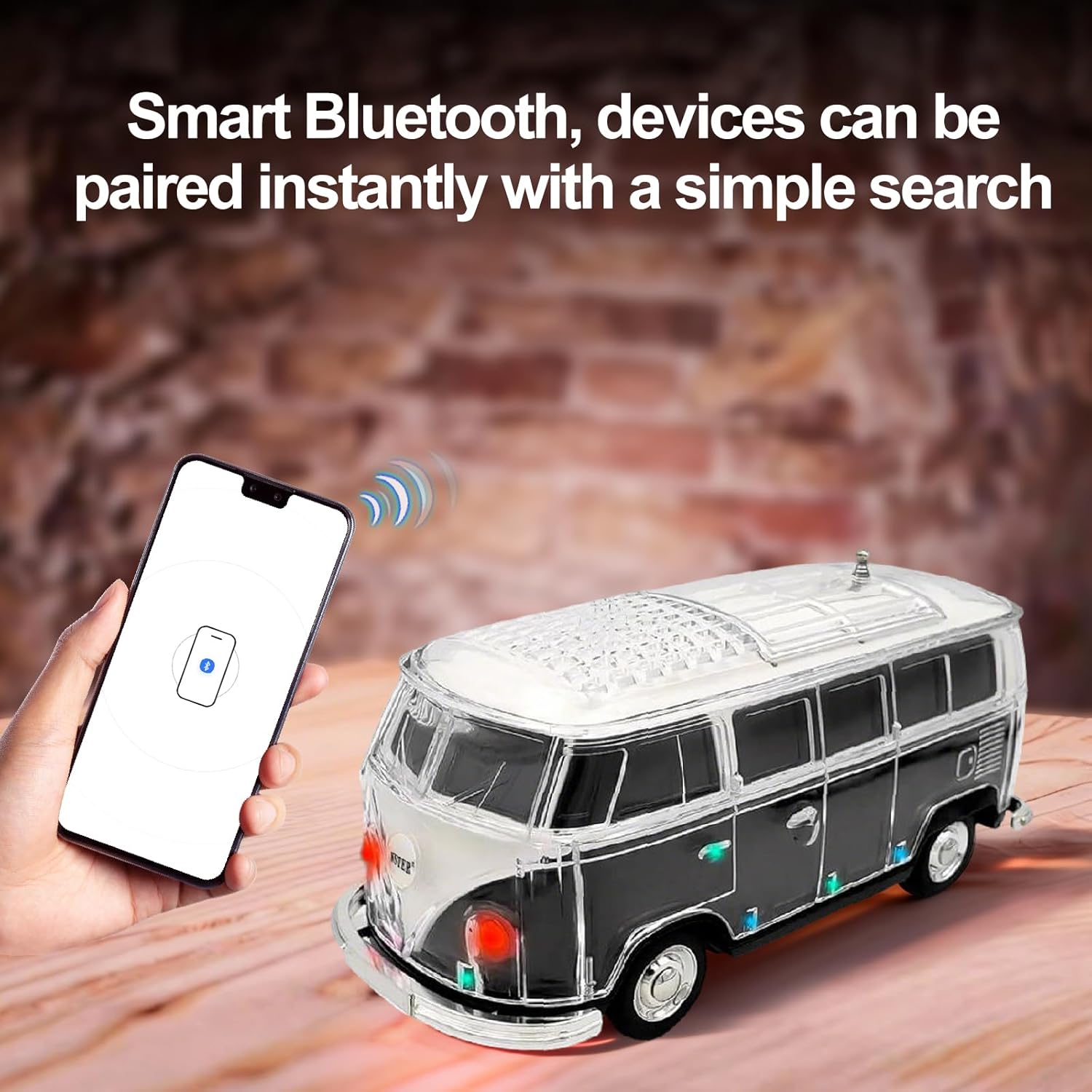
Image: A smartphone screen showing Bluetooth pairing with the WS-267BT speaker.
6.2 FM Radio
- Turn on the speaker and press the 'M' button to switch to FM radio mode.
- Extend the antenna for better reception.
- Long press the Play/Pause button to automatically scan and save available FM stations.
- Use the Volume/Track buttons to navigate between saved stations.
6.3 USB/TF Card Playback
- Insert a USB drive or TF card (with MP3 audio files) into the corresponding port/slot.
- The speaker will automatically detect the storage device and begin playing music.
- Use the Volume/Track buttons to control playback.
6.4 TWS (True Wireless Stereo) Pairing
To achieve stereo sound, you can pair two WS-267BT speakers together:
- Ensure both speakers are turned on and not connected to any Bluetooth device.
- On one speaker (this will be the primary speaker), long press the 'M' button until you hear a pairing prompt.
- The two speakers will automatically connect to each other.
- Once connected, pair your mobile device to the primary speaker via Bluetooth as described in section 6.1.
6.5 LED Light Control
The speaker features switchable LED party lights. Use the dedicated LED light switch to turn the surrounding lights on or off. The front headlight LEDs will continue to flash even when the surrounding lights are off, providing a subtle visual effect.
6.6 Hands-Free Calling
When connected to your smartphone via Bluetooth, the built-in microphone allows for hands-free calling. Press the Play/Pause button to answer or end a call.
Video: An overview of the WS-267BT Mini Bus Bluetooth Speaker, demonstrating its LED lights and design. This video is provided by the seller, WSTER Audio.
7. Troubleshooting
- Speaker does not turn on: Ensure the battery is charged. Connect the speaker to a power source using the charging cable.
- Cannot pair via Bluetooth: Make sure the speaker is in Bluetooth pairing mode. Check that Bluetooth is enabled on your device and that "WS-267BT" is selected. Ensure no other devices are currently connected to the speaker.
- No sound: Check the volume level on both the speaker and your connected device. Ensure the correct playback mode (Bluetooth, FM, USB, TF) is selected.
- Poor FM reception: Extend the antenna fully. Try moving the speaker to a different location to improve signal strength.
- TWS pairing issues: Ensure both speakers are the same model and are not connected to any other Bluetooth devices before initiating TWS pairing.
8. Specifications
| Feature | Detail |
|---|---|
| Model Number | WS-267BT |
| Brand | WSTER |
| Speaker Maximum Output Power | 5 Watts |
| Frequency Response | 18 KHz |
| Connectivity Technology | Bluetooth |
| Audio Output Mode | Stereo |
| Enclosure Material | Acrylonitrile Butadiene Styrene (ABS) |
| Additional Features | Built-in Microphone, FM Radio, LED Light, Portable, USB Port |
| Item Dimensions (D x W x H) | 8.58"D x 3.78"W x 4.17"H |
| Item Weight | 600 Grams |
| Battery | 1 Nonstandard Battery (included) |
9. Maintenance
9.1 Cleaning
Wipe the speaker with a soft, dry cloth. Do not use liquid cleaners or aerosols, as they may damage the finish or internal components.
9.2 Storage
When not in use for extended periods, store the speaker in a cool, dry place away from direct sunlight and extreme temperatures. Ensure the battery is partially charged before storage to prolong its lifespan.
10. Warranty Information
Please note that this product does not come with a manufacturer's warranty. For any issues, please refer to the retailer's return policy or contact their customer service.
11. Customer Support
For further assistance or inquiries, please contact the retailer where you purchased the WSTER WS-267BT Mini Bus Bluetooth Speaker.
