
1. Introduction
The AITEK ANB-BE1200P Pure Sine Wave Uninterruptible Power Supply (UPS) is designed to provide clean, stable, and fully protected power for sensitive electronic equipment. This 1200VA (700W) UPS utilizes Online Double Conversion technology, ensuring filtered power with zero transfer time. It is ideal for computers, workstations, network devices, security systems, and professional electronics.
This manual provides essential information for the safe and efficient use of your AITEK ANB-BE1200P UPS. Please read it thoroughly before installation and operation.
2. Safety Information
WARNING: Failure to follow these safety instructions may result in fire, electric shock, or other injury or damage.
- Do not open the UPS casing. There are no user-serviceable parts inside. Refer all servicing to qualified service personnel.
- Do not operate the UPS in environments with excessive humidity or extreme temperatures.
- Ensure proper ventilation around the UPS. Do not block ventilation openings.
- Connect the UPS only to a grounded power outlet.
- Do not connect appliances that could overload the UPS, such as laser printers or heaters.
- Disconnect the UPS from the power source before cleaning or performing any maintenance.
- Battery replacement should only be performed by qualified personnel using the correct battery type.
3. Package Contents
Verify that all items listed below are included in your package:
- 1x AITEK ANB-BE1200P UPS (110V version)
- 1x Instruction Manual (this document)
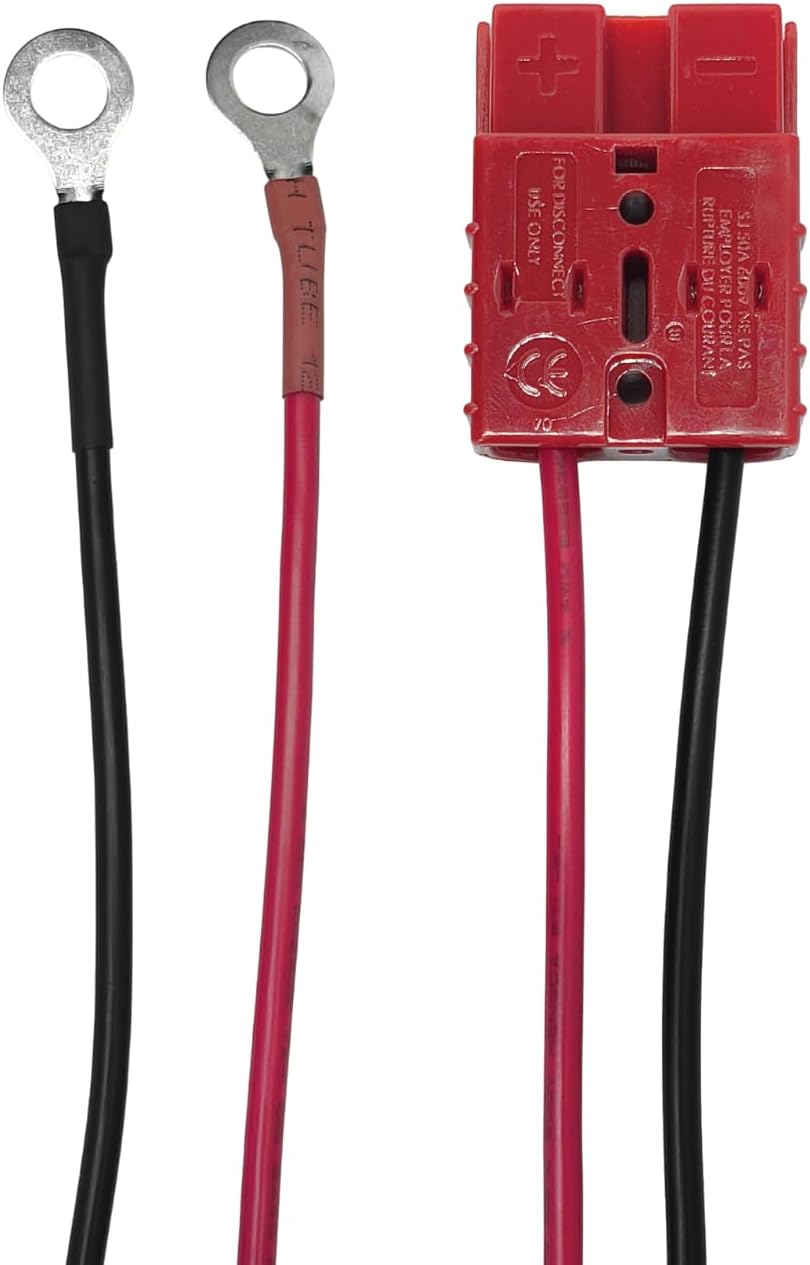
- 1x SB50 Cable (for battery connection)
4. Product Overview
The AITEK ANB-BE1200P UPS provides reliable power protection with a compact design and quiet operation. Key features include pure sine wave output, online double conversion technology, and a high power factor.


5. Setup
5.1 Placement
- Place the UPS on a flat, stable surface.
- Ensure adequate clearance (at least 10 cm) around all ventilation openings for proper airflow.
- Avoid direct sunlight, heat sources, and areas with excessive dust or moisture.
5.2 Connecting to Power
- Connect the UPS power input cable to a grounded 110V AC wall outlet.
- The UPS will begin charging its internal batteries automatically. Allow the batteries to charge for at least 4 hours before initial use to ensure optimal runtime.
5.3 Connecting Devices
- Plug your electronic devices (computers, monitors, network equipment, etc.) into the output sockets on the rear panel of the UPS.
- Ensure the total power consumption of connected devices does not exceed the UPS's 700W capacity.
- For PC communication and monitoring, connect an RS-232 cable (not included) from the UPS to your computer.
6. Operation
6.1 Powering On/Off
- To Power On: Press and hold the power button on the front panel until the display illuminates and the UPS starts.
- To Power Off: Press and hold the power button until the display turns off.
6.2 Front Panel Display and Controls
The LCD display provides real-time information about the UPS status, input/output voltage, battery level, and load. Use the control buttons to navigate through display modes or mute alarms.
6.3 Online Double Conversion Mode
The ANB-BE1200P operates in Online Double Conversion mode, meaning your connected devices are continuously powered by the UPS's inverter, which is fed by the battery charger. This isolates your equipment from utility power fluctuations, providing a constant, clean power supply with zero transfer time during outages.
7. Maintenance
7.1 Battery Care
- Keep the UPS connected to AC power to ensure batteries remain fully charged.
- If the UPS is stored for an extended period, recharge it every three months to prevent battery degradation.
- Battery replacement should only be performed by qualified service personnel. Use only specified lead-acid batteries.
7.2 Cleaning
- Ensure the UPS is turned off and disconnected from the AC power outlet before cleaning.
- Use a soft, dry cloth to wipe the exterior. Do not use liquid or aerosol cleaners.
- Keep ventilation openings free from dust and debris.
8. Troubleshooting
This section addresses common questions and issues you might encounter with your UPS.
- Q: What is a pure sine wave?
- A: A pure sine wave is the cleanest and safest form of electrical power, identical to the power supplied by the utility company. It is essential for sensitive electronics.
- Q: What is Online Double Conversion?
- A: This technology ensures that your equipment is continuously powered by the UPS's inverter, which is always active. This means there are no fluctuations or transfer times when the utility power fails, providing constant, stable power.
- Q: What is the maximum power capacity?
- A: The maximum output power is 700W.
- Q: How long does it take to charge the batteries?
- A: The batteries reach 90% charge in approximately 4 hours.
- Q: Does it have PC communication?
- A: Yes, it features an RS-232 port for communication and monitoring with a PC.
9. Specifications
| Feature | Specification |
|---|---|
| Brand / Model | Aitek ANB-BE1200P |
| Capacity | 1200VA (1.2 kVA) |
| Output Power | 700W |
| Output Voltage | 110V |
| Waveform | Pure Sine Wave |
| Input Voltage Range | 85V to 145V AC |
| Frequency | 60 Hz |
| Efficiency | 85% (AC mode and battery mode) |
| Power Factor | ≥ 0.99 |
| Recharge Time | 4 hours to 90% |
| Noise Level | <45 dBA |
| Ports | RS-232 |
| Dimensions (L x W x H) | 36 × 14.7 × 22 cm (14.17 x 5.79 x 8.66 inches) |
| Weight | 8.5 kg (18.7 lbs) |
| Composition | Metal, plastic, and electronic components |
| Battery Composition | Lead-acid |
10. Warranty and Support
The AITEK ANB-BE1200P UPS comes with a manufacturer's warranty of 90 days from the date of purchase. Please retain your proof of purchase for warranty claims.
For technical support, troubleshooting assistance beyond this manual, or warranty inquiries, please contact your retailer or the AITEK customer service department.