
1. Introduction
Welcome to the NAVIC Electric Scooter user manual. This guide provides essential information for the safe and efficient operation, maintenance, and troubleshooting of your NAVIC T1 or T1 Pro electric scooter. Designed for urban commuting and leisure, your scooter offers a blend of speed, convenience, and safety features.
Please read this manual thoroughly before your first ride to ensure optimal performance and safety.
2. Safety Information
Your safety is paramount. Always adhere to local traffic laws and regulations when operating the scooter. Wearing a helmet and appropriate safety gear is strongly recommended.
- Always wear a helmet and protective gear (knee pads, elbow pads) when riding.
- Ensure all components are securely fastened before each ride.
- Do not ride in heavy rain, on icy surfaces, or through deep puddles.
- Maintain a safe speed and distance from other vehicles and pedestrians.
- Avoid riding under the influence of alcohol or drugs.
- Familiarize yourself with the braking system and practice emergency stops.
- The maximum weight limit for this scooter is 264 pounds.
3. Product Overview & Features
The NAVIC Electric Scooter is equipped with advanced features for a comfortable and reliable ride.
Key Features:
- Powerful Motor: 750W peak power motor (350W/500W nominal) for speeds up to 22 MPH and a 20% climbing ability.
- Long-Range Battery: High-capacity 48V lithium battery (10.4Ah for T1, 22.5Ah for T1 Pro) offering ranges up to 27 miles (T1) or 49 miles (T1 Pro).
- Dual Suspension System: Features dual shock absorbers for a smooth and comfortable ride over varied terrain.
- Solid Tires: 14-inch solid rubber tires (8.5"/10" options available) eliminate the need for air refills and provide consistent performance.
- Triple Braking System: Equipped with front and rear disc brakes, and an electronic brake for enhanced safety.
- Foldable Design: Quick folding mechanism allows for easy storage and portability.
- Integrated Lighting: Bright front lamp and rear taillight for visibility during day and night.
- Smart App Control: Connects to a mobile app for speed control, battery monitoring, and security features.
- LCD Display: Clear handlebar-mounted display shows speed, battery status, and riding mode.
- Adjustable Handlebar: Customize the handlebar height for ergonomic comfort.
- Storage & Comfort: Includes a comfortable seat with spring shock absorber and a detachable rear basket for carrying belongings.

Figure 3.1: NAVIC Electric Scooter highlighting key performance features.

Figure 3.2: Detail of the 14-inch solid tires, designed for durability and no air maintenance.

Figure 3.3: The scooter's dual shock absorbers provide a comfortable ride.

Figure 3.4: Illustration of the triple braking system for reliable stopping power.

Figure 3.5: The detachable rear basket offers convenient storage for personal items or groceries.
4. Setup
4.1 Unboxing & Initial Assembly
Your NAVIC Electric Scooter comes partially assembled. Follow these steps to complete the setup:
- Carefully remove all components from the packaging.
- Unfold the scooter by releasing the quick folding mechanism. Ensure it locks securely into the upright position.
- Attach the handlebars, ensuring all cables are properly connected and not pinched.
- Install the seat and rear basket if they are not pre-attached.

Figure 4.1: The quick folding mechanism allows for easy setup and storage.
4.2 Charging the Battery
Before your first ride, fully charge the scooter's battery. The charging port is located on the side of the scooter's deck.
- Connect the charger to the charging port.
- Plug the charger into a standard wall outlet.
- The charging indicator light on the charger will change (e.g., red to green) when fully charged.
- Charging typically takes approximately 4-5 hours.
5. Operating Instructions
5.1 Powering On/Off
Press and hold the power button on the LCD display to turn the scooter on or off.
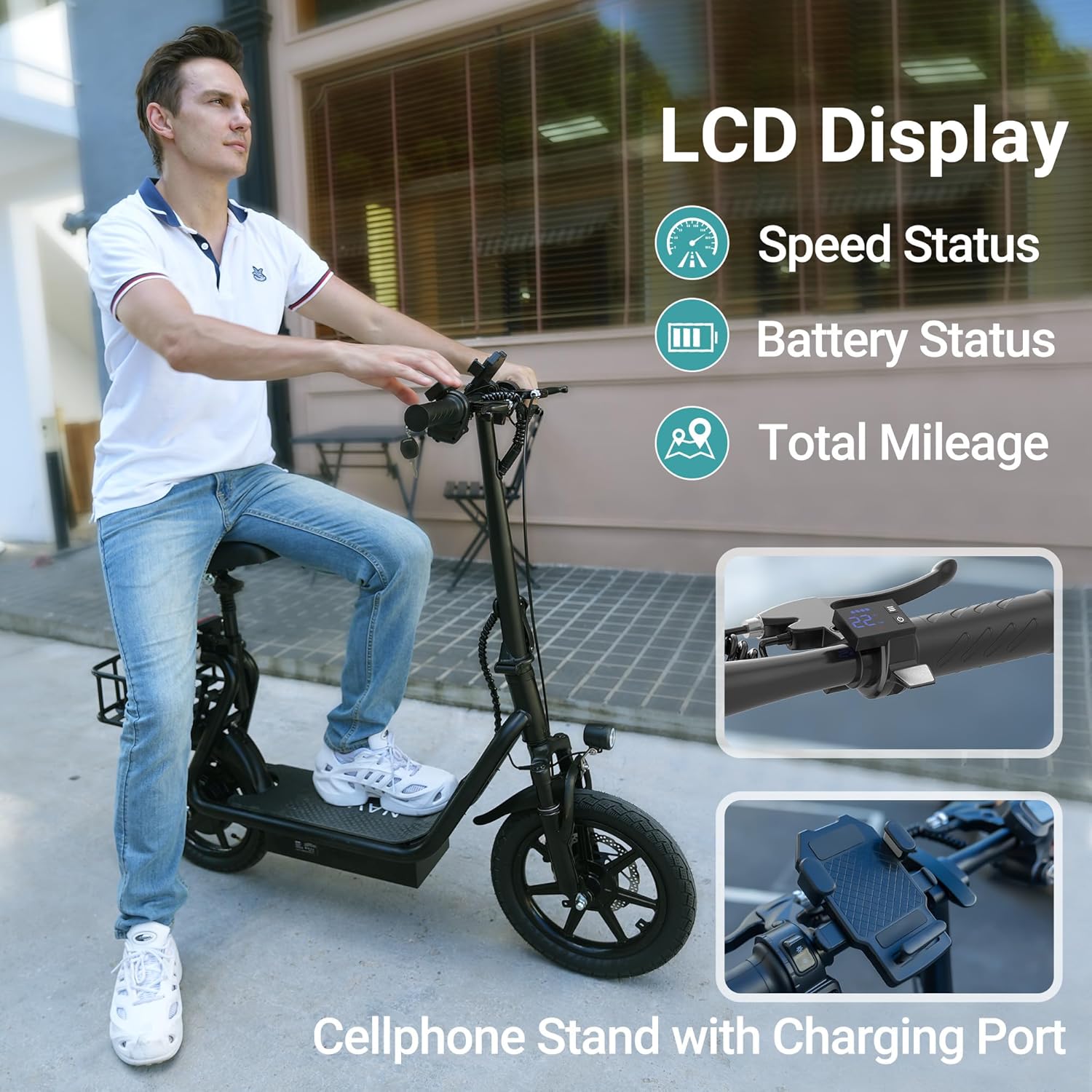
Figure 5.1: The LCD display provides real-time information and controls.
5.2 Riding Modes
Your scooter features multiple riding modes to suit different conditions and preferences:
- ECO Mode: Energy-saving mode for extended range and lower speeds (approx. 7 MPH).
- Slow Mode: Intermediate speed mode (approx. 9 MPH).
- Sport Mode: Maximum performance mode for top speeds (up to 19-22 MPH).
Switch between modes using the controls on the handlebar or via the mobile app.
5.3 Mobile App Control
Download the NAVIC mobile app to unlock additional features and customize your riding experience. The app allows you to:
- Monitor speed and battery life.
- Lock/unlock the scooter for security.
- Adjust riding modes and set maximum speed limits.
- Control lighting.
- Access advanced settings and firmware updates.
Video 5.1: Official NAVIC video demonstrating the T1/T1 Pro Electric Scooter with seat and highlighting range capabilities.
6. Maintenance
Regular maintenance ensures the longevity and safe operation of your scooter.
6.1 Cleaning
- Wipe the scooter clean with a damp cloth after each use.
- Avoid using high-pressure water jets or harsh chemicals, as these can damage electronic components.
6.2 Battery Care
- Charge the battery regularly, even if the scooter is not in use, to maintain battery health.
- Store the scooter in a cool, dry place away from direct sunlight and extreme temperatures.
6.3 General Inspection
- Periodically check all screws and fasteners to ensure they are tight.
- Inspect the brakes for proper function and wear.
- Check the tires for any signs of damage or excessive wear.
7. Troubleshooting
If you encounter issues with your scooter, refer to the following common troubleshooting tips:
- Scooter not turning on: Ensure the battery is charged and the power button is pressed correctly.
- Reduced range/speed: Check battery charge level. Performance can be affected by rider weight, terrain, and riding mode.
- Brakes not responding: Inspect brake cables and pads for wear or damage. Adjust as necessary or consult a professional.
- App connectivity issues: Ensure Bluetooth is enabled on your device and the scooter is powered on and within range.
For persistent issues, please contact customer support.
8. Specifications
| Feature | Detail |
|---|---|
| Brand | NAVIC |
| Model Name | Electric Scooter (T1/T1 Pro) |
| Motor Power | 750W Peak (350W/500W Nominal) |
| Battery | 48V Lithium (10.4Ah / 22.5Ah options) |
| Max Speed | Up to 22 MPH |
| Max Range | Up to 49 Miles (T1 Pro) / 27 Miles (T1) |
| Climbing Ability | 20% |
| Tire Size | 14 Inches (Solid Rubber) |
| Suspension Type | Dual Shock Absorbers (Rigid) |
| Brake Style | Front & Rear Disc Brakes, Electronic Brake |
| Frame Material | Aluminum |
| Weight Limit | 264 Pounds |
| Product Dimensions | 47.24"L x 9.84"W x 39.3"H |
| Special Features | Adjustable Handlebar Height, Foldable, App Control, LCD Display, Front Lamp, Taillight, Detachable Basket, Seat |
9. Warranty & Support
9.1 Manufacturer's Warranty
Your NAVIC Electric Scooter comes with a 1-Year Limited Manufacturer's Warranty. This warranty covers defects in materials and workmanship under normal use. Please refer to the warranty card included with your product for full terms and conditions.
9.2 Customer Support
For technical assistance, warranty claims, or general inquiries, please contact NAVIC customer support through the retailer where you purchased the product or visit the official NAVIC website.