
1. Introduction
Thank you for choosing the AMZCHEF 60cm 4-Zone Induction Hob. This appliance is designed to provide efficient and versatile cooking with its advanced features, including two flexible zones, nine power levels, a Boost function, and specialized modes like BBQ, Pause, and Keep Warm. This manual provides essential information for safe installation, operation, and maintenance of your new induction hob.
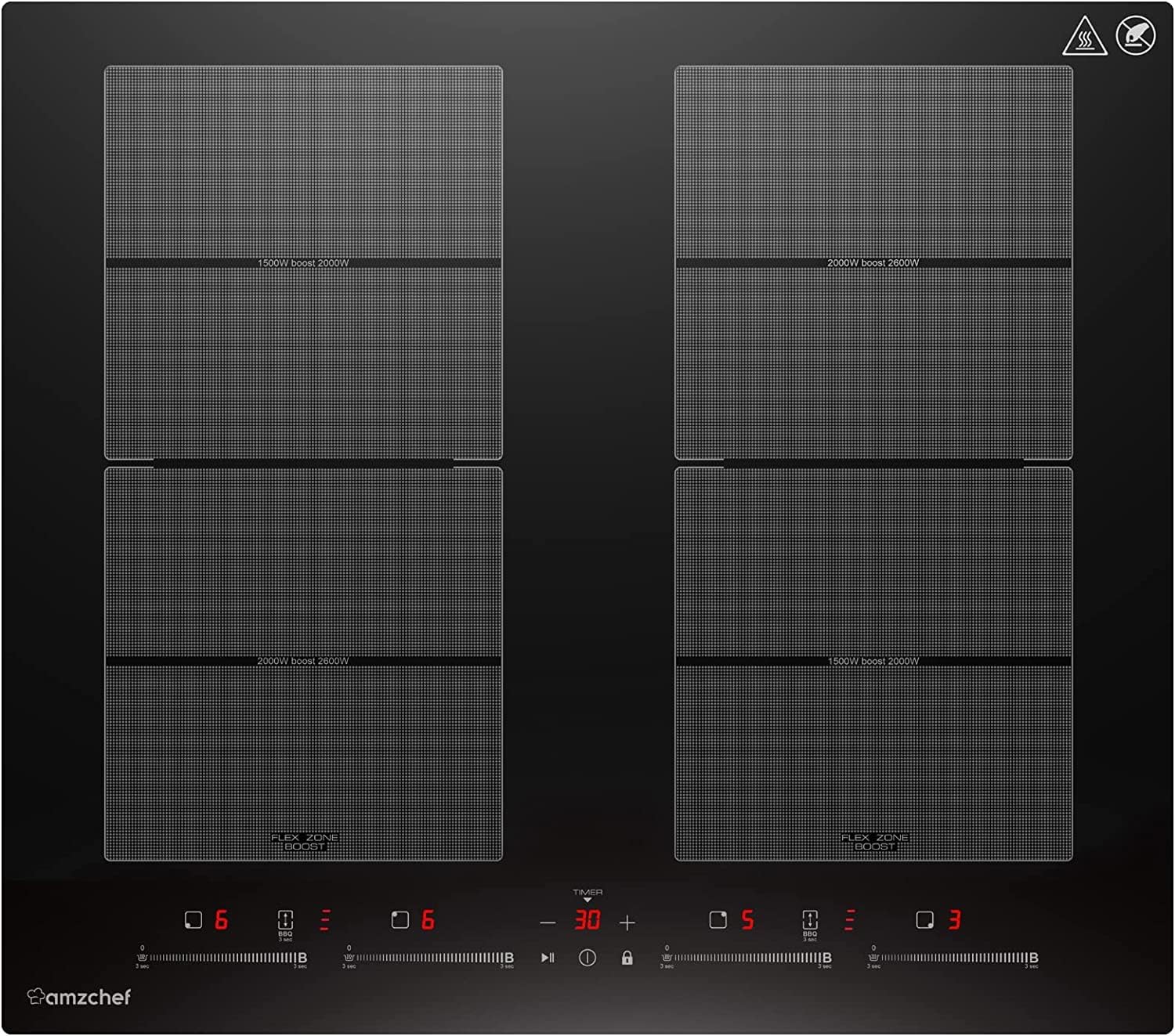
Image 1: Front view of the AMZCHEF 60cm 4-Zone Induction Hob.
2. Safety Information
Please read all safety instructions carefully before using the appliance to prevent personal injury or property damage. Keep this manual for future reference.
- Electrical Safety: This appliance must be installed by a qualified electrician. Ensure the power supply matches the voltage and wattage specified on the rating plate. Do not use extension cords or adapters.
- Heat and Burns: The hob surface will become hot during and after use. Do not touch hot surfaces. Always use oven mitts.
- Children and Vulnerable Persons: This appliance is not intended for use by persons with reduced physical, sensory, or mental capabilities, or lack of experience and knowledge, unless they have been given supervision or instruction concerning use of the appliance by a person responsible for their safety. Keep children away from the appliance.
- Cookware: Only use cookware suitable for induction hobs (magnetic bottom). Do not place empty pots or pans on the hob when it is switched on.
- Pacemakers: Persons with pacemakers or similar medical implants should consult their doctor before using an induction hob.
- Ventilation: Ensure adequate ventilation around the appliance as specified in the installation instructions.
- Cleaning: Disconnect the appliance from the power supply before cleaning.
3. Setup and Installation
Installation of this appliance must be carried out by a qualified professional in accordance with local regulations and standards. The appliance requires hardwiring; a plug is not included.
3.1 Dimensions and Cut-out
- Product Dimensions (D x W x H): 59 cm x 52 cm x 6 cm
- Built-in Dimensions (Cut-out): (55.8 ~ 56.0) cm x (48.8 ~ 49.0) cm
3.2 Electrical Connection
- Voltage: 220 Volts
- Power: 7400 Watts
- Ensure the electrical circuit is adequately protected and capable of handling the appliance's power requirements.
3.3 Cookware Compatibility
The induction hob requires cookware with a magnetic base. Suitable materials include:
- Iron
- Cast Iron
- Enameled Iron
- Magnetic Stainless Steel
To check if your cookware is compatible, place a magnet on the bottom. If it sticks, the cookware is suitable for induction.
4. Operating Instructions
The AMZCHEF induction hob features intuitive touch controls for easy operation.
4.1 Power On/Off
- Touch the power symbol (O/I) to turn the hob on or off.
4.2 Selecting a Cooking Zone and Power Level
- After turning on the hob, select the desired cooking zone by touching its corresponding zone selection button.
- Adjust the power level using the '+' and '-' controls or the slider, choosing from 9 available levels.
4.3 Boost Function
- Activate the Boost function for rapid heating. This temporarily increases the power of a selected zone (e.g., 1500W to 2000W or 2000W to 2600W) for faster boiling or searing.
- Touch the 'Boost' button for the selected zone. The function will automatically deactivate after a set period or when the temperature is reached.
4.4 Flexible Zones
- The hob features two flexible zones that can be combined to accommodate larger or elongated cookware.
- To combine zones, place the large cookware over the two adjacent zones and activate the 'Flex Zone' function (refer to the control panel for the specific symbol). The two zones will then operate as a single large heating area.
4.5 BBQ Function
- The BBQ function is designed to maintain an optimal surface temperature for grilling.
- Activate this function for the flexible zone when using a grill plate or griddle.
4.6 Timer Function
The 99-minute timer can be used in two ways:
- Short-term Alarm: Set a countdown timer that will sound an alarm when finished, but will not switch off any cooking zones.
- Automatic Shut-off: Assign the timer to one or more cooking zones. The selected zone(s) will automatically switch off once the set time expires.
4.7 Pause Function
- Touch the 'Pause' button to temporarily stop all active cooking zones. This allows you to step away from the hob without losing your settings.
- Touch 'Pause' again to resume cooking with the previous settings.
4.8 Keep Warm Function
- Activate the 'Keep Warm' function to maintain food at a serving temperature without further cooking.
4.9 Safety Lock (Child Lock)
- To prevent accidental operation, especially by children, activate the safety lock by touching the lock symbol.
- To unlock, touch and hold the lock symbol for a few seconds.
5. Maintenance and Cleaning
Regular cleaning and maintenance will ensure the longevity and optimal performance of your induction hob.
- Daily Cleaning: After each use, allow the hob to cool down. Wipe the ceramic glass surface with a damp cloth and a mild detergent. Dry thoroughly with a clean cloth.
- Stubborn Stains: For burnt-on food or stubborn stains, use a specialized ceramic hob scraper or cleaner. Follow the product instructions carefully.
- Avoid Abrasives: Do not use abrasive cleaners, scouring pads, or harsh chemicals, as these can scratch or damage the ceramic glass surface.
- Spills: Clean up spills immediately, especially sugary liquids, to prevent them from burning onto the surface and causing permanent damage.
- Ventilation: Ensure the ventilation openings underneath the hob are not blocked to allow proper airflow for cooling.
6. Troubleshooting
If you encounter any issues with your induction hob, refer to the following common problems and solutions before contacting customer support.
| Problem | Possible Cause | Solution |
|---|---|---|
| Hob does not turn on | No power supply; Safety lock activated | Check circuit breaker; Deactivate safety lock by touching and holding the lock symbol. |
| Cooking zone not heating | Incorrect cookware; Cookware not centered; Zone not selected | Use induction-compatible cookware; Center cookware on the zone; Select the desired cooking zone. |
| Display shows an error code (e.g., 'E0', 'E1') | Overheating; Internal fault; Voltage fluctuation | Turn off the hob, let it cool down, then restart; If error persists, disconnect power and contact support. |
| Unusual noise during operation | Normal fan operation; Cookware vibration | The cooling fan operates normally (≤ 56 dB); Some cookware may produce slight vibrations, which is normal for induction. |
| Hob switches off unexpectedly | Overheating protection; Automatic shut-off timer activated | Allow the hob to cool; Check if a timer was set for automatic shut-off. |
7. Specifications
Detailed technical specifications for the AMZCHEF Induction Hob.
| Feature | Specification |
|---|---|
| Brand | AMZCHEF |
| Model Number | CE-FS-I74S-FFDD10 |
| Color | Black |
| Material | Ceramic Glass |
| Heating Elements | 4 |
| Special Features | Two Flexible Zones, Boost Function, BBQ Function, Pause Function, Keep Warm Function, 9 Power Levels, 99-minute Timer, Safety Lock |
| Product Dimensions (D x W x H) | 59 cm x 52 cm x 6 cm |
| Built-in Dimensions (Cut-out) | (55.8 ~ 56.0) cm x (48.8 ~ 49.0) cm |
| Power | 7400 W |
| Control Type | Touch |
| Voltage | 220 Volts |
| Burner Type | Induction |
| Power Source | Wired Electric |
| Item Weight | 9 Kilograms |
| Included Components | None (Appliance only, no plug) |
| Manufacturer | AMZCHEF |
8. Warranty Information
This AMZCHEF Induction Hob comes with a 2-year manufacturer's warranty. Please retain your proof of purchase for any warranty claims. The warranty covers defects in materials and workmanship under normal use. It does not cover damage resulting from improper installation, misuse, abuse, accidents, or unauthorized repairs.
9. Customer Support
For further assistance, technical support, or warranty inquiries, please contact AMZCHEF customer service. Refer to the product packaging or the official AMZCHEF website for the most up-to-date contact information.


