
Introduction
This manual provides comprehensive instructions for the XO Poppy Wireless Retro Typewriter Keyboard and Mouse Combo. This set combines a vintage aesthetic with modern wireless technology, offering compatibility with Windows, Apple, and Android devices. Please read this manual carefully before use to ensure proper setup and operation.
Package Contents
- Wireless Retro Typewriter Keyboard
- Wireless Mouse
- USB-A Wireless Receiver Dongle
- USB-C Adapter
- Instruction Manual (this document)
Setup
1. Battery Installation
Keyboard Battery Installation
The keyboard requires 2 x AAA batteries (1.5V). Batteries are not included.
- Locate the battery compartment on the underside of the keyboard.
- Open the battery compartment cover.
- Insert two AAA batteries, ensuring correct polarity (+/-).
- Close the battery compartment cover securely.
Mouse Battery Installation
The mouse requires 2 x AAA batteries (1.5V). Batteries are not included.
- Locate the battery compartment on the underside of the mouse.
- Open the battery compartment cover.
- Insert two AAA batteries, ensuring correct polarity (+/-).
- Close the battery compartment cover securely.
2. Connecting the Wireless Receiver
The wireless combo operates using a single USB receiver.
- Locate the USB-A wireless receiver dongle, typically stored within the mouse battery compartment or packaging.
- For devices with a USB-A port: Insert the USB-A receiver directly into an available USB-A port on your computer, tablet, or phone.
- For devices with a USB-C port (e.g., iPhone, iPad, newer tablets): Attach the included USB-C adapter to the USB-A receiver, then insert the combined unit into an available USB-C port on your device.
- Allow a few moments for your operating system to recognize and install the necessary drivers. No additional software installation is typically required.
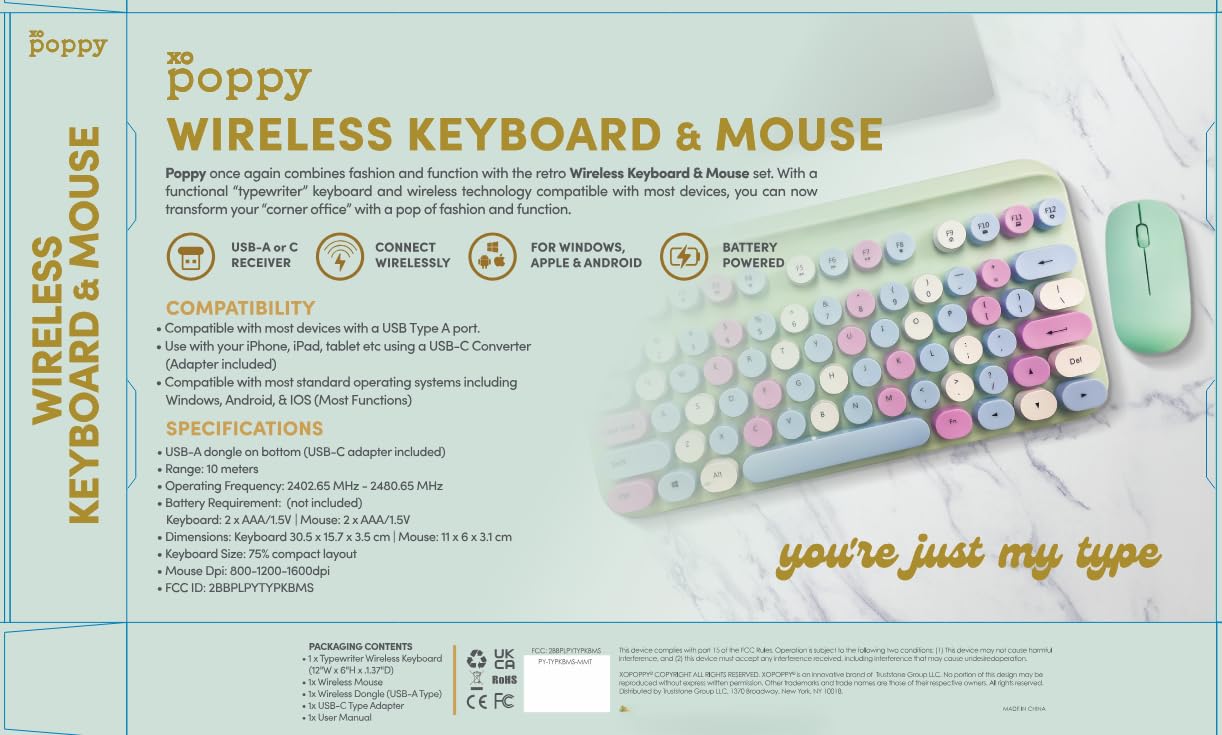
Image: The XO Poppy Wireless Keyboard and Mouse Combo, illustrating the keyboard, mouse, USB-A receiver, and USB-C adapter for various device connections.
Operating Instructions
Keyboard Functions
The keyboard features a 75% compact QWERTY layout with 78 keys. It functions as a standard keyboard for typing and input.
- Power On/Off: There is typically a power switch on the underside of the keyboard. Ensure it is in the "ON" position for operation.
- Indicator Lights: Observe any indicator lights for battery status or connection.
- Function Keys: Standard function keys (F1-F12) are accessible, often requiring the "Fn" key combination for secondary functions.
Mouse Functions
The wireless mouse provides precise cursor control with adjustable DPI settings.
- Power On/Off: There is typically a power switch on the underside of the mouse. Ensure it is in the "ON" position for operation.
- DPI Adjustment: The mouse features a DPI button, usually located near the scroll wheel. Press this button to cycle through DPI settings: 800, 1200, and 1600. Higher DPI settings result in faster cursor movement.
- Standard Buttons: Left-click, right-click, and scroll wheel functions operate as standard.
Compatibility
This combo is compatible with a wide range of operating systems and devices:
- Operating Systems: Windows, macOS, Android, iOS.
- Devices: Desktop PCs, Laptops, Tablets (including iPad), Smartphones (including iPhone).
- Connectivity: USB Type-A ports (direct receiver) or USB Type-C ports (with included adapter).
Maintenance
- Cleaning: Use a soft, dry cloth to clean the keyboard and mouse. For stubborn dirt, a slightly damp cloth can be used, ensuring no moisture enters the devices. Avoid harsh chemicals or abrasive cleaners.
- Battery Replacement: Replace batteries promptly when performance degrades. Always use new AAA batteries of the same type.
- Storage: When not in use for extended periods, turn off both the keyboard and mouse to conserve battery life. Store in a cool, dry place away from direct sunlight.
- Receiver Care: Keep the USB receiver free from dust and damage. When transporting, consider storing it in the mouse's battery compartment if available.
Troubleshooting
No Connection / Device Not Responding
- Check Batteries: Ensure both the keyboard and mouse have fresh batteries installed correctly.
- Power Switch: Verify that both the keyboard and mouse power switches are in the "ON" position.
- Receiver Connection: Ensure the USB receiver is securely plugged into a working USB port on your device. Try a different USB port.
- USB-C Adapter: If using the USB-C adapter, ensure it is firmly connected to both the receiver and your device.
- Distance: Ensure the keyboard and mouse are within the 10-meter operating range of the receiver.
- Interference: Move away from other wireless devices or strong electromagnetic fields that might cause interference.
- Re-pairing (if applicable): Some devices may require re-pairing. Refer to the manufacturer's website if standard troubleshooting does not resolve the issue.
Mouse Cursor Jumps or is Erratic
- Surface: Use the mouse on a clean, non-reflective, and opaque surface.
- DPI Setting: Adjust the DPI setting to a lower value if the cursor is too sensitive.
- Battery Level: Low mouse battery can cause erratic behavior. Replace batteries.
Keys Not Responding
- Battery Level: Low keyboard battery can cause keys to become unresponsive. Replace batteries.
- Cleanliness: Ensure no debris is lodged under the keys.
Specifications
| Feature | Detail |
|---|---|
| Brand | XO Poppy |
| Model | B0G6GF1QFY |
| Connectivity Technology | Wireless (USB-A receiver, USB-C adapter included) |
| Operating Frequency | 2402.65 MHz - 2480.65 MHz |
| Wireless Range | Up to 10 meters (32 feet) |
| Keyboard Layout | 75% Compact QWERTY, 78 keys |
| Keyboard Dimensions | 12 x 6.2 x 1.4 inches (30.5 x 15.7 x 3.5 cm) |
| Keyboard Power | 2 x AAA batteries (1.5V, not included) |
| Mouse DPI Settings | 800 / 1200 / 1600 DPI (adjustable) |
| Mouse Dimensions | 4.3 x 2.4 x 1.2 inches |
| Mouse Power | 2 x AAA batteries (1.5V, not included) |
| Compatible Operating Systems | Windows, macOS, Android, iOS |
| Item Weight | 1.2 Pounds (total combo) |
Warranty and Support
This product is covered by Amazon's Standard 30-Day Return Policy. For further support or inquiries, please refer to the seller's contact information on the Amazon product page or visit the XO Poppy brand store.
Seller: Truststone Group LLC
Amazon Store: XO Poppy Store on Amazon


