
1. Product Overview
The PETLIBRO Upgraded RFID Collar Tag (PLTG001) is designed to work seamlessly with compatible PETLIBRO pet feeders and water fountains, specifically the PLAF301 RFID Automatic Cat Feeder and the PLWF305 Smart App Monitoring Multi Cats Water Fountain. This tag enables personalized access for each pet in multi-pet households, ensuring they receive their designated meals and hydration while allowing for individual tracking via the companion app.

Image 1: PETLIBRO RFID Collar Tag and Collar
2. Key Features
- RFID Collar Tag Recognition: Ensures each pet in a multi-pet household has exclusive access to their designated feeder or fountain. It also tracks hydration amount, duration, and frequency.
- Compatible Devices: ONLY compatible with PETLIBRO RFID Automatic Cat Feeder PLAF301 and PETLIBRO Cat Water Fountain PLWF305. (Does not support microchips.)
- Dedicated Pairing: Each PETLIBRO RFID automatic cat feeder is compatible with only one collar tag. One collar tag can be paired with one fountain and one feeder simultaneously. For multiple identical devices, use separate tags.
- Comfort and Safety: The collar features a snap-release design that activates under approximately 6.6 lbs (3 kg) of force for pet safety. The tag is lightweight (0.18 oz) and includes a no-cinch adjustment system to prevent accidental tightening.
- QR Code on Tag: Allows recording of contact information for easier pet reunions.

Image 2: Snap-release design of the PETLIBRO collar for pet safety.
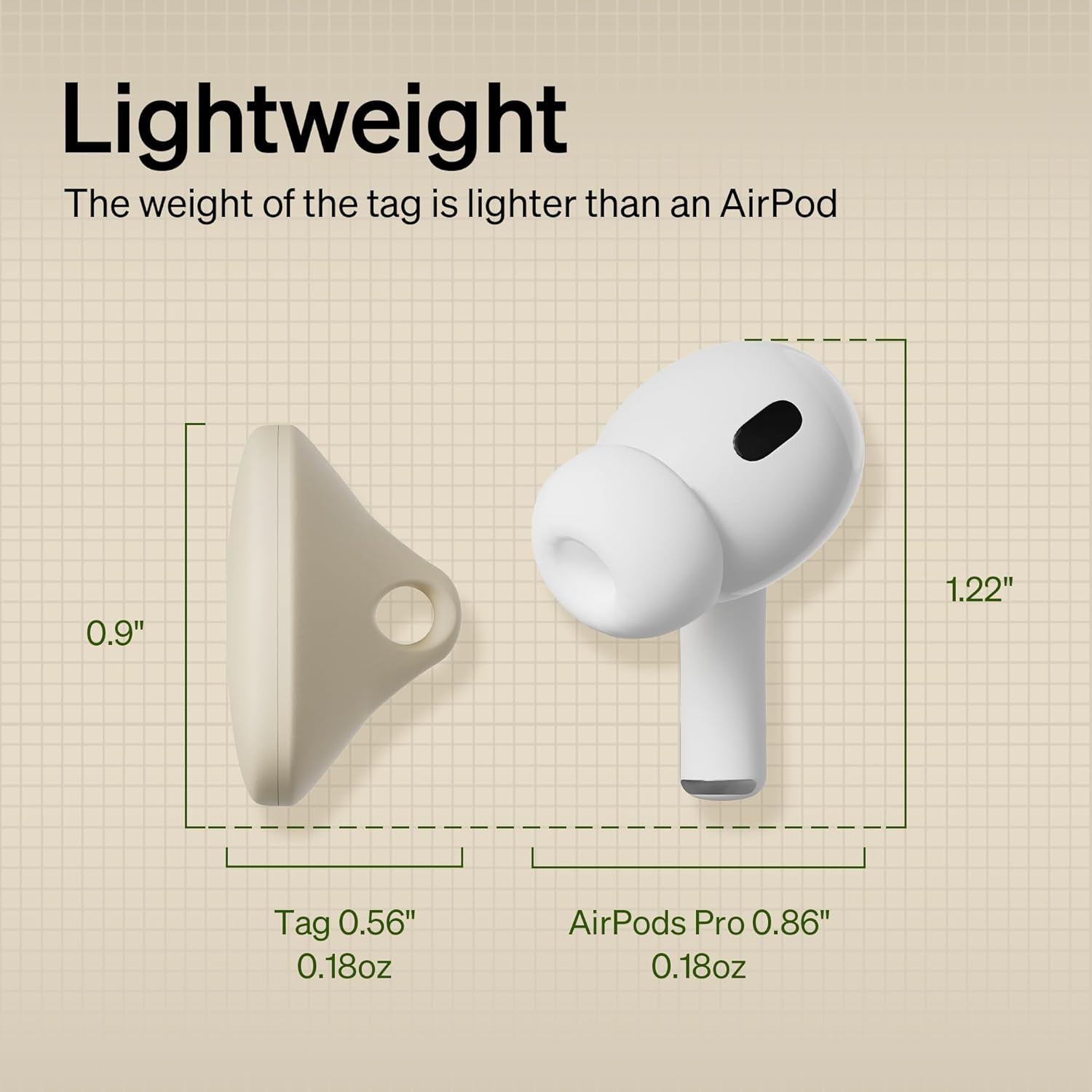
Image 3: Lightweight PETLIBRO RFID tag, weighing only 0.18 oz.
3. Setup and Pairing Instructions
Follow these steps to pair your RFID Collar Tag with your PETLIBRO device:
- Access Device Page: Open the PETLIBRO app and tap on your specific PETLIBRO RFID Pet Feeder (PLAF301) or Water Fountain (PLWF305) to enter its device page.
- Initiate Pairing: On the device page, locate and tap the "ADD" option under the "COLLAR" section. The device will then prompt "Waiting for the collar to pair."
- Pairing Method 1: RFID Recognition Area
- Place the RFID collar tag in the RFID recognition area of the feeder or fountain. Ensure it is as close to the RFID reader as possible.
- The device will confirm "Collar paired successfully."
- Pairing Method 2: Scan QR Code (if applicable)
- Alternatively, within the app, select the "Scan QR code" option.
- Scan the QR code located on the RFID collar tag using your phone's camera.
- The device will confirm "Collar paired successfully."
- Bind Pet Information: After successful pairing, tap "CONFIRM" in the app. Then, tap the "+" icon under the collar to add your pet's information (name, type, age, weight, sex, sterilization status). Tap "SAVE" to complete.
- Final Confirmation: Select the newly added pet and tap "CONFIRM" to finalize the binding process.
Video 1: This video demonstrates how to add a collar tag and bind your pet to the PETLIBRO RFID Automatic Pet Feeder using the app, showing both direct pairing and QR code scanning methods.

Image 4: Visual guide illustrating two methods for pairing the RFID collar tag: holding near the feeder or scanning with the app.
4. Operating Instructions
Once paired, the RFID Collar Tag enables the following functions:
- Automatic Access: When your pet approaches a compatible PETLIBRO RFID feeder or fountain, the device will recognize their unique collar tag and automatically grant access to their food or water.
- Personalized Feeding/Hydration: The device will only open for the pet whose tag is recognized, preventing other pets from accessing their food or water.
- App Monitoring: The PETLIBRO app will record your pet's feeding and hydration data, allowing you to monitor their habits and identify any changes.

Image 5: A cat using the collar-tag-activated food bowl lid of the PETLIBRO RFID feeder.
5. Maintenance
- Cleaning: Regularly clean the collar tag and the collar with a damp cloth to remove dirt and debris. Avoid harsh chemicals.
- Inspection: Periodically check the collar and tag for any signs of wear, damage, or loose components. Ensure the snap-release mechanism is functioning correctly.
- Placement: Ensure the tag is securely attached to the collar and positioned comfortably for your pet, allowing the RFID reader to detect it easily.
6. Troubleshooting
- Tag Not Recognized:
- Ensure the tag is within close proximity to the RFID reader on the feeder/fountain.
- Check if the tag is correctly paired with the device via the PETLIBRO app. If not, repeat the pairing process.
- Verify that the PETLIBRO device is powered on and functioning correctly.
- Difficulty Pairing:
- Ensure only one collar tag is being paired at a time.
- Confirm that your PETLIBRO device model is compatible with this RFID tag (PLAF301 or PLWF305).
- Restart the PETLIBRO app and try the pairing process again.
- Collar Issues:
- If the collar is too loose or too tight, adjust it for your pet's comfort and safety.
- If the snap-release mechanism is not working as intended, inspect for damage or obstruction.
7. Specifications
| Feature | Detail |
|---|---|
| Product Dimensions | 0.9 x 0.56 x 0.9 inches |
| Item Model Number | PLTG001 |
| Weight | 0.63 ounces (tag: 0.18 oz) |
| Material | Plastic |
| Target Species | Cats, Dogs, Small Animals |
| Special Feature | Lightweight, Snap-Release Design |
| Included Components | 1 collar, 1 tag, and 1 tag ring |
| Batteries Required | No |
8. Warranty and Support
This PETLIBRO RFID Collar Tag comes with a 24-month warranty from the date of purchase. For any product inquiries, technical assistance, or warranty claims, please contact PETLIBRO customer support through their official website or the contact information provided in your product packaging.