
Introduction
This manual provides essential information for the safe and efficient operation, maintenance, and troubleshooting of your Total TDLI12206 12V Cordless Drill. Please read this manual thoroughly before using the tool and keep it for future reference.
The Total TDLI12206 is a versatile cordless drill designed for various drilling and fastening tasks. It features a powerful 12V Lithium-ion system, delivering an impressive 20 Nm of torque. The two-speed mechanical gear system offers flexibility with speeds ranging from 0-400 to 0-1500 RPM. With 15+1 torque settings and a reliable 0.8-10mm plastic chuck, you maintain precise control. An integrated LED work light illuminates your workspace, and a modern Type-C USB charging port provides convenient charging. The package includes a 65mm Cr-V bit and two 1.5Ah battery packs, all organized in a carry case. Note that the charger must be purchased separately.
Safety Information
Always follow basic safety precautions to reduce the risk of fire, electric shock, and personal injury when using power tools.
- Work Area Safety: Keep your work area clean and well-lit. Cluttered or dark areas invite accidents. Do not operate power tools in explosive atmospheres, such as in the presence of flammable liquids, gases, or dust.
- Electrical Safety: Avoid body contact with earthed or grounded surfaces. Do not expose power tools to rain or wet conditions. Water entering a power tool will increase the risk of electric shock.
- Personal Safety: Always wear eye protection. Use safety glasses, goggles, or a face shield. Wear hearing protection when operating noisy tools. Dress properly; avoid loose clothing or jewelry. Keep hair, clothing, and gloves away from moving parts.
- Tool Use and Care: Do not force the power tool. Use the correct power tool for your application. Disconnect the battery pack from the power tool before making any adjustments, changing accessories, or storing power tools.
- Battery Pack Use and Care: Recharge only with the charger specified by the manufacturer. Do not use battery packs with any other power tools. When the battery pack is not in use, keep it away from other metal objects.
Package Contents
Verify that all items listed below are present in your package:
- Total TDLI12206 12V Cordless Drill
- Two (2) 1.5Ah Lithium-ion Battery Packs
- One (1) Cr-V 65mm Drill Bit
- Carry Case
Note: The charger for the battery packs is sold separately.
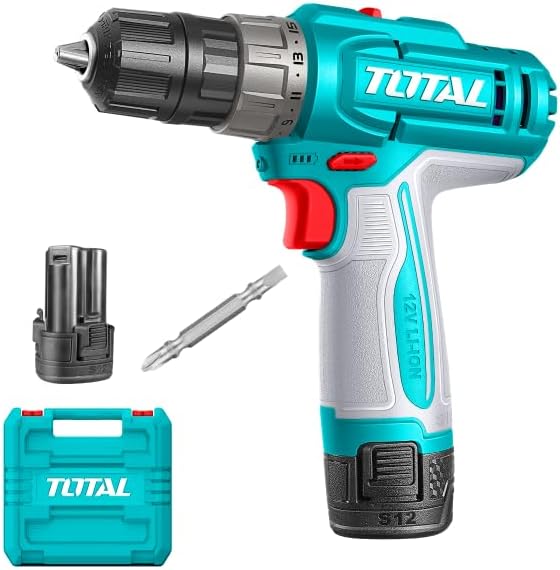
Image: The Total TDLI12206 12V Cordless Drill, showing the main unit, a 1.5Ah battery pack, a Cr-V 65mm drill bit, and the carry case.
Product Overview
Familiarize yourself with the main components and features of your cordless drill.
- Chuck: 0.8-10mm plastic chuck for secure bit retention.
- Torque Adjustment Ring: 15+1 settings for precise control over fastening and drilling.
- Speed Selector: Two-speed mechanical gear system (0-400 RPM and 0-1500 RPM).
- Trigger Switch: Variable speed control.
- Forward/Reverse Selector: Changes rotation direction.
- LED Work Light: Illuminates the work area.
- Battery Pack: 12V Lithium-ion, 1.5Ah capacity.
- Type-C USB Charging Port: Located on the battery for convenient charging.

Image: Side view of the Total TDLI12206 12V Cordless Drill, illustrating the Type-C charging port, 20Nm torque, and 1.5Ah battery capacity.
Setup
1. Charging the Battery
- Ensure the battery pack is securely inserted into a compatible Type-C USB charger (sold separately).
- Connect the charger to a power source.
- Allow the battery to charge fully before first use. Refer to your charger's manual for specific charging indicators.
2. Installing/Removing Drill Bits
- To Install: Rotate the chuck counter-clockwise until the jaws are open wide enough to insert the drill bit. Insert the bit fully and then rotate the chuck clockwise to tighten it securely.
- To Remove: Rotate the chuck counter-clockwise until the jaws release the drill bit.
Always ensure the battery is removed from the drill before installing or removing bits to prevent accidental startup.
Operating Instructions
1. Selecting Speed
The drill features a two-speed mechanical gear selector located on top of the tool:
- Position 1 (Low Speed, 0-400 RPM): Ideal for driving screws and drilling larger holes where higher torque is required.
- Position 2 (High Speed, 0-1500 RPM): Suitable for drilling smaller holes and applications requiring faster rotation.
Change speed settings only when the drill is stopped to prevent gear damage.
2. Adjusting Torque
The torque adjustment ring allows you to select from 15 torque settings plus a drill mode. Rotate the ring to the desired setting:
- Settings 1-15: For driving screws. Lower numbers are for smaller screws or softer materials, higher numbers for larger screws or harder materials.
- Drill Symbol: For drilling applications, providing maximum torque.
3. Forward/Reverse Operation
The forward/reverse selector switch is located above the trigger. Push it left for forward rotation (drilling/tightening) and right for reverse rotation (removing screws/loosening). Center position locks the trigger for safety.
4. Using the LED Work Light
The integrated LED work light automatically illuminates when the trigger is pressed, providing better visibility in dimly lit areas.
Maintenance
Regular maintenance ensures optimal performance and extends the life of your tool.
- Cleaning: Keep the ventilation openings clear and free of dust. Use a soft, damp cloth to clean the tool's exterior. Do not use harsh chemicals or abrasive cleaners.
- Battery Care: Store batteries in a cool, dry place away from direct sunlight. Do not store batteries in a discharged state for extended periods.
- Chuck Maintenance: Periodically clean the chuck jaws to ensure proper gripping of bits.
- Storage: Store the drill and its accessories in the provided carry case in a dry, secure location out of reach of children.
Troubleshooting
If you encounter issues, refer to the following common problems and solutions:
| Problem | Possible Cause | Solution |
|---|---|---|
| Drill does not start | Battery not charged or improperly inserted; Forward/Reverse selector in center (locked) position. | Charge battery; Reinsert battery correctly; Move selector to forward or reverse position. |
| Loss of power during operation | Battery charge is low. | Recharge the battery pack. |
| Bit slips in chuck | Chuck not tightened sufficiently; Bit shank is dirty or damaged. | Tighten chuck firmly; Clean or replace bit. |
| Overheating | Continuous heavy use; Blocked ventilation slots. | Allow tool to cool; Clear ventilation slots. |
Specifications
| Feature | Specification |
|---|---|
| Brand | Total |
| Model Number | TDLI12206 |
| Voltage | 12 Volts |
| Maximum Torque | 20 Newton Meters |
| No-load Speed (Low) | 0-400 RPM |
| No-load Speed (High) | 0-1500 RPM |
| Chuck Capacity | 0.8-10 mm |
| Torque Settings | 15+1 |
| Battery Type | Lithium-ion |
| Battery Capacity | 1.5 Ampere Hours |
| Charging Port | Type-C USB |
| Material | Plastic |
| Item Weight | 1 Kilogram |
| Product Dimensions (L x W x H) | 15 x 10 x 30 cm |
| Special Features | 15+1 Torque Settings, Two-speed Gear, Integrated LED Work Light, Type-C USB Charging Port |
| Included Components | 2x 1.5Ah Battery, Carry Case, 1x Cr-V 65mm Bit |
Warranty Information
This product is covered by a limited warranty. For specific warranty terms and conditions, please refer to the warranty card included with your purchase or contact Total customer service. Keep your proof of purchase for warranty claims.
Customer Support
For technical assistance, spare parts, or any other inquiries, please contact Total customer support. Contact details can typically be found on the product packaging or the official Total website.


