
Product Overview
The RAINPOINT WiFi Water Timer is a smart sprinkler controller designed for garden hose applications. This system includes a 2-zone water timer (Model HTV245FRF) and a WiFi antenna gateway (Model HWG023WBRF). It allows users to manage watering schedules remotely via the RAINPOINT HOME app, providing flexible and efficient irrigation for various gardening needs.
The HWG023 gateway extends the signal transmission range up to 250 meters and can penetrate 3-4 walls, ensuring stable connectivity between the timer and your home network. One gateway can support up to 8 RAINPOINT WiFi devices, creating a comprehensive smart watering ecosystem.
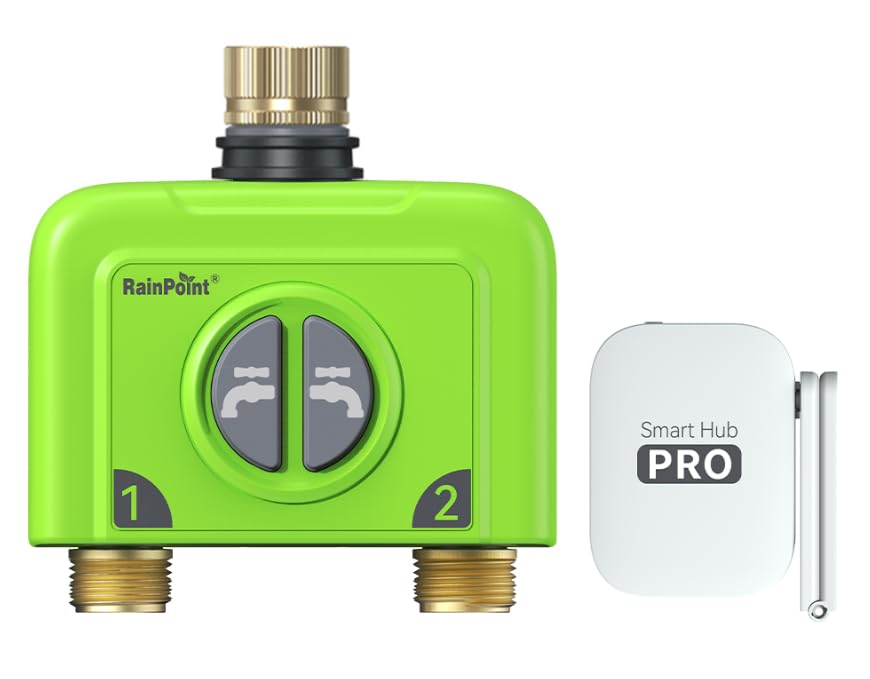
Image: The RAINPOINT WiFi Water Timer main unit, showcasing its compact design and dual hose connections.
Package Contents
- RAINPOINT 2-Zone WiFi Water Timer (Model HTV245FRF)
- RAINPOINT WiFi Antenna Gateway (Model HWG023WBRF)
- User Manual
Safety Information
- Do not immerse the water timer or gateway in water.
- Use only new, high-quality AA alkaline batteries for the water timer.
- Ensure all hose connections are securely tightened to prevent leaks.
- Protect the device from freezing temperatures. Remove batteries and store the timer indoors during winter months to prevent damage.
- The gateway is for indoor use only and should be kept dry.
Setup
1. Battery Installation (Water Timer)
Locate the battery compartment on the RAINPOINT Water Timer. Open the compartment and insert four (4) AA alkaline batteries, ensuring correct polarity. Close the compartment cover firmly to maintain its water-resistant seal.
2. Water Timer Installation
Screw the RAINPOINT Water Timer onto your outdoor hose bib. Hand-tighten until secure, but do not overtighten. Connect your garden hoses to the two output zones (labeled 1 and 2) on the timer. Ensure the hose bib is fully open after installation.
Note: The timer unit can be heavy, especially when hoses are attached. Verify that your hose bib and plumbing can adequately support the combined weight.
3. Gateway Setup (HWG023)
Plug the HWG023 WiFi Antenna Gateway into a standard indoor power outlet. Position the gateway within range of your 2.4GHz WiFi router and the water timer. The gateway will automatically attempt to connect to your home WiFi network.
Important: The gateway only supports 2.4GHz WiFi networks. It is not compatible with 5GHz WiFi.
4. App Installation and Pairing
Download the RAINPOINT HOME app from your smartphone's app store (available for iOS and Android). Follow the in-app instructions to create an account and add your HWG023 gateway and water timer. This process typically involves selecting 'Add Device' and following prompts to connect to your WiFi network and then to the timer.
Operating Instructions
The RAINPOINT HOME app provides comprehensive control over your water timer. You can configure up to 6 distinct watering plans for each of the two zones.

Image: A visual guide to the flexible watering schedule options, illustrating three watering modes and five frequency settings.
Watering Modes:
- Normal Irrigation: Provides a continuous flow of water for a set duration.
- Cycle & Soak: Waters in short bursts followed by soak times. This mode improves water absorption, reduces runoff, and is ideal for sloped areas or dense soil.
- Misting Irrigation: Delivers very short, frequent bursts of water, suitable for delicate plants, seed germination, or specific misting requirements.
Watering Frequency Options:
- Everyday: Activates the watering schedule daily.
- Odd Days: Activates the watering schedule on odd-numbered days of the month.
- Even Days: Activates the watering schedule on even-numbered days of the month.
- Interval: Allows you to set watering to occur every 2 to 30 days.
- Custom: Provides the flexibility to select specific days of the week for watering (e.g., Monday, Wednesday, Friday).
Manual Operation:
The RAINPOINT HOME app also allows for manual control of each zone, enabling you to start or stop watering instantly outside of your programmed schedules. Refer to the app interface for specific manual control options.
Maintenance
Battery Replacement:
When the battery level indicator in the RAINPOINT HOME app shows low power, replace all four (4) AA batteries in the water timer with new ones. Ensure the battery compartment is securely closed after replacement to maintain water resistance.
Winterization:
Before the first expected frost, disconnect the water timer from the hose bib. Remove the batteries and store the unit indoors in a dry, protected area. This prevents potential damage from freezing water expanding within the device.
Troubleshooting
| Problem | Possible Cause | Solution |
|---|---|---|
| Water timer not connecting to the app. | Gateway not powered, out of range, or incorrect WiFi band. | Ensure the gateway is plugged in and powered. Move the gateway closer to both the water timer and your 2.4GHz WiFi router. Confirm your home WiFi is 2.4GHz. Attempt to re-pair the devices through the RAINPOINT HOME app. |
| Water not flowing from a zone. | Hose bib closed, low battery, or schedule not active. | Verify that the outdoor hose bib is fully open. Replace the batteries in the water timer. Check the watering schedule and manual control status in the RAINPOINT HOME app. |
| Rapid battery drain. | Weak signal between timer and gateway, frequent valve operations, or low-quality batteries. | Ensure the gateway is within optimal range of the water timer to maintain a strong signal. Use high-quality alkaline batteries. If the issue persists, contact RAINPOINT customer support. |
| Alexa integration not working. | Incorrect Alexa Skill enabled or setup. | Enable the "HomGar Smart" Alexa Skill. During setup, specify RainPoint as the device brand. Ensure your Alexa device is connected to the same network as your gateway. |
Specifications
- Water Timer Model: HTV245FRF
- Gateway Model: HWG023WBRF
- Brand: RAINPOINT
- Number of Zones: 2
- Connectivity: WiFi (2.4GHz only)
- Gateway Range: Up to 250 meters (820 feet), capable of penetrating 3-4 walls
- App Compatibility: RAINPOINT HOME app
- Timer Power Source: 4 x AA Alkaline Batteries (not included)
- Gateway Power Source: AC Power Outlet
- Smart Home Compatibility: Smart Home Compatible (via app and Alexa Skill)
Warranty and Support
RAINPOINT products are manufactured to high-quality standards and are designed for reliable performance. For detailed warranty information, product support, or technical assistance, please visit the official RAINPOINT website or contact their customer service department. Please retain your purchase receipt as proof of purchase for any warranty claims.
RAINPOINT Official Website: www.rainpointonline.com


