
1. Introduction and Overview
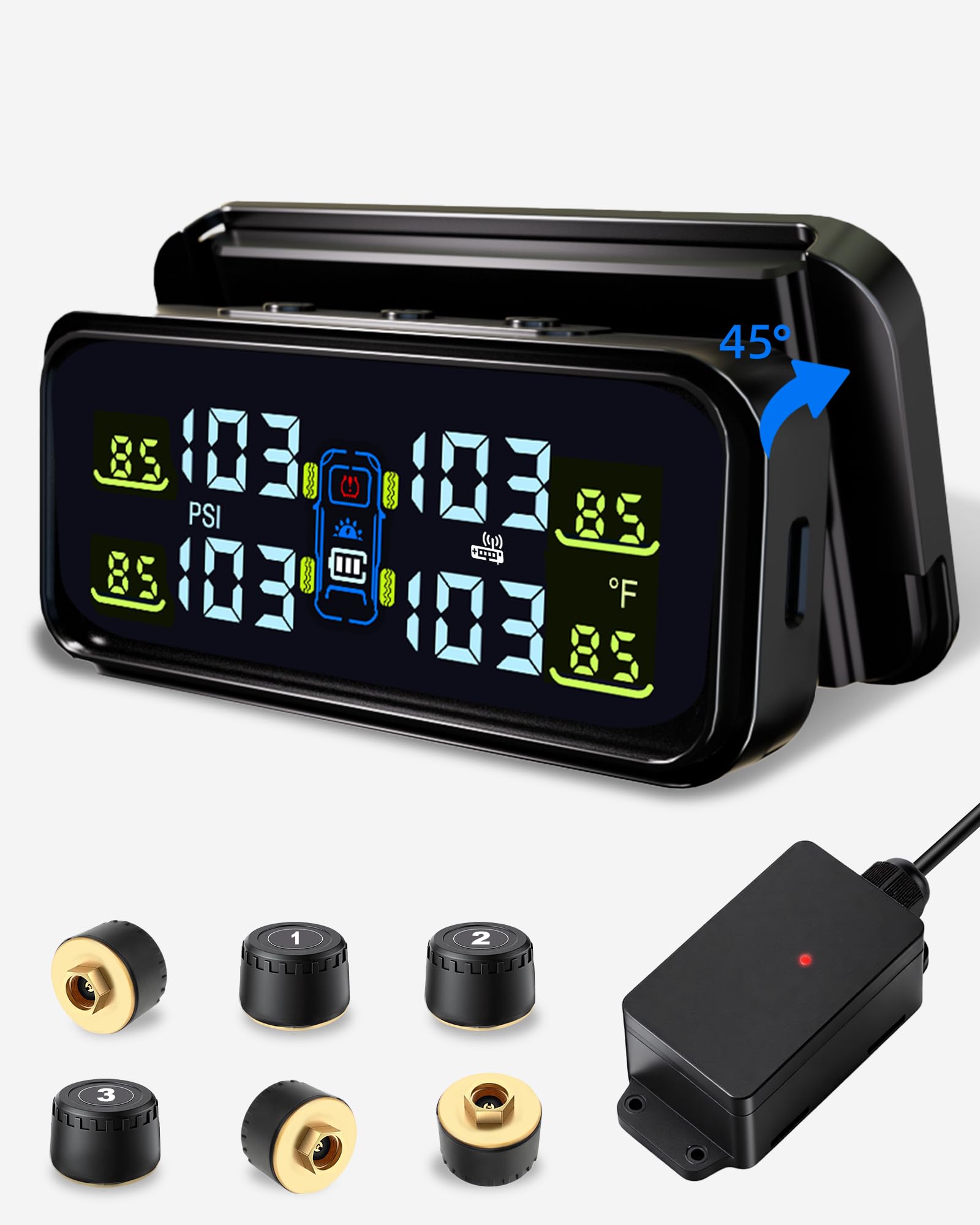
The Tenpmas RV Tire Pressure Monitoring System (TPMS) TY102 is designed to enhance driving safety and tire longevity for various vehicles, including RVs, trucks, SUVs, and towing medium trailers. This system provides real-time tire pressure and temperature data, alerting you to potential issues before they become critical. It features 6 all-metal sensors, a repeater for extended signal range, and a dual solar/USB charging display.
The TY102 system supports a wide pressure range of 0–116 PSI and offers 6 distinct alarm modes for comprehensive monitoring. Its robust all-metal integrated pure copper sensor design ensures durability and stability in harsh environments, including marine trailers. The detachable mounting bracket allows for flexible placement and easy operation of the display unit.
2. What's in the Box
Your Tenpmas RV TPMS TY102 package includes the following items:
- TPMS Display Unit
- 6 All-Metal Tire Pressure Sensors (TY102 version)
- Repeater for Long-Distance Signal Transmission
- Detachable Mounting Bracket with Double-Sided Tape
- 6 Locking Nuts
- Wrench for Sensor Installation
- USB Charging Cable (USB-C)
- Instruction Manual

3. Setup & Installation
3.1 Initial Charging
Before first use, fully charge the display unit via the provided USB-C cable. Solar charging will maintain the battery, but initial full charge ensures optimal performance.
3.2 Display Unit Placement
Mount the display unit on your windshield using the detachable bracket and double-sided tape. Ensure it does not obstruct your view. The angle can be adjusted vertically for optimal data reading.

3.3 Sensor Installation
All sensors are pre-programmed to specific tire positions (e.g., LF for Left Front, RR for Right Rear). Simply match each sensor to its marked wheel position. Ensure you install sensors on metal valve stems only, as plastic valve stems can be damaged.
- Remove the existing valve cap from the tire.
- Screw on the corresponding TPMS sensor firmly.
- Use the provided wrench to tighten the locking nut against the sensor to prevent theft and ensure a secure fit.
Tire balancing may be required after sensor installation due to the sensor's weight (0.48 ounces).

3.4 Repeater Installation
The repeater extends the signal transmission distance up to 66 feet, crucial for longer vehicles. It is waterproof and connects to a 12V power supply. Install the repeater between the display and the furthest sensor for optimal signal strength. It automatically pairs with the system.

3.5 Setup Video Guide
Watch this video for a detailed guide on setting up your TPMS system:
4. Operating Instructions
4.1 Real-Time Monitoring
The display unit provides real-time updates on tire pressure (PSI) and temperature for all connected sensors. It supports 2/4/6-wheel modes, allowing flexible switching for various vehicle configurations.
4.2 Alarm Modes
The system features 6 alarm modes to alert you to critical tire conditions:
- High Pressure Alarm: Alerts if tire pressure exceeds a safe limit.
- Low Pressure Alarm: Alerts if tire pressure drops below a safe limit.
- High Temperature Alarm: Alerts if tire temperature exceeds a safe limit.
- Sensor Loss Alarm: Alerts if communication with a sensor is lost.
- Fast Leak Alarm: Alerts for rapid pressure loss.
- Slow Leak Alarm: Alerts for gradual pressure loss.
Audible and visual alerts are provided for each alarm mode.

4.3 Automatic Screen Brightness
The color screen supports 3 levels of automatic brightness adjustment. This ensures clear visibility in various lighting conditions, from bright sunny days to nighttime driving, preventing glare and improving readability.

5. Maintenance
5.1 Dual Power Supply
The display unit supports both solar and USB charging. Solar charging is efficient for continuous operation during daylight hours. For insufficient sunlight or low battery, use the provided USB-C cable to charge the device. Ensure the device is fully charged via USB-C before initial use.

5.2 Sensor Battery Replacement
Sensors use CR2032 batteries. When a sensor's battery is low, the system will provide an alert. To replace the battery:
- Use the provided wrench to open the sensor cover anti-clockwise.
- Carefully remove the old CR2032 battery.
- Insert a new CR2032 battery, ensuring the positive pole is facing upwards.
- Check the waterproof O-ring for any damage. Replace it if broken to maintain water resistance.
- Screw the sensor cover clockwise with the wrench until secure.
6. Troubleshooting
- Incorrect Pressure Readings: Ensure sensors are installed on the correct tire positions and tightened securely. Verify the display unit is receiving a strong signal.
- Signal Loss: Check the repeater's power supply and placement. Ensure it is positioned optimally between the display and the furthest sensor.
- Display Not Turning On: Confirm the display unit is fully charged via USB-C or receiving sufficient sunlight for solar charging.
- Tire Balancing: If you experience vibration after sensor installation, tire balancing may be required.
- Valve Stem Compatibility: This system is designed for metal valve stems only. Do not install on plastic valve stems to avoid damage.
7. Specifications
| Feature | Detail |
|---|---|
| Brand | Tenpmas |
| Model | TY102 |
| Item Model Number | TY102-US5 |
| Pressure Range | 0-116 PSI (0-130 PSI mentioned in title) |
| Sensor Type | All-Metal Integrated Pure Copper |
| Repeater Range | Max 66 feet (20m) |
| Power Supply | USB / Solar Charging |
| Display | Color Screen with 3-level Automatic Brightness |
| Item Weight | 14.1 ounces |
| Package Dimensions | 8.9 x 5.5 x 1.8 inches |
| Batteries | 1 Lithium Polymer battery required (included) |
The TY102 system is suitable for harsh environments such as high pressure and high/low temperatures, and can withstand seawater corrosion, making it suitable for marine trailers.

8. Warranty & Support
For warranty information, technical support, or any inquiries regarding your Tenpmas RV Tire Pressure Monitoring System TY102, please refer to the contact details provided in the product packaging or visit the official Tenpmas website. Keep your purchase receipt for warranty claims.