
1. Introduction
Thank you for choosing the Swissbrand Vintage Ambient LED Clock. This device combines a classic aesthetic with modern functionality, featuring an ambient LED display and convenient dual USB charging ports. This manual provides detailed instructions for setup, operation, and maintenance to ensure optimal performance and longevity of your clock.

Image 1.1: The Swissbrand Vintage Ambient LED Clock displayed on a coffee table.
2. Package Contents
- Swissbrand Vintage Ambient LED Clock (Model: SBVINTCLK-MFN)
- USB Power Cable (USB-A to USB-C)
- User Manual
Note: A 5V USB power adapter is not included and must be supplied separately. For optimal charging performance, use a compatible USB power adapter.
3. Product Overview
The Swissbrand Vintage Ambient LED Clock features a unique design with a wood-grain housing and a vintage-style LED digit display. It includes onboard controls for easy adjustments and dual USB ports for charging external devices.

Image 3.1: Front view of the clock with labels indicating Vintage-Style Analog Readout, Ambient LED Clock Display, Dual USB-A & USB-C Ports, and Onboard Controls.
Key Features:
- Warm Ambient LED Display: Provides a soft, eye-pleasing glow without harsh glare.
- Wood-Grain Housing: Adds a retro and decorative touch to any space.
- Dual Device Charging: Equipped with front USB-A and USB-C ports for simultaneous charging of two devices.
- USB-Powered: Designed for easy placement and power via any standard 5V USB power adapter.
- Simple Onboard Controls: Intuitive buttons for setting time and adjusting display brightness.
4. Setup Instructions
4.1 Power Connection
- Connect the provided USB power cable to the USB-C power input port located on the back of the clock.
- Plug the other end of the USB power cable into a compatible 5V USB power adapter (not included).
- Plug the USB power adapter into a standard wall outlet. The clock display will illuminate, indicating it is powered on.
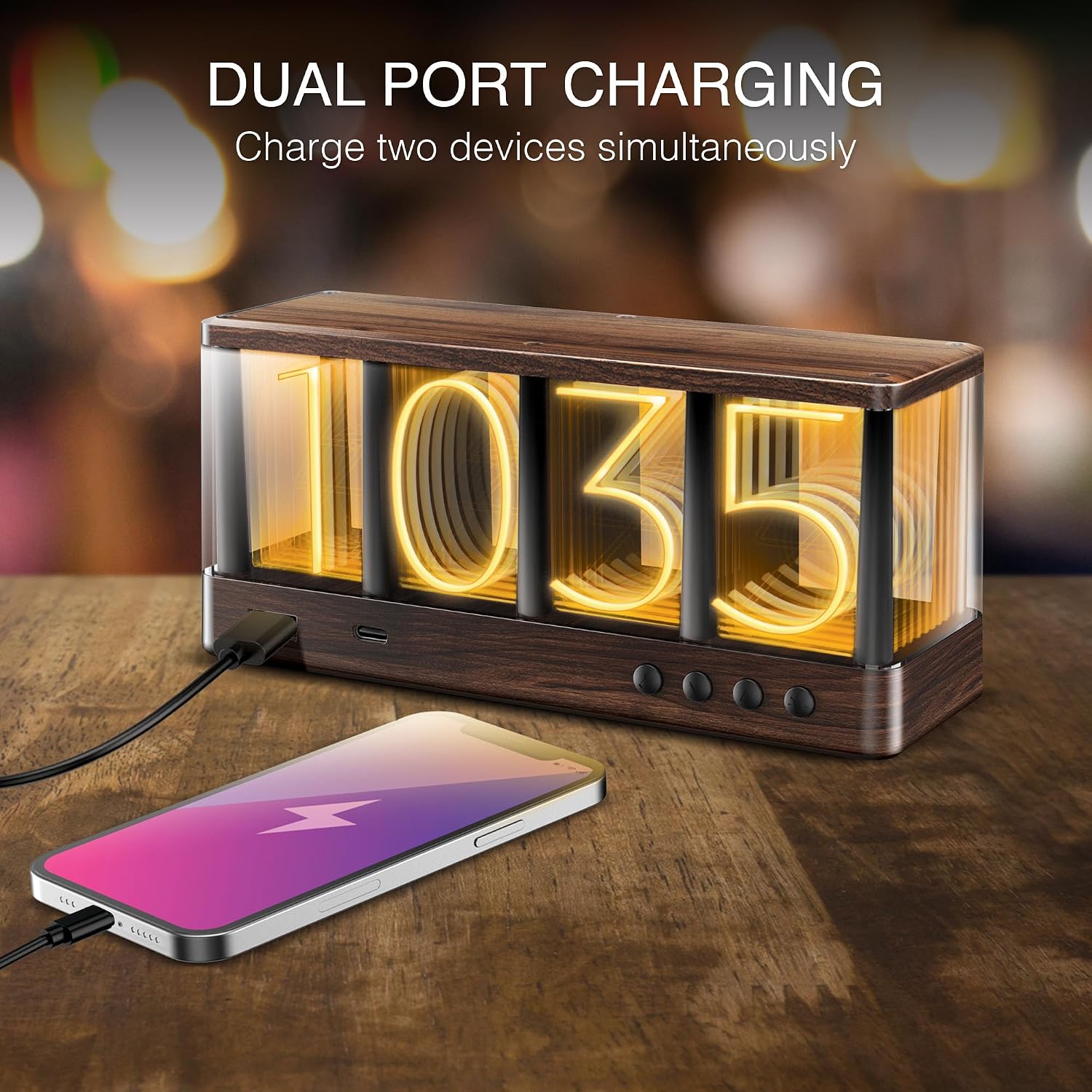
Image 4.1: The clock connected to power, with a smartphone charging from its front USB port.
5. Operating Instructions
5.1 Setting the Time
The clock features four control buttons on the front panel, typically labeled (from left to right) as SET, UP, DOWN, and BRIGHTNESS.
- Press and hold the SET button for approximately 3 seconds until the hour digits begin to flash.
- Use the UP and DOWN buttons to adjust the hour.
- Press the SET button again to move to the minute digits.
- Use the UP and DOWN buttons to adjust the minutes.
- Press the SET button one more time to confirm the time and exit the setting mode.
5.2 Adjusting Display Brightness
- Press the BRIGHTNESS button repeatedly to cycle through different brightness levels (e.g., High, Medium, Low, Off).
- Select the desired brightness level. The clock will save your preference automatically.
5.3 Using the Charging Ports
The clock is equipped with one USB-A port and one USB-C port on the front for charging external devices.
- Connect your device's charging cable to either the USB-A or USB-C port on the clock.
- Ensure your device is properly connected and begins charging.
Important: Charging speed depends on the connected device, the quality of your charging cable, and the power output of your 5V USB power adapter (not included). The clock provides standard 5V output for charging.
6. Maintenance
6.1 Cleaning
- Unplug the clock from the power source before cleaning.
- Use a soft, dry, lint-free cloth to wipe the surface of the clock.
- Do not use abrasive cleaners, solvents, or chemical sprays, as these may damage the finish or electronic components.
6.2 General Care
- Avoid exposing the clock to direct sunlight, extreme temperatures, or high humidity.
- Do not place the clock near strong magnetic fields.
- Handle the clock with care to prevent drops or impacts.
7. Troubleshooting
- Clock not powering on:
- Ensure the USB power cable is securely connected to both the clock and a functional 5V USB power adapter.
- Verify that the power adapter is plugged into a live wall outlet. - Display is dim or not visible:
- Press the BRIGHTNESS button to cycle through brightness levels. The display might be set to the lowest setting or off.
- Ensure the clock is receiving adequate power. - Devices not charging via USB ports:
- Confirm that the clock is powered on.
- Check that your device's charging cable is properly connected to both the clock's USB port and your device.
- Try a different charging cable or device to rule out cable/device issues.
- Ensure your 5V USB power adapter provides sufficient power for charging multiple devices simultaneously. - Time is incorrect:
- Follow the 'Setting the Time' instructions in Section 5.1 to reset the time.
8. Specifications
| Feature | Specification |
|---|---|
| Brand | Swissbrand |
| Model | SBVINTCLK-MFN |
| Display Type | Digital LED (Vintage-style) |
| Power Source | Corded Electric (USB-powered, 5V adapter required) |
| Charging Ports | 1x USB-A, 1x USB-C (5V output) |
| Material | Wood |
| Product Dimensions | 17.78 x 3.81 x 8.13 cm (7 x 1.5 x 3.2 inches) |
| Weight | 453.59 g (1 lb) |
| Special Features | Ambient LED, Dual USB Charging |
9. Safety Information
- Do not disassemble or attempt to repair the clock yourself. This may void the warranty and pose safety risks.
- Keep the clock away from water or other liquids to prevent electric shock or damage.
- Ensure proper ventilation around the clock, especially when charging devices, to prevent overheating.
- Use only a compatible 5V USB power adapter. Using an adapter with incorrect voltage may damage the device.
- This product is intended for indoor use only.
10. Warranty and Support
Swissbrand products are designed for reliability and performance. For warranty information or technical support, please refer to the warranty card included with your purchase or visit the official Swissbrand website. Please have your model number (SBVINTCLK-MFN) and proof of purchase ready when contacting support.