
Introduction
The FosPower NOAA Emergency Weather Radio D8 is a multi-functional device designed to provide essential information and power during emergencies. It features AM/FM and NOAA weather band reception, a powerful internal battery that doubles as a power bank, multiple charging options (USB, solar, hand crank), a flashlight, a reading light, and an SOS alarm. This manual provides detailed instructions for the safe and effective use of your radio.
Safety Instructions
- Do not expose the device to extreme temperatures, direct sunlight for prolonged periods, or high humidity.
- Avoid dropping or subjecting the radio to strong impacts.
- Do not disassemble or attempt to repair the device yourself. Refer to qualified service personnel.
- Keep the device away from water and other liquids to prevent electric shock or damage. The radio has an IPX3 rating, meaning it is resistant to water spray, but not submersion.
- Ensure proper ventilation when charging to prevent overheating.
Product Overview
Components and Controls
Familiarize yourself with the various parts of your FosPower D8 Emergency Weather Radio:

Image: FosPower D8 Emergency Weather Radio with key components labeled for easy identification.
- Solar Panel: For passive charging under sunlight.
- Crank Handle: For manual power generation.
- LED Reading Light: Provides illumination for reading or general area lighting.
- Power Indicator: Displays battery charge level.
- SOS Button: Activates a loud siren and flashing light for emergency signaling.
- 2x USB Ports: One USB-A output for charging external devices, one USB-C input for charging the radio.
- LED Flashlight: Powerful beam for directional lighting.
- AM/FM/Weather Band: Controls for radio frequency selection.
- Headphone Jack: For private listening.
- Automated NOAA Alert: Receives emergency weather alerts.
Setup
Initial Charging
Before first use, fully charge the radio using the included USB-A to USB-C charging cable. Connect the USB-C end to the radio's input port and the USB-A end to a standard USB power adapter (not included) or a computer USB port. The power indicator will show charging status.
Powering On/Off
Press and hold the power button (usually marked with a power symbol) to turn the radio on or off.
Operating Instructions
Radio Operation (AM/FM/NOAA)
- Turn On: Press the power button.
- Select Band: Press the 'BAND' button to cycle through AM, FM, and NOAA weather bands.
- Tune Stations: Use the tuning buttons (often marked with arrows or 'TUNE +/-') to find desired stations. Extend the telescopic antenna for better reception.
- Adjust Volume: Use the 'VOL +/-' buttons to adjust the sound level.
- NOAA Alert: When in NOAA mode, the radio can automatically activate to broadcast emergency weather alerts. Ensure this feature is enabled if available and desired.

Image: The radio's digital display showing frequency and battery status. The internal battery capacity is 37000mWh.
Power Bank Function
The radio's internal 37000mWh (10000mAh) battery can charge external USB devices.
- Connect your device's USB charging cable to the USB-A output port on the radio.
- The radio will begin charging your device. Monitor your device's charging indicator.

Image: The FosPower D8 radio connected to a smartphone, demonstrating its power bank capability.
Lighting Functions
- Flashlight: Press the flashlight button (often located on the side or front) to turn the LED flashlight on or off.
- Reading Light: Lift the reading light panel (usually located on top) and press its dedicated button to activate the LED reading light.
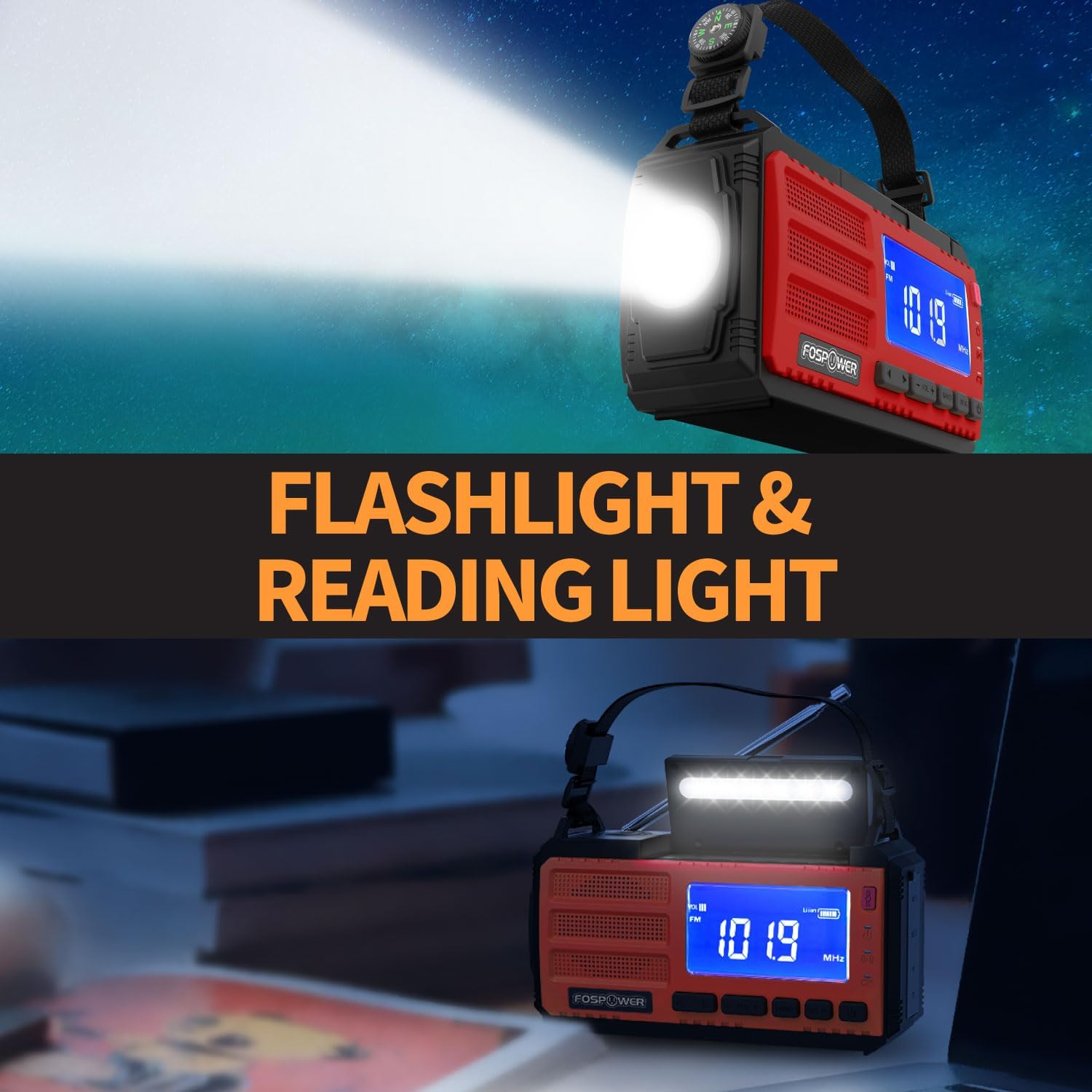
Image: The radio's flashlight illuminating a dark area and the reading light providing ambient light.
SOS Alarm
In an emergency, activate the SOS alarm to emit a loud siren and a flashing light.
- Press and hold the 'SOS' button (usually red) to activate the alarm.
- Press the 'SOS' button again to deactivate it.

Image: The radio's SOS alarm activated, showing a flashing light and sound waves, indicating its emergency function.
Multiple Charging Methods
The FosPower D8 radio offers three ways to recharge its internal battery:
- USB-C Charging: The most efficient method. Connect the radio to a USB power source using the provided USB-C cable.
- Solar Charging: Place the radio with the solar panel facing direct sunlight. This method is ideal for maintaining charge or slow charging in outdoor conditions.
- Hand Crank Charging: Rotate the hand crank clockwise or counter-clockwise at a steady pace (approximately 130-150 RPM) for manual power generation. Cranking for 1 minute can provide several minutes of radio use or flashlight power.

Image: A diagram illustrating the three charging methods: USB-C, solar panel, and hand crank.
Maintenance
- Cleaning: Wipe the radio with a soft, damp cloth. Do not use harsh chemicals or abrasive cleaners.
- Storage: Store the radio in a cool, dry place away from direct sunlight and extreme temperatures. If storing for extended periods, ensure the battery is partially charged (around 50%) and recharge it every 3-6 months to prolong battery life.
- Battery Care: Avoid fully discharging the battery frequently, as this can reduce its lifespan.
Troubleshooting
| Problem | Possible Solution |
|---|---|
| Radio does not turn on. | Ensure the battery is charged. Try charging via USB-C, solar, or hand crank. |
| Poor radio reception. | Extend the telescopic antenna fully. Try repositioning the radio. Ensure no strong interference sources are nearby. |
| External device not charging. | Check if the radio's battery has sufficient charge. Ensure the USB cable is properly connected to the USB-A output port. |
| SOS alarm not working. | Ensure the radio is powered on and the SOS button is pressed and held correctly. Check battery level. |
Specifications
| Feature | Detail |
|---|---|
| Model Name | Model D8 |
| Model Number | FOSPWB-2465PU |
| Battery Capacity | 37000mWh (10000mAh) Lithium Ion |
| Radio Bands | AM, FM, NOAA Weather Band |
| Charging Methods | USB-C, Solar Panel, Hand Crank |
| Special Features | Power Bank, LED Flashlight, LED Reading Light, SOS Alarm, Automated NOAA Alert |
| Product Dimensions | 17.53 x 8.13 x 9.91 cm |
| Weight | 640 g |
| Included Components | 1x Solar Crank Radio, 1x USB-A to USB-C Charging Cable, 1x Holding Strap with Compass, Owner's Manual |
Warranty and Support
FosPower offers a limited lifetime warranty for this product. For warranty claims, technical support, or any inquiries, please contact FosPower customer service. Details can typically be found on the official FosPower website or through your purchase platform.
Join millions of satisfied customers with our limited lifetime warranty, backed by our experienced and dedicated USA based customer service.
Product Video Overview
Video: A visual overview of the FosPower D8 Emergency Weather Radio's features and functions, including its versatile power sources, lighting, and emergency alert capabilities.


