
1. Introduction
The Mechanic IX5 Ultra Universal Preheating Platform is a precision desoldering station designed for mobile phone motherboard repair. It facilitates tasks such as motherboard delamination, lamination, and dot matrix repair by providing controlled and uniform heating. This manual provides essential information for the safe and effective operation, setup, and maintenance of your device.
2. Safety Information
Please read all safety instructions carefully before operating the device. Failure to follow these instructions may result in electric shock, fire, or personal injury.
- Electrical Safety: Ensure the power supply matches the device's voltage (110V/220V). Do not operate with wet hands or in damp environments. Disconnect power before cleaning or maintenance.
- Heat Hazard: The heating platform reaches high temperatures (up to 260°C). Avoid direct contact with the heating surface during and immediately after operation. Use heat-resistant gloves if necessary.
- Ventilation: Operate the device in a well-ventilated area to dissipate any fumes generated during desoldering or glue removal.
- Flammable Materials: Keep flammable liquids, gases, and materials away from the heating platform.
- Children and Pets: Keep the device out of reach of children and pets.
- Proper Use: Use the device only for its intended purpose as described in this manual. Do not modify the device.
3. Package Contents
Verify that all items listed below are included in your package:
- 1x Mechanic IX5 Ultra Universal Preheating Platform Desoldering Station
- 1x WYLIE Name Card PVC Fine Frosted Plastic Material Removing Screen Functional Card
- 1x WYLIE WL-5A Solder Paste Scraper Dismantling Machine Piece (Non-destructive tin scraping slice)
- 1x Pair of WYLIE ESD BGA Repair Soldering Working Antiskid Carbon Fiber Gloves
- 3x WYLIE WL-9A Dismantling Blades for iPhone/iPad LCD Screen Dismantling Tool
- 1x WYLIE K1 Blade Durable Screen Opener with 5 Different Depth Corners (Pry tool for iPhone/Android/Huawei/Oppo/iPad/Macbook screen)
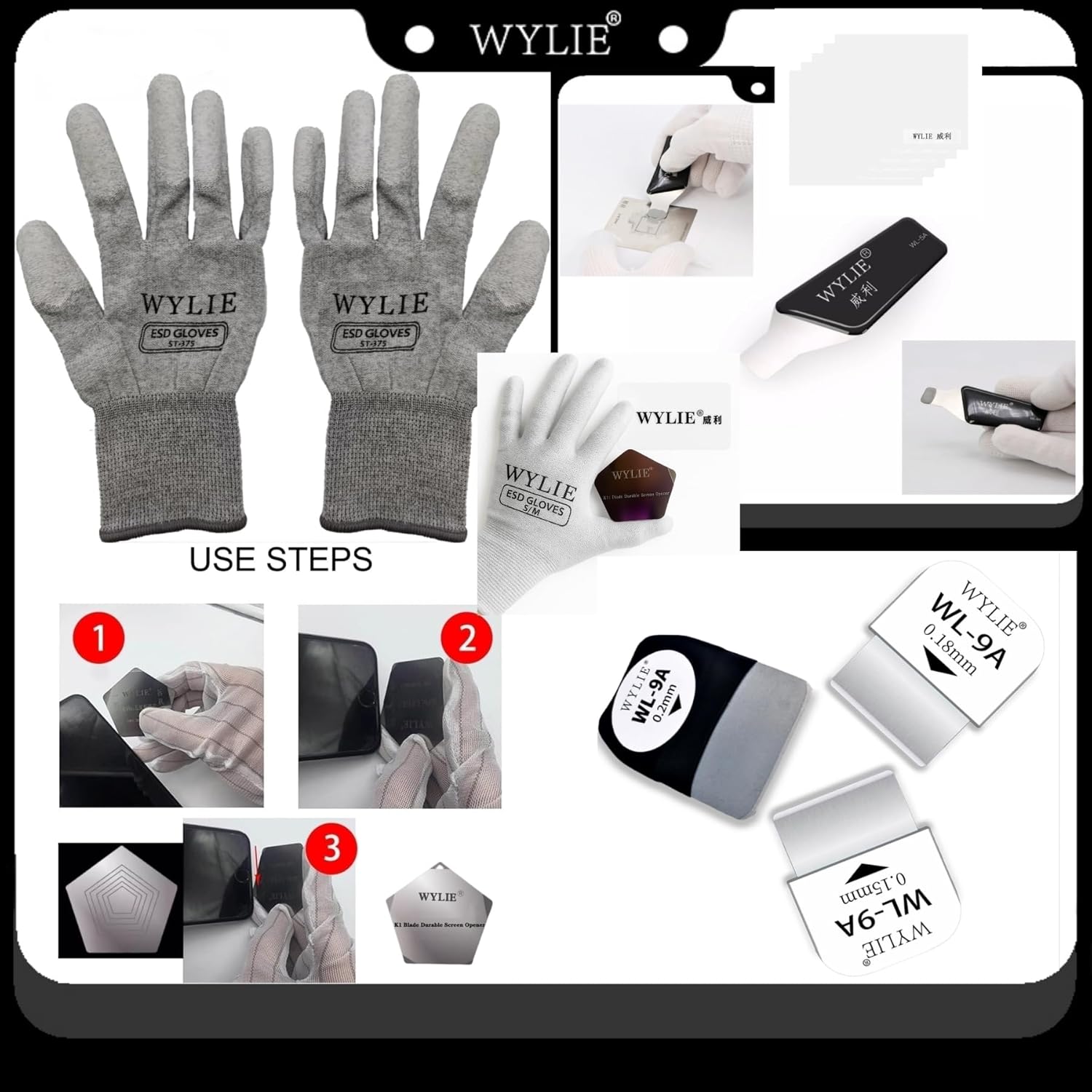
Figure 3.1: The Mechanic IX5 Ultra Preheating Platform shown with its various included WYLIE accessories, such as ESD gloves, screen removal tools, and dismantling blades, which aid in mobile device repair.
4. Product Overview
The Mechanic IX5 Ultra features a compact design with precise temperature control for various mobile device repair tasks.

Figure 4.1: The Mechanic IX5 Ultra Preheating Platform, illustrating its compact 80mm x 80mm footprint and showing some of the included accessories.

Figure 4.2: The compact size of the Mechanic IX5 Ultra Preheating Platform is demonstrated by a hand holding the device.
Key Features:
- High-Performance CPU Control: Ensures accurate temperature control and strong practicality.
- HD LED Digital Temperature Display: Provides intuitive and clear temperature readings.
- Efficient Multi-Tube Heating: Guarantees uniform heat transfer and high conduction efficiency.
- Aluminum Alloy Heating Element: Offers quick heating, high efficiency, and uniform temperature distribution.
- Wide Compatibility: Supports all sizes of mobile phone motherboards, including iPhone X-15 Pro Max, Huawei, Samsung, Xiaomi, and other Android phones.
- Adjustable Temperature Range: Freely controllable from 20°C to 260°C.
5. Setup
Follow these steps to set up your Mechanic IX5 Ultra Preheating Platform:
- Unpack: Carefully remove all components from the packaging and inspect for any damage.
- Placement: Place the preheating platform on a stable, heat-resistant, and level surface in a well-ventilated area. Ensure there is adequate space around the device for heat dissipation.
- Power Connection: Connect the power cord to the device and then to a suitable electrical outlet (110V or 220V, depending on your model and region).
- Initial Check: Before first use, ensure the heating plate is clean and free of debris.

Figure 5.1: The Mechanic IX5 Ultra Preheating Platform features adjustable clamps to securely hold various sizes of mobile phone motherboards during the heating process.

Figure 5.2: A detailed view of the clamping system on the preheating platform, demonstrating how it firmly holds a mobile phone motherboard in place for precise work.
6. Operating Instructions
This section details the steps for operating the preheating platform for various repair tasks.
6.1 Power On and Temperature Setting
- Press the power button to turn on the device. The LED display will show the current temperature.
- Use the '+' and '-' buttons to adjust the desired preheating temperature. The temperature range is 20°C to 260°C.
- The device will automatically heat up to the set temperature. The LED display will show the temperature rising.

Figure 6.1: The control panel of the Mechanic IX5 Ultra, displaying the digital temperature and the '+' and '-' buttons for adjustment. An accompanying graph illustrates the wide temperature range from 20°C to 260°C.
6.2 Motherboard Placement and Heating
- Once the desired temperature is reached, carefully place the mobile phone motherboard onto the heating platform.
- Use the adjustable clamps to secure the motherboard firmly in place. Ensure even contact with the heating surface.
- Allow the motherboard to preheat for the recommended duration based on the specific repair task (e.g., delamination, reballing, glue removal). The uniform heating ensures consistent results without the need for an air gun or soldering iron for initial preheating.

Figure 6.2: The Mechanic IX5 Ultra Preheating Platform in operation, demonstrating its uniform heating capability and its suitability for tasks such as motherboard delamination without requiring an air gun or soldering iron.

Figure 6.3: An illustrative diagram showing the layered heating process facilitated by the Mechanic IX5 Ultra Preheating Platform, ensuring even heat distribution through multiple layers of a motherboard.
6.3 Using Included Tools
The included WYLIE tools are designed to assist with various repair procedures:
- ESD Gloves: Wear the ESD BGA repair soldering working antiskid carbon fiber gloves to protect against electrostatic discharge and for better grip during handling components.
- Dismantling Blades (WL-9A): Use these blades for carefully separating LCD screens from mobile devices. Refer to the specific device's repair guide for proper technique.
- Screen Opener (K1 Blade): The K1 blade with its various depth corners is useful for prying open screens on iPhones, Android phones, iPads, and Macbooks.
- Solder Paste Scraper (WL-5A): This tool is designed for non-destructive tin scraping and solder paste application.
- Functional Card: The PVC fine frosted plastic material removing screen functional card can assist in screen removal and separation tasks.
7. Maintenance
Proper maintenance ensures the longevity and optimal performance of your preheating platform.
- Cleaning: Always disconnect the power cord and allow the device to cool completely before cleaning. Use a soft, dry cloth to wipe the exterior. For the heating plate, use a non-abrasive cleaner if necessary, ensuring no liquid enters the internal components.
- Storage: Store the device in a clean, dry environment away from direct sunlight and extreme temperatures.
- Inspection: Periodically inspect the power cord for any signs of damage. If damaged, discontinue use and contact customer support.
8. Troubleshooting
If you encounter issues with your Mechanic IX5 Ultra, refer to the following common problems and solutions:
- Device Does Not Power On:
- Check if the power cord is securely connected to both the device and the electrical outlet.
- Verify that the power outlet is functional by plugging in another device.
- Ensure the power switch on the device is in the 'ON' position.
- Temperature Not Reaching Set Point:
- Confirm the set temperature is within the operational range (20-260°C).
- Allow sufficient time for the device to heat up, especially to higher temperatures.
- Ensure the environment is not excessively cold, which can affect heating efficiency.
- Inconsistent Heating:
- Ensure the motherboard is placed flat and makes full contact with the heating surface.
- Clean the heating plate to remove any residue that might impede heat transfer.
- LED Display Not Working:
- If the device is powered on but the display is blank, try cycling the power.
- If the issue persists, contact customer support.
For issues not covered here, please contact customer support.
9. Specifications
| Feature | Specification |
|---|---|
| Model | Mechanic IX5 Ultra Universal Preheating Platform |
| Voltage | 110V / 220V |
| Product Dimensions (L x W x H) | 80mm x 80mm x 57.6mm (approx. 3.15 x 3.15 x 2.27 inches) |
| Preheating Temperature Range | 20°C to 260°C (68°F to 500°F) |
| Temperature Stability | ±2°C (typical) |
| Display Type | HD LED Digital |
| Material | Aluminum, Iron |
| Power Source | Corded Electric |
| Manufacturer | MECHANIC |
10. Warranty Information
This product is covered by a standard manufacturer's warranty against defects in materials and workmanship. The warranty period typically begins from the date of purchase. Please retain your proof of purchase for warranty claims. For specific warranty terms and conditions, refer to the documentation provided with your purchase or contact the retailer.
11. Customer Support
If you have any questions, require technical assistance, or need to report an issue with your Mechanic IX5 Ultra Universal Preheating Platform, please contact your retailer or the manufacturer's customer service department. Have your product model number and purchase date ready when contacting support.