
Introduction
This manual provides detailed instructions for the installation, operation, and maintenance of the Generic TS-FT007 Digital Water Tank Water Level Gauge. This ultrasonic liquid level gauge is designed to accurately monitor water levels in tanks and provide high and low-level alarms. Please read this manual thoroughly before installation and use to ensure proper function and safety.
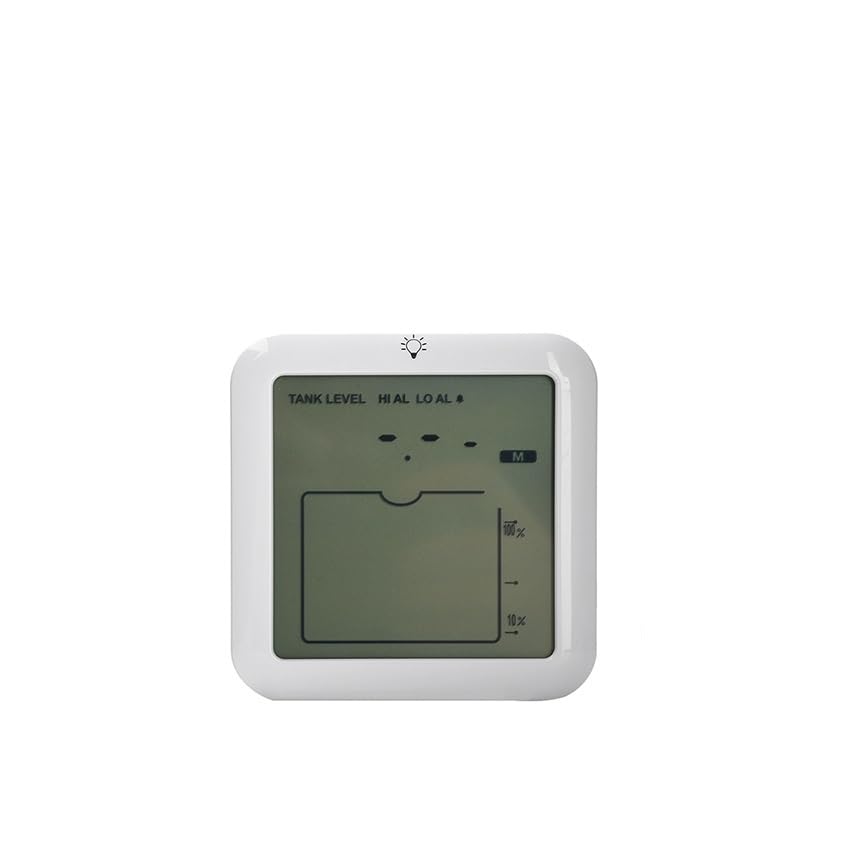
Figure 1: Generic TS-FT007 Digital Water Tank Water Level Gauge unit.
Safety Precautions
- Ensure power is disconnected before installation or maintenance.
- Do not expose the device to extreme temperatures or direct sunlight for prolonged periods.
- Avoid using abrasive cleaners on the device.
- This device is rated IP65; however, avoid submerging it in water.
- Consult a qualified technician for any repairs beyond basic troubleshooting.
Package Contents
Verify that all items are present in the package:
- 1x TS-FT007 Digital Water Tank Water Level Gauge Unit
- 1x Ultrasonic Sensor Probe
- 1x Power Adapter (if included)
- 1x User Manual (this document)
- Mounting Hardware (screws, anchors)
Setup
1. Sensor Probe Installation
- Select Location: Choose a suitable location on the top of your water tank where the ultrasonic sensor can have a clear, unobstructed path to the water surface. Avoid areas with agitators, pipes, or other obstructions that could interfere with the ultrasonic signal.
- Mounting: Securely mount the ultrasonic sensor probe using the provided mounting hardware. Ensure the probe is positioned vertically, pointing directly down towards the water surface.
- Cable Connection: Connect the sensor probe cable to the main display unit. Ensure the connection is firm and secure.
2. Display Unit Placement
- Indoor Placement: Place the display unit indoors, away from direct sunlight, moisture, and extreme temperatures.
- Power Connection: Connect the power adapter to the display unit and plug it into a standard electrical outlet.
3. Initial Power-On and Calibration
- Once powered on, the unit will perform a self-test.
- Follow the on-screen prompts (if any) to set the tank height and other initial parameters. Refer to the "Operating" section for detailed parameter settings.
Operating Instructions
1. Display Overview
The display unit shows the current water level, tank capacity percentage, and alarm status.
2. Setting Parameters
- Tank Height: Press the "SET" button to enter the settings menu. Use the "UP" and "DOWN" buttons to adjust the total height of your water tank. Confirm with "SET".
- High Level Alarm: Navigate to the high-level alarm setting. Adjust the desired maximum water level percentage or distance from the top at which an alarm should trigger.
- Low Level Alarm: Navigate to the low-level alarm setting. Adjust the desired minimum water level percentage or distance from the bottom at which an alarm should trigger.
- Unit Selection: Select between metric (cm/m) or imperial (inches/feet) units for level display.
3. Alarm Functionality
When the water level reaches the set high or low alarm thresholds, the unit will emit an audible alert and/or display a visual indicator. To silence an audible alarm, press any button on the display unit. The visual indicator will remain until the water level returns to a normal range.
Maintenance
- Sensor Cleaning: Periodically inspect the ultrasonic sensor probe for any dirt, debris, or mineral buildup. Gently clean the sensor surface with a soft, damp cloth. Do not use harsh chemicals or abrasive materials.
- Display Unit Cleaning: Wipe the display unit with a dry, soft cloth.
- Cable Inspection: Regularly check all cables for signs of wear, damage, or loose connections.
- Battery Replacement (if applicable): If your unit uses backup batteries, replace them annually or when the low battery indicator appears.
Troubleshooting
| Problem | Possible Cause | Solution |
|---|---|---|
| No display/Unit not powering on | No power, faulty adapter, loose connection. | Check power outlet, ensure adapter is securely connected, try a different outlet. |
| Inaccurate water level readings | Sensor obstructed, incorrect tank height setting, sensor dirty. | Clear obstructions, verify tank height setting in menu, clean sensor probe. |
| Alarm not triggering | Alarm thresholds incorrectly set, alarm function disabled. | Review and adjust high/low alarm settings. Ensure alarm is enabled. |
| Intermittent readings | Loose sensor cable, interference, sensor partially obstructed. | Check sensor cable connection, ensure no strong electrical interference nearby, inspect sensor for partial obstructions. |
Specifications
- Model: TS-FT007
- Measurement Type: Ultrasonic
- Measurement Range: (Specific range, e.g., 0.2m - 15m, would be here if available)
- Accuracy: (Specific accuracy, e.g., ±1cm, would be here if available)
- Display: Digital LCD
- Alarm Functions: High and Low Water Level
- Ingress Protection: IP65 (Sensor Probe)
- Power Supply: (e.g., DC 5V, Power Adapter)
- Operating Temperature: (Specific range, e.g., -10°C to 60°C, would be here if available)
Note: Specific technical specifications such as measurement range, accuracy, and power supply details are typically found on the product packaging or a separate specification sheet. Please refer to those documents for precise values.
Warranty Information
This product comes with a standard manufacturer's warranty. Please refer to the warranty card included in your product packaging for specific terms, conditions, and duration. Typically, the warranty covers defects in materials and workmanship under normal use. Damage resulting from misuse, unauthorized modification, or improper installation is not covered.
Customer Support
For technical assistance, troubleshooting not covered in this manual, or warranty claims, please contact your retailer or the manufacturer's customer support.
- Online Support: Visit the manufacturer's official website (if known).
- Email Support: (Email address would be here if available)
- Phone Support: (Phone number would be here if available)
When contacting support, please have your product model (TS-FT007) and purchase information ready.

