
Introduction
This manual provides detailed instructions for the setup, operation, and maintenance of your Yamnweo X-960D 8-Channel Powered Mixer. This all-in-one unit integrates an 8-channel mixer with a high-performance amplifier, designed to directly power passive speakers. It is suitable for various live sound applications, including churches, schools, bars, and outdoor events.
Please read this manual thoroughly before using the device to ensure proper operation and to prevent damage.
Safety Information
Important Compatibility Note:
The Yamnweo X-960D is a powered mixer with an integrated amplifier. The main speaker outputs on the rear are designed exclusively for passive speakers.
- Never connect these amplified outputs to active (powered) speakers. Doing so can cause severe damage to both the mixer and the active speakers.
- If you are using active speakers, connect them only via the "Main Out" (line level) jacks.
Always ensure the power cable is securely connected and that the voltage matches your local power supply (220 Volts AC). Do not expose the unit to moisture or extreme temperatures. Ensure adequate ventilation to prevent overheating.
Product Features

Image: Visual representation of key product features, including its engineering suitcase design, built-in amplifier, professional balance adjustment, sound effects, wireless connectivity, and integrated USB player.
- Integrated High-Performance Amplifier: Directly powers passive speakers, eliminating the need for external amplifiers. Provides clear, powerful sound for 15-inch passive speakers.
- 8 Input Channels: Features XLR/TRS combo inputs for microphones, guitars, and keyboards. Each channel includes independent gain control and a 3-band equalizer.
- +48V Phantom Power: Global phantom power supply for condenser microphones.
- 99 DSP Effects Engine: Offers a wide range of professional vocal effects, including reverb (Hall), delay, and chorus, to enhance performances.
- 7-Band Master Graphic Equalizer: Allows precise adjustment of the main mix output, helping to reduce feedback and optimize sound for room acoustics.
- Bluetooth Connectivity: Enables wireless streaming of background music from smartphones or tablets.
- USB-A Interface: Supports MP3 playback directly from USB flash drives for background music or karaoke.
- Robust Construction: Housed in a compact metal casing, designed for durability and portability.
- Efficient Cooling: Integrated dual fan system ensures stable operation during continuous use.
Setup
1. Unpacking and Placement
Carefully remove the mixer from its packaging. Place the unit on a stable, flat surface, ensuring adequate space around it for ventilation. Avoid placing it near heat sources or in direct sunlight.

Image: The Yamnweo X-960D Powered Mixer housed in its durable, suitcase-sized protective case, highlighting its portability and robust design.
2. Power Connection
Connect the provided power cable to the mixer's power input and then to a suitable 220V AC power outlet. Ensure the mixer's power switch is in the OFF position before connecting.
3. Connecting Passive Speakers
Use Speakon or 6.35mm (1/4-inch) jack cables to connect your passive speakers to the amplified speaker outputs on the rear of the mixer. Ensure correct polarity (+ to + and - to -) if using bare wire connections (though Speakon/jack are recommended). Reiterate: Do not connect active speakers to these outputs.

Image: Rear view of the Yamnweo X-960D mixer, illustrating its built-in 450W x 2 amplifier and connections to two large passive speakers, demonstrating its capability to power them directly.
4. Connecting Microphones and Instruments
Connect microphones, guitars, keyboards, or other audio sources to the 8 XLR/TRS combo inputs. For condenser microphones, activate the +48V phantom power switch (global for all channels) located on the mixer.

Image: Detailed view of the mixer's high-quality input interfaces (XLR/6.35mm), channel control knobs, damping faders, and the +48V phantom power switch, indicating connection points for various audio sources.
Operating Instructions
1. Basic Channel Control
- Gain: Adjust the input sensitivity for each channel using the GAIN knob to achieve an optimal signal level without clipping.
- 3-Band EQ: Use the HIGH, MID, and LOW knobs on each channel to adjust the tonal balance of individual inputs.
- Faders: Control the volume level of each channel in the main mix using the channel faders.
2. DSP Effects Processing
The mixer features a 99 DSP effects engine. Use the dedicated controls to select and apply effects to your channels.
- Effect Selection: Rotate the PROGRAM knob to browse through the 99 available effects (e.g., reverb, delay, chorus). The selected effect number will be displayed on the digital screen.
- Effect Level: Use the EFF/FX send knob on each channel to send a portion of that channel's signal to the effects processor. Adjust the overall effect return level with the dedicated FX RETURN fader.

Image: Close-up of the mixer's digital display, showing the "99" DSP effects available, indicating the wide range of sound processing options.
3. Master 7-Band Graphic Equalizer
The 7-band graphic equalizer allows you to fine-tune the overall sound of your main mix. Adjust the faders for specific frequency bands to shape the sound to your environment and reduce feedback.
4. Bluetooth Connectivity
To stream audio wirelessly:
- Activate Bluetooth mode on the mixer (refer to the media player section controls).
- Enable Bluetooth on your smartphone or tablet.
- Search for "X-960D" or a similar device name in your device's Bluetooth settings and pair.
- Once connected, you can play audio from your device through the mixer.

Image: A smartphone displaying a music player interface, with a wireless signal icon connecting it to the Yamnweo X-960D mixer, demonstrating its Bluetooth playback capability.
5. USB Playback
Insert a USB flash drive containing MP3 audio files into the USB-A port on the mixer. The mixer will automatically detect the drive and begin playback. Use the media player controls (play/pause, skip) to manage your audio.
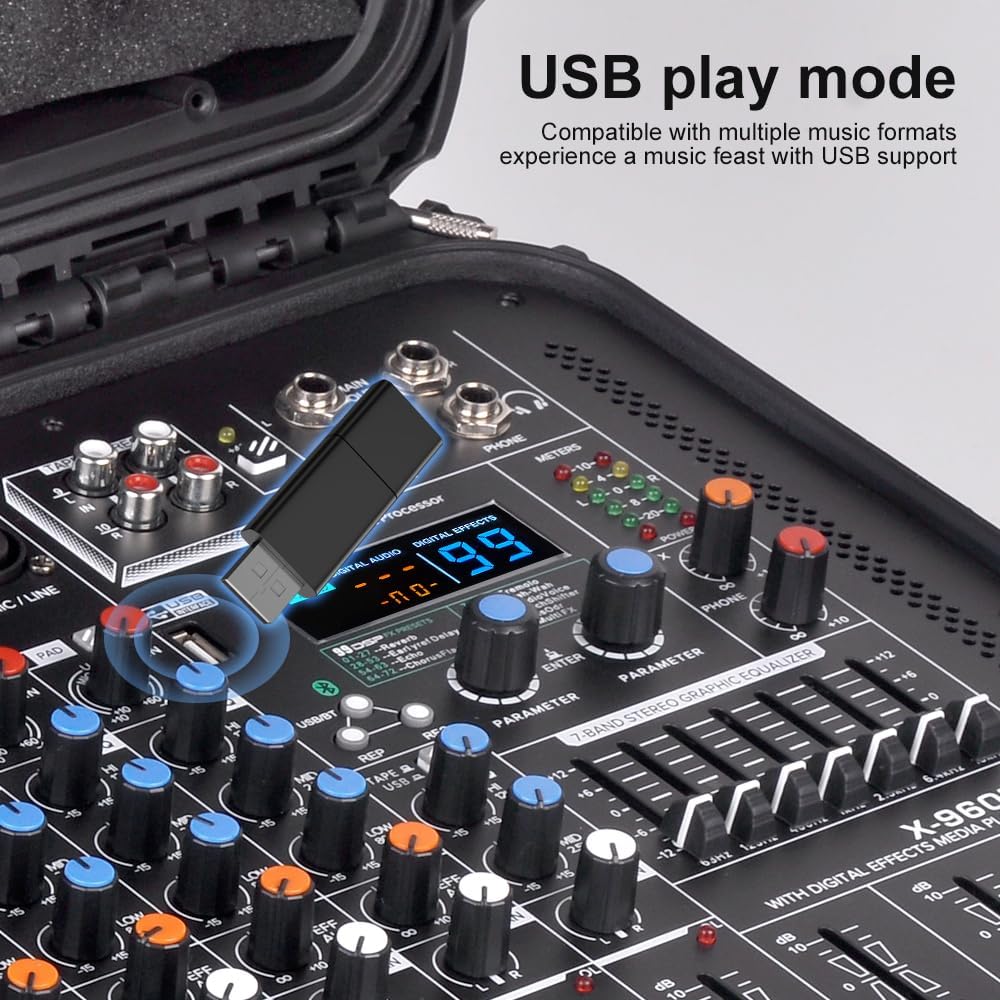
Image: A USB flash drive inserted into the mixer's USB port, with the digital display showing playback information, illustrating the mixer's USB play mode for multiple music formats.
6. Main Output (Line Level)
For connecting to active speakers or external recording devices, use the "Main Out" (line level) RCA or XLR outputs. These outputs provide an unamplified signal.
Maintenance
- Cleaning: Disconnect the power before cleaning. Use a soft, dry cloth to wipe the surface of the mixer. Do not use liquid cleaners or solvents.
- Ventilation: Ensure the dual cooling fans are not obstructed. Regularly check for dust buildup and gently clean vents if necessary to maintain optimal airflow.
- Storage: When not in use, store the mixer in a cool, dry place, away from direct sunlight and excessive dust. Using its protective case is recommended for long-term storage or transport.
Troubleshooting
| Problem | Possible Cause | Solution |
|---|---|---|
| No sound output from speakers. |
|
|
| Distorted sound. |
|
|
| Bluetooth not connecting. |
|
|
| USB playback not working. |
|
|
Specifications
| Feature | Detail |
|---|---|
| Model Number | X-960D |
| Channels | 8 (XLR/Line Combo Inputs) |
| Phantom Power | +48V Global (for condenser microphones) |
| Amplified Output | For passive speakers (Speakon / 6.35mm jack) |
| EQ (Channels) | 3-band equalizer per channel |
| EQ (Master) | 7-band graphic equalizer |
| DSP Effects | 99 presets (reverb, delay, chorus, etc.) |
| Connectivity | Bluetooth, USB, XLR, 6.35mm TRS, RCA |
| Power Source | Electric Cable |
| Voltage | 220 Volts (AC) |
| Cooling | Integrated dual fan |
| Dimensions (L x W x H) | 28.01 x 35 x 25 cm (11.03 x 13.78 x 9.84 inches) |
| Weight | 1.25 Kilograms (2.76 lbs) |
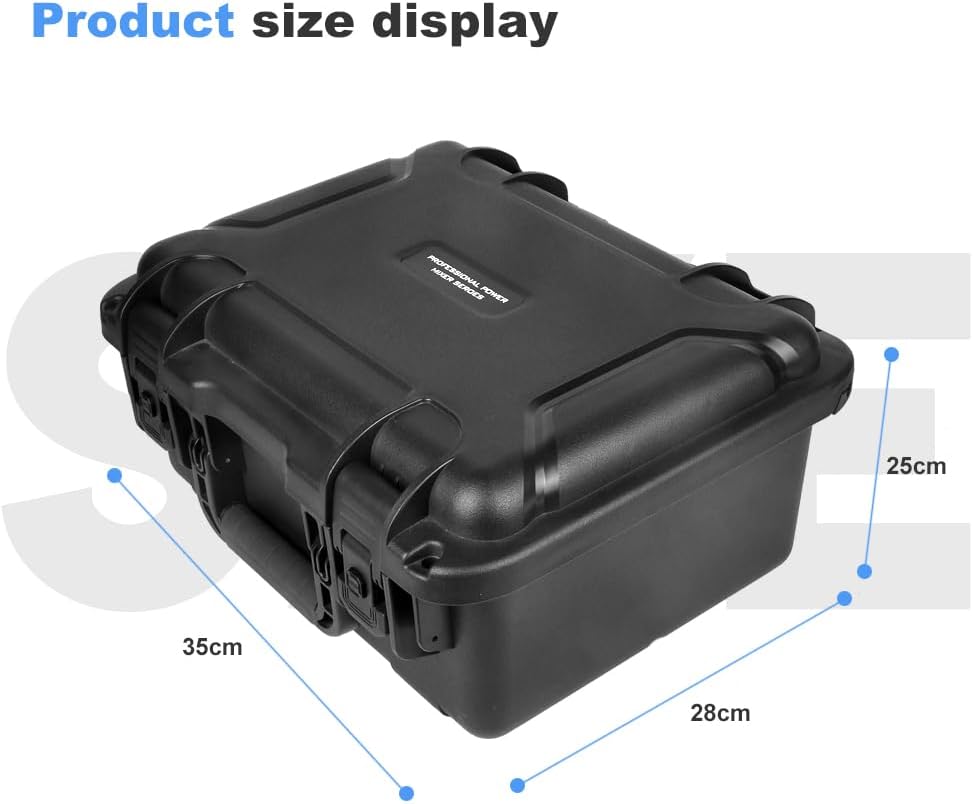
Image: A diagram illustrating the physical dimensions of the Yamnweo X-960D mixer: 28cm (length), 35cm (width), and 25cm (height).
Warranty and Support
Specific warranty details are not provided in this manual. Please refer to the warranty information included with your purchase or contact the seller/manufacturer directly for details regarding warranty coverage and support services.
For technical assistance or further inquiries, please contact Yamnweo customer support or your authorized dealer.