
1. Introduction
This manual provides essential information for the safe and efficient operation of your EFFORTWAY 4000W Pure Sine Wave Power Inverter. Please read this manual thoroughly before installation, operation, or maintenance to ensure proper use and to prevent damage to the unit or connected devices. Keep this manual for future reference.
The EFFORTWAY 4000W Pure Sine Wave Power Inverter converts 12V DC battery power into 110V/120V AC household power, suitable for various applications including RVs, trucks, boats, camping, and off-grid systems. It features multiple AC outlets, a USB port, a hardwire port, and remote control capabilities.
2. Safety Instructions
Failure to follow these safety instructions may result in electric shock, fire, serious injury, or death. Always exercise caution when working with electrical equipment.
- Ventilation: Ensure the inverter is installed in a well-ventilated area. Do not block ventilation openings.
- Moisture: Do not expose the inverter to rain, moisture, or water. Operate in a dry environment.
- Flammable Materials: Do not operate the inverter near flammable liquids, gases, or other combustible materials.
- Overload: Do not exceed the inverter's rated power output. Overloading can damage the inverter and connected devices.
- Grounding: Ensure the inverter is properly grounded according to local electrical codes.
- Battery Connection: Connect the inverter directly to a 12V DC battery. Ensure correct polarity (red to positive, black to negative). Incorrect connection will damage the inverter.
- Children: Keep the inverter out of reach of children.
- Servicing: Do not attempt to service the inverter yourself. Refer all servicing to qualified personnel.
- Sparking: Small sparks may occur during initial battery connection. Follow pre-charging instructions to minimize this.
3. Package Contents
Verify that all items are present in the package:
- EFFORTWAY 4000W Pure Sine Wave Power Inverter
- Wired Remote Control with Cable
- Wireless Remote Control (requires 12V 23A battery, not included)
- Battery Cables (Red and Black)
- User Manual

Image: The EFFORTWAY 4000W Pure Sine Wave Power Inverter shown with its wired remote control, wireless remote control, battery cables, and user manual.
4. Product Features
- 4000W Pure Sine Wave Output: Provides clean, stable power suitable for sensitive electronics, similar to household electricity.
- LCD Display: Offers real-time monitoring of input/output voltage, output power, battery level, fan status, frequency, and temperature/power percentage.
- Wired and Wireless Controls: Includes a 16 ft wired remote for reliable connection and a wireless remote with up to 164 ft range (requires 12V 23A battery, not included).
- Multi-Protection System: Integrated safeguards against overloads, short circuits, over-voltage, under-voltage, and overheating.
- Versatile Power Hub: Equipped with 4 AC outlets, a 5V/2.1A USB port, and hardwiring terminals (G/L/N) for diverse power needs.
- Intelligent Cooling Fan: Automatically activates based on temperature to maintain optimal operating conditions.

Image: Front view of the EFFORTWAY 4000W Pure Sine Wave Power Inverter highlighting its key features including USB port, AC outlets, pure sine wave capability, remote control, and cooling fan.

Image: The inverter displaying its multiple protection features: overheat, under voltage, overload, over voltage, and short circuit protection.
5. Setup
5.1 Connecting to a 12V Battery
- Ensure the inverter is turned off and disconnected from any AC loads.
- Connect the red battery cable to the positive (+) terminal of the 12V battery and the red positive terminal of the inverter.
- Connect the black battery cable to the negative (-) terminal of the 12V battery and the black negative terminal of the inverter.
- Tighten all connections securely to prevent loose contacts and excessive heat.
5.2 Pre-charging the Inverter Capacitor
It is common to observe small sparks when connecting the inverter to the battery due to the inverter's capacitors drawing current rapidly during initial charging. To minimize or prevent this, you can pre-charge the inverter's capacitor:
- Use a pencil sharpened at both ends, a 12V car headlight, or a standard incandescent bulb.
- Briefly touch one end of the pre-charging tool to the inverter's positive terminal and the other end to the positive terminal of the battery. This will slowly charge the capacitors.
- For a car headlight, when it stops emitting light, it indicates the inverter's capacitor has completed charging.
- After pre-charging, proceed with the direct battery connection as described in Section 5.1.

Image: Illustration of wiring tips, demonstrating how to pre-charge the inverter's capacitor using a pencil or a light bulb to prevent sparking during initial battery connection.
5.3 Hardwire Terminal Connection
For applications requiring a stable high-power output or permanent installation, use the hardwire terminals (G/L/N).
- Consult a qualified electrician for hardwire installations to ensure compliance with electrical codes and safety standards.
- Connect the ground (G), live (L), and neutral (N) wires from your AC system to the corresponding terminals on the inverter.
- Ensure all connections are secure and properly insulated.

Image: The inverter providing power to various appliances, demonstrating the use of AC outlets and the hardwiring terminals for stable high-power output.
5.4 Remote Control Connection
- Wired Remote: Plug the wired remote control cable into the designated port on the inverter.
- Wireless Remote: Insert a 12V 23A battery (not included) into the wireless remote control.
- Note: Wired and wireless remote controls cannot be used simultaneously.
6. Operating Instructions
6.1 Powering On/Off
- Ensure all connections are secure and the battery is adequately charged.
- Press and hold the power switch on the inverter for a few seconds until the LCD screen illuminates.
- To power off, press and hold the power switch again until the LCD screen turns off.
- Alternatively, use the ON/OFF button on the wired or wireless remote control.
6.2 Using AC Outlets and USB Port
- Once the inverter is powered on, plug your AC appliances into the 4 AC outlets.
- Connect USB-powered devices to the 5V/2.1A USB port.
- Ensure the total wattage of all connected devices does not exceed the inverter's continuous power rating (4000W).
6.3 Understanding the LCD Display
The LCD display provides critical operational information:
- Input Voltage: Displays the current DC voltage from the battery.
- Output Voltage: Shows the AC output voltage (110V/120V).
- Output Power: Indicates the current power consumption of connected devices in watts.
- Battery Level: Graphic representation of the battery's charge status.
- Fan Status: Indicates when the cooling fan is active.
- Frequency: Displays the output frequency (50Hz or 60Hz).
- Temperature/Power Percentage: Shows the internal temperature or percentage of power being used.

Image: Close-up of the inverter's LCD display, illustrating how it shows real-time charging status including battery allowance, input voltage, output voltage, output power, frequency, and fan activity.
6.4 Frequency Switch (50Hz/60Hz)
The inverter includes a switch to select between 50Hz and 60Hz output frequency. Ensure the selected frequency matches the requirements of your connected appliances.
6.5 Using Remote Controls
The wired remote control provides convenient operation from up to 16 feet away, while the wireless remote offers flexibility up to 164 feet. Use the ON/OFF button on the remote to control the inverter's power state.

Image: The inverter shown with both its wired remote control (displaying status) and wireless remote control, indicating their respective operating distances. A note clarifies that both remotes cannot be used simultaneously.
Video: Official product video demonstrating the EFFORTWAY 4000W Pure Sine Wave Inverter, including its LCD display and power switch operation.
7. Maintenance
- Cleaning: Regularly clean the exterior of the inverter with a dry, soft cloth. Do not use liquids or abrasive cleaners.
- Ventilation: Ensure the cooling vents are free from dust and debris to maintain proper airflow.
- Connections: Periodically check all electrical connections (battery cables, hardwire terminals) to ensure they are tight and free from corrosion.
- Storage: When not in use for extended periods, store the inverter in a cool, dry place, disconnected from the battery.
8. Troubleshooting
If you encounter issues with your inverter, refer to the following troubleshooting guide:
| Problem | Possible Cause | Solution |
|---|---|---|
| No power output / Inverter does not turn on | Loose battery connections Low battery voltage Inverter switch off Internal fuse blown | Check and tighten battery cables Recharge or replace battery Ensure power switch is ON Contact customer support |
| Low output voltage / Intermittent power | Overload Poor battery connection Battery voltage too low | Reduce load Check and tighten battery cables Recharge battery |
| Inverter shuts down (protection mode) | Overload Over-temperature Over-voltage / Under-voltage Short circuit | Reduce load Ensure proper ventilation, allow to cool Check battery voltage Disconnect load, check for faults |
| Fan not running | Normal operation (fan activates when needed) Fan malfunction | Monitor temperature on LCD. If inverter overheats without fan, contact support. Contact customer support |
9. Specifications
| Feature | Specification |
|---|---|
| Model Number | F-4000P |
| Continuous Output Power | 4000 Watts |
| Peak Output Power | 8000 Watts |
| Input Voltage | 12 Volts DC |
| Output Voltage | 110 Volts AC |
| Electrical Output Waveform | Pure Sine Wave |
| Frequency | 60 Hz (Switchable to 50 Hz) |
| AC Outlets | 4 |
| USB Port Output | 5V/2.1A |
| Display Type | LCD |
| Dimensions (L x W x H) | 13" x 7.8" x 6.3" |
| Protection Features | Overload, Short Circuit, Over-voltage, Under-voltage, Overheating |
| Recommended Uses | Boat, Camping, Home, Recreational Vehicle, Road trips, Truck |
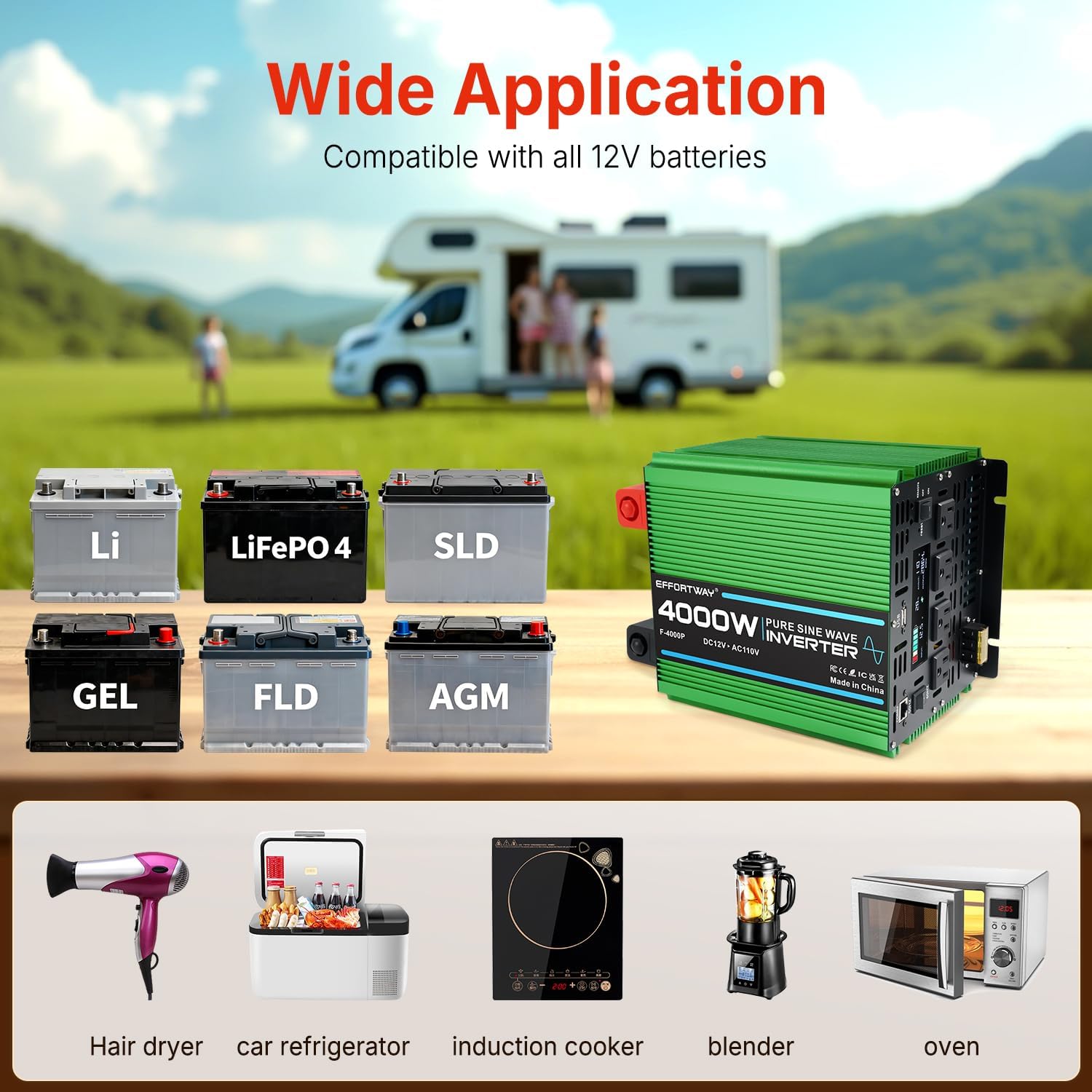
Image: The inverter demonstrating its wide application compatibility with various 12V battery types and common household appliances.
10. Warranty and Support
For warranty information, technical support, or service inquiries, please contact EFFORTWAY customer service or the retailer from whom you purchased the product. Keep your purchase receipt as proof of purchase.