
1. Product Overview
The Virubi Farmhouse 4-Piece Entertainment Wall Unit Set is designed to accommodate TVs up to 70 inches. This unit features a two-tone appearance with black retro handles and a walnut-hued tabletop, providing a mid-century farmhouse style. It integrates a display cabinet, bookshelves, a TV stand, and storage units, including wine racks.
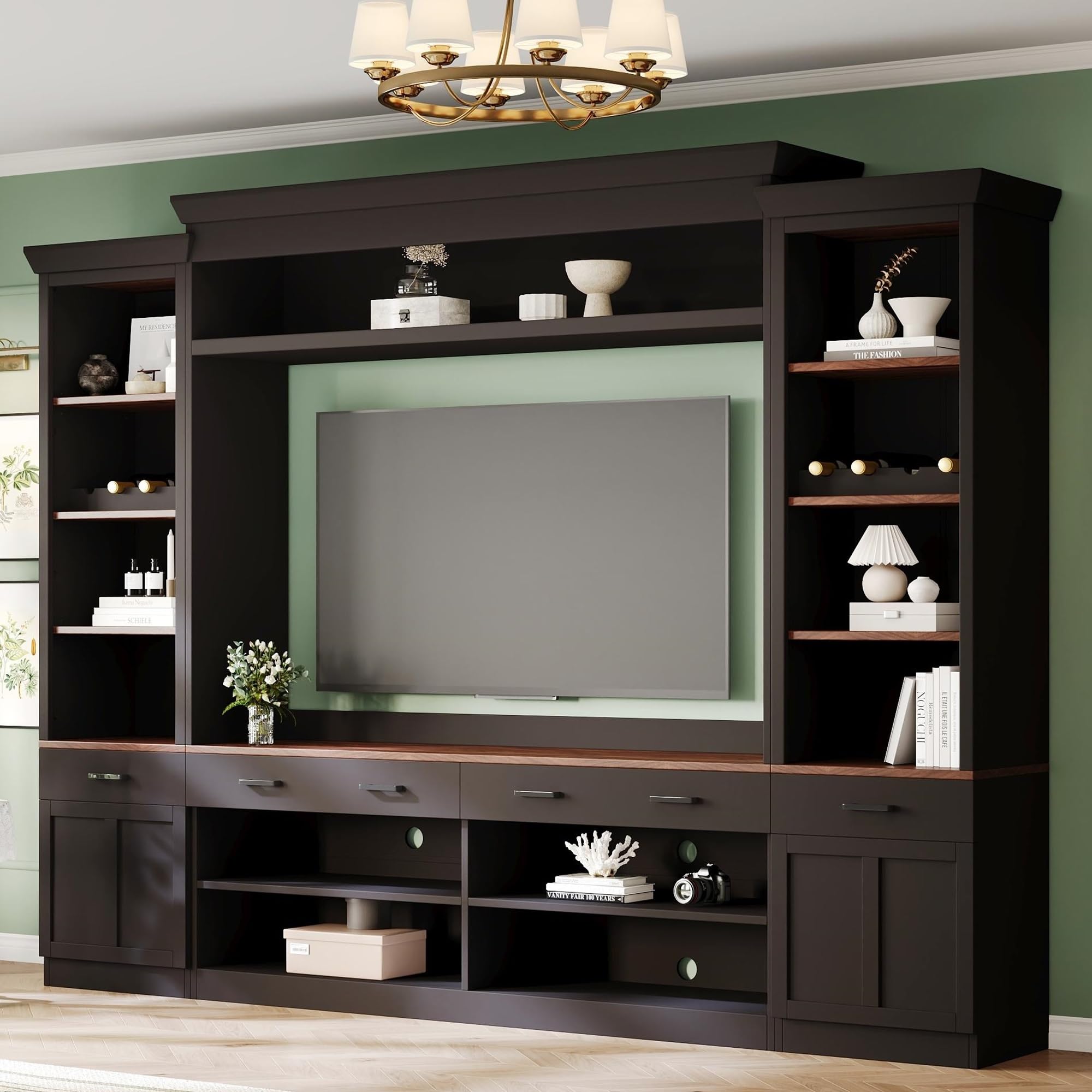
Image 1.1: Complete Virubi Farmhouse 4-Piece Entertainment Wall Unit Set.
The unit offers diverse storage options, including four drawers, open shelves, and two cabinets with rebounders for easy access. The middle back panel includes four cable holes for organizing media device wires. Two adjustable shelves on each side provide flexible display space.

Image 1.2: Illustration of the unit's integrated features including display cabinet, TV stand, bookshelves, and wine racks.
2. Safety Information
Please read and understand all safety warnings before assembly and use. Assembly may involve handling heavy parts and components with potentially sharp edges. Always follow the provided instructions carefully to prevent injury.
Once assembled, it is crucial to securely anchor the unit to the wall using the provided anti-tipping devices. This measure is essential to prevent tip-overs, especially in households with small children or pets, ensuring stability and safety.

Image 2.1: Visual representation of the unit's robust construction, waterproof surface, and anti-tipping devices.
3. Assembly and Setup
Assembly of this entertainment wall unit is required. Detailed assembly instructions are included with your product. It is recommended that two adults assemble this unit due to its size and weight.
Assembly Steps:
- Unpack Components: Carefully unpack all parts and hardware. Verify that all components listed in the instruction manual are present and undamaged.
- Prepare Workspace: Choose a clear, spacious area for assembly. Lay down a blanket or cardboard to protect both the furniture parts and your floor.
- Follow Instructions: Adhere strictly to the step-by-step assembly guide provided. Do not skip steps or overtighten fasteners unless specified.
- Secure Anti-Tipping Devices: Once the unit is fully assembled and in its final position, install the anti-tipping devices as instructed to secure the unit to the wall.

Image 3.1: Front view of the entertainment unit with cabinet doors open, illustrating internal storage compartments.
4. Operating Instructions
This entertainment wall unit is designed for functional storage and display in your living space.
Using Storage Features:
- TV Placement: The central opening is designed to accommodate televisions up to 70 inches. Ensure the TV is centered and stable.
- Drawers: Utilize the four drawers for storing smaller items, remote controls, or media accessories.
- Cabinets: The two bottom cabinets feature rebounders for easy opening and closing. Use these for concealed storage.
- Adjustable Shelves: The two adjustable shelves on each side allow you to customize the height for various items, such as books, decorative objects, or media components.
- Wine Racks: The lateral cabinets are equipped with dedicated wine racks for storing bottles.
- Cable Management: Use the four cable holes located on the middle back panel to route and organize wires from your media devices, maintaining a tidy appearance.

Image 4.1: Illustration highlighting the diverse storage options available within the unit.
5. Maintenance
To ensure the longevity and appearance of your Virubi entertainment wall unit, follow these simple maintenance guidelines:
- Cleaning: The smooth surfaces of the unit are waterproof and easy to clean. Use a soft, damp cloth to wipe down surfaces. Avoid abrasive cleaners or harsh chemicals, which can damage the finish.
- Dusting: Regularly dust the unit with a dry, soft cloth to prevent dust buildup.
- Spills: Wipe up spills immediately to prevent moisture damage, especially on the walnut-hued tabletop.
- Inspection: Periodically check all fasteners and connections to ensure they remain tight. Retighten if necessary.
6. Troubleshooting
If you encounter any issues with your entertainment wall unit, refer to the following common troubleshooting tips:
- Wobbly Unit: Ensure the unit is placed on a level surface. Check all assembly hardware and tighten any loose screws. Verify that the anti-tipping devices are correctly installed and secured to the wall.
- Drawers Not Sliding Smoothly: Check for any obstructions in the drawer slides. Ensure the drawer slides are properly aligned and lubricated if necessary.
- Cabinet Doors Not Closing Properly: Inspect hinges for proper alignment and tightness. Adjust hinges as needed according to the assembly instructions.
- Minor Scratches/Dents: For minor surface imperfections, touch-up pens or furniture repair kits matching the unit's finish may be used.
7. Product Specifications
The following table outlines the key specifications for the Virubi Farmhouse 4-Piece Entertainment Wall Unit Set:
| Specification | Detail |
|---|---|
| Brand | Virubi |
| Model Number | N721S000046 |
| Color | Black Style1 |
| Style | Mid-Century |
| Material Type | Engineered Wood |
| Item Dimensions (L x W x H) | 108.2 x 16.3 x 80.4 inches |
| Item Weight | 290 Pounds |
| Number of Drawers | 4 |
| Included Components | Cabinets |
| Assembly Required | Yes |
| TV Size Accommodation | Up to 70 inches |
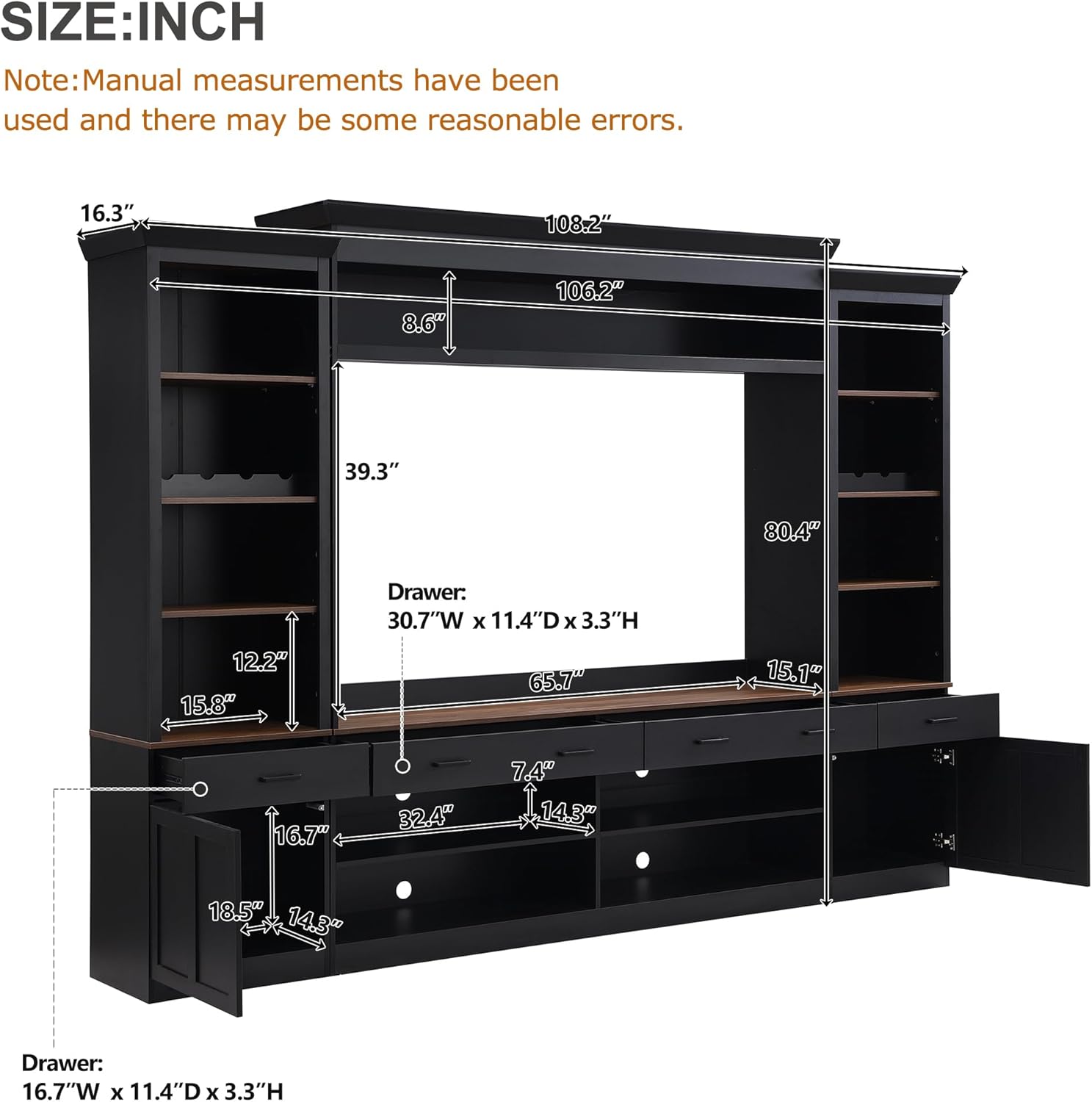
Image 7.1: Diagram illustrating the dimensions of the entertainment wall unit.
8. Warranty and Support
Specific warranty details and direct support contact information are not provided in this manual. For warranty claims, product support, or to inquire about replacement parts, please refer to the documentation included with your purchase or contact the retailer where the product was acquired. You may also visit the official Virubi website for further assistance.