
1. Introduction
The bonoch AirSentry 16-in-1 Air Quality Monitor is designed to provide real-time insights into your indoor air environment. It tracks 9 essential parameters, offering comprehensive data to help you maintain a healthier living space. This manual provides detailed instructions for setup, operation, and maintenance of your device.
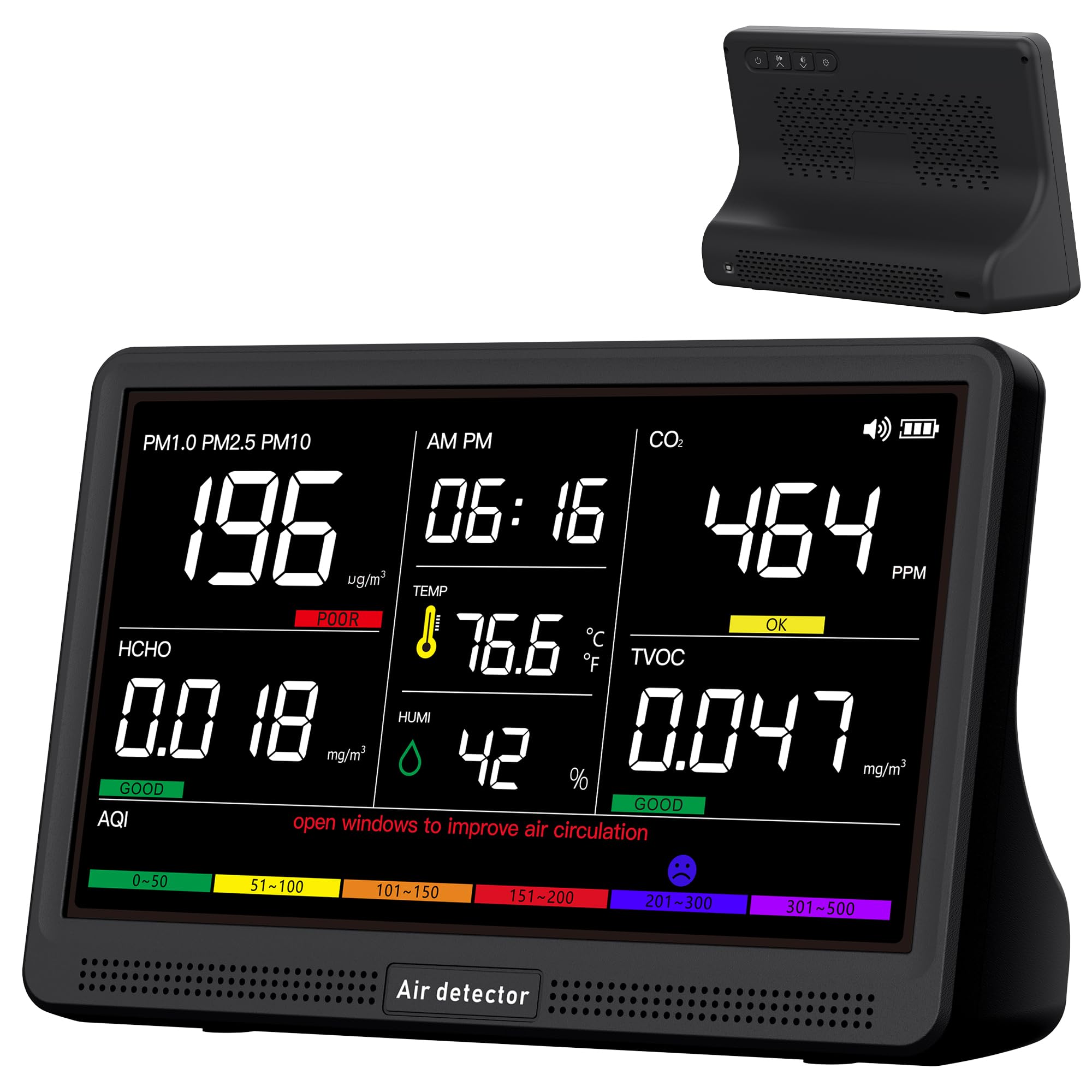
Image: The bonoch AirSentry 16-in-1 Air Quality Monitor with its large display.
2. Product Overview
The monitor features a 7-inch crystal-clear LED display for easy readability and external high-precision sensors for accurate measurements. It is designed for portability with an 8-hour long-lasting battery.
2.1 Key Components
- Air Quality Monitor: Main unit with 7-inch LED display.
- Charging Adapter: For powering the device.
- USB-C Cable: For charging and power supply.
- User Manual: This document.
2.2 Sensor Technology
The device utilizes external high-precision sensors and a multi-sensor array with an enhanced airflow design to detect even slight changes in air quality. It provides 0.001-level precision for various parameters.

Image: Diagram showing the internal components and airflow design for accurate sensing.
3. Setup
Follow these steps to set up your bonoch AirSentry monitor:
- Initial Charging: For optimal performance, always charge the device using the provided USB-C cable and charging adapter. A red indicator light confirms secure charging. The built-in 2500mAh battery provides up to 8 hours of cordless monitoring.
- Power On: Press and hold the power button located on the back of the device to turn it on. The device will perform a brief countdown before displaying real-time readings.
- Placement: Place the monitor in an area where you wish to monitor air quality. Avoid touching the external sensors or exposing them to strong odors like perfumes, as this may interfere with data accuracy.
Video: Unboxing and initial power-on of the bonoch Air Quality Monitor. This video demonstrates the physical setup and first boot-up of the device.
4. Operating Instructions
The bonoch AirSentry monitor is designed for user-friendly operation with intuitive controls.
4.1 Time Adjustment
- Switch Time Format: Click the “Time button” to toggle between 12/24-hour format.
- Set Hours: Long press the “Time button” to enter setting mode. Use the “Alarm button” or “Brightness button” to adjust hours.
- Set Minutes: Click the “Time button” again. Use the “Alarm button” or “Brightness button” to adjust minutes.
- Confirm: Click the “Time button” to save settings.
4.2 Temperature Unit Switching
Toggle between Fahrenheit (°F) and Celsius (°C) instantly with a single click of the “Power” button.
4.3 Brightness Adjustment
The 7-inch LED display offers 3-level brightness adjustment. Use the dedicated brightness button on the back of the device to cycle through the settings and find the one that suits you.
4.4 AQI Alerts and Alarm Settings
The monitor provides real-time AQI alerts with 7 distinct warning buzzers for various pollutants (CO2, PM2.5/PM1.0/PM10, HCHO, TVOC, and AQI). A mute button is available to silence alerts when needed.

Image: Visual guide for adjusting time and switching temperature units on the monitor.
5. Understanding Air Quality Readings
The monitor displays various air quality parameters. Understanding these readings is key to interpreting your indoor environment.
5.1 Monitored Parameters and Health Risks

Image: Detailed table outlining various air quality parameters, their health risks, and corresponding good, OK, and poor ranges.
- CO2 (Carbon Dioxide): High levels can lead to drowsiness and reduced cognitive function. Readings above 2,000 ppm may cause dizziness or even suffocation.
- PM2.5/PM1.0/PM10: Fine particulate matter that can penetrate deep into the lungs, contributing to respiratory issues, heart attacks, and strokes.
- HCHO (Formaldehyde): A pungent, colorless gas linked to serious health issues, including leukemia. Common sources include new furniture and household products.
- TVOC (Total Volatile Organic Compounds): Organic chemicals that can irritate the nose, throat, and eyes. High levels can affect organs and the nervous system. Sources include cooking, paints, and cleaning products.
- Temperature & Humidity: Essential for comfort and preventing mold growth.
- AQI (Air Quality Index): An overall indicator of air quality, color-coded for easy interpretation.

Image: Visual representation of various hidden pollutants in the air, including VOCs, CO2, PM2.5, PM1.0, PM10, and HCHO.
6. Maintenance
6.1 Auto Recalibration
The monitor features auto-recalibration to ensure precision. If significant indoor environmental changes occur, the ultra-sensitive sensors may generate an average value. A one-click reset helps recalibrate for quick, accurate readings. To reset, long-press the power button.

Image: Instructions for auto-recalibration and a note to avoid touching sensors for accurate readings.
6.2 Sensor Care
For best results and to ensure accuracy, avoid touching the external sensors or air intake holes. Also, do not expose the device to perfumes or strong odors.
7. Troubleshooting
If you encounter any issues with your bonoch AirSentry monitor, refer to the following common solutions:
- Inaccurate Readings: If you notice strange readings, turn off the device for a few minutes, then turn it back on to let the sensors recalibrate. Ensure sensors are not obstructed or exposed to strong chemicals.
- Device Not Powering On: Ensure the device is fully charged using the provided USB-C cable and adapter. A red indicator light should confirm charging.
- High Readings During Cooking/Cleaning: It is normal for certain activities like cooking or using cleaning products to temporarily increase pollutant levels. Ensure proper ventilation by opening windows or using air purifiers.
8. Specifications
| Feature | Detail |
|---|---|
| Brand | bonoch |
| Model | AK22A |
| Power Source | Battery Powered (2500mAh) |
| Display Type | 7-inch LED |
| Temperature Accuracy | ±1-3°F (±1.67°C) |
| Humidity Accuracy | ±2-3% RH |
| Air Sensor Accuracy | 0.001 level |
| Included Components | Air Quality Monitor, Charging Adapter, USB-C Cable, User Manual |
9. Warranty and Customer Support
Your bonoch AirSentry Air Quality Monitor comes with a user manual and dedicated customer support. For any queries or assistance, the bonoch support team is available to help within 24 hours.
Please refer to the included user manual for specific warranty details and contact information.