
1. Introduction
Thank you for choosing the Monster N-Tune mini 02 Noise Cancelling Headphones. These headphones are designed to provide a superior audio experience with advanced noise cancellation, extended battery life, and comfortable wear. This manual will guide you through the setup, operation, and maintenance of your new headphones.
2. What's in the Box
- Monster N-Tune mini 02 Noise Cancelling Headphones
- Charging Cable (Type-C)
- Audio Cable (Aux)
- User Manual
3. Product Overview
Familiarize yourself with the components and features of your Monster N-Tune mini 02 headphones.

Figure 3.1: Exploded view of the headphone driver, illustrating the components that deliver Pure Monster Sound.

Figure 3.2: Overview of headphone controls. The Power button manages play/pause and call functions. Volume buttons adjust audio levels and skip tracks. The ANC button controls noise cancellation.
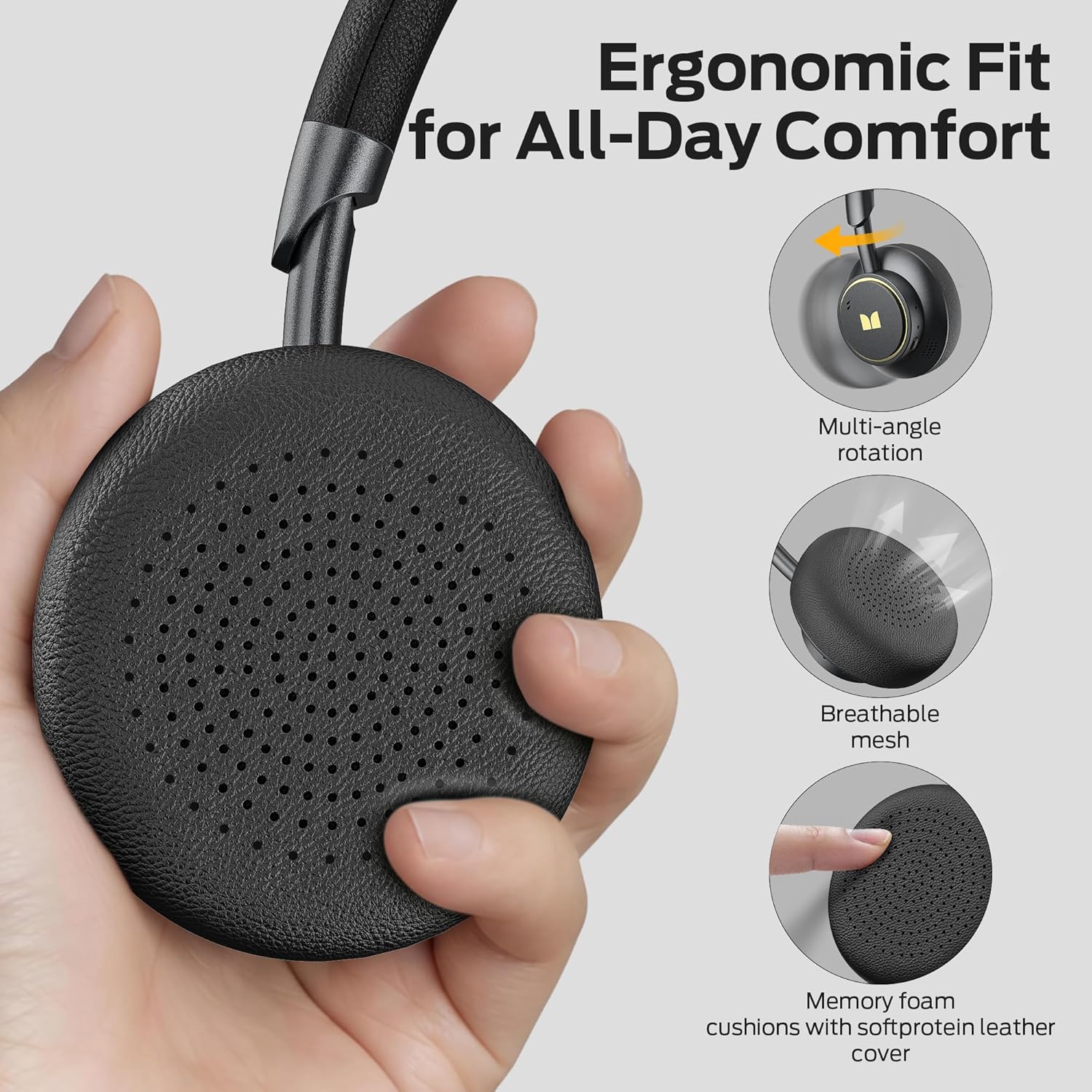
Figure 3.3: Ergonomic design features for comfort, including multi-angle rotation, breathable mesh, and memory foam cushions with soft protein leather cover.
4. Setup
4.1 Charging the Headphones
Before first use, fully charge your headphones. Connect the provided Type-C charging cable to the charging port on the headphones and to a USB power source. The LED indicator will show charging status. A full charge provides up to 50 hours of listening time (ANC off). A quick 5-minute charge provides approximately 4 hours of listening.

Figure 4.1: The headphones offer up to 50 hours of playtime with ANC off, ensuring extended use.
4.2 Bluetooth Pairing
- Ensure the headphones are powered off.
- Press and hold the Power button until the LED indicator flashes blue and red, indicating pairing mode.
- On your device (smartphone, tablet, laptop), enable Bluetooth and search for available devices.
- Select "Monster N-Tune mini 02" from the list.
- Once connected, the LED indicator will turn solid blue or off, depending on the model.
The Bluetooth 6.0 technology ensures a stable connection with lower latency and improved audio output.

Figure 4.2: Seamless Bluetooth pairing with your devices for wireless audio freedom.
5. Operating Instructions
5.1 Power On/Off
- Power On: Press and hold the Power button for 2 seconds.
- Power Off: Press and hold the Power button for 3 seconds.
5.2 Music Playback
- Play/Pause: Short press the Power button.
- Volume Up: Short press the "+" button.
- Volume Down: Short press the "-" button.
- Next Song: Long press the "+" button for 2 seconds.
- Previous Song: Long press the "-" button for 2 seconds.
5.3 Call Management
- Answer/Hang Up: Short press the Power button.
- Reject Call: Long press the Power button for 2 seconds.
- Cancel Call: Press the Power button twice.
The built-in microphone ensures clear voice quality during calls.

Figure 5.1: Enjoy crystal-clear calls with the integrated microphone.
5.4 Active Noise Cancellation (ANC)
- ANC On/Off: Press the ANC button.
- When ANC is on, a white light will illuminate.
- When ANC is off, the white light will turn off.
The Hybrid Active Noise Cancelling feature uses two internal and two external microphones to detect and reduce ambient noise, providing an immersive listening experience.

Figure 5.2: Experience effective noise cancellation in various environments, from busy cafes to public transport.
6. Maintenance
- Cleaning: Use a soft, dry cloth to clean the headphones. Do not use harsh chemicals or abrasive materials.
- Storage: Store the headphones in a cool, dry place away from direct sunlight and extreme temperatures. The foldable design makes them compact for travel and storage.
- Battery Care: To prolong battery life, avoid fully discharging the headphones frequently. Charge them regularly, even if not in use for extended periods.

Figure 6.1: The compact and foldable design allows for easy storage and portability.
7. Troubleshooting
| Problem | Possible Cause | Solution |
|---|---|---|
| Headphones do not power on | Low battery | Charge the headphones fully. |
| Cannot pair with device | Headphones not in pairing mode; Bluetooth off on device; device too far | Ensure headphones are in pairing mode (flashing blue/red LED). Turn on Bluetooth on your device. Move device closer to headphones. |
| No sound | Volume too low; device not connected; incorrect audio source | Increase volume on headphones and device. Re-pair headphones. Check audio output settings on your device. |
| ANC not working effectively | ANC not activated; extreme noise levels | Press the ANC button to activate. ANC is most effective against low-frequency ambient noise. |
8. Specifications
| Feature | Detail |
|---|---|
| Model Name | Monster N-Tune mini 02 |
| Item Model Number | MH22265 |
| Connectivity Technology | Wireless (Bluetooth) |
| Bluetooth Version | 6.0 |
| Noise Control Features | Hybrid Active Noise Cancelling |
| Battery Life | Up to 50 Hours (ANC off) |
| Charging Time | 5 minutes for 4 hours listening (Type-C Fast Charge) |
| Earpiece Shape | On Ear |
| Included Components | Microphone, Charging Cable, Audio Cable |
| Color | Black |
| Manufacturer | Monster |
9. Warranty and Support
Monster N-Tune mini 02 Noise Cancelling Headphones come with lifetime customer service. If you have any questions or require assistance, please feel free to contact us. We are committed to responding to inquiries within 24 hours.
For further support or warranty claims, please refer to the contact information provided with your purchase or visit the official Monster website.


