
1. Introduction
This manual provides essential information for setting up, operating, maintaining, and troubleshooting your REDMI Note 15 5G smartphone. Please read this guide thoroughly to ensure proper use and to maximize the device's capabilities.
2. Setup
2.1 Unboxing and Initial Inspection
Upon unboxing, verify that all components are present and undamaged. The box contents typically include:
- REDMI Note 15 5G Smartphone
- Charger
- USB Type-C Cable
- SIM Eject Tool
- Warranty Card
- User Guide (this document)
- Protective Case
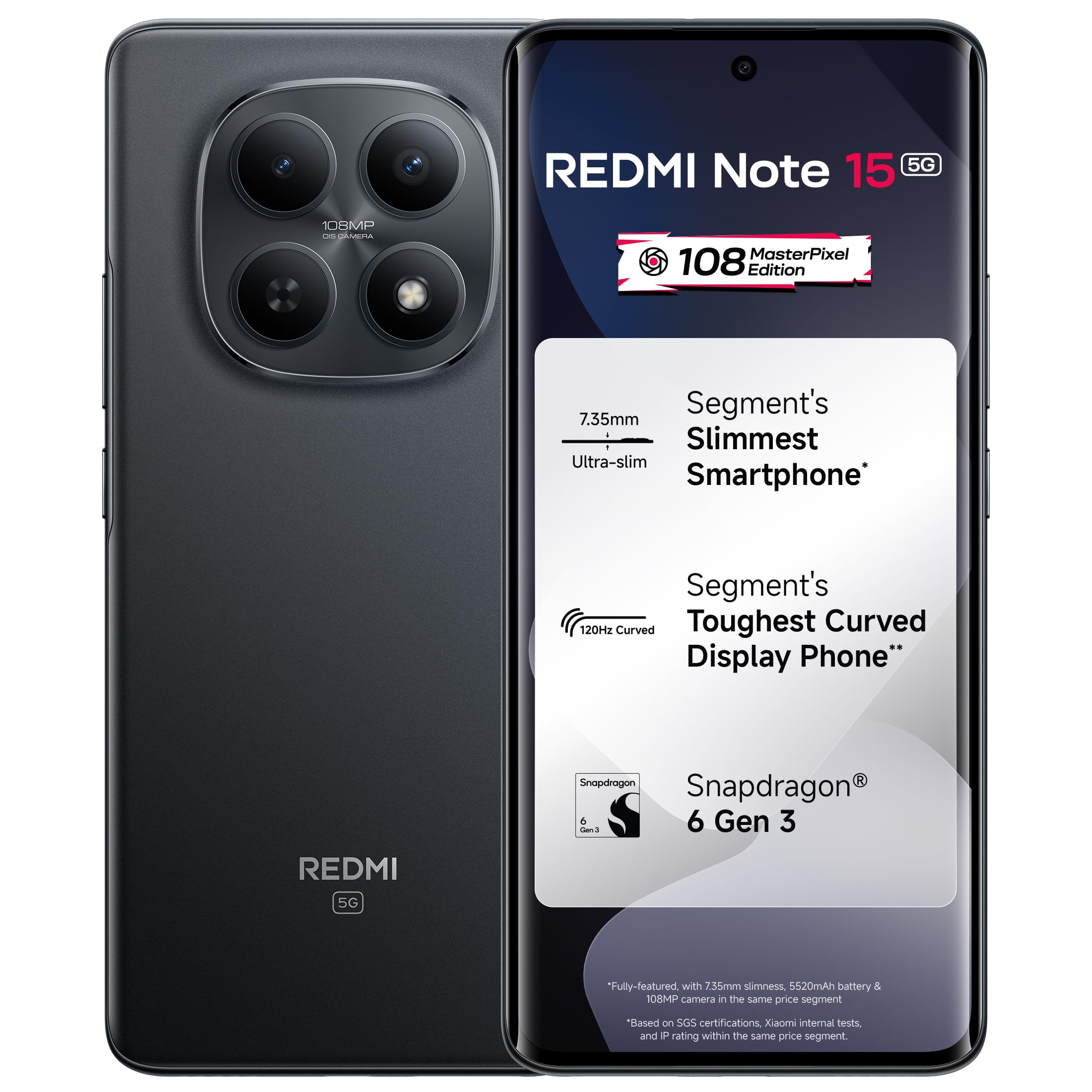
Image: Rear view of the REDMI Note 15 5G smartphone, highlighting its sleek design and camera array.
2.2 Inserting the SIM Card
- Locate the SIM card tray on the side of your device.
- Insert the SIM eject tool into the small hole next to the tray and press firmly until the tray pops out.
- Place your Nano-SIM card(s) into the tray with the gold contacts facing down. Ensure proper orientation.
- Carefully push the tray back into the slot until it clicks into place.
2.3 Initial Power On and Configuration
- Press and hold the Power button until the REDMI logo appears.
- Follow the on-screen instructions to select your language, region, connect to Wi-Fi, and set up your Google account.
- You may be prompted to transfer data from an old device or restore from a backup.
3. Operating Your Device
3.1 Display and Navigation
The REDMI Note 15 5G features a 6.7-inch 120Hz Curved AMOLED display with up to 3200 nits peak brightness. This display offers smooth visuals and excellent visibility even in bright sunlight.

Image: The REDMI Note 15 5G's Curved POLED display showcasing its high brightness and vibrant color reproduction.
Navigation is primarily gesture-based. Swipe up from the bottom for the home screen, swipe up and hold for recent apps, and swipe from the left or right edge to go back.
3.2 Camera Usage
The device is equipped with a 108MP OIS MasterPixel camera system. This advanced camera allows for high-resolution photos and stable 4K video recording.

Image: Detail of the 108MP MasterPixel camera system on the REDMI Note 15 5G, designed for extreme clarity.
- Photo Mode: Tap the shutter button to capture images. Use pinch-to-zoom for optical or digital zoom.
- Video Mode: Select video mode and tap to start/stop recording. Optical Image Stabilization (OIS) helps reduce blur.
- Pro Mode: For advanced users, adjust settings like ISO, white balance, and shutter speed manually.
3.3 Performance and Software
Powered by the Snapdragon 6 Gen 3 processor and running Xiaomi HyperOS 2, the REDMI Note 15 5G delivers fast and fluid performance for multitasking and applications.

Image: The Snapdragon 6 Gen 3 processor, highlighting its role in providing fast, fluid, and reliable performance.
HyperOS 2 includes intelligent features like Circle to Search with Google Gemini AI Assistance, enhancing user interaction and productivity.

Image: The HyperOS 2 interface demonstrating AI-powered assistance features for smarter interaction.
3.4 Battery and Charging
The device features a 5520mAh EV-Grade battery with 45W fast charging support. This allows for extended usage and quick recharges.

Image: Illustration of the 5520mAh battery and its 45W fast charging feature, ensuring long-lasting and dependable power.
- Use only the provided charger and cable for optimal charging speed and safety.
- Avoid exposing the device to extreme temperatures during charging.
3.5 Audio Features
The REDMI Note 15 5G includes Dolby Atmos stereo speakers, providing enhanced audio output for media consumption and gaming.

Image: Visual representation of the device's exceptional sound capabilities, cutting through noise with dual stereo speakers.
4. Maintenance
4.1 Cleaning Your Device
- Use a soft, lint-free cloth to clean the screen and body.
- Avoid using harsh chemicals or abrasive materials.
- For stubborn smudges, slightly dampen the cloth with water or a screen cleaner designed for electronics.
4.2 Software Updates
Regularly check for and install software updates to ensure your device has the latest features, security patches, and performance improvements. You can usually find this option in Settings > About phone > MIUI version (or HyperOS version).
4.3 Battery Care
- Avoid fully discharging the battery frequently.
- Keep the device within a comfortable temperature range (0°C to 35°C) to prolong battery life.
- If storing the device for an extended period, charge it to about 50% before turning it off.
4.4 Durability Features
The REDMI Note 15 5G is designed with an IP66 rating for dust and water resistance and MIL-STD 810H certified protection, offering enhanced durability against everyday challenges.

Image: The REDMI Note 15 5G demonstrating its IP66 dust and water resistance and MIL-STD 810H certification for real-world durability.
5. Troubleshooting
5.1 Common Issues and Solutions
- Device not turning on: Ensure the battery is charged. Connect to the charger for at least 15 minutes, then try powering on.
- Charging issues: Check the charger and cable for damage. Try a different power outlet. Ensure the charging port is clean.
- Network connectivity problems: Verify your SIM card is correctly inserted. Check if airplane mode is off. Restart the device. Contact your network provider if issues persist.
- Apps crashing or freezing: Close and reopen the app. Clear the app's cache (Settings > Apps > [App Name] > Storage > Clear cache). Restart the device.
5.2 Factory Reset
Warning: A factory reset will erase all data on your device. Back up important data before proceeding.
- Go to Settings > About phone > Factory reset.
- Follow the on-screen prompts to confirm the reset.
6. Specifications
| Feature | Specification |
|---|---|
| Brand | Redmi |
| Operating System | Android 15, Xiaomi HyperOS |
| RAM Memory Installed Size | 8 GB |
| Memory Storage Capacity | 128 GB |
| CPU Speed | 2.4 GHz |
| Colour | Black |
| Connector Type | USB Type C |
| Water Resistance Level | Water Resistant (IP66) |
| Rear Facing Camera Photo Sensor Resolution | 108 MP |
| Battery Capacity | 5520 Milliamp Hours |
| Video Capture Resolution | 4K |
| Screen Size | 6.7 Inches |
| Display Type | OLED |
| Cellular Technology | 5G |
| Item Weight | 178 Grams |
| Item Dimensions (L x W x H) | 16.4 x 7.5 x 0.7 Centimeters |
7. Warranty Information
The REDMI Note 15 5G comes with a 1-year manufacturer warranty for the device from the date of purchase. In-box accessories, including batteries, are covered by a 6-month manufacturer warranty from the date of purchase.
For warranty claims or service, please retain your proof of purchase.
8. Support
8.1 Manufacturer Contact
For technical support or service inquiries, please contact the manufacturer:
- Manufacturer: DBG Technology (India) Pvt Ltd
- Address: PLOT NO-2, BAWAL, SECTOR-8, Rewari, Haryana, 123501, India
8.2 Online Resources
Visit the official Redmi website for additional support, FAQs, and software downloads. Keep your device's software updated for optimal performance and security.

Image: Information on industry-leading repair turnaround times and affordable repair options, highlighting commitment to customer support.


