
1. Introduction
This manual provides essential information for using your new REDMI Note 15 5G smartphone. Please read it carefully to ensure proper operation and to maximize the device's features. The REDMI Note 15 5G combines advanced technology with a user-friendly interface, offering a powerful mobile experience.
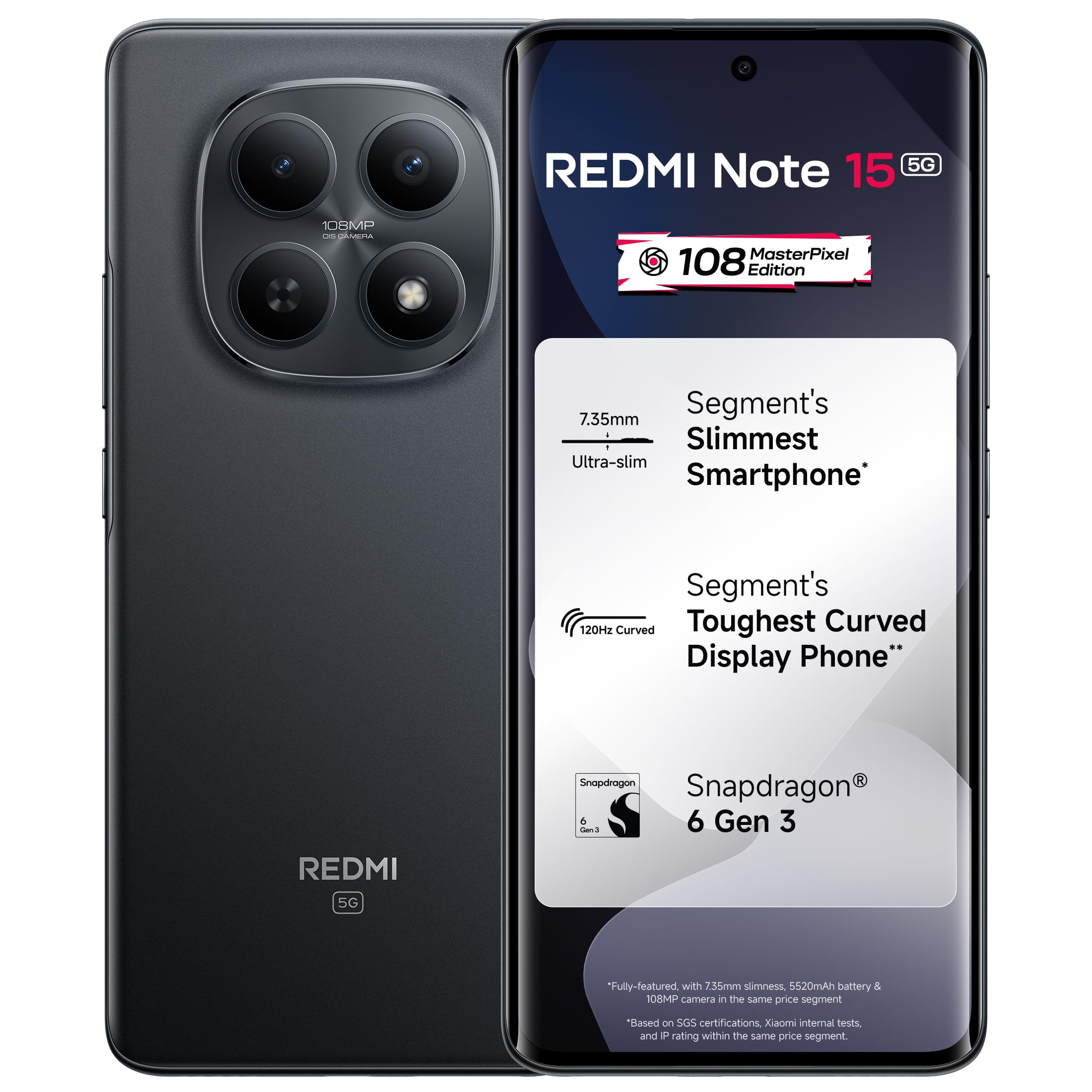
Figure 1: REDMI Note 15 5G Smartphone (Black)
2. What's in the Box
Upon unboxing your REDMI Note 15 5G, verify that all the following items are present:
- REDMI Note 15 5G Smartphone
- Charger
- USB Type-C Cable
- SIM Eject Tool
- Warranty Card
- User Guide (this document)
- Protective Case
3. Device Overview
Familiarize yourself with the physical components of your REDMI Note 15 5G.

Figure 2: Rear view of the REDMI Note 15 5G, highlighting the camera module and branding.
3.1. Buttons and Ports
- Power Button: Located on the right side. Press to turn on/off, wake/sleep screen.
- Volume Buttons: Located above the power button. Adjust media volume, call volume, or notification volume.
- USB Type-C Port: Located at the bottom. Used for charging and data transfer.
- SIM Card Tray: Located on the side. Insert SIM card(s) and microSD card.
- Speakers: Stereo speakers for enhanced audio output.
- Microphones: For calls and voice recording.
4. Setup
4.1. Inserting the SIM Card(s)
- Locate the SIM card tray on the side of your device.
- Insert the SIM eject tool into the small hole next to the tray and press gently until the tray pops out.
- Place your Nano-SIM card(s) into the designated slots on the tray. Ensure the gold contacts face downwards.
- Carefully reinsert the tray into the phone.
4.2. Initial Power On and Configuration
- Press and hold the Power button until the REDMI logo appears.
- Follow the on-screen prompts to select your language, region, and connect to a Wi-Fi network.
- Sign in with your Google account or create a new one.
- Set up a screen lock (PIN, pattern, password, or fingerprint).
- Complete the setup process to access the home screen.
5. Operating Instructions
5.1. Display
The REDMI Note 15 5G features a 17.2cm (6.77-inch) Tough Curved AMOLED screen with a 120Hz refresh rate and up to 3200 nits peak brightness. This ensures vibrant visuals and smooth scrolling, even in bright outdoor conditions.

Figure 3: The 3200 nits peak brightness display ensures clear visibility.
Adjust display settings via Settings > Display to customize brightness, color scheme, and refresh rate.
5.2. Camera
Capture high-quality photos and videos with the 108MP OIS MasterPixel camera system. The camera supports 4K video recording with Optical Image Stabilization (OIS) for steady footage.

Figure 4: The 108MP OIS MasterPixel camera for detailed photos and stable 4K videos.
Open the Camera app to access various modes like Photo, Portrait, Video, Night, and Pro mode. Tap the shutter button to take a photo or the record button to start/stop video recording.
5.3. Performance
Powered by the Snapdragon 6 Gen 3 processor, the REDMI Note 15 5G delivers smooth performance for daily tasks, multitasking, and gaming. The 8GB RAM ensures efficient app switching.

Figure 5: Snapdragon 6 Gen 3 processor for fast and fluid performance.
5.4. Battery and Charging
The device is equipped with a 5520mAh EV-Grade battery, providing extended usage. It supports 45W fast charging, allowing for quick power top-ups.

Figure 6: The 5520mAh battery with 45W fast charging capability.
To charge, connect the USB Type-C cable to the phone and the charger, then plug the charger into a power outlet. Use only the provided charger and cable for optimal performance and safety.
5.5. Audio
Experience immersive sound with Dolby Atmos stereo speakers, delivering clear vocals and deep audio for media consumption and gaming.

Figure 7: Dual stereo speakers with Dolby Atmos for enhanced audio.
5.6. Software (Xiaomi HyperOS 2)
The REDMI Note 15 5G runs on Xiaomi HyperOS 2, offering a seamless and intelligent user experience. Features include Circle to Search with Google Gemini AI Assistance for enhanced productivity.

Figure 8: Xiaomi HyperOS 2 provides a smooth and intelligent user interface.
6. Maintenance
6.1. General Care
- Keep your phone dry. Moisture can damage the device.
- Avoid extreme temperatures.
- Clean the screen and body with a soft, lint-free cloth. Avoid harsh chemicals.
- Protect the screen with a screen protector and use the provided protective case.
6.2. Durability
The REDMI Note 15 5G features an IP66 rating for dust and water resistance, military-grade durability, and Diamond Structure Protection, designed to withstand everyday challenges.

Figure 9: IP66 dust and water resistance, and MIL-STD-810H certified protection.
6.3. Software Updates
Regularly check for and install software updates to ensure your device has the latest features, security patches, and performance improvements. Go to Settings > About phone > System update.
7. Troubleshooting
This section addresses common issues you might encounter with your REDMI Note 15 5G.
| Issue | Possible Solution |
|---|---|
| Phone does not turn on | Ensure the battery is charged. Connect the charger and wait a few minutes before attempting to power on. If unresponsive, perform a force restart by holding the Power button for 10-15 seconds. |
| Apps are crashing or freezing | Close the problematic app and reopen it. Clear the app's cache (Settings > Apps > [App Name] > Storage > Clear cache). If the issue persists, uninstall and reinstall the app. Ensure your phone's software is up to date. |
| Poor battery life | Check battery usage in Settings to identify power-hungry apps. Reduce screen brightness, disable unnecessary features like GPS or Bluetooth when not in use, and close background apps. |
| Cannot connect to Wi-Fi | Restart your phone and the Wi-Fi router. Forget the network (Settings > Wi-Fi > [Network Name] > Forget) and reconnect. Ensure you are entering the correct password. |
| Fingerprint sensor not working | Ensure your finger is clean and dry. Re-register your fingerprint in Settings > Password & security > Fingerprint unlock. |
8. Specifications
Key technical specifications for the REDMI Note 15 5G:
| Feature | Detail |
|---|---|
| Brand | Redmi |
| Model | Note 15 5G |
| Operating System | Android 15, Xiaomi HyperOS |
| Processor | Snapdragon 6 Gen 3 (2.4 GHz CPU Speed) |
| RAM | 8 GB |
| Internal Storage | 256 GB |
| Display | 17.2 cm (6.77 inches) Curved AMOLED, 1920 x 1080 Resolution, 120Hz Refresh Rate, 3200 nits Peak Brightness |
| Rear Camera | 108 MP with OIS, LED Flash, 4K Video Capture |
| Battery Capacity | 5520 mAh |
| Charging | 45W Fast Charging |
| SIM Card Slot | Dual SIM (Nano) |
| Connectivity | 5G, GSM, LTE, USB Type C |
| Security | Fingerprint Recognition |
| Durability | IP66 Water Resistant, MIL-STD-810H Certified Protection |
| Dimensions | 16.4 x 7.5 x 0.7 Centimeters |
| Weight | 178 Grams |
9. Warranty and Support
9.1. Warranty Information
Your REDMI Note 15 5G comes with a 1-year manufacturer warranty for the device from the date of purchase. In-box accessories, including batteries, are covered by a 6-month manufacturer warranty from the date of purchase.
Please retain your proof of purchase for warranty claims.
9.2. Manufacturer and Importer
- Manufacturer: DBG Technology (India) Pvt Ltd, PLOT NO-2, BAWAL, SECTOR-8, Rewari, Haryana, 123501, India.
- Importer: Xiaomi Technology India Private Limited, Building Orchid. Block E, Embassy Tech Village, Marathahalli Outer Ring Road, Devarabisanahalli, Bengaluru 560103, India.
9.3. Customer Support
For further assistance, technical support, or warranty claims, please contact Redmi customer service through their official website or authorized service centers. Refer to the warranty card for specific contact details.

Figure 10: Information regarding support and service for your device.


