
MINISO MS112
MINISO MS112 AI Translation Earbuds User Manual
Model: MS112
Introduction
Thank you for choosing the MINISO MS112 AI Translation Earbuds. These intelligent earbuds are designed to facilitate real-time communication across languages, monitor heart rate, and provide high-fidelity audio. This manual will guide you through the setup, operation, and maintenance of your device.
The MS112 earbuds offer a 4-in-1 functionality, combining real-time translation, video calls, phone calls, and high-fidelity music listening. They are compatible with both iOS and Android devices.
Package Contents
Before you begin, please verify that all items are present in your package:
- Miniso MS112 Earbuds (2)
- Charging Box (1)
- Charging Cable (1)
- User Manual (1)
- Packaging Box (1)
- Ear Caps (6)

Image: Contents of the MINISO MS112 Earbuds package.
Setup
1. Charging the Earbuds and Case
Before first use, fully charge the earbuds and the charging case. Connect the provided USB-C cable to the charging case and a power source. The indicator lights on the case will show the charging status.
2. App Installation
The translation function requires the "AuralIntelli" application. Please download the app from your device's app store (iOS or Android).
- Download the "AuralIntelli" app.
- Log in to the app or create a new account.

Image: Steps for downloading and logging into the AuralIntelli app.
3. Bluetooth Pairing
To connect your MINISO MS112 earbuds to your smartphone:
- Ensure the earbuds are charged and placed in the charging case.
- Open the charging case. The earbuds will enter pairing mode.
- On your smartphone, go to Bluetooth settings and enable Bluetooth.
- Select "MINISO MS112" from the list of available devices to pair.
- Once paired, open the "AuralIntelli" app and connect the earbuds within the app's device management section.

Image: Visual guide for connecting earbuds via Bluetooth and within the app.
Operating Instructions
1. Real-time Translation
The MINISO MS112 earbuds support real-time translation for 135 languages with high accuracy and minimal delay. This function is managed through the "AuralIntelli" app.

Image: Earbuds displaying support for 135 languages.
Translation Modes:
- Hands-free Mode: For real-time communication without holding your phone.
- Dual-ear Control: Operate translation functions directly via earbud touch controls.
- Live Photo Translation: Translate text from images using your phone's camera through the app.
- AI Conversation Mode: Facilitates fluent dialogue with AI assistance.
- Conference Mode: Designed for multilingual meetings.
- Dual Mode: Allows simultaneous music listening and translation.
- Voice Memos: Automatically transcribes spoken words.
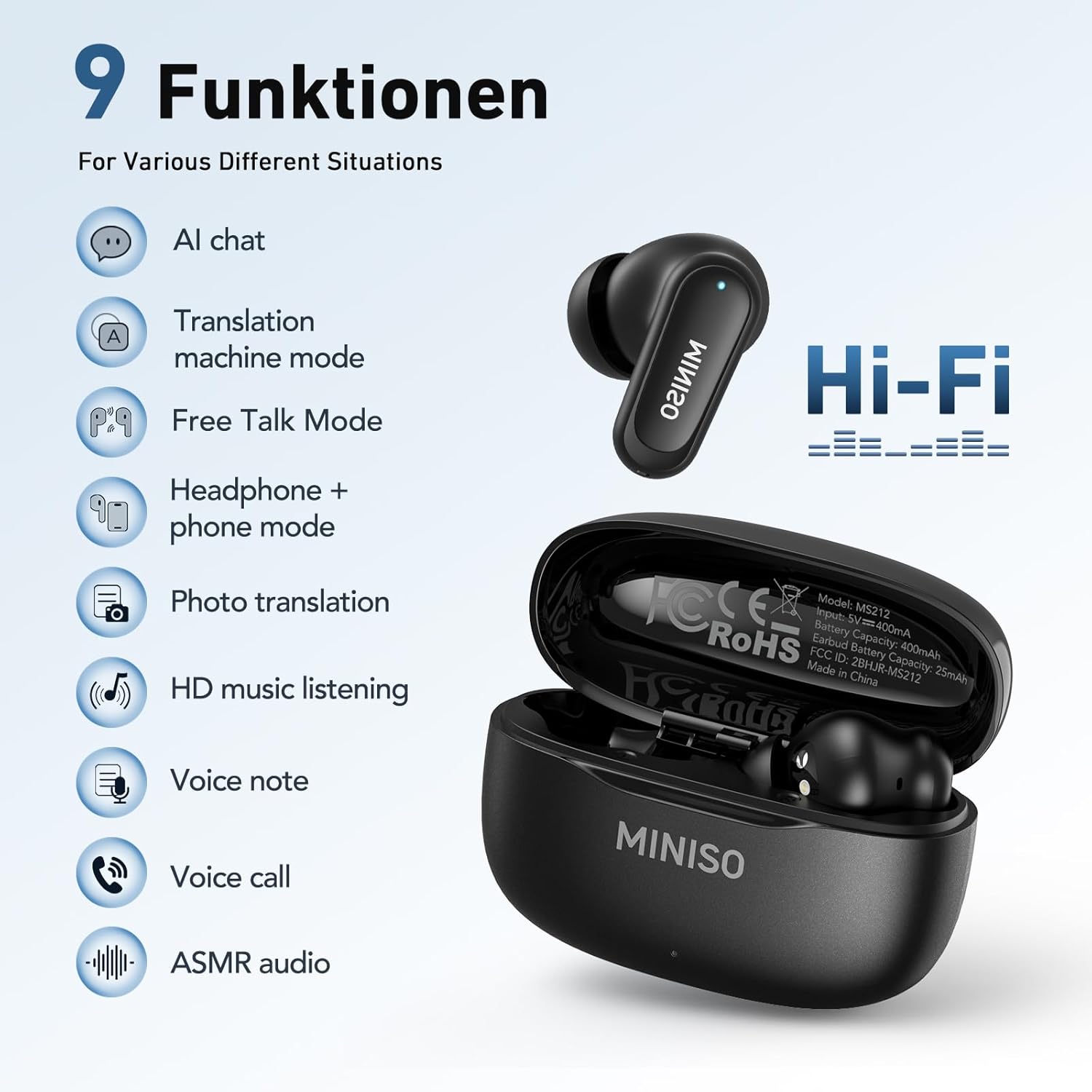
Image: Overview of the 9 functions, including multiple translation modes.

Image: Real-time translation function in use.
2. Heart Rate Sensing
The earbuds feature a built-in heart rate sensor that tracks your heart rate in real-time across over 50 workout types. This data is accessible through the "AuralIntelli" app.
To use this feature, ensure the earbuds are properly seated in your ear canal. Open the app, navigate to the heart rate detection section, and initiate a measurement. The app will display your current heart rate and historical data.

Image: Heart rate sensing feature displayed on a smartphone app.

Image: Heart rate monitoring during physical activity.
3. Active Noise Cancellation (ANC)
The earbuds are equipped with Adaptive Noise Cancellation to effectively block background noise, ensuring clear communication and immersive audio. This feature enhances your listening experience in various environments.

Image: Noise cancelling feature in use, showing different modes like Commuting, Outdoor, and Indoor.
4. Audio Playback and Calls
Enjoy high-fidelity stereo sound for music playback. The earbuds also support video calls and phone calls, providing clear audio for conversations.
Touch Controls:
The MINISO MS112 earbuds feature touch controls for managing playback, calls, and translation functions. Specific gestures and their corresponding actions can be configured or found within the "AuralIntelli" app.

Image: 4-in-1 AI Earbuds functionality for translation, calls, and music.
Maintenance
Cleaning
- Gently wipe the earbuds and charging case with a soft, dry, lint-free cloth.
- Do not use abrasive cleaners, alcohol, or chemical solvents.
- Ensure the charging ports are free of dust and debris.
Storage
When not in use, store the earbuds in their charging case to protect them and keep them charged. Avoid extreme temperatures and direct sunlight.
Troubleshooting
| Problem | Possible Solution |
|---|---|
| Earbuds not pairing |
|
| Translation not working |
|
| No sound or poor audio quality |
|
| Heart rate sensor not detecting |
|
Specifications
| Feature | Detail |
|---|---|
| Brand | MINISO |
| Model Number | MS112 |
| Color | Black |
| Ear Placement | Open Ear |
| Form Factor | Open ear True Wireless |
| Noise Control | Adaptive Noise Cancellation |
| Connectivity Technology | Wireless (Bluetooth) |
| Bluetooth Version | 5.4 |
| Frequency Range | 20Hz - 20,000Hz |
| Material | Plastic |
| Water Resistance Level | Waterproof |
| Control Type | Touch Control |
| Compatible Devices | Smartphones (iOS, Android) |
| Additional Features | Real-time Translation, Heart Rate Sensing, Active Noise Cancellation |
Warranty Information
The MINISO MS112 AI Translation Earbuds come with a limited warranty. Please refer to the warranty card included in your product packaging for specific terms, conditions, and duration. Retain your proof of purchase for warranty claims.
Customer Support
For further assistance, technical support, or inquiries regarding your MINISO MS112 AI Translation Earbuds, please contact MINISO customer service. Contact details can typically be found on the official MINISO website or on the product packaging.
Remember that the "AuralIntelli" app is essential for the translation features and may offer in-app support or FAQs.
Related documentsMS112


Ask a question about this manual
Ask about setup, troubleshooting, compatibility, parts, safety, or missing instructions. Manuals+ will review the question and use this page’s manual context to help answer it.