
1. Introduction
The FOXWELL JT200 Fuel Injector Tester is a diagnostic tool designed to evaluate the performance of fuel injectors in 6V/12V Multi-Port Injection (MPI) systems found in motorcycles and cars. This device allows for visual inspection of spray patterns, measurement of fuel flow rates, and identification of issues such as clogging, leakage, or poor atomization. By simulating various engine conditions, the JT200 assists in pinpointing faulty injectors to restore optimal engine performance and fuel efficiency. This manual provides detailed instructions for the safe and effective use of your JT200 tester.

Image: The FOXWELL JT200 Fuel Injector Tester helps identify and address common engine issues caused by faulty injectors, such as misfires, rough idle, and increased fuel consumption.
2. Safety Information
Please read and understand all safety warnings before operating the FOXWELL JT200 Fuel Injector Tester. Failure to follow these instructions may result in injury or damage to the equipment.
- Test Fluid: Use only recommended test fluid (e.g., kerosene or diesel). DO NOT USE GASOLINE. Gasoline's strong solvent properties can damage the test tubes and poses a severe fire hazard due to its flammability.
- Ventilation: Operate the tester in a well-ventilated area to avoid inhaling fumes from the test fluid.
- Eye Protection: Always wear appropriate eye protection to guard against splashes of test fluid.
- Pressure Release: Before removing injectors or disassembling any part of the system, ensure all pressure is released by unscrewing the orange filling cap. Failure to do so can result in test fluid spraying out.
- Electrical Connection: Connect the tester to a 12V power source (e.g., a car battery) using the provided power cord. Ensure correct polarity.
- Stability: Place the tester on a stable, level surface during operation to prevent tipping and spills.

Image: The FOXWELL JT200 is designed for safer operation compared to direct fuel injector cleaning sprays, allowing for controlled testing in a contained environment.
3. What's in the Box
Verify that all components are present before beginning setup:
- 1x Fuel Injector Tester Machine (Main Unit)
- 2x Φ9-11.3mm Adapters
- 2x Φ11-12.8mm Adapters
- 2x Φ13-14.5mm Adapters
- 2x Φ10 Washers
- 2x Φ14 Washers
- 2x Lock Threads
- 2x Transparent Measuring Cylinders
- 1x Fuel Distribution Rail
- 1x Base Plate
- 1x Block Screw (for single injector testing)
- 1x Funnel
- 1x Power Cord (with battery clamps)
- 1x Signal Cord (for injector connections)

Image: All components included with the FOXWELL JT200 Fuel Injector Tester, showing the main unit, various adapters, measuring cylinders, and connection cables.
4. Setup Instructions
Follow these steps to set up your FOXWELL JT200 Fuel Injector Tester:
- Prepare the Unit: Remove the two screws that secure the plate holding the graduated tubes. Replace these screws with the provided long rods (lock threads) that will retain the injectors and fuel distribution rail.
- Install Injectors: Select the appropriate Φ9-14.5mm adapters for your injectors. Place the injectors into the manifold, ensuring a snug fit with the chosen adapters. If testing only one injector, use the block screw to seal the unused port.
- Secure Injectors: Tighten the thumb screws on the lock threads to firmly hold the injectors and adapters in place, creating a leak-free seal. Apply light pressure on the top of the injector manifold while tightening.
- Connect Fuel Hose: Attach the fuel deliver hose to the top of the manifold via the compression fitting. Hand-tighten securely.
- Connect Signal Cords: Plug the two signal cords into the designated ports on the tester and connect the other ends to the injector terminals. The cables have small female spade connectors for broad compatibility.
- Power Connection: Connect the power cord's battery clamps to a 12V vehicle battery. Ensure the red clamp connects to the positive (+) terminal and the black clamp to the negative (-) terminal.
- Fill with Test Fluid: Use the provided funnel to carefully pour the recommended test fluid (kerosene or diesel) into the filler cap opening on the top of the unit. Observe the fluid level through the sight glass tube. Do not overfill.
Video: This video demonstrates the installation steps for the FOXWELL JT200 Injector Tester, showing how to set up the unit and connect injectors for testing.
5. Operation
The JT200 offers both Automatic and Manual testing modes to simulate various engine conditions.
5.1 General Controls
- Display Area: Shows current RPM or time settings.
- Decrease/Increase Buttons (-/+): Adjust time or speed settings.
- Mode Selection Button: Toggles between Automatic (A) and Manual (M) modes.
- Start/Stop Button: Initiates or halts the test cycle.
- Mode Indication Lights: Indicate the currently active mode (A for Auto, M for Manual).
- Pressure Gauge: Displays the working pressure of the test fluid.

Image: The user-friendly interface of the FOXWELL JT200, highlighting the display area, control buttons, and pressure gauge for easy operation.
5.2 Automatic Mode
In Automatic Mode, the JT200 simulates real-world driving conditions by automatically cycling through various RPMs, from low to high speed. This mode is ideal for a comprehensive assessment of injector performance across the entire operating range.
- Press the Mode Selection button until the 'A' indicator light is on.
- Use the +/- buttons to set the desired test duration (30 to 600 seconds).
- Press the Start/Stop button to begin the automatic test cycle.

Image: The FOXWELL JT200 offers an adjustable testing mode, including an Automatic Mode that simulates real driving conditions for accurate diagnostics.
5.3 Manual Mode
Manual Mode allows you to set a specific RPM (100-9900 RPM) to pinpoint issues at particular engine speeds, such as idle, steady cruising, or acceleration. This is useful for diagnosing intermittent faults.
- Press the Mode Selection button until the 'M' indicator light is on.
- Use the +/- buttons to set the desired RPM.
- Press the Start/Stop button to begin the manual test at the selected RPM.
- Typical RPM Ranges:
- Idle Test: 600-1000 RPM
- Steady Test: 1500-3000 RPM
- Acceleration Test: 2500-5000 RPM
- High Speed Test: > 5000 RPM
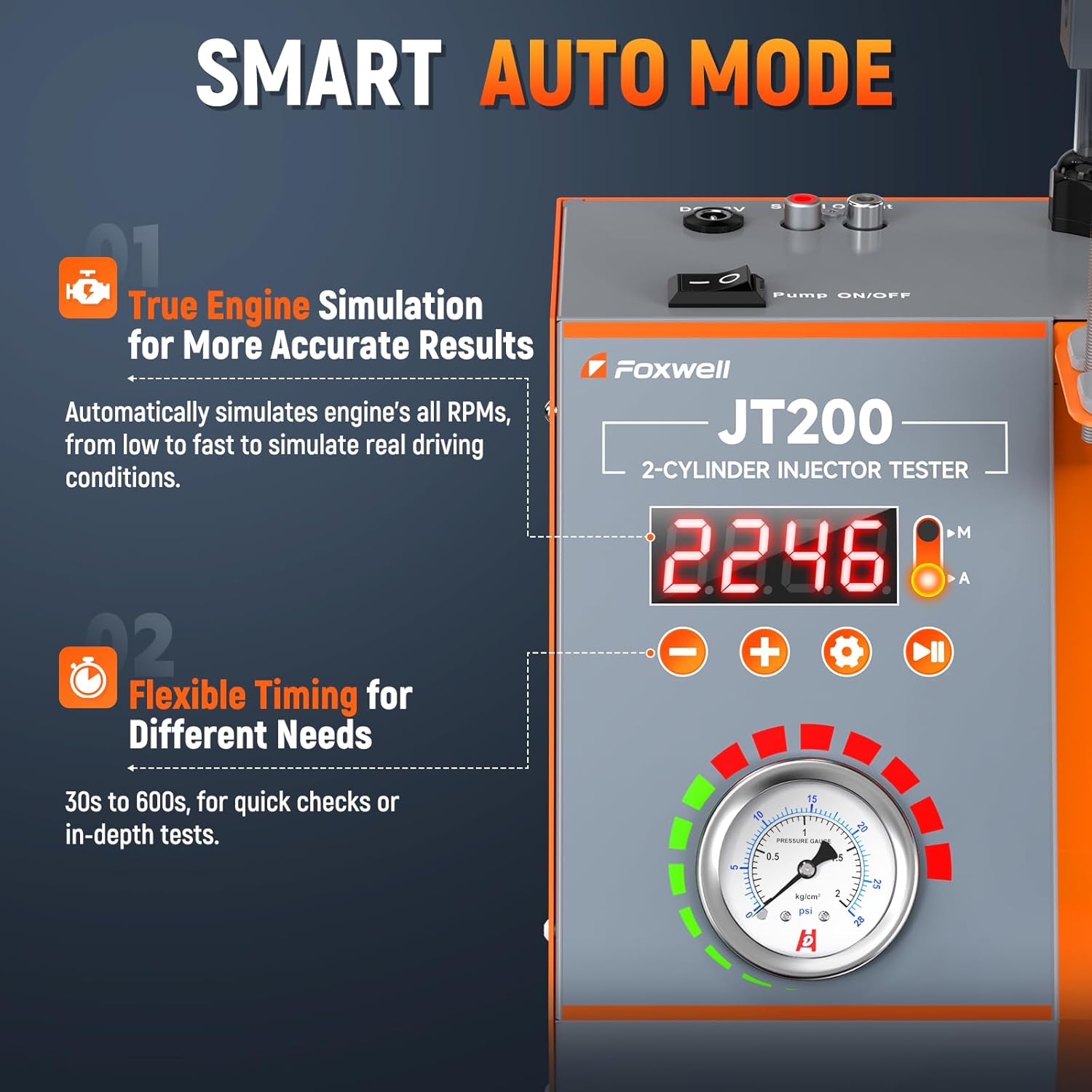
Image: Close-up of the FOXWELL JT200 control panel, illustrating the digital display for RPM settings in Manual Mode.
5.4 Visual Spray Pattern Diagnosis
The transparent test tubes provide a clear view of each injector's spray pattern and atomization quality. Observe for:
- Distorted Sprays: An ideal spray pattern is a fine, conical mist. Distorted patterns may appear as streams or uneven distribution.
- Uneven Streams: Instead of a fine mist, the injector may produce visible streams of fluid.
- Poor Atomization: Large droplets instead of a fine mist indicate poor atomization, leading to inefficient combustion.
- Leakage: Observe if any fluid drips from the injector tip when it is not actively pulsing.

Image: Visual comparison of a blocked injector's poor spray pattern versus an unblocked injector's ideal spray pattern, as seen through the JT200's transparent tubes.
5.5 Precision Flow Measurement
The graduated cylinders allow for precise measurement and comparison of fuel volume delivered by each injector over a set period. This helps identify inconsistencies in flow rate.
- After a test cycle, compare the fluid levels in the transparent measuring cylinders.
- Significant differences in volume indicate an injector that is under-performing or over-performing compared to others.
- Refer to manufacturer specifications for expected flow rates for your specific injectors.

Image: The JT200's graduated cylinders clearly show the difference in injection volume between a good injector and a faulty one, enabling precise comparison.
6. Compatibility
The FOXWELL JT200 is designed for wide compatibility with most traditional EFI (Electronic Fuel Injection) and MPI (Multi-Port Injection) top-feed injectors. It supports both 6V motorcycle and 12V car/pickup injectors.
- Injector Sizes: Compatible with Φ9-14.5mm injectors using the included adapter set.
- Voltage: Works with 6V and 12V systems.
- Important Note: The JT200 is NOT compatible with GDI (Gasoline Direct Injection) injectors.

Image: The FOXWELL JT200 is compatible with a wide range of 6V/12V motorcycle and gasoline vehicle injectors, excluding GDI types.
7. Maintenance
Proper maintenance ensures the longevity and accuracy of your JT200 Fuel Injector Tester.
- Cleaning: After each use, wipe down the unit with a clean, dry cloth. Avoid using harsh chemicals that may damage the plastic components or labels.
- Test Fluid Management: The test fluid is reusable. After testing, you can pour the fluid back into its original container or a designated storage container. Ensure the container is sealed to prevent evaporation or contamination.
- Storage: Store the JT200 in a clean, dry environment away from direct sunlight and extreme temperatures. Keep all adapters and accessories organized to prevent loss.
- Regular Inspection: Periodically check all hoses, connections, and seals for any signs of wear or damage. Replace any compromised parts immediately.

Image: The FOXWELL JT200 promotes energy efficiency by allowing the reuse of test fluid, reducing waste and operational costs.
8. Troubleshooting
If you encounter issues with your JT200, refer to the following common problems and solutions:
| Problem | Possible Cause | Solution |
|---|---|---|
| No power to the unit | Incorrect 12V battery connection; discharged battery; faulty power cord. | Ensure correct polarity (+/-) and secure connection to a charged 12V battery. Check power cord for damage. |
| No fluid flow during test | Insufficient test fluid; clogged pump/lines; air in the system; pump not activated. | Check fluid level. Ensure the pump is switched on. Bleed any air from the system. If problem persists, contact support. |
| Fluid leakage from injector manifold | Injectors not properly seated; incorrect adapters; loose compression fitting; damaged O-rings. | Re-seat injectors and tighten thumb screws. Verify correct adapter usage. Tighten fuel hose compression fitting. Inspect and replace O-rings if damaged. |
| Inconsistent test results | Air in the system; inconsistent power supply; test fluid contamination. | Ensure no air bubbles are present. Use a stable 12V power source. Use clean, uncontaminated test fluid. |
9. Specifications
- Model: JT200
- Item Weight: 7.85 pounds
- Package Dimensions: 11.54 x 10.35 x 7.6 inches
- Power Input: 12V DC (via vehicle battery)
- RPM Range (Manual Mode): 100 - 9900 RPM
- Test Duration (Auto Mode): 30 - 600 seconds
- Injector Compatibility: Φ9-14.5mm MPI/EFI injectors (Not for GDI)
10. Warranty and Support
For warranty information, technical support, or service inquiries regarding your FOXWELL JT200 Fuel Injector Tester, please contact FOXWELL customer support directly. Refer to the product packaging or the official FOXWELL website for contact details.


