
1. Introduction
Thank you for purchasing the MZEIBO KY-2020D 80W Detachable Sound Bar. This sound bar is designed to enhance your audio experience with powerful sound, versatile connectivity, and a unique 2-in-1 detachable design. Please read this manual carefully before use to ensure proper operation and to maximize the product's performance.
2. Safety Information
- Do not expose the device to rain, moisture, or extreme temperatures.
- Do not disassemble or modify the sound bar. Refer all servicing to qualified personnel.
- Ensure the power supply voltage matches the requirements specified on the device.
- Keep the sound bar away from heat sources, direct sunlight, and strong magnetic fields.
- Clean the device only with a dry, soft cloth. Avoid using liquid cleaners.
3. Package Contents
Verify that all items listed below are included in your package:
- MZEIBO KY-2020D Sound Bar (2 detachable sections)
- Remote Control
- Power Supply Adapter
- Optical Cable
- AUX Cable
- HDMI ARC Cable
- Stand Bases (for tower configuration)
- Quick Start Guide
- Warranty Card

Figure 3.1: Included Accessories
4. Product Overview
4.1 Key Features
- 80W Powerful Sound Performance: Delivers rich bass, clear mids, and immersive surround sound.
- 2-in-1 Detachable Design: Can be used as a single 31-inch sound bar or split into two separate tower speakers.
- Stable Bluetooth 5.0 Connection: For seamless wireless streaming from compatible devices.
- Multiple Sound Modes: Optimized audio for Movie, Music, and News content using DSP technology.
- Multiple Input Options: Supports ARC, Optical, AUX, and Bluetooth 5.0 for universal compatibility.

Figure 4.1: 80W Powerful Output and Audio Quality
4.2 Ports and Controls
The sound bar features various input ports for connecting to different audio sources and controls for easy operation.

Figure 4.2: Connectivity Ports (DC IN, OPT, AUX, ARC)

Figure 4.3: Remote Control Functions
5. Setup
5.1 Assembly Options
The MZEIBO KY-2020D sound bar offers flexible assembly options:
- Single Sound Bar: Align and merge the two sections, then twist to lock them into a single 31-inch unit. This can be placed on a desktop or wall-mounted under a TV.
- Two Tower Speakers: Separate the two sections and attach the included stand bases to create two independent tower speakers. These can be placed on either side of your TV or desktop for a wider stereo soundstage.

Figure 5.1: Sound Bar Assembly Options
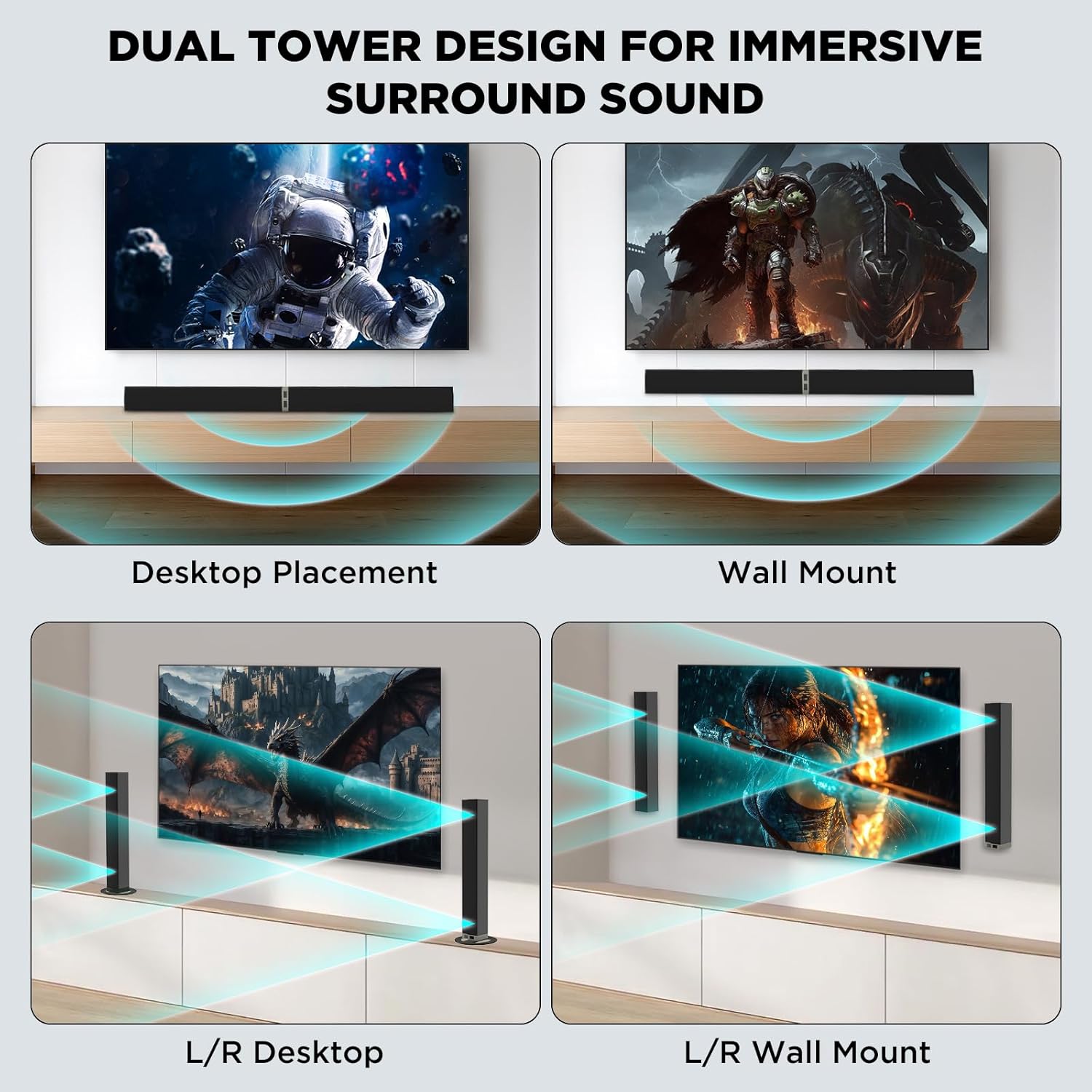
Figure 5.2: Versatile Placement Options
5.2 Connecting to Your TV
Choose one of the following connection methods based on your TV's available ports:
5.2.1 HDMI ARC Connection
- Insert one end of the HDMI ARC cable into your TV's HDMI eARC or ARC port.
- Insert the other end of the cable into the ARC (TV) port on the sound bar.
- Press the "ARC" button on the remote control. The sound bar LED indicator will turn orange.

Figure 5.3: HDMI ARC Connection Guide
5.2.2 Optical Connection
- Insert one end of the Optical cable into your TV's Optical OUT port.
- Insert the other end of the cable into the OPT port on the sound bar.
- Press the "OPT" button on the remote control. The sound bar LED indicator will turn green.

Figure 5.4: Optical Connection Guide
5.2.3 AUX Connection
- Insert one end of the AUX cable into your TV's AUX port (usually a 3.5mm headphone jack or RCA L/R audio out).
- Insert the other end of the cable into the AUX port on the sound bar.
- Press the "AUX" button on the remote control. The sound bar LED indicator will show white.

Figure 5.5: AUX Connection Guide
5.3 Bluetooth Connection
- Power on the sound bar.
- Press the "BT mode" button on the remote control or the corresponding button on the sound bar. The LED indicator will flash blue, indicating pairing mode.
- On your mobile device (phone, tablet, laptop), enable Bluetooth and search for "MZEIBO KY-2020D".
- Select the sound bar from the list of available devices to pair. Once connected, the LED indicator will turn solid blue.
The sound bar supports Bluetooth 5.0 for a stable connection up to 10 meters.
6. Operating
6.1 Power On/Off
Press the power button on the remote control or on the sound bar to turn the device on or off.
6.2 Volume Control
Use the Volume Up (+) and Volume Down (-) buttons on the remote control or on the sound bar to adjust the audio level.
6.3 Sound Modes
The sound bar features three optimized sound modes:
- Movie Mode: Enhances dialogue clarity and provides a more immersive cinematic experience.
- Music Mode: Optimizes audio for balanced music playback.
- News Mode: Focuses on vocal clarity for news broadcasts and spoken content.
Press the "Music/Movie/News" button on the remote control to cycle through these modes.

Figure 6.1: Three Equalizer Modes
6.4 Input Source Selection
Press the corresponding input button (ARC, OPT, AUX, BT mode) on the remote control to switch between different audio sources.
7. Maintenance
- Always disconnect the power cable before cleaning.
- Use a soft, dry, lint-free cloth to clean the surface of the sound bar.
- Do not use abrasive cleaners, waxes, or solvents as they may damage the finish.
- Keep the ventilation openings clear of dust and debris.
8. Troubleshooting
If you encounter issues with your MZEIBO KY-2020D sound bar, refer to the following common problems and solutions:
| Problem | Possible Cause | Solution |
|---|---|---|
| No sound from the sound bar. | Incorrect input source selected. Cables not connected properly. TV audio output settings incorrect. | Ensure the correct input mode (ARC, OPT, AUX, BT) is selected. Check all audio cables are securely connected. Verify your TV's audio output is set to external speakers or the correct digital output format. |
| Sound is distorted or low volume. | Volume too low on sound bar or TV. Incorrect sound mode. | Increase volume on both the sound bar and TV. Try switching between Movie, Music, and News modes. |
| Bluetooth device cannot pair. | Sound bar not in pairing mode. Device too far from sound bar. Interference. | Ensure the sound bar LED is flashing blue. Move your device closer to the sound bar. Avoid placing the sound bar near other wireless devices. |
| Sound bar stops working unexpectedly. | Temporary software glitch. | Unplug the power supply from the sound bar, wait for one minute, then plug it back in. This often resolves temporary issues. |
| Remote control not working. | Dead batteries. Obstruction between remote and sound bar. | Replace the batteries in the remote control. Ensure there is a clear line of sight between the remote and the sound bar's sensor. |
9. Specifications
| Feature | Detail |
|---|---|
| Brand | MZEIBO |
| Model Number | KY-2020D |
| Speaker Maximum Output Power | 80 watts |
| Frequency Response | 20 KHz |
| Connectivity Technology | Auxiliary, Bluetooth, Optical, HDMI ARC |
| Audio Output Mode | Stereo |
| Mounting Type | Tabletop Mount, Wall Mount |
| Speaker Type | Soundbar (Detachable) |
| Additional Features | Hi Res Audio, DSP Technology, Multiple Sound Modes |
| Control Method | Push Button, Remote |
| Speaker Size | 31 inches (combined) |
| Specific Uses For Product | Home entertainment, general music listening |
| Wireless Technology | Bluetooth 5.0 |
| Item Dimensions (D x W x H) | 31.5"D x 2.36"W x 2.36"H (combined) |
| Compatible Devices | Laptop, Projector, Smartphone, Tablet, Television |
10. Warranty
The MZEIBO KY-2020D Sound Bar comes with a 36-month warranty from the date of purchase. This warranty covers manufacturing defects and workmanship under normal use. Please retain your proof of purchase for warranty claims. The warranty does not cover damage caused by misuse, accidents, unauthorized modifications, or natural disasters.
11. Support
For technical support, troubleshooting assistance, or warranty inquiries, please contact MZEIBO customer service through the retailer where you purchased the product or visit the official MZEIBO website for contact information.


