
1. Product Overview
This manual provides instructions for the KUNFINE 9.7-inch Octa Core Android Car Stereo, designed specifically for Toyota Camry models manufactured between 2007 and 2011 that are equipped with automatic climate control (AUTO AC). This head unit integrates advanced features such as CarPlay, Android Auto, GPS navigation, and multimedia playback to enhance your driving experience.
1.1 Compatibility Notice
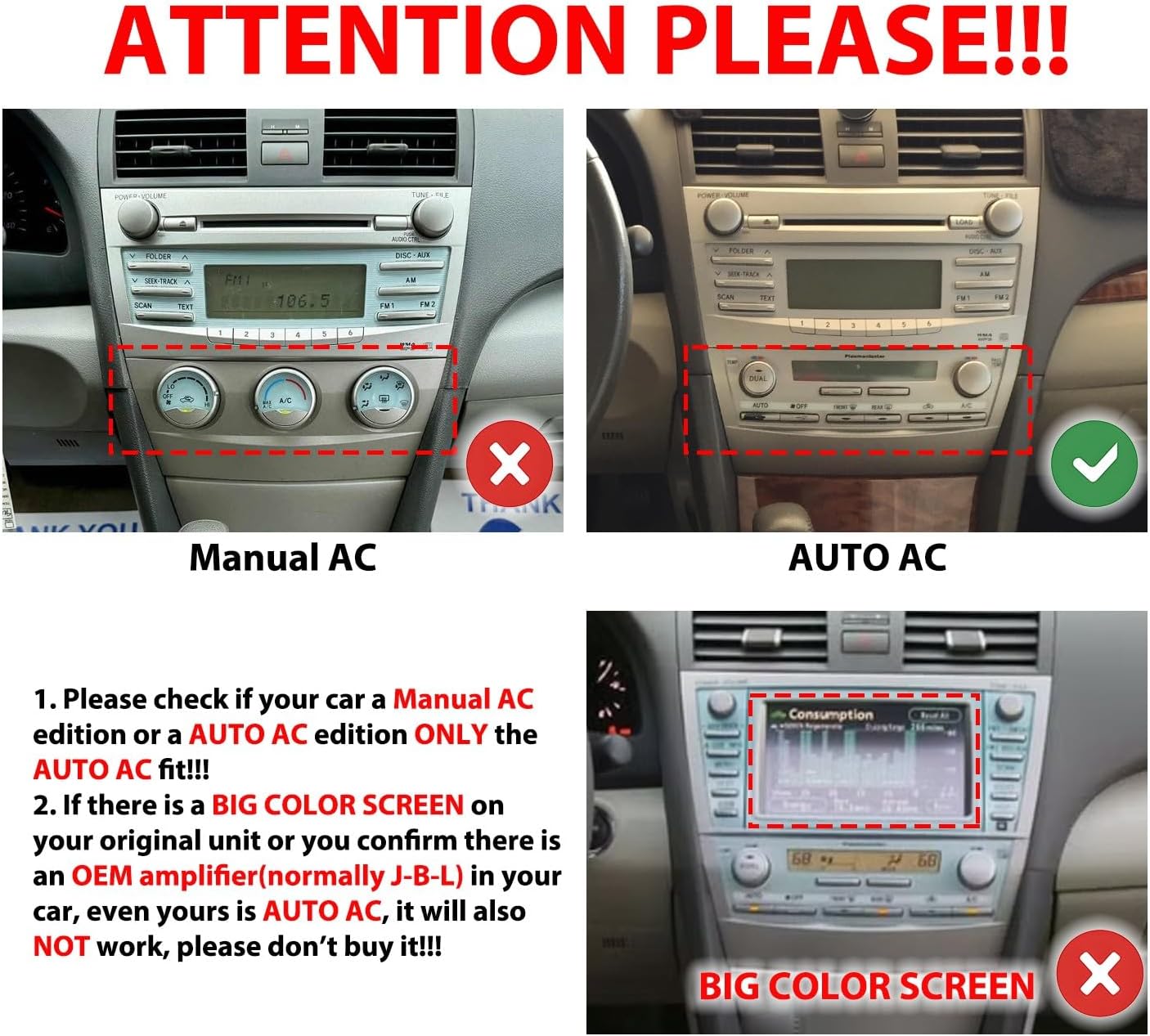
Important: This unit is compatible ONLY with Toyota Camry 2007-2011 models that have Automatic AC. It is not compatible with vehicles equipped with Manual AC or those with a large color screen and an OEM JBL amplifier.
1.2 Package Contents
Verify that all items are present in the package:
- 1x Car Android Head Unit with Mask
- 1x GPS Antenna
- 1x Power Cable (Plug & Play)
- 2x USB Port Cables
- 1x RCA Expand Cable
- 1x RCA Connector for Reverse Camera
- 1x Install Kit (Tools)
- 1x External Microphone
- 1x AHD 720 Reverse Camera
- CANBUS Decoder (Included)

Video 1.1: Unboxing and overview of the car stereo radio for Toyota Camry 2006-2011, showing the main unit and included accessories.
2. Setup and Installation
Professional installation is recommended. Disconnect the vehicle's battery before beginning installation to prevent electrical damage.
2.1 Pre-Installation Checks
- Confirm your vehicle's AC type (Automatic AC).
- Ensure all components listed in Section 1.2 are present.
2.2 Wiring Connections
Connect the provided power cable, GPS antenna, USB cables, and RCA cables to the corresponding ports on the head unit. The CANBUS decoder should be integrated as per the vehicle's wiring diagram to ensure proper communication with the car's systems, especially for steering wheel controls and AC information.
2.3 Reverse Camera Installation
The included AHD 720 reverse camera requires connection to the RCA connector for the reverse camera and power from the vehicle's reverse light circuit. Locate the positive wire of the reverse light to ensure the camera activates when the vehicle is in reverse.
Video 2.1: Detailed installation guide for a car radio in a Camry 2007-2011, covering wiring and mounting.
Video 2.2: Comprehensive installation process for a 9-inch car radio in a Toyota Camry, demonstrating panel removal and connections.
Video 2.3: Installation guide for a car radio in 2006-2011 Toyota Camry models, specifically addressing vehicles with JBL sound systems.
3. Operating Instructions
The KUNFINE car stereo runs on an Android operating system, offering a user-friendly interface and access to various applications.
3.1 Initial Power On and Calibration
After installation, turn on your vehicle's ignition. The unit will boot up. Follow any on-screen prompts for initial setup, including screen calibration if necessary.
Video 3.1: Demonstration of the head unit's user interface and initial boot-up sequence.
3.2 CarPlay and Android Auto
The unit supports wireless CarPlay for iOS devices and wired Android Auto for Android devices. Mirror Link functionality is also available for both platforms.
- CarPlay (Wireless): Connect your iPhone via Bluetooth and then follow the on-screen prompts to establish a wireless CarPlay connection.
- Android Auto (Wired): Connect your Android phone using a USB cable to enable Android Auto.
- Mirror Link: Use the dedicated app on the head unit to mirror your smartphone screen.

Video 3.2: Demonstration of CarPlay functionality on the car radio for Toyota Camry.
Video 3.3: Overview of CarPlay and Android Auto features on the 2006-2011 Toyota Camry radio.
3.3 GPS Navigation
The unit comes with built-in GPS and supports both online and offline navigation applications. Connect to Wi-Fi for online map updates and real-time traffic information.

3.4 Multimedia Playback (Music & Radio)
Enjoy music and videos from various sources, including USB, Bluetooth streaming, and FM/AM radio. The unit features a professional DSP chip for enhanced sound quality and multi-EQ bands for audio customization.

3.5 Steering Wheel Control (SWC)
The unit supports your vehicle's original steering wheel controls, allowing for safe and convenient operation of media and calls without taking your hands off the wheel. Configuration may be required in the settings menu.

4. Maintenance
To ensure optimal performance and longevity of your KUNFINE car stereo, follow these maintenance guidelines:
- Screen Cleaning: Use a soft, lint-free cloth to gently wipe the touchscreen. Avoid abrasive cleaners or solvents.
- Software Updates: Periodically check for available software updates through the unit's settings menu or the manufacturer's website. Updates can improve performance and add new features.
- Environmental Conditions: Avoid exposing the unit to extreme temperatures, direct sunlight for prolonged periods, or excessive moisture.
- Cable Connections: Ensure all cables are securely connected. Loose connections can lead to intermittent issues.
5. Troubleshooting
If you encounter issues with your car stereo, refer to the following common problems and solutions. For persistent issues, contact customer support.
- No Power:
- Check all power cable connections. Ensure the vehicle's ignition is on.
- Verify the vehicle's fuse for the stereo system. - No Sound:
- Check speaker wire connections. Ensure volume is not muted or set to zero.
- Verify audio settings in the unit's menu. - GPS Not Working / Inaccurate:
- Ensure the GPS antenna is properly installed and has a clear view of the sky.
- Check GPS settings and ensure location services are enabled. - CarPlay/Android Auto Connection Issues:
- For CarPlay, ensure Bluetooth is enabled on your iPhone and the unit. For Android Auto, try a different USB cable.
- Restart both your phone and the head unit. - Steering Wheel Controls Not Responding:
- Verify CANBUS decoder connection.
- Access the steering wheel control learning function in the unit's settings and reconfigure. - Rear View Camera Not Displaying:
- Check the RCA video cable connection from the camera to the head unit.
- Ensure the camera's power wire is correctly connected to the reverse light circuit.
Video 5.1: Troubleshooting guide addressing common issues with car radios, providing solutions for various problems.
6. Specifications
Detailed technical specifications for the KUNFINE 9.7" Octa Core Car Stereo:
| Feature | Specification |
|---|---|
| CPU | Octa Core |
| RAM | 4GB |
| ROM | 64GB |
| Operating System | Android System |
| CarPlay | Wireless |
| Android Auto | Wired |
| Mirror Link | iOS: Wireless, Android: Wired |
| Network | Wi-Fi |
| Bluetooth | 5.0 |
| Reverse Camera | Support (Aftermarket RCA type) |
| 360 Camera | Optional |
| DVR | Optional |
| DSP | Yes |
| RDS | Yes |
| Radio | FM |
| Multimedia | Video + Music |
| Positioning Module | GPS & GLONASS |
| Screen Size | 9.7 Inches |
| Touch Screen Type | Capacitive IPS Full HD |
| OSD Language | English, French, German, Spanish, Italian, etc. (over 20 languages) |

7. Warranty and Support
The KUNFINE car stereo comes with a one-year warranty covering manufacturing defects (non-human damage). For any questions, technical assistance, or warranty claims, please contact the seller directly. Your inquiries are always welcome.
For additional resources and support, you may refer to the manufacturer's official website or contact their customer service department.