
1. Introduction
This manual provides comprehensive instructions for the KKnoon 150W 20A DC Electronic Load Battery Capacity Tester. This device is designed for precise measurement of power battery capacity and evaluation of power supplies. It features a user-friendly interface and multiple operating modes to suit various testing requirements. Please read this manual thoroughly before operation to ensure correct usage and to prevent damage to the device or connected equipment.
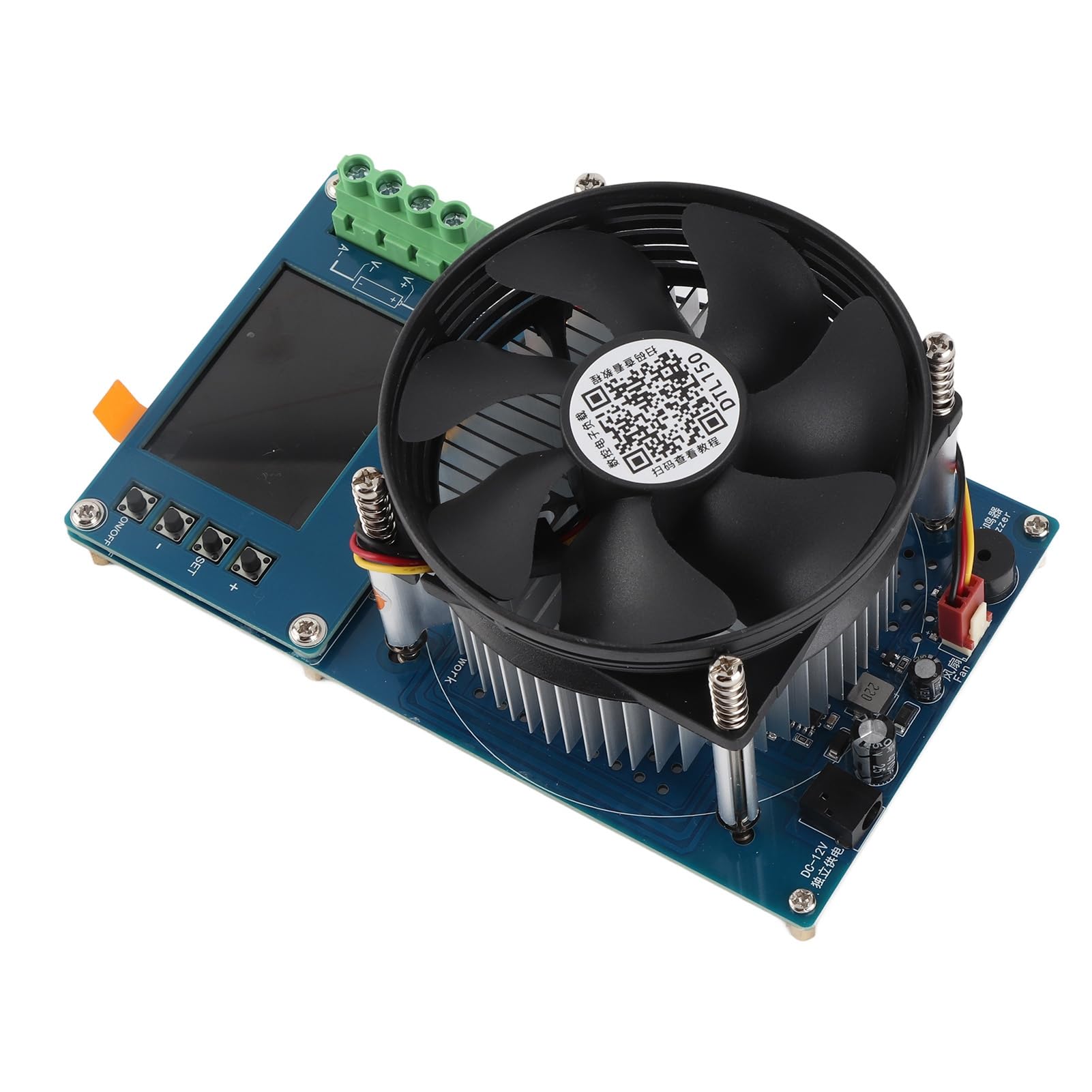
Image 1: KKnoon 150W 20A DC Electronic Load Battery Capacity Tester. This image shows the front view of the electronic load tester with its display and control buttons.
2. Key Features
- High-precision Battery Testing: Offers a maximum power of 150W and a load current of 20A, ideal for accurately measuring power battery capacity. The 2.4-inch TFT color screen displays essential parameters such as voltage, current, power, and more, ensuring precise testing results.
- Multifunctional Design: Equipped with four working modes - constant current (CC), constant voltage (CV), constant power (CP), and constant resistance (CR) - this device allows for versatile testing options. It also features protections against voltage, current, and power overruns, as well as customizable stop discharge voltage and time settings.
- Accurate Measurement: By adopting a four-wire wiring method, this electronic load ensures precise voltage measurement unaffected by wiring voltage drops. The device's innovative discharge control mode protects power supplies from damage, making it an efficient and reliable testing tool.
- Temperature Monitoring: With an integrated silent alloy heat sink and intelligent temperature control system, this electronic load effectively manages heat dissipation. It can monitor power supply temperature using an external sensor, ensuring stable and safe operation.
- User-friendly Interface: The system menu supports English and Chinese language options, making operation convenient for a wide range of users. Additionally, features like accumulated data display, voltage and current nulling, and standby time setting enhance usability.
3. Setup
3.1 Unpacking
Carefully remove the electronic load tester and all accessories from the packaging. Inspect for any signs of damage during transit. Retain the packaging for future storage or shipping.
3.2 Power Connection
Connect the provided power adapter to the DC input port on the electronic load tester. Plug the power adapter into a suitable AC power outlet. Ensure the power source matches the voltage requirements of the adapter.
3.3 Load Connection (4-Wire Method)
For accurate measurements, especially with high currents, use the four-wire sensing method. Connect the main load wires (positive and negative) from the device under test (DUT) to the corresponding load input terminals on the electronic load. Then, connect the two sensing wires (positive and negative) from the DUT as close as possible to the DUT's output terminals to the sensing input terminals on the electronic load. This method compensates for voltage drops across the load wires.
3.4 Initial Power On
After all connections are secure, press the power button to turn on the device. The TFT color screen will illuminate, displaying the startup sequence and then the main measurement interface.
4. Operating Modes
The electronic load supports four primary operating modes:
- Constant Current (CC) Mode: In this mode, the electronic load draws a constant current from the device under test, regardless of the input voltage. This is ideal for testing battery discharge characteristics or power supply current limiting.
- Constant Voltage (CV) Mode: The electronic load maintains a constant voltage across its input terminals by adjusting the current draw. This mode is useful for testing chargers or power supplies that output a stable voltage.
- Constant Power (CP) Mode: The electronic load maintains a constant power dissipation by dynamically adjusting current and voltage. This mode simulates a load that consumes a fixed amount of power, useful for evaluating power supply efficiency under varying conditions.
- Constant Resistance (CR) Mode: In this mode, the electronic load simulates a fixed resistance. The current drawn will vary proportionally with the input voltage, mimicking a resistive load. This is suitable for testing power supplies with resistive loads.
To select an operating mode, navigate through the menu using the control buttons and confirm your selection. Adjust the desired parameters (current, voltage, power, or resistance) using the numerical input controls.
5. Maintenance
5.1 Cleaning
Regularly clean the exterior of the device with a soft, dry cloth. Do not use abrasive cleaners or solvents. Ensure ventilation openings are free from dust and debris to maintain proper airflow for cooling.
5.2 Storage
When not in use, store the electronic load tester in a cool, dry place, away from direct sunlight and extreme temperatures. If storing for extended periods, disconnect it from all power sources and loads.
5.3 Firmware Updates
Check the manufacturer's website periodically for any available firmware updates. Follow the provided instructions carefully for any update procedures to ensure optimal performance and access to new features.
6. Troubleshooting
- Device does not power on: Ensure the power adapter is correctly connected to both the device and a working power outlet. Check the power button.
- Incorrect readings: Verify all wiring connections, especially for the four-wire sensing method. Ensure the device under test is functioning correctly. Perform a nulling operation for voltage and current if available in the menu.
- Overheating: Ensure the device is placed in a well-ventilated area and that the fan is not obstructed. Reduce the load if operating near the maximum power limit for extended periods. The device has an intelligent temperature control system and will protect itself.
- Error messages on display: Refer to the on-screen message for specific error codes. Consult the manufacturer's support resources if the error persists.
7. Specifications
| Parameter | Value |
|---|---|
| Brand | KKnoon |
| Model | 150W 20A DC Electronic Load Battery Capacity Tester |
| Maximum Power | 150W |
| Maximum Load Current | 20A |
| Operating Modes | Constant Current (CC), Constant Voltage (CV), Constant Power (CP), Constant Resistance (CR) |
| Display | 2.4-inch TFT Color Screen |
| Wiring Method | Four-wire sensing |
| Cooling System | Integrated silent alloy heat sink, intelligent temperature control |
| Language Options | English, Chinese |
| Product Dimensions (L x W) | 20 cm x 11 cm |
| Country of Origin | China |
| ASIN | B0G57S2S8D |
8. Safety Information
Always observe basic safety precautions when operating electrical equipment. Ensure proper ventilation to prevent overheating. Do not operate the device in wet or damp conditions. Disconnect power before making or changing connections. Avoid exceeding the maximum voltage, current, or power ratings of the device. Use appropriate personal protective equipment if necessary.
9. Warranty and Support
This KKnoon product comes with a standard manufacturer's warranty. For specific warranty terms and conditions, please refer to the documentation included with your purchase or visit the official KKnoon website. For technical support, troubleshooting assistance, or service inquiries, please contact KKnoon customer service through their official channels. Provide your product model and ASIN (B0G57S2S8D) when seeking support.
