
1. Introduction and Overview
The Spovan Electro Pro 2 is an advanced smartwatch designed for comprehensive health monitoring and smart communication. It integrates various features including air pressure blood pressure measurement, NFC access control, voice call functionality, and ECG capabilities, all presented on a vibrant AMOLED display.
This manual provides essential information for setting up, operating, and maintaining your Spovan Electro Pro 2 smartwatch.
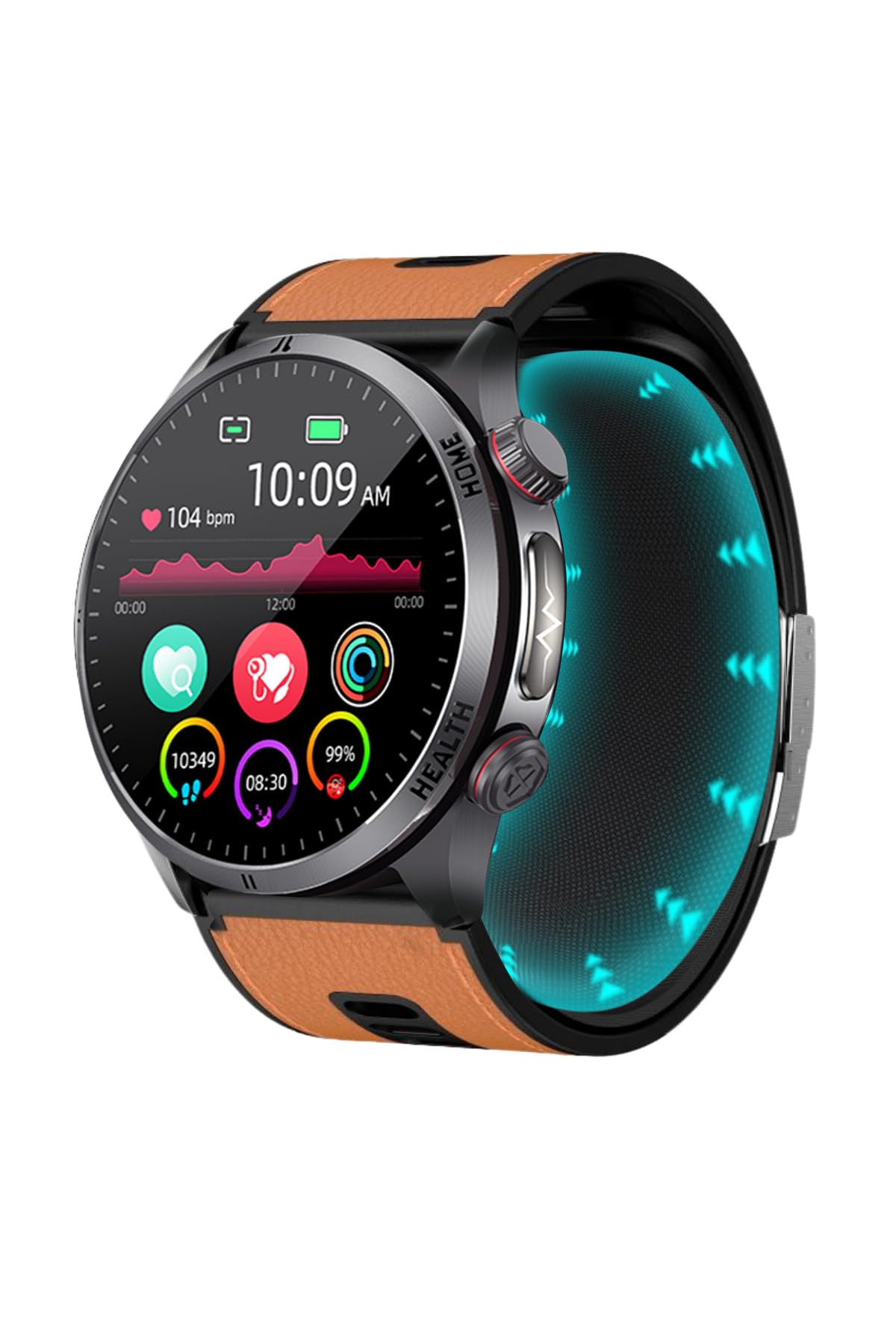
Figure 1.1: Spovan Electro Pro 2 Smartwatch display with various health metrics.
2. Package Contents
Ensure all items are present in the package:
- Spovan Electro Pro 2 Smartwatch
- Air Pressure Strap
- Magnetic Charging Cable
- Silicone Strap
3. Setup Guide
3.1 Initial Charging
Before first use, fully charge your smartwatch. Connect the magnetic charging cable to the charging port on the back of the watch and plug the USB end into a power adapter (not included) or a computer's USB port. The watch features a 600mAh high-density li-polymer battery with short-circuit protection.
3.2 App Installation and Pairing
- Download the App: Search for the companion application on your smartphone's app store. The watch is compatible with Android 8.0 and above, and iOS 11.0 and above.
- Create Account: Open the app and follow the on-screen instructions to create a user account.
- Enable Bluetooth: Ensure Bluetooth is enabled on your smartphone.
- Pair Device: Within the app, navigate to the device pairing section and select "Spovan Electro Pro 2" from the list of available devices. Confirm the pairing request on both your phone and the smartwatch. The watch uses BT BLE 5.3 for low power consumption connectivity.
4. Operating Instructions
4.1 Basic Navigation
The Spovan Electro Pro 2 features a 1.43-inch AMOLED touchscreen display with a resolution of 466x466 pixels. Navigate through menus and functions by swiping across the screen and tapping icons.

Figure 4.1: Side view illustrating the rotating crown and button for interface control.
4.2 Health Tracking Features
- Blood Pressure Measurement: The watch utilizes an air filtration and inflation system with cushions, along with a non-linear high-temperature air pressure sensor, for blood pressure readings. Follow the app's instructions for accurate measurements.
- ECG Monitoring: Equipped with a PPG Chip SFH2703/2+GH3220T-2, the watch can perform ECG measurements. Access this feature via the watch or companion app.

Figure 4.2: ECG monitoring interface on the smartwatch.
- Temperature Measurement: An NTC Temperature Sensor allows for body temperature monitoring.

Figure 4.3: Temperature measurement display on the smartwatch.
- Heart Rate Monitoring: The watch continuously tracks your heart rate.
- Activity Tracking: Features include step counting, calorie tracking, distance measurement, and various exercise modes.
- Sleep Monitoring: Automatically tracks your sleep patterns.
- Breathing Therapy: Engage in guided breathing exercises for relaxation.

Figure 4.4: Breathing therapy feature on the smartwatch.
4.3 Communication Features
- Voice Calls: Make and receive calls directly from your smartwatch when connected to your smartphone.
- Notifications: Receive incoming call and notification reminders from your paired smartphone.
4.4 Smart Features
- NFC Access Control: Use the integrated NFC for access control functions (check compatibility with your specific systems).
- Alarm Clock: Set alarms directly on the watch or through the app.
- Raise-to-Wake: Lift your wrist to automatically illuminate the screen.
- Family Monitoring: The companion app allows for family monitoring or adding friends for real-time tracking.
5. Maintenance
5.1 Charging
Charge the watch using the provided magnetic charging cable. A full charge provides 8-13 days of typical usage and up to 30-40 days of standby time.
5.2 Cleaning
Wipe the watch and straps with a soft, dry cloth. For stubborn dirt, use a slightly damp cloth. Avoid harsh chemicals or abrasive materials.
5.3 Strap Replacement
The watch comes with both an air pressure strap and a silicone strap. To replace, locate the quick-release pins on the underside of the strap and slide them to detach. Align the new strap and re-engage the pins.

Figure 5.1: Side view of the smartwatch with a silicone strap.
6. Troubleshooting
- Watch not turning on: Ensure the watch is fully charged. Connect it to the magnetic charger and wait a few minutes.
- Cannot pair with phone: Make sure Bluetooth is enabled on your phone and the watch is within range. Restart both devices and try pairing again through the app.
- Inaccurate health readings: Ensure the watch is worn snugly on your wrist, not too tight or too loose. Clean the sensors regularly. Consult the app for calibration options if available.
- Notifications not received: Check app permissions on your phone to ensure the companion app has access to notifications. Verify that notifications are enabled within the app settings.
7. Specifications
| Feature | Detail |
|---|---|
| Brand | Spovan |
| Model Name | Electro Pro 2 |
| Display Type | AMOLED |
| Screen Size | 1.43 inches (44 Millimeters) |
| Resolution | 466 x 466 |
| Internal Memory | 128 MB |
| Operating System | Android, iOS |
| Compatible Devices | Android Phones, iOS Phones |
| Connectivity Technology | Bluetooth (BT BLE 5.3), NFC |
| Human Interface Input | Touchscreen |
| Battery Capacity | 600mAh (High-density li-polymer) |
| Average Battery Life | 8-13 days (usage), 30-40 days (standby) |
| Charging Type | Magnetic charging (with short circuit protection) |
| Key Features | Air Pressure Blood Pressure, ECG, Heart Rate, Temperature, NFC Access Control, Voice Call, Step Counting, Calorie Tracking, Exercise Modes, Sleep Monitoring |
| Country of Origin | China |
| First Available Date | December 4, 2025 |
8. Warranty and Support
For warranty information and customer support, please refer to the documentation provided with your purchase or contact the retailer. Specific warranty terms may vary by region and seller.
